
LinkedIn Profesional Headshot
Foto apa pun yang pencahayaannya bagus menjadi headshot profesional yang siap untuk LinkedIn. Latar belakang bersih, penyempurnaan alami, dan penyajian halus yang meningkatkan tampilan profil hingga 14x.
Coba templat ini gratisProfessional template preview
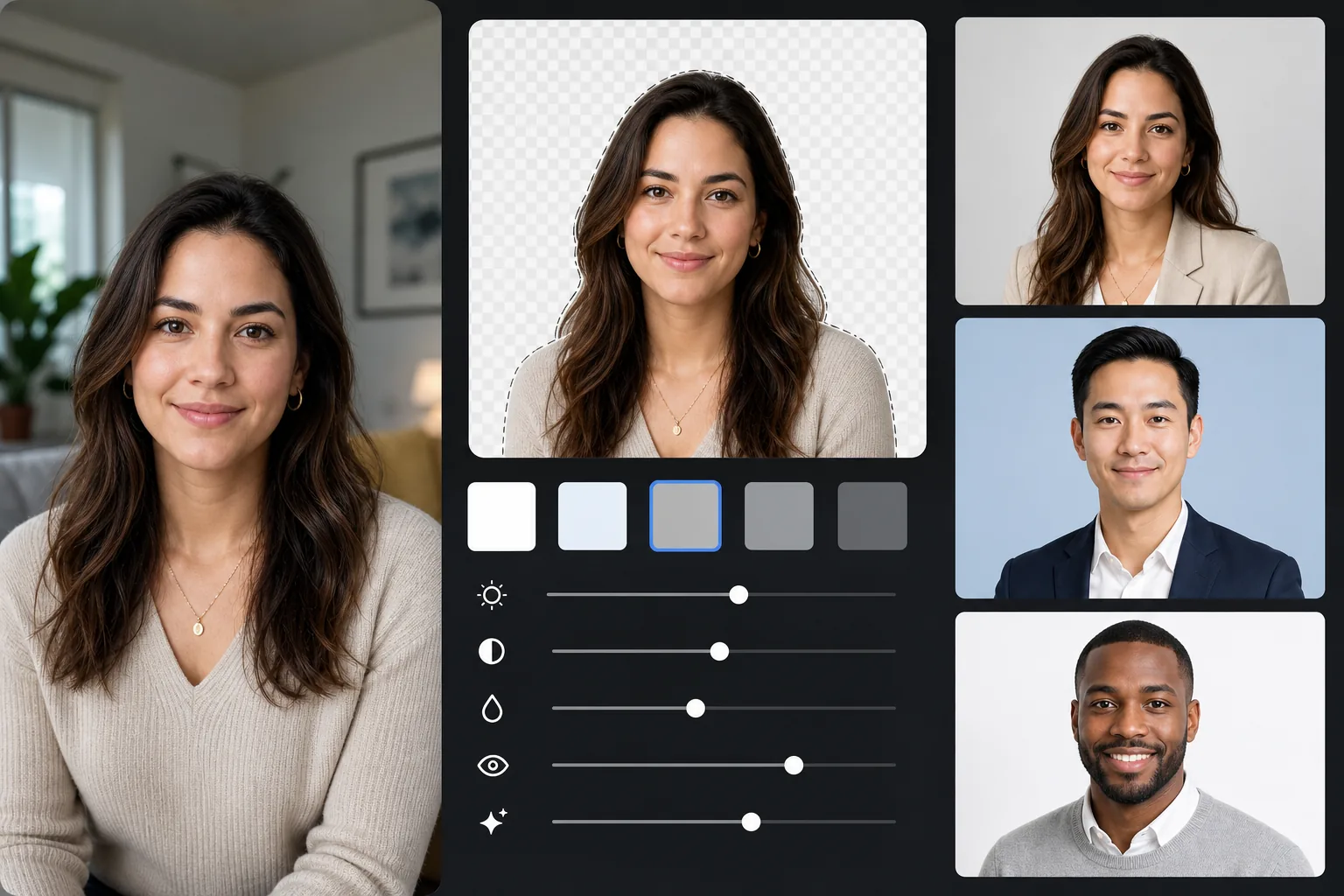
Apa yang dilakukan templat ini
Mengganti latar belakang apa pun dengan warna solid profesional (abu-abu muda, biru lembut, atau putih), menerapkan penyempurnaan kulit dan pencahayaan alami, serta mengekspor pada dimensi yang direkomendasikan LinkedIn. Hasilnya terlihat seperti sesi headshot di studio.
Pengaturan templat
| Latar belakang | Abu-abu muda (#E8E8E8) — standar profesional |
| Ukuran keluaran | 800×800px (direkomendasikan LinkedIn) |
| Penyempurnaan | Kulit alami, pencahayaan merata, mata tajam |
| Pemotongan | Kepala dan bahu, wajah di sepertiga atas |
| Format file | JPEG (kualitas 95%) |
Cara menggunakan templat ini
Ambil foto Anda
Berdirilah di dekat jendela untuk mendapatkan cahaya alami. Kenakan pakaian yang sesuai untuk wawancara. Minta seseorang mengambil foto sejajar mata dari jarak sekitar 4 kaki, dengan pembingkaian dari bahu ke atas.
Hapus latar belakang
Background Eraser mengganti lingkungan apa pun dengan abu-abu profesional yang bersih. AI mempertahankan garis rambut, tepi pakaian, dan kontur tubuh alami Anda dengan presisi.
Sempurnakan secara alami
AI Enhance meratakan pencahayaan di seluruh wajah Anda, mengoreksi semburat warna dalam ruangan untuk warna kulit alami, dan menajamkan mata Anda — titik fokus dari setiap headshot.
Ekspor untuk LinkedIn
Unduh pada 800×800px untuk profil LinkedIn. Sumber yang sama diekspor ke ukuran lain: 400×400 untuk thumbnail LinkedIn, dan resolusi penuh untuk resume atau keperluan cetak.
Tips pro untuk hasil terbaik
- ✓Senyum tipis yang tulus dengan tatapan rileks terkesan ramah dan percaya diri — ekspresi ideal untuk LinkedIn.
- ✓Kenakan warna yang kontras dengan latar belakang abu-abu: biru tua, hijau gelap, marun, atau hitam semuanya cocok.
- ✓Ambil setidaknya 20 jepretan — Anda butuh satu di mana ekspresi Anda alami dan mata benar-benar tajam.
- ✓Headshot yang sama sebaiknya digunakan di LinkedIn, resume, dan semua profil profesional demi konsistensi merek.
Pertanyaan umum
Warna latar belakang apa yang paling cocok untuk LinkedIn?
+
Abu-abu muda (#E8E8E8) adalah pilihan yang paling universal dan profesional. Biru lembut menyampaikan kepercayaan untuk peran korporat. Putih bersih tetapi bisa memudarkan warna kulit yang lebih terang. Ketiganya tersedia dengan templat ini.
Apakah hasilnya akan terlihat seperti foto studio profesional?
+
Dengan cahaya alami yang baik dan ekspresi yang tulus, hasil yang disempurnakan AI secara visual tidak dapat dibedakan dari headshot studio. Penggantian latar belakang, koreksi pencahayaan, dan penyempurnaan kulit yang halus meniru apa yang diberikan fotografer profesional.
Bisakah saya menggunakannya untuk profil profesional lain?
+
Ya. Templat yang sama cocok untuk bio perusahaan, halaman pembicara konferensi, foto penulis, dan platform apa pun yang membutuhkan headshot profesional. Ekspor dalam ukuran berbeda untuk tiap platform.
Dapatkan headshot profesional Anda hari ini
Tidak perlu janji temu studio. Unggah foto Anda dan dapatkan headshot yang siap untuk LinkedIn dalam waktu kurang dari satu menit.
Coba gratisRelated templates
More professional templates for your workflow.
Buat foto paspor dan visa yang sesuai di rumah. Latar belakang putih, rasio ukuran kepala yang benar, standar AS 2×2 inci, dan keluaran 600 DPI yang memenuhi persyaratan Departemen Luar Negeri.
Templat headshot profesional untuk aktor dan model. Penuhi standar direktur casting dengan hasil siap cetak 8×10, sentuhan ulang alami, dan latar belakang bersih untuk kiriman agensi.
Sempurnakan foto pemasaran gigi dengan pemutihan gigi alami, latar belakang potret yang konsisten, dan gambar perbandingan sebelum dan sesudah untuk situs web latihan dan media sosial.