
Peningkatan Senyuman Gigi
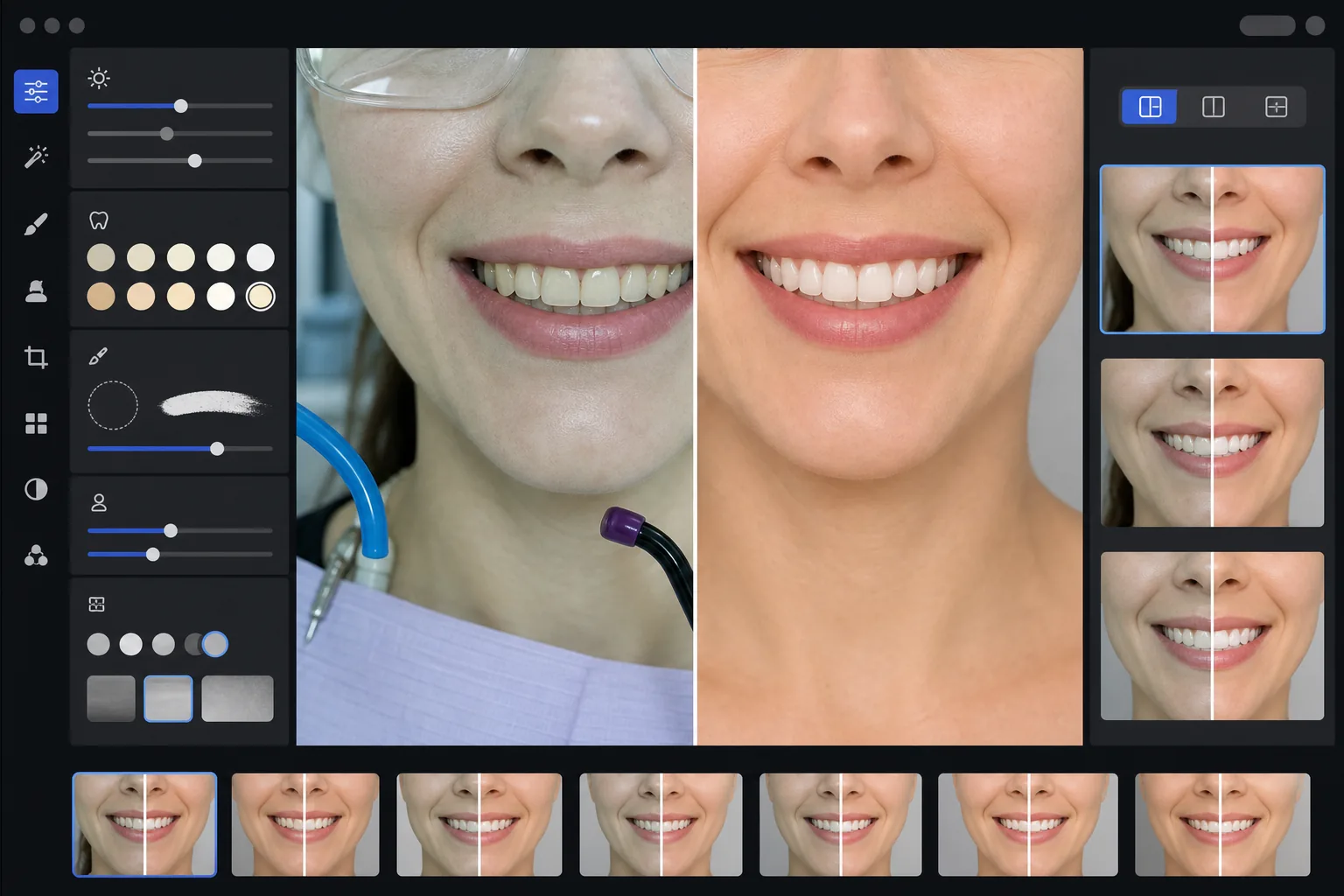
Buat gambar pemasaran gigi sebelum-sesudah yang profesional dan menampilkan hasil kerja praktik Anda. Templat ini menerapkan pemutihan gigi yang terlihat alami, menghilangkan kekacauan latar belakang klinis, menstandarkan latar belakang potret pasien, dan menyeimbangkan pencahayaan atas yang keras yang umum pada foto ruang perawatan.
Coba templat ini gratisProfessional template preview
Apa yang dilakukan templat ini
Mengubah foto gigi klinis menjadi gambar pemasaran yang halus untuk situs web praktik, media sosial, dan materi edukasi pasien. AI Enhance mengoreksi rona hijau-putih yang tidak menarik dari pencahayaan ruang perawatan gigi dan menerapkan pemutihan gigi halus yang terlihat alami — mencerahkan gigi 2-3 tingkat tanpa membuatnya terlihat buatan. Magic Eraser menghilangkan elemen latar belakang klinis seperti selang isap, lampu pengeras, bekas kertas artikulasi pada bibir, dan kacamata pelindung. Latar belakang potret pasien distandarkan menjadi latar yang bersih dan konsisten di seluruh galeri kasus Anda.
Pengaturan templat
| Pemutihan gigi | Pencerahan alami +2 hingga +3 tingkat (mempertahankan transparansi dan tekstur email) |
| Koreksi pencahayaan | Keseimbangan cahaya siang ruang perawatan gigi (menghilangkan rona klinis hijau-putih) |
| Latar belakang | Latar abu-abu atau putih netral yang konsisten dengan vinyet lembut |
| Warna kulit | Koreksi kehangatan sekitar mulut (mengurangi pucat akibat pencahayaan gigi) |
| Warna bibir | Pemulihan saturasi alami (mengimbangi pencahayaan klinis yang pudar) |
Cara menggunakan templat ini
Unggah foto klinis
Unggah jepretan dekat senyuman, foto sebelum-sesudah bergaya potret, atau gambar intraoral yang diambil di ruang perawatan Anda. Templat ini berfungsi dengan foto dari kamera khusus gigi, DSLR dengan lampu kilat cincin, dan foto ponsel pintar yang diambil di bawah lampu ruang perawatan.
Koreksi pencahayaan klinis
AI Enhance menetralkan rona warna hijau-putih dari lampu unit gigi atas, menghangatkan warna kulit di sekitar mulut, dan memulihkan warna bibir alami. Warna gigi dicerahkan secara halus untuk menampilkan hasil terbaiknya sambil tetap realistis dan jujur.
Bersihkan latar belakang dan gangguan
Magic Eraser menghilangkan selang yang terlihat, ujung lampu pengeras, klip celemek, noda kertas artikulasi pada bibir, dan peralatan klinis di latar belakang. Latar belakang diganti dengan latar netral konsisten yang cocok di semua pasangan sebelum-sesudah Anda.
Ekspor untuk penggunaan pemasaran
Unduh gambar yang ditingkatkan secara individual atau komposit sebelum-sesudah berdampingan. Keluaran berukuran untuk galeri situs web, postingan Instagram, Google Business Profile, dan brosur pasien cetak dengan resolusi yang cocok untuk cetakan 8x10 inci.
Tips profesional untuk hasil terbaik
- ✓Untuk pasangan sebelum-sesudah, fotolah baik gambar pra-perawatan maupun pasca-perawatan dari sudut, jarak, dan posisi pencahayaan yang sama. Templat dapat mengoreksi perbedaan pencahayaan di antara keduanya, tetapi mencocokkan sudut kamera asli menghasilkan perbandingan yang paling meyakinkan.
- ✓Pemutihan gigi sengaja dibuat konservatif — mencerahkan 2-3 tingkat vita daripada membuat gigi seputih kertas. Ini terlihat lebih alami dan kredibel bagi calon pasien. Jika hasil klinis Anda yang sebenarnya dramatis, foto jujur dengan peningkatan ringan lebih persuasif daripada gambar yang diproses berlebihan.
- ✓Gunakan retraktor pipi untuk jepretan senyuman intraoral guna mendapatkan tampilan kerja gigi yang paling lengkap. Templat menangani tampilan yang sedikit klinis dari foto berbantuan retraktor dengan menghangatkan warna kulit dan memotong untuk fokus pada zona senyuman.
- ✓Proseslah seluruh galeri kasus Anda dalam satu kelompok untuk memastikan warna latar belakang, kecerahan, dan kehangatan yang konsisten di semua pasangan sebelum-sesudah. Pencahayaan yang tidak cocok antar kasus di situs web Anda merusak kesan profesional.
Pertanyaan umum
Apakah ini dianggap iklan gigi yang menyesatkan?
+
Peningkatan pemutihan dibatasi pada 2-3 tingkat vita dan mempertahankan transparansi alami serta tekstur permukaan email. Ini berada dalam batas yang secara alami dipengaruhi oleh pencahayaan fotografi profesional dan keseimbangan putih. Templat tidak mengubah bentuk gigi, susunan, atau kontur gusi — hanya mengoreksi efek warna yang tidak menarik dari pencahayaan klinis yang membuat hasil terlihat lebih buruk di foto daripada secara langsung.
Bisakah ini membuat komposit sebelum-sesudah berdampingan?
+
Ya. Templat dapat menghasilkan gambar yang ditingkatkan secara individual atau membuat komposit berdampingan dengan pembatas tengah, latar belakang konsisten, dan label sebelum/sesudah. Kedua gambar dalam pasangan menerima perlakuan latar belakang yang sama sehingga perbandingannya bersih dan profesional secara visual.
Apakah ini berfungsi dengan foto kamera intraoral?
+
Ya. Gambar kamera intraoral biasanya memiliki pencahayaan yang sangat keras dan langsung yang memudarkan tekstur permukaan. Templat memulihkan detail email, mengoreksi rona putih ekstrem, dan menyesuaikan kontras untuk menampilkan anatomi gigi secara alami. Hasilnya lebih rinci dan terlihat lebih alami daripada tangkapan intraoral mentah.
Tampilkan kerja gigi Anda dengan foto pemasaran profesional
Unggah foto klinis dan dapatkan gambar sebelum-sesudah yang ditingkatkan secara alami dengan gaya konsisten, siap untuk situs web, media sosial, dan brosur pasien Anda.
Coba gratisRelated templates
More professional templates for your workflow.
Templat foto kepala LinkedIn profesional. Latar belakang bersih, penyempurnaan kulit alami, dan tampilan halus yang menghasilkan tampilan profil 14x lebih banyak.
Buat foto paspor dan visa yang sesuai di rumah. Latar belakang putih, rasio ukuran kepala yang benar, standar AS 2×2 inci, dan keluaran 600 DPI yang memenuhi persyaratan Departemen Luar Negeri.
Templat headshot profesional untuk aktor dan model. Penuhi standar direktur casting dengan hasil siap cetak 8×10, sentuhan ulang alami, dan latar belakang bersih untuk kiriman agensi.