
Hapus porta-johns dari foto lokasi konstruksi
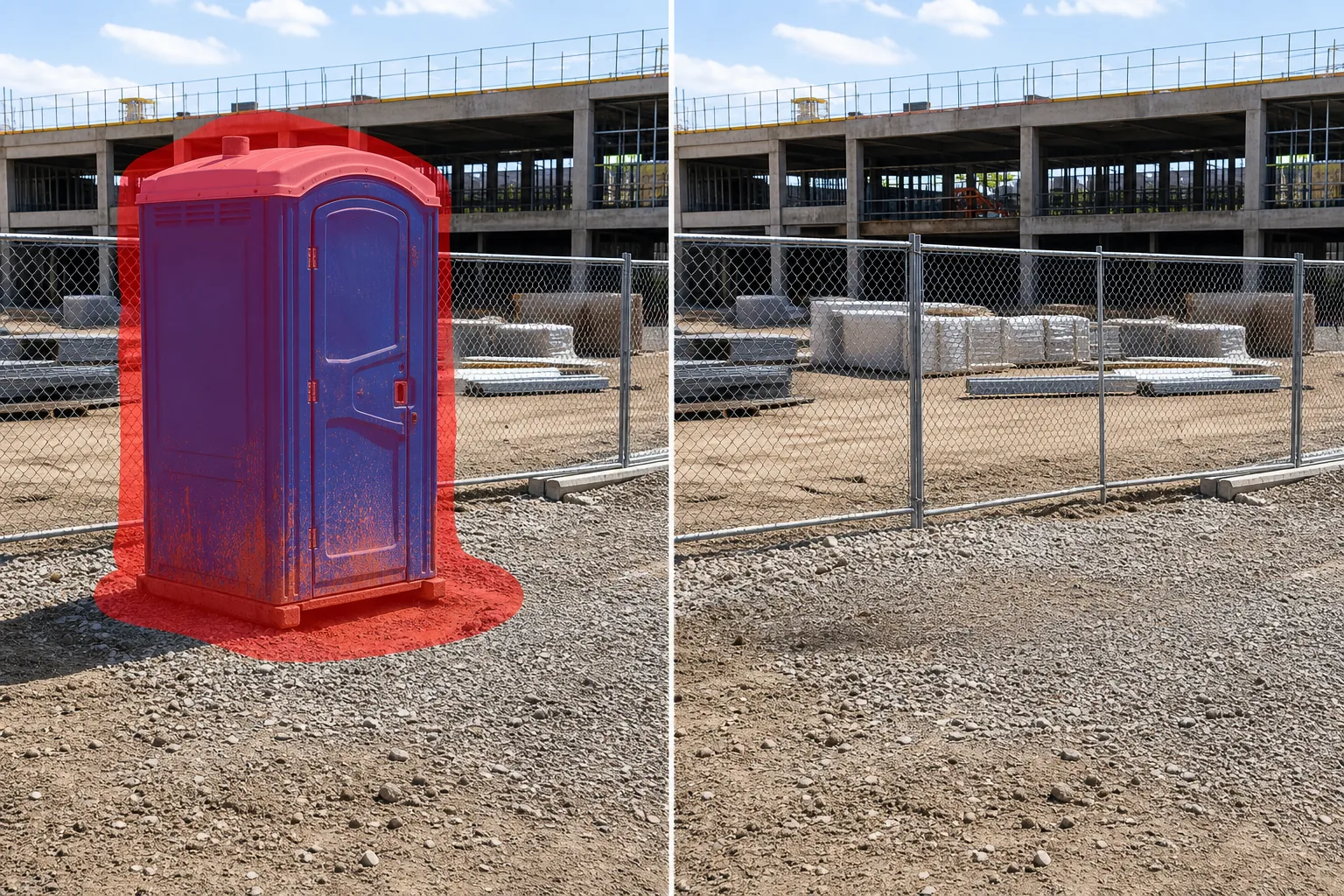
Hapus unit toilet portabel, porta-john, dan trailer sanitasi dari foto kemajuan lokasi konstruksi, pemasaran pembangunan baru, dan dokumentasi lokasi kerja. Magic Eraser memindahkan unit dan merekonstruksi tanah, kerikil, pagar, atau bangunan di belakangnya — menghasilkan citra lokasi profesional tanpa peralatan sanitasi.
Terakhir diperbarui
Mengapa porta-john meremehkan fotografi konstruksi dan pengembangan
Setiap lokasi konstruksi yang aktif memerlukan sanitasi portabel, namun unit berwarna biru terang atau hijau ini adalah salah satu objek yang paling mengganggu secara visual dalam fotografi lokasi kerja. Pengembang yang membuat materi pemasaran untuk kondominium pra-penjualan, townhome, atau ruang komersial tidak dapat menunjukkan kepada calon pembeli situs yang dipenuhi porta-johns — keterkaitan dengan konstruksi yang aktif dan berantakan melemahkan kualitas aspirasional pemasaran. Kontraktor umum yang mendokumentasikan pencapaian proyek untuk informasi terkini bagi investor dan laporan kemajuan menginginkan fokus pada struktur yang mulai terbentuk, bukan pada deretan toilet portabel di sepanjang pagar pembatas. Fotografer arsitektur yang memotret sebuah bangunan selama tahap konstruksi akhir menemukan bahwa satu porta-john di latar depan langsung memberi tanggal pada foto tersebut sebagai pertengahan konstruksi, bukan hampir selesai. Unit-unit tersebut juga sulit untuk dipindahkan secara manual karena berada pada permukaan yang tidak beraturan — tanah yang padat, area kerikil, pengerasan jalan sementara yang retak — dan bentuknya yang kotak-kotak menghalangi area yang luas dari apa pun yang ada di belakangnya, baik itu pagar rantai, tumpukan material, alat berat, atau bangunan itu sendiri. AI Magic Eraser menghapus unit sepenuhnya, lalu mengisi ruang dengan permukaan tanah dan elemen latar belakang yang konsisten dengan pemandangan sekitarnya. Kerikil dilanjutkan dengan tekstur dan tingkatan yang serasi, garis pagar disambung kembali, dan struktur yang terlihat sebagian di belakang unit direkonstruksi sehingga foto lokasi terlihat seperti peralatan sanitasi tidak pernah ada.
Hapus porta-johns dalam tiga langkah
- 1
Unggah foto situs Anda
Buka Magic Eraser di web, iOS, atau Android dan unggah foto lokasi konstruksi, pengembangan, atau lokasi kerja yang berisi toilet portabel yang ingin Anda hapus. JPEG, PNG, HEIC, dan WebP didukung. Gunakan resolusi tertinggi yang tersedia sehingga tekstur tanah dan struktur latar belakang direkonstruksi dengan detail penuh.
- 2
Sikat unitnya
Cat seluruh porta-john — bilik, tutup ventilasi atap, pintu, dan semua tempat pembersih tangan atau selang servis yang terpasang. Sertakan bayangan yang dihasilkan unit di tanah dan percikan lumpur atau noda di dasarnya. Jika beberapa unit berbaris dalam satu baris, sapukan semuanya dalam satu gerakan.
- 3
Hapus dan ekspor
Ketuk Hapus dan porta-john menghilang. Magic Eraser mengisi ruangan dengan permukaan tanah yang serasi — tanah yang dipadatkan, kerikil, lumpur, atau pengerasan jalan sementara — dan merekonstruksi pagar, peralatan, atau elemen bangunan yang sebagian tersembunyi di belakang unit. Tinjau dengan zoom penuh, lalu ekspor untuk dek investor, brosur pemasaran, atau arsip proyek Anda.
Terbaik untuk
- Pemasaran perkembangan baru di mana penanda konstruksi aktif seperti porta-john berbenturan dengan branding yang aspiratif
- Laporan kemajuan kontraktor dan presentasi investor yang fokusnya harus pada struktur
- Fotografi arsitektur bangunan pada tahap konstruksi akhir
- Foto persiapan lokasi tempat acara di mana sanitasi sementara dilakukan tetapi tidak diinginkan dalam gambar pemasaran
- Dokumentasi proyek kota dan infrastruktur untuk laporan yang dapat dilihat publik
Tips untuk menghapus porta-johns dari foto situs
Porta-john di lokasi konstruksi sering kali duduk di tanah yang tidak rata, berlumpur, atau berkerikil sehingga bobotnya menimbulkan cekungan dan bekas percikan. Sertakan margin tanah yang besar — setidaknya lebar tapak unit di bawah dasar — sehingga AI tidak hanya mengisi unit tetapi juga tanah yang terganggu di sekitarnya. Untuk deretan unit (umum di situs besar), hapus unit tersebut dalam kelompok yang terdiri dari dua atau tiga unit, bukan sekaligus; ini menghasilkan detail penimbunan tanah yang lebih akurat untuk setiap bagian. Jika tempat cuci tangan atau trailer servis berdekatan dengan porta-john, putuskan apakah akan menghapusnya juga — meninggalkan tempat cuci tangan yang tidak ada lagi di samping tanah kosong akan terlihat aneh. Saat unit berada di dekat pagar rantai, sertakan bagian pagar di belakangnya di area sikat Anda sehingga AI dapat merekonstruksi garis pagar yang berkesinambungan. Untuk foto yang diambil saat hujan atau setelah cuaca buruk, pola lumpur dan genangan air di sekitar dasar merupakan bagian dari gangguan visual — perluas pilihan Anda untuk menutupinya.
Pertanyaan yang sering diajukan
- Apa bedanya dengan alat penghapus port-a-potty?
- Alat 'port-a-potty' berfokus pada konteks acara — festival, pernikahan di luar ruangan, dan pameran di mana toilet portabel muncul di rumput dan di dekat area publik. Alat 'porta-john' ini dioptimalkan untuk konstruksi dan konteks lokasi kerja dengan latar belakang tanah, kerikil, pagar, dan alat berat.
- Bisakah itu menghilangkan deretan porta-john di situs yang besar?
- Ya. Sikat seluruh baris dan AI menghapus setiap unit, mengisi ruang dengan tanah yang serasi dan merekonstruksi pagar atau latar belakang di belakangnya. Untuk baris yang terdiri dari lima orang atau lebih, kerjakan dalam kelompok yang terdiri dari dua hingga tiga orang untuk mendapatkan hasil yang paling bersih.
- Bagaimana dengan tanah terganggu tempat unit itu berada?
- Sertakan area dasar dalam sapuan kuas Anda. AI mengisinya dengan tekstur tanah di sekitarnya — sesuai dengan tingkat kerikil, warna tanah, dan pola pemadatan permukaan yang berdekatan. Jejak ban, lumpur, dan perpindahan kerikil semuanya menjadi mulus.
- Apakah ini gratis?
- Ya. Tingkat gratis mencakup penghapusan porta-john dengan batasan harian. Premium ($29,99/tahun) membuka pengeditan tanpa batas dan ekspor resolusi penuh untuk fotografi konstruksi dan pemasaran pembangunan.