
Hapus penutup lubang got dari foto
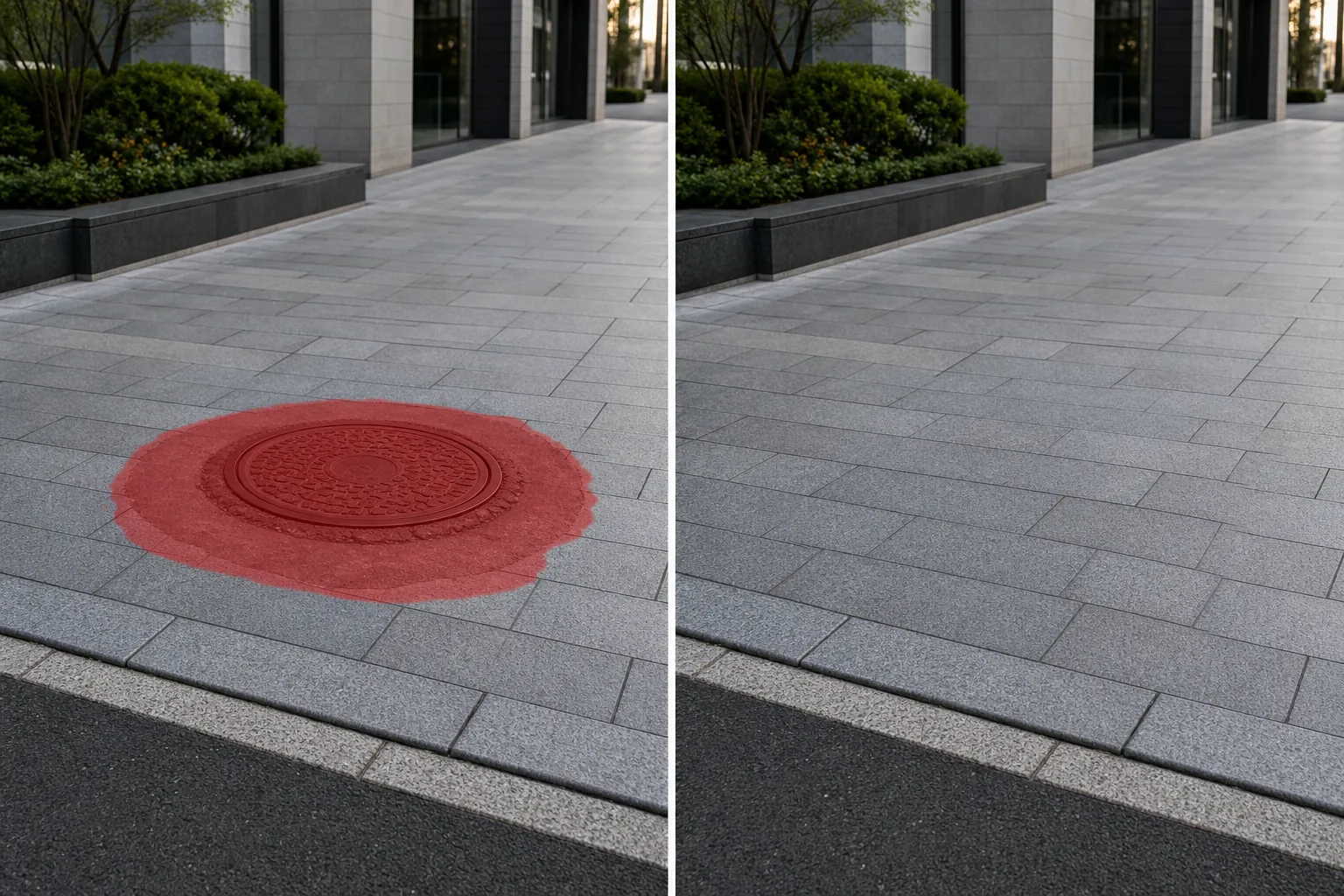
Penutup lubang got yang berkarat berada tepat di tengah pemandangan jalanan yang Anda buat dengan cermat. Panel akses utilitas memecah kelancaran dalam daftar real estat Anda. Serangkaian saluran pembuangan dan lubang servis mengganggu permukaan jalan yang bersih di alun-alun yang Anda foto untuk portofolio arsitektur. Magic Eraser melepas penutup lubang got, lubang palka utilitas, saluran pembuangan, dan panel akses — kemudian merekonstruksi aspal, beton, batu bata, atau pengerasan jalan batu sehingga permukaan jalan terlihat kokoh dan tidak terputus.
Terakhir diperbarui
Mengapa penutup lubang got dan panel utilitas mengganggu kebersihan komposisi
Penutup lubang got terdapat di mana-mana di lingkungan perkotaan dan pinggiran kota — penutup tersebut terdapat di jalan raya, jalan masuk, trotoar, alun-alun, dan tempat parkir sekitar satu blok per blok kota di jalan perumahan dan beberapa blok per blok di jalan komersial. Mereka dirancang agar sejajar dengan permukaan jalan, namun secara visual sama sekali tidak rata: lingkaran besi gelap yang dicap dengan logo utilitas dan pola geometris yang berada di tengah aspal abu-abu menciptakan titik fokus kontras tinggi yang mengalihkan pandangan dari subjek foto sebenarnya. Dalam fotografi arsitektur bangunan dengan pendekatan permukaan tanah, penutup lubang got di jalur latar depan bersaing dengan pintu masuk bangunan untuk mendapatkan perhatian visual. Dalam pengambilan gambar properti dengan drone real estat, panel utilitas jalan masuk dan penutup pembersih menciptakan bintik-bintik gelap pada permukaan yang seragam. Dalam fotografi jalanan dan fotografi perjalanan, penutup lubang got di penyeberangan dan alun-alun menambah noise visual pada bidang dasar yang tidak dipilih dan tidak dapat dihindari oleh fotografer tanpa mengubah keseluruhan sudut kamera. Tantangan dalam pelepasan secara manual adalah bahwa penutup lubang got berada di permukaan beraspal – aspal, beton, batu bata, batu bulat – dan setiap permukaan memiliki tekstur dan pola tertentu yang perlu direkonstruksi secara meyakinkan di area lingkaran atau persegi panjang yang luas. Aspal memiliki keacakan granular yang dapat ditangani dengan cukup baik oleh alat stempel klon, namun batu bata dan batu bulat memiliki pola geometris yang berulang sehingga setiap diskontinuitas dalam pola ikatan dapat segera terlihat. AI Magic Eraser menangani kedua kasus tersebut: untuk permukaan dengan tekstur acak seperti aspal dan beton, AI ini memperluas butiran di sekitarnya; untuk permukaan berpola seperti batu bata dan batu bulat, pola ikatan diteruskan melalui area timbunan, menjaga jarak baris, garis sambungan, dan variasi warna pengerasan jalan di sekitarnya.
Lepaskan penutup lubang got dalam tiga langkah
- 1
Unggah foto Anda
Buka Magic Eraser di web, iOS, atau Android dan muat pemandangan jalanan, foto arsitektur, daftar real estat, foto drone, atau gambar perjalanan yang berisi penutup lubang got atau panel utilitas yang ingin Anda hapus. Format JPEG, PNG, HEIC, dan WebP didukung.
- 2
Sikat penutup lubang got
Cat seluruh penutup termasuk pinggiran logamnya dan lingkaran aspal yang tertambal atau berubah warna di sekelilingnya. Sebagian besar penutup lubang got berada di bagian jalan yang warnanya sedikit berbeda di mana penutup tersebut terakhir kali diservis — menyikat cincin perbaikan bersama dengan penutupnya akan memberikan hasil yang jauh lebih bersih daripada hanya menyikat cakram besinya. Untuk panel utilitas berbentuk persegi panjang dan saluran pembuangan, sikat seluruh panel termasuk rangkanya. Untuk beberapa sampul dalam adegan yang sama, sapukan semuanya sebelum mengetuk Hapus.
- 3
Hapus dan tinjau
Magic Eraser melepas penutup dan merekonstruksi permukaan jalan. Untuk aspal, isiannya sesuai dengan tekstur butiran dan warna perkerasan di sekitarnya. Untuk beton, ini melanjutkan penyelesaian permukaan dan sambungan kontrol apa pun. Untuk batu bata atau batu bulat, ini memperluas pola ikatan dan jarak sambungan. Perbesar hingga 100% dan periksa apakah pola pengerasan jalan berlanjut melalui area yang diisi — pada permukaan batu bata, pastikan bahwa garis baris sejajar dengan jalur di sekitarnya. Ekspor dengan resolusi penuh.
Terbaik untuk
- Fotografi arsitektur dengan penutup lubang got di alun-alun, halaman, dan pendekatan bangunan mengalihkan perhatian dari desain
- Foto drone real estat dan eksterior saat panel utilitas jalan masuk dan penutup pembersih menciptakan titik gelap
- Fotografi jalanan dengan penutup lubang got menambah kebisingan visual yang tidak diinginkan pada bidang tanah
- Fotografi perjalanan alun-alun bersejarah dan jalan berbatu yang dilengkapi dengan utilitas modern mematahkan estetika zaman itu
- Fotografi properti komersial dengan tempat parkir mengeringkan kisi-kisi dan panel akses mengacaukan permukaan beraspal
- Fotografi tempat pernikahan dan acara di mana area upacara atau resepsi memiliki titik akses utilitas yang terlihat di lantai atau tanah
- Fotografi lanskap perkotaan yang menggunakan marka jalan dan penutup utilitas bersaing dengan komposisi lanskap kota
Tips melepas penutup lubang got agar terlihat alami
Satu-satunya tip paling penting untuk melepas penutup lubang got adalah dengan menyikat tambalan perbaikan di sekitar penutup, bukan hanya penutup itu sendiri. Ketika kru utilitas memasang atau memperbaiki lubang got, mereka memotong bagian jalan berbentuk lingkaran atau persegi di sekitarnya dan menambalnya dengan aspal baru — lingkaran perbaikan ini biasanya memiliki warna dan tekstur yang berbeda dari jalan di sekitarnya. Jika Anda hanya menyikat penutup besinya, AI akan mengisi bagian tengahnya dengan tekstur jalan yang serasi tetapi membiarkan cincin perbaikan yang berubah warna terlihat, menciptakan lingkaran samar di tempat penutup itu berada. Menyikat seluruh zona perbaikan memberi AI margin bersih dari permukaan jalan asli sebagai referensi, dan pengisiannya menyatu dengan mulus. Untuk permukaan berpola — jalan bata, alun-alun berbatu, paver beton dekoratif — AI meneruskan pola ikatan melalui penuangan. Hal ini menghasilkan hasil yang sangat baik bila penutup lubang got relatif kecil terhadap pengulangan pola (lebar satu atau dua batu bata), namun penutup yang sangat besar pada permukaan berpola halus mungkin menunjukkan sedikit penyimpangan keselarasan di ujung jauh timbunan. Umpan kedua yang cepat dengan sikat sempit pada garis sambungan yang tidak sejajar akan memperbaiki hal ini. Untuk pengambilan gambar drone yang menghadap langsung ke jalan masuk atau tempat parkir, penutup lubang got tampak seperti lingkaran sempurna dan AI memiliki referensi seragam di semua sisi — ini adalah salah satu target penghapusan yang paling mudah. Untuk bidikan jalanan dengan sudut miring yang sampulnya diperpendek menjadi elips, AI menangani perspektif dengan benar menggunakan permukaan jalan di sekitarnya sebagai panduannya.
Pertanyaan yang sering diajukan
- Apakah melepas penutup lubang got dari foto gratis?
- Ya. Tingkat gratis Magic Eraser menangani pelepasan penutup lubang got dengan batas penggunaan harian. Premium ($29,99/tahun) menghilangkan batasan dan membuka ekspor resolusi lebih tinggi untuk portofolio arsitektur, hasil cetakan, dan cetakan format besar.
- Bisakah ia merekonstruksi pola batu bata atau batu bulat di tempat penutupnya berada?
- Ya. AI melanjutkan pola ikatan, jarak sambungan, dan variasi warna pengerasan jalan di sekitarnya melalui area penimbunan. Untuk sampul berukuran kecil hingga sedang (diameter hingga sekitar 24 inci / 60 cm) dengan pola ikatan teratur, rekonstruksi biasanya berjalan mulus. Untuk sampul yang sangat besar pada permukaan berpola halus, periksa kesejajaran sambungan di tepi isian dan perbaiki garis yang tidak sejajar dengan sapuan kuas yang sempit.
- Haruskah saya menyikat penutup logamnya saja atau bagian sekitarnya juga?
- Sikat juga tambalan perbaikan di sekitarnya. Sebagian besar penutup lubang got berada di dalam lingkaran aspal yang telah diperbaiki dari kunjungan servis terakhir — lingkaran ini memiliki warna dan tekstur yang berbeda dari jalan aslinya. Jika Anda hanya menyikat cakram besinya, AI akan mengisi bagian tengahnya tetapi membiarkan cincin yang berubah warna tetap terlihat. Menyikat zona perbaikan penuh memberikan permukaan jalan asli AI sebagai referensi dan menghasilkan pengisian yang mulus.
- Apakah ini akan berfungsi pada foto drone yang menghadap ke bawah?
- Ya. Pemotretan drone dari atas ke bawah sebenarnya merupakan cara termudah untuk menghilangkan penutup lubang got karena penutup tersebut tampak seperti lingkaran sempurna dengan permukaan jalan yang seragam di semua sisi, sehingga memberikan referensi yang kuat bagi AI dari segala arah. Isiannya cocok dengan material aspal, beton, atau paving di sekitarnya dengan bersih.
- Bisakah saya melepas beberapa penutup lubang got dan saluran pembuangan dari satu foto?
- Ya. Sikat setiap sampul dan parut pada gambar sebelum mengetuk Hapus — AI memproses semua wilayah yang ditandai dalam satu gerakan. Untuk pemandangan jalanan dengan beberapa sampul yang terlihat pada kedalaman berbeda, AI menangani variasi perspektif secara otomatis, mencocokkan tekstur jalan pada setiap bidang kedalaman.