
Hapus postingan kotak surat dari foto
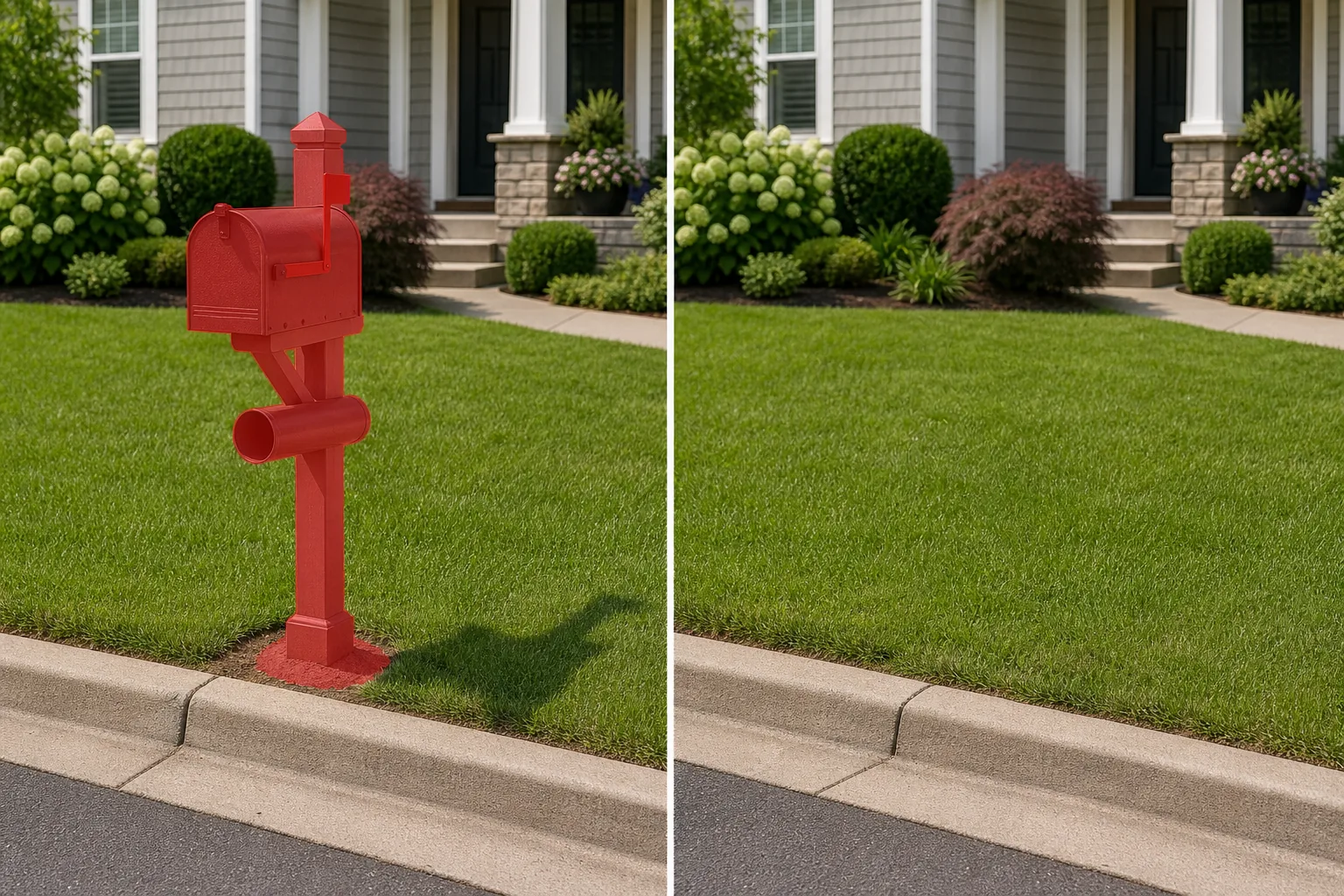
Hapus tiang kotak surat yang berdiri sendiri, tempat surat di tepi jalan, tempat tabung koran, dan tiang kotak surat cluster dari halaman depan dan foto properti. Magic Eraser melepas seluruh rakitan tiang — kotak, dudukan, dan jangkar tanah — dan merekonstruksi halaman rumput, alas mulsa, trotoar, atau tepi jalan di belakangnya untuk mendapatkan pemandangan properti yang bersih dan tidak terhalang.
Terakhir diperbarui
Mengapa postingan kotak surat mengacaukan latar depan foto properti
Setiap properti tempat tinggal memiliki kotak surat, tetapi tidak semua foto real estat perlu menampilkannya. Tiang kotak surat di tepi jalan yang berdiri tepat di antara kamera dan pintu depan menciptakan interupsi vertikal yang membagi komposisi dan menghalangi pintu masuk rumah — satu-satunya elemen terpenting dalam foto listing. Masalahnya menjadi lebih buruk ketika kotak surat sudah lapuk, miring, tidak sesuai dengan gaya rumah, atau dikelilingi oleh tanah kosong dimana halaman rumput sudah rusak karena lalu lintas pejalan kaki. Bahkan tiang dekoratif yang menarik pun dapat mengalihkan perhatian bila menempati pusat visual dari bidikan eksterior sudut lebar. Menghapus kiriman kotak surat secara manual tampaknya rumit. Tiang tersebut melintasi tiga atau lebih tekstur latar belakang — langit di atas, dinding rumah di tengah, dan halaman rumput atau mulsa di bagian bawah — dan setiap persimpangan memerlukan konten isian yang berbeda. Basisnya sering kali terletak di sepetak kecil tanah yang terganggu dengan tanah yang dipadatkan, batu tepi, atau pijakan beton, yang semuanya perlu diganti dengan rumput atau penutup tanah yang terlihat alami. Magic Eraser menyelesaikan semua transisi ini secara bersamaan, merekonstruksi tepi halaman, segmen trotoar, dan latar belakang dedaunan atau dinding yang dikaburkan oleh tiang. Hasilnya adalah foto halaman depan dimana mata bergerak lurus dari tepi jalan menuju pintu depan tanpa gangguan.
Hapus postingan kotak surat dalam tiga langkah
- 1
Unggah foto Anda
Buka Magic Eraser di web, iOS, atau Android dan unggah foto halaman depan, tepi jalan, atau tampilan jalan yang berisi kiriman kotak surat. Format JPEG, PNG, HEIC, dan WebP didukung. Gunakan gambar beresolusi tinggi sehingga AI memiliki detail maksimal untuk membangun kembali tekstur halaman dan latar belakang.
- 2
Sikat seluruh rakitan tiang
Cat seluruh struktur kotak surat dari atas ke bawah - kotak itu sendiri, lengan atau bendera dekoratif, tiang kayu atau logam, perangkat keras pemasangan apa pun, dan alas pertemuannya dengan tanah. Sertakan bayangan tiang di halaman dan gangguan tanah apa pun (tanah gundul, batu tepi, bantalan beton) di sekitar alasnya. Jika tabung surat kabar atau nomor alamat terlampir, sertakan juga.
- 3
Hapus dan tinjau
Ketuk Hapus dan Magic Eraser menghapus seluruh kiriman kotak surat sambil merekonstruksi halaman rumput, tepi jalan, trotoar, dan dinding latar belakang atau dedaunan. Perbesar untuk memverifikasi bahwa tekstur rumput konsisten dan tidak ada sisa bayangan atau bekas luka di dasar. Ekspor dengan resolusi penuh untuk listingan atau materi pemasaran Anda.
Terbaik untuk
- Gambar pahlawan daftar real estat di mana tiang kotak surat menghalangi pandangan pintu masuk depan
- Foto penilaian dan penilaian properti yang memerlukan ketinggian depan tanpa halangan
- Portofolio arsitektur lanskap menampilkan desain halaman tanpa perlengkapan utilitarian
- Pemasaran persewaan liburan dengan daya tarik tepi jalan yang bersih mendorong konversi pemesanan
- Materi pemasaran lingkungan untuk HOA dan asosiasi komunitas
Tip untuk penghapusan kiriman kotak surat yang tampak alami
Artefak paling umum setelah melepas kiriman kotak surat adalah sepetak rumput yang tidak alami di dasar tempat tanahnya terganggu. Untuk menghindari hal ini, rentangkan sikat Anda melewati dasar tiang untuk memasukkan tanah padat di sekitarnya, cincin kerikil, atau pijakan beton — AI memerlukan konteks halaman rumput yang cukup bersih di semua sisi untuk menghasilkan timbunan rumput yang meyakinkan. Jika kiriman kotak surat memberikan bayangan panjang di halaman (umumnya terdapat pada foto daftar pagi atau sore hari), sertakan seluruh bayangan dalam pilihan Anda. Untuk properti dengan unit kotak surat cluster (umum di komunitas townhome), tapak yang lebih besar memerlukan kuas yang lebih luas, namun prosesnya sama. Jika elemen dekoratif seperti plakat nomor alamat, lampu tenaga surya, atau kotak tanam terpasang pada tiang, sertakan semuanya sekaligus — melepas tiang tetapi meninggalkan nomor rumah terapung akan lebih buruk daripada meninggalkan tiang sepenuhnya. Setelah dihapus, verifikasi bahwa tepi tepi jalan dan sambungan trotoar tetap menyambung melewati area tempat tiang berdiri.
Pertanyaan yang sering diajukan
- Apa perbedaan antara menghapus kotak surat dan menghapus kiriman kotak surat?
- Alat 'hapus kotak surat' berfokus pada kotak surat yang terpasang di dinding dan slot surat yang menempel pada bangunan. Alat ini menargetkan tiang kotak surat tepi jalan yang berdiri bebas — seluruh rakitan termasuk kotak, tiang, lengan pemasangan, dan jangkar tanah. Jika kotak surat Anda berada di pos mandiri di pinggir jalan, ini adalah alat yang tepat.
- Bisakah itu menghilangkan kolom kotak surat dari batu bata atau batu dekoratif?
- Ya, meskipun kolom pasangan bata yang lebih besar memerlukan area sikat yang lebih besar. AI menangani pilar batu bata, kolom batu, dan penutup kotak surat semen. Untuk kolom yang sangat lebar, pastikan sikat Anda menutupi seluruh lebar ditambah bantalan beton atau alas yang ditinggikan di dasarnya. AI akan mengisi dengan rumput, mulsa, atau permukaan apa pun yang mengelilingi struktur.
- Apakah ini pantas untuk foto listingan MLS?
- Menghapus kiriman kotak surat adalah pembersihan kosmetik yang umum dalam fotografi real estat, mirip dengan membuang tong sampah atau selang taman. Kotak surat bukanlah fitur struktural rumah. Ikuti pedoman MLS lokal Anda tentang pengeditan foto — penghapusan kosmetik objek tepi jalan non-struktural adalah praktik yang diterima secara umum.
- Apakah gratis untuk digunakan?
- Ya. Tingkat gratis Magic Eraser mendukung penghapusan kiriman kotak surat dengan batas penggunaan harian. Premium ($29,99/tahun) menghilangkan batasan tersebut dan menyediakan ekspor resolusi lebih tinggi untuk listingan MLS dan pemasaran cetak.