
Photo de produit horloger
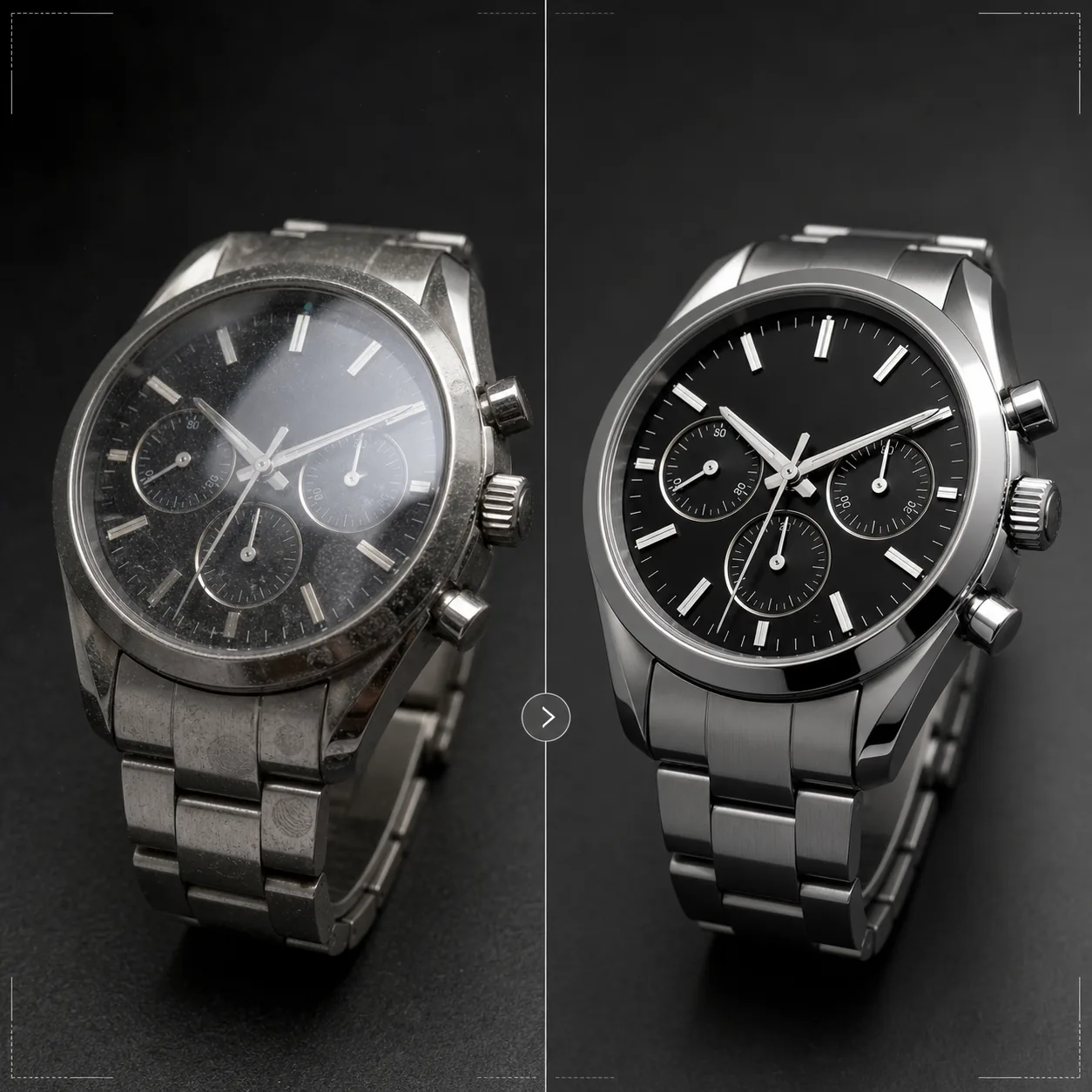
Mettez en valeur les montres avec la précision qu'elles méritent. Ce modèle affine les détails du cadran et les index, maîtrise les reflets du verre, sublime les textures métalliques du bracelet et du boîtier, élimine la poussière et les traces de doigts des surfaces polies, et prépare l'image pour les fiches produits e-commerce haut de gamme et l'usage en catalogue.
Essayer ce modèle gratuitementE-commerce template preview
Ce que fait ce modèle
Il répond aux défis spécifiques de la photographie horlogère, où le moindre détail compte énormément pour les acheteurs. Les cadrans de montre contiennent des détails complexes — index, compteurs, guichets de date, texte imprimé — qui doivent être d'une netteté absolue pour que l'image traduise la qualité. Ce modèle utilise AI Enhance pour affiner sélectivement les éléments du cadran tout en conservant un rendu global naturel. Magic Eraser élimine les particules de poussière, les traces de doigts sur les boîtiers polis et les micro-rayures sur les verres qui apparaissent à fort grossissement. Les reflets du verre sont réduits afin que le cadran en dessous reste clairement visible, et les textures métalliques des boîtiers et bracelets sont sublimées pour révéler les finitions brossée et polie que les acheteurs de montres évaluent avec soin.
Paramètres du modèle
| Netteté du cadran | Amélioration sélective des micro-détails (index, aiguilles, texte) |
| Reflet du verre | Réduction de l'éblouissement et des reflets sur le verre saphir/minéral |
| Texture métallique | Renforcement de la distinction entre surfaces brossée et polie |
| Nettoyage de surface | Élimination de la poussière, des traces de doigts et des micro-rayures |
| Résolution de sortie | 4000 × 4000 px (détail macro pour l'agrandissement) |
| Arrière-plan | Blanc pur, foncé uni ou dégradé (standard des produits de luxe) |
Comment utiliser ce modèle
Importez la photo de votre montre
Importez une photo produit de la montre — au poignet, à plat ou en studio sur un coussin ou un support. Les gros plans macro du cadran et les vues de profil du boîtier sont également pris en charge. Pour de meilleurs résultats, photographiez la montre avec les aiguilles à 10 h 10, la position standard du secteur qui encadre le logo et crée une composition équilibrée et symétrique.
Mise en valeur du cadran et des détails
AI Enhance affine sélectivement le cadran — index horaires, aiguilles, compteurs, guichet de date et texte imprimé deviennent nets et lisibles. Les points lumineux des index sont légèrement éclaircis pour révéler leur présence. L'amélioration respecte la profondeur de champ de votre prise de vue d'origine, en conservant la douceur des zones volontairement floues.
Nettoyage de surface et contrôle des reflets
Magic Eraser élimine les particules de poussière sur le cadran, les traces de doigts sur le boîtier et le bracelet, ainsi que les micro-rayures sur le verre. Les reflets du verre sont réduits pour révéler l'intégralité du cadran en dessous tout en conservant assez de reflet pour traduire la présence du verre — supprimer totalement les reflets donne à la montre un aspect plat et irréaliste.
Exportez pour une fiche ou un catalogue
Téléchargez en 4000 × 4000 px pour les fiches e-commerce avec zoom, ou en résolution d'impression pour les catalogues et les publicités. Les options d'arrière-plan incluent le blanc pur pour les places de marché, le foncé uni pour l'esthétique des marques de luxe et les dégradés pour un usage éditorial.
Conseils de pro pour de meilleurs résultats
- ✓Photographiez la montre avec les aiguilles réglées sur 10 h 10 ou 10 h 08 — cette position encadre le logo de la marque entre les aiguilles, montre clairement le guichet de date et les compteurs, et crée une composition visuellement équilibrée utilisée dans tout le secteur horloger.
- ✓Utilisez un objectif macro ou le mode gros plan pour capturer le maximum de détails du cadran. Le modèle peut affiner les détails existants mais ne peut pas créer un détail qui n'a pas été capturé — une image source en plus haute résolution, avec plus de détails de cadran, donne des résultats nettement meilleurs.
- ✓Pour les montres à bracelet métallique, orientez la lumière pour faire ressortir la différence entre surfaces brossée et polie. Le modèle renforce ce contraste, mais partir d'une distinction de surface déjà visible produit le résultat le plus saisissant.
- ✓Nettoyez la montre avec un chiffon en microfibre juste avant la prise de vue. Bien que Magic Eraser élimine la poussière et les traces de doigts, partir d'une surface propre signifie moins de reconstruction par l'IA et une préservation plus fidèle de la texture métallique dans les zones nettoyées.
Outils
E-commerce workflow
Product photo hub
Use this template with the full ecommerce product photo workflow for marketplace backgrounds, cleanup, compression, resizing, and listing-ready exports.
View ecommerce product photo workflowQuestions fréquentes
Cela peut-il corriger des photos où le cadran est masqué par un reflet ?
+
Les reflets modérés peuvent être réduits pour révéler les détails du cadran en dessous. Toutefois, si le reflet est si fort qu'aucun détail du cadran n'est visible sur la photo d'origine, l'IA ne peut pas créer un détail qui n'a jamais été capturé. Pour de meilleurs résultats, photographiez avec la source lumineuse positionnée de façon à minimiser le reflet direct sur le verre.
Cela fonctionne-t-il pour les montres connectées ?
+
Oui. Les écrans de montres connectées sont mis en valeur avec des éléments d'interface affinés et des traces de doigts réduites sur le verre. Le modèle reconnaît à la fois les cadrans analogiques traditionnels et les affichages numériques, et adapte son approche de netteté en conséquence.
Et les bracelets et sangles de montre ?
+
Les bracelets en cuir bénéficient d'une amélioration de texture qui révèle le grain et les détails des coutures. Les bracelets NATO et en tissu reçoivent une subtile accentuation de texture. Les bracelets métalliques bénéficient de l'amélioration des surfaces brossée/polie. L'ensemble de la montre — boîtier, verre, cadran et bracelet — est traité comme un produit complet.
Chaque détail compte lorsqu'on vend une montre
Importez vos photos de montres et obtenez des détails de cadran d'une clarté absolue, des reflets maîtrisés et une qualité d'image de niveau joaillerie pour vos fiches.
Essayer gratuitementRelated templates
More e-commerce templates for your workflow.
Modèle de fond blanc pur pour les photos de produits. Paramètres Amazon, Shopify et compatibles avec le marché pour des images de produits claires et professionnelles qui se convertissent.
Modèle de photo de liste optimisé pour Etsy. Convertit les photos de style de vie en arrière-plans blancs purs à 2 000 px, améliore les détails des produits faits à la main et respecte les directives d'image d'Etsy.
Modèle de photo d'annonce optimisé pour eBay. Fond blanc pour les images de la galerie, amélioration de la documentation sur l'état et mises en page multi-angles conformes aux normes d'image d'eBay.
Modèle de photographie de bijoux professionnel pour bagues, colliers et montres. Contrôle les reflets, améliore l'éclat des pierres précieuses et fournit des images prêtes à être commercialisées sur des arrière-plans épurés.
Modèle de photo de mobilier professionnel pour les listes de marchés. Supprimez l'encombrement de la pièce, affichez les vraies dimensions et présentez les pièces sur des arrière-plans épurés ou dans des contextes de pièce stylisés.
Nettoyez les photos de vêtements à plat avec l'élimination des plis, le nettoyage des peluches, des arrière-plans d'un blanc pur et une couleur de tissu précise. Prêt pour Shopify, Amazon et les boutiques.