
Photo d'annonce de meuble
Vendez vos meubles plus vite avec des photos d'annonce propres et professionnelles. Ce modèle supprime l'encombrement de la pièce et les objets personnels de l'arrière-plan, corrige les distorsions de couleur dues à l'éclairage intérieur et présente chaque pièce dans son meilleur état — que vous ayez besoin d'un fond blanc pour les exigences du marché ou d'un contexte de pièce stylisé pour un attrait lifestyle.
Essayer ce modèle gratuitementE-commerce template preview
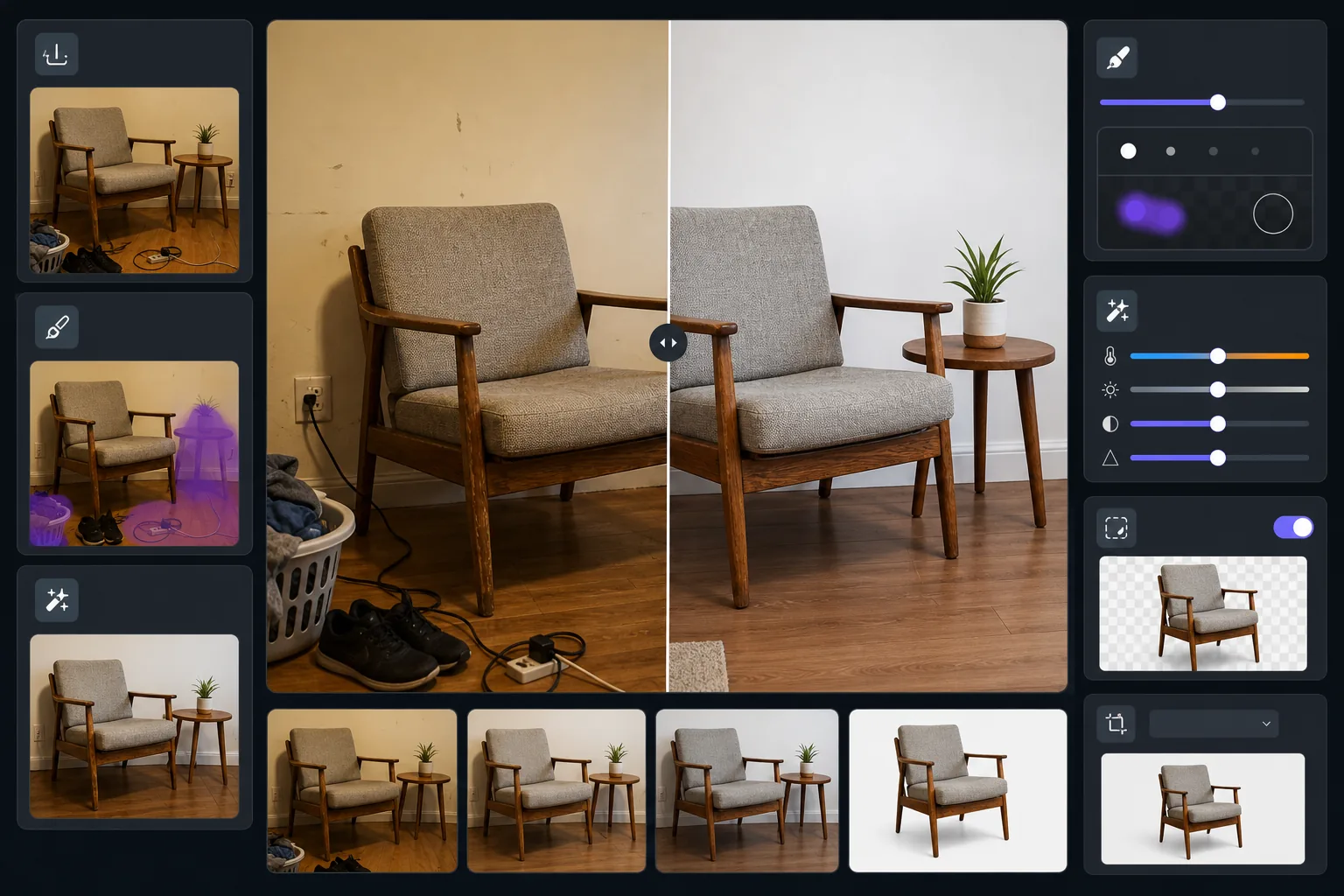
Ce que fait ce modèle
Transforme les photos de meubles prises dans des pièces habitées en images d'annonce soignées. Magic Eraser supprime l'encombrement environnant, les objets personnels et les dommages aux murs visibles sur la photo. AI Enhance corrige la dominante jaune de l'éclairage intérieur pour révéler les véritables tons du bois et les couleurs des tissus. Background Eraser peut isoler entièrement la pièce sur un fond blanc épuré conforme aux normes d'annonce de Facebook Marketplace, Craigslist et Chairish.
Paramètres du modèle
| Mode d'arrière-plan | Blanc épuré ou contexte de pièce désencombrée (au choix) |
| Taille de sortie | 2000×1500px (4:3 paysage, standard d'annonce) |
| Correction des couleurs | Ajustement de la balance des blancs de l'intérieur vers la lumière du jour |
| Suppression de l'encombrement | Automatique — supprime les objets dans un rayon de 12 inches autour des bords du meuble |
| Amélioration des détails | Sensible à la texture — affine le grain du bois, le tissage et la quincaillerie |
| Documentation de l'état | Préserve les marques d'usure et la patine pour une représentation honnête |
Comment utiliser ce modèle
Photographiez le meuble
Reculez suffisamment pour capturer la pièce entière avec un peu d'espace autour. Photographiez à hauteur des yeux debout pour les chaises et les tables, ou à hauteur assise pour les pièces basses comme les tables basses. Allumez toutes les lumières de la pièce et ouvrez les rideaux pour un éclairage uniforme.
Supprimez l'encombrement environnant
Magic Eraser détecte et supprime automatiquement les objets à proximité — chaussures sur le sol, objets sur les surfaces adjacentes, décorations murales et cordons d'alimentation. Le résultat ne montre que le meuble dans un environnement épuré.
Corrigez les couleurs et améliorez les détails
AI Enhance supprime la dominante jaune chaude ou fluorescente froide des photos d'intérieur, révélant la couleur réelle des teintures du bois, des tissus d'ameublement et de la quincaillerie métallique. L'accentuation de la texture fait ressortir les motifs du grain et les détails des coutures que les acheteurs veulent inspecter.
Choisissez l'arrière-plan et exportez
Conservez le contexte de pièce désencombrée pour un attrait lifestyle, ou passez à un fond blanc pur pour la conformité au marché. Exportez aux dimensions optimisées pour les annonces qui se chargent rapidement tout en conservant des détails dignes d'un zoom.
Conseils de pro pour de meilleurs résultats
- ✓Placez un objet courant comme un livre ou une tasse sur la surface du meuble avant de le retirer — cela aide les acheteurs à évaluer l'échelle sur l'image avant, tandis que l'après reste épuré.
- ✓Photographiez les pièces rembourrées sous un angle de trois quarts pour montrer à la fois la face avant et le profil latéral en une seule prise.
- ✓Pour les meubles en bois, photographiez en journée près d'une fenêtre pour capturer des tons de bois précis — la lumière artificielle vire le chêne à l'orange et le noyer à un brun boueux.
- ✓Prenez une vue large et un gros plan des détails notables (assemblage, quincaillerie, texture du tissu) et traitez les deux avec ce modèle pour une annonce complète.
E-commerce workflow
Product photo hub
Use this template with the full ecommerce product photo workflow for marketplace backgrounds, cleanup, compression, resizing, and listing-ready exports.
View ecommerce product photo workflowQuestions fréquentes
Cela va-t-il masquer les dommages ou l'usure du meuble ?
+
Non, et c'est intentionnel. Le modèle préserve les marques d'usure, les rayures et la patine existantes sur le meuble lui-même — il ne supprime que l'encombrement environnant et corrige la couleur de l'éclairage. Une représentation honnête de l'état renforce la confiance des acheteurs et réduit les litiges de retour.
Puis-je montrer la pièce dans un cadre de pièce sans le désordre ?
+
Oui. Le mode contexte de pièce désencombrée supprime les objets personnels, l'encombrement et les distractions tout en conservant les murs, le sol et l'environnement général de la pièce. Les acheteurs voient le meuble dans un cadre réaliste sans le bruit visuel d'un espace habité.
Quelles dimensions conviennent pour Facebook Marketplace et Craigslist ?
+
La sortie par défaut de 2000×1500px fonctionne sur toutes les grandes plateformes. Facebook Marketplace affiche les images en 1200px de large, et Craigslist accepte jusqu'à 600×450px — la sortie du modèle reste nette à toutes ces tailles d'affichage.
Mettez en vente des meubles qui se vendent au premier coup d'œil
Téléchargez la photo de votre meuble et obtenez une image d'annonce propre et professionnelle en quelques secondes. Pas de mise en scène, pas de studio photo, aucune compétence en design requise.
Essayer gratuitementRelated templates
More e-commerce templates for your workflow.
Modèle de fond blanc pur pour les photos de produits. Paramètres Amazon, Shopify et compatibles avec le marché pour des images de produits claires et professionnelles qui se convertissent.
Modèle de photo de liste optimisé pour Etsy. Convertit les photos de style de vie en arrière-plans blancs purs à 2 000 px, améliore les détails des produits faits à la main et respecte les directives d'image d'Etsy.
Modèle de photo d'annonce optimisé pour eBay. Fond blanc pour les images de la galerie, amélioration de la documentation sur l'état et mises en page multi-angles conformes aux normes d'image d'eBay.
Modèle de photographie de bijoux professionnel pour bagues, colliers et montres. Contrôle les reflets, améliore l'éclat des pierres précieuses et fournit des images prêtes à être commercialisées sur des arrière-plans épurés.
Nettoyez les photos de vêtements à plat avec l'élimination des plis, le nettoyage des peluches, des arrière-plans d'un blanc pur et une couleur de tissu précise. Prêt pour Shopify, Amazon et les boutiques.
Créez des photos de produits conformes à Amazon avec des arrière-plans d'un blanc pur, une correction d'éclairage appropriée et des dimensions optimisées pour les images des listes principales et secondaires.