
Nettoyage de vêtements à plat
Transformez des photos brutes de vêtements à plat en images produit prêtes pour les places de marché. Ce modèle élimine les plis, les peluches, les poils d'animaux et les fils qui dépassent, remplace les arrière-plans en désordre par un blanc pur et corrige la couleur du tissu afin que ce que les clients voient à l'écran corresponde à ce qui arrive dans le colis.
Essayer ce modèle gratuitementE-commerce template preview
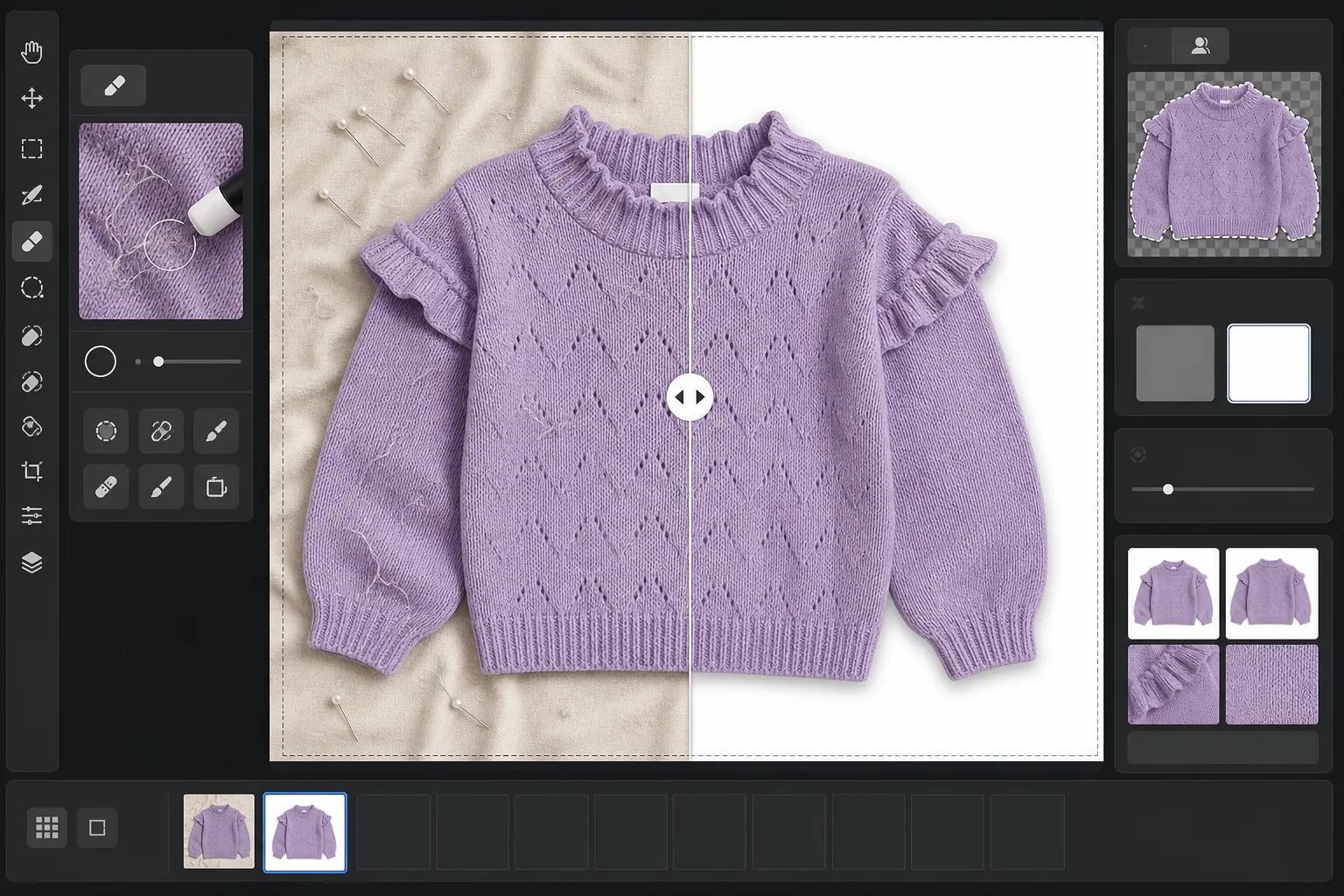
Ce que fait ce modèle
Il traite les problèmes les plus courants de la photographie de vêtements à plat : les plis du tissu dus au pliage et à l'expédition, les peluches et poils d'animaux que l'appareil capture mais que l'œil ne voit pas, les arrière-plans irréguliers dus aux draps ou aux raccords de carton, et les couleurs de tissu inexactes causées par un éclairage mixte. Magic Eraser élimine les saletés de surface, les fils qui dépassent et les étiquettes d'entretien qui pointent au niveau de l'encolure. Background Eraser isole le vêtement et le place sur un fond blanc net. AI Enhance corrige la température de couleur afin que les teintes du tissu apparaissent fidèles sur les écrans comme dans les catalogues imprimés.
Paramètres du modèle
| Arrière-plan | Blanc pur (#FFFFFF) avec un contour adouci de 2px |
| Réduction des plis | Moyenne (lisse les plis d'expédition, préserve les plis intentionnels) |
| Précision des couleurs | sRGB avec calibrage automatique du point blanc sur une carte grise neutre |
| Élimination des peluches | Détection automatique des fibres, poils et poussières de plus de 3px |
| Ombre | Ombre portée subtile (décalage de 4px, opacité de 15%) pour la profondeur |
| Dimensions de sortie | Recadrage carré 2000×2000px avec une marge de 10% |
Comment utiliser ce modèle
Importez votre photo à plat
Photographiez le vêtement posé à plat sur n'importe quelle surface propre — un lit, une table ou un carton. L'arrière-plan n'a pas besoin d'être parfaitement blanc ni sans plis, car il sera remplacé. La lumière naturelle près d'une fenêtre produit les couleurs de tissu les plus fidèles.
Éliminez peluches, fils et étiquettes
Magic Eraser détecte et élimine automatiquement les peluches, poils d'animaux, fils qui dépassent et étiquettes d'entretien visibles au-dessus de l'encolure ou de la ceinture. Vous pouvez aussi sélectionner et supprimer manuellement les cintres, pinces ou épingles de stylisme laissés sur la photo.
Remplacez l'arrière-plan
Background Eraser isole le vêtement de la surface sur laquelle il a été photographié et le place sur un fond blanc pur. La détection des contours suit le véritable tracé du vêtement, y compris les volants, les franges et les détails en dentelle, sans rogner les fines particularités.
Corrigez la couleur et exportez
AI Enhance ajuste la balance des blancs pour que la couleur du tissu à l'écran corresponde le plus fidèlement possible au vêtement physique. Téléchargez l'image finale au format JPEG carré 2000x2000px, prête pour Shopify, Amazon, Etsy ou votre propre boutique — dimensionnée pour répondre aux exigences d'image de la plupart des places de marché.
Conseils de pro pour de meilleurs résultats
- ✓Passez le vêtement à la vapeur ou au fer avant la prise de vue si possible. La réduction des plis gère bien les légers plis d'expédition, mais les marques de pliage profondes dues à un long stockage sont plus difficiles à lisser sans affecter le drapé et la texture naturels du tissu.
- ✓Placez une petite carte grise ou une carte de référence de balance des blancs au bord de votre cadre (en dehors de la zone de recadrage finale). L'algorithme de précision des couleurs l'utilise pour calibrer le point blanc, produisant des couleurs de tissu nettement plus fidèles que la balance des blancs automatique seule.
- ✓Pour les tissus foncés sur fond blanc, assurez-vous que la photo d'origine présente un contraste suffisant entre le bord du vêtement et la surface. Un vêtement noir sur du bois foncé est plus difficile à détourer proprement qu'un vêtement noir sur un drap gris clair ou blanc.
- ✓Photographiez tous les vêtements dans le même lot sous le même éclairage pour maintenir la cohérence des couleurs dans votre catalogue. Les traiter ensemble avec ce modèle garantit une balance des blancs uniforme sur toute la gamme de produits.
E-commerce workflow
Product photo hub
Use this template with the full ecommerce product photo workflow for marketplace backgrounds, cleanup, compression, resizing, and listing-ready exports.
View ecommerce product photo workflowQuestions fréquentes
L'élimination des plis rend-elle le tissu artificiellement lisse ?
+
La réduction des plis est calibrée pour éliminer les plis dus au pliage et à l'expédition tout en préservant la texture naturelle du tissu — l'armure du lin, le sergé du denim, les côtes du coton et les motifs de maille sont tous conservés. Le résultat ressemble à un vêtement fraîchement défroissé, et non à une surface peinte numériquement.
Les couleurs correspondront-elles entre la photo et le vêtement réel ?
+
La précision des couleurs dépend de l'éclairage de votre photo d'origine. Sous une lumière naturelle ou un éclairage de studio calibré, l'algorithme de correction des couleurs produit des résultats dans un écart delta-E de 3 par rapport au vêtement physique sur un écran calibré. Sous une forte lumière fluorescente ou au tungstène, l'amélioration est significative mais une correspondance exacte nécessite une carte grise de référence.
Quelles places de marché acceptent ces dimensions ?
+
La sortie carrée 2000x2000px répond aux exigences d'image d'Amazon, Shopify, Etsy, eBay, Poshmark et de la plupart des autres plateformes d'e-commerce. Amazon recommande au moins 1000px sur le côté le plus long pour la fonction de zoom, et 2000px dépasse cette valeur avec une marge confortable.
Vendez des vêtements aussi beaux en ligne qu'en vrai
Importez des photos à plat et obtenez des images produit sans peluches, sans plis et sur fond blanc, prêtes pour n'importe quelle plateforme d'e-commerce.
Essayer gratuitementRelated templates
More e-commerce templates for your workflow.
Modèle de fond blanc pur pour les photos de produits. Paramètres Amazon, Shopify et compatibles avec le marché pour des images de produits claires et professionnelles qui se convertissent.
Modèle de photo de liste optimisé pour Etsy. Convertit les photos de style de vie en arrière-plans blancs purs à 2 000 px, améliore les détails des produits faits à la main et respecte les directives d'image d'Etsy.
Modèle de photo d'annonce optimisé pour eBay. Fond blanc pour les images de la galerie, amélioration de la documentation sur l'état et mises en page multi-angles conformes aux normes d'image d'eBay.
Modèle de photographie de bijoux professionnel pour bagues, colliers et montres. Contrôle les reflets, améliore l'éclat des pierres précieuses et fournit des images prêtes à être commercialisées sur des arrière-plans épurés.
Modèle de photo de mobilier professionnel pour les listes de marchés. Supprimez l'encombrement de la pièce, affichez les vraies dimensions et présentez les pièces sur des arrière-plans épurés ou dans des contextes de pièce stylisés.
Créez des photos de produits conformes à Amazon avec des arrière-plans d'un blanc pur, une correction d'éclairage appropriée et des dimensions optimisées pour les images des listes principales et secondaires.