
Photo de produit de bijouterie
Transformez n'importe quel cliché de bijou en une image produit professionnelle digne d'un catalogue de luxe. Ce modèle relève les défis propres à la photographie de métaux réfléchissants et de pierres précieuses translucides : maîtriser les reflets indésirables, sublimer l'éclat et garantir une reproduction fidèle de la couleur des pierres.
Essayer ce modèle gratuitementE-commerce template preview
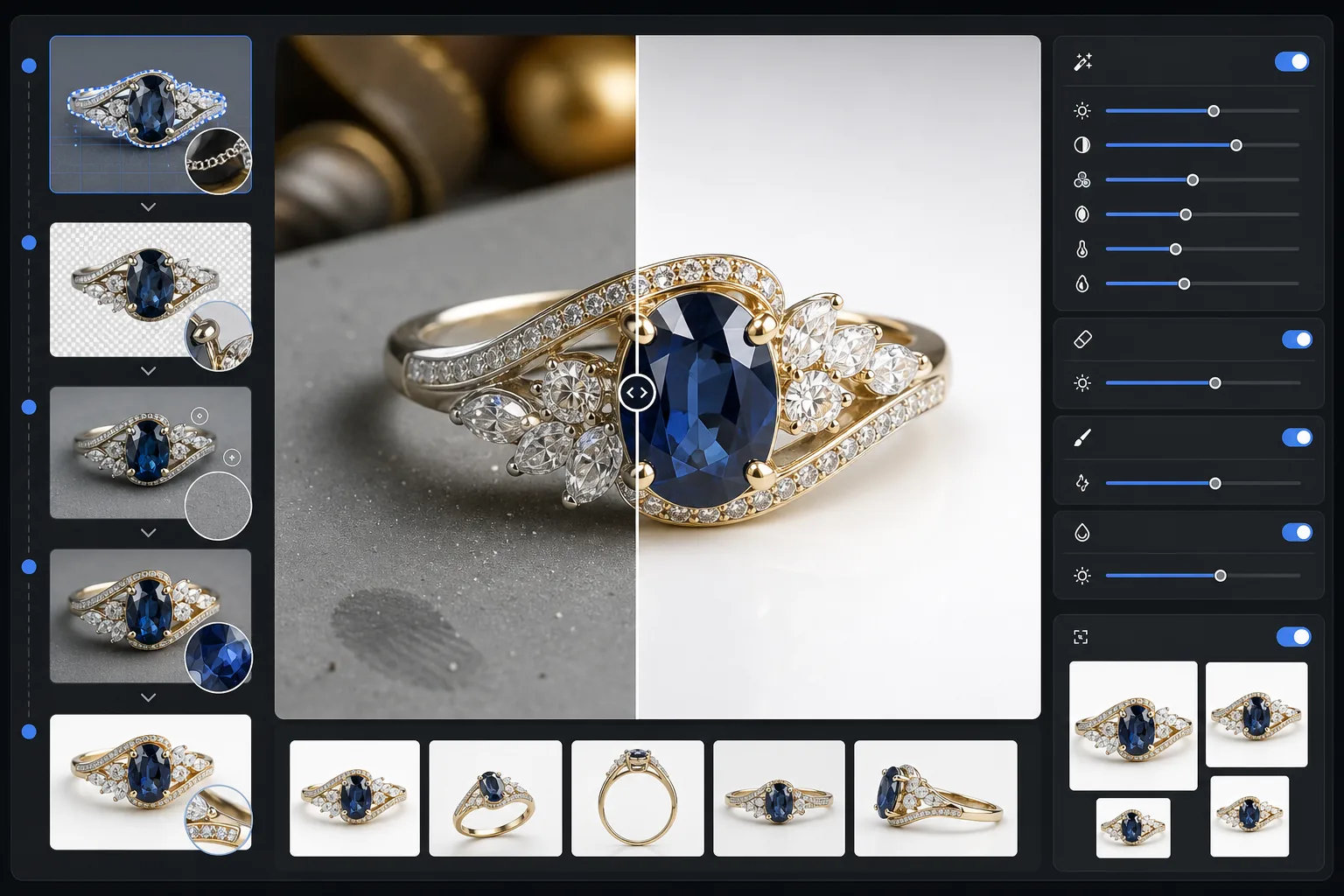
Ce que fait ce modèle
Supprime les arrière-plans encombrés des photos de bijoux et les remplace par une surface épurée et sans distraction. L'amélioration par IA affine ensuite les détails des facettes, équilibre les hautes lumières du métal sans les surexposer et restitue la véritable couleur des pierres précieuses que l'éclairage intérieur fausse souvent. Magic Eraser élimine les grains de poussière, les traces de doigts sur le métal et les reflets parasites presque impossibles à éviter lors de la prise de petits objets réfléchissants.
Paramètres du modèle
| Arrière-plan | Blanc pur ou gris en dégradé (au choix) |
| Taille de sortie | 2400×2400px (zoom haute résolution pour les détails fins) |
| Amélioration de l'éclat | Moyenne (préserve l'éclat naturel sans reflet artificiel) |
| Contrôle des reflets | Doux — réduit les reflets de miroir intenses sur le métal poli |
| Précision des couleurs | sRGB calibré pour les pierres précieuses (optimisé pour émeraude, rubis, saphir, diamant) |
| Netteté des détails | Niveau macro — sublime les facettes, les griffes et les gravures |
Comment utiliser ce modèle
Photographiez votre bijou
Posez la pièce sur une surface mate non réfléchissante. Utilisez une lumière naturelle diffuse ou une boîte à lumière pour minimiser les reflets intenses sur le métal. Photographiez légèrement en plongée, sous un angle de 30 à 45 degrés, pour capturer la face des pierres précieuses.
Supprimez l'arrière-plan
Background Eraser isole le bijou de n'importe quelle surface, gérant les contours délicats où les griffes fines, les chaînes délicates et les petits fermoirs rencontrent l'arrière-plan — même sur les pièces très réfléchissantes.
Améliorez les détails et la couleur
AI Enhance affine les arêtes des facettes et les gravures visibles au zoom, corrige la couleur des pierres faussée par l'éclairage artificiel et équilibre les hautes lumières du métal afin que l'or paraisse chaud et l'argent froid, sans zones surexposées.
Nettoyez et exportez
Utilisez Magic Eraser pour supprimer les particules de poussière, les traces de doigts ou les reflets indésirables sur la surface du métal. Exportez en 2400px pour la compatibilité avec le zoom des places de marché et un rendu précis des détails.
Conseils de pro pour de meilleurs résultats
- ✓Photographiez sur une carte gris moyen plutôt que blanche — cela permet à l'IA de mieux séparer les contours sur les pièces en argent et en or blanc.
- ✓Pour les pièces en diamant et les pierres précieuses transparentes, placez un petit morceau de papier blanc sous la pierre afin de capturer la transmission de la lumière et le feu.
- ✓Photographiez les bagues debout à l'aide de cire muséale ou d'un support à bague, puis effacez le support avec Magic Eraser pour une présentation en suspension.
- ✓Capturez plusieurs angles de chaque pièce et traitez-les par lots avec les mêmes paramètres de modèle pour un rendu de catalogue homogène.
E-commerce workflow
Product photo hub
Use this template with the full ecommerce product photo workflow for marketplace backgrounds, cleanup, compression, resizing, and listing-ready exports.
View ecommerce product photo workflowQuestions fréquentes
L'éclat de mes diamants paraîtra-t-il naturel ?
+
Oui. L'amélioration de l'éclat amplifie les reflets de lumière déjà présents dans votre photo plutôt que d'ajouter un reflet artificiel. Le résultat ressemble à une prise de vue en studio éclairée par un professionnel, préservant le motif de feu naturel de chaque pierre.
Peut-il gérer l'or et le platine polis très réfléchissants ?
+
Absolument. Le réglage de contrôle des reflets réduit les reflets de miroir intenses tout en préservant l'éclat caractéristique de chaque métal. L'or conserve sa lueur chaude et le platine sa brillance froide, sans zones blanches surexposées.
Quel arrière-plan convient le mieux aux annonces de bijoux de luxe ?
+
Le blanc pur répond aux exigences des places de marché Amazon et Etsy. Pour votre propre site web ou une image de marque haut de gamme, l'option gris en dégradé ajoute de la profondeur et un sentiment de prestige. Les deux options sont incluses dans ce modèle.
Faites vendre vos photos de bijoux
Importez la photo d'une bague, d'un collier, d'un bracelet ou d'une montre et obtenez une image produit de qualité catalogue en quelques secondes. Chaque facette, chaque détail, parfaitement mis en valeur.
Essayer gratuitementRelated templates
More e-commerce templates for your workflow.
Modèle de fond blanc pur pour les photos de produits. Paramètres Amazon, Shopify et compatibles avec le marché pour des images de produits claires et professionnelles qui se convertissent.
Modèle de photo de liste optimisé pour Etsy. Convertit les photos de style de vie en arrière-plans blancs purs à 2 000 px, améliore les détails des produits faits à la main et respecte les directives d'image d'Etsy.
Modèle de photo d'annonce optimisé pour eBay. Fond blanc pour les images de la galerie, amélioration de la documentation sur l'état et mises en page multi-angles conformes aux normes d'image d'eBay.
Modèle de photo de mobilier professionnel pour les listes de marchés. Supprimez l'encombrement de la pièce, affichez les vraies dimensions et présentez les pièces sur des arrière-plans épurés ou dans des contextes de pièce stylisés.
Nettoyez les photos de vêtements à plat avec l'élimination des plis, le nettoyage des peluches, des arrière-plans d'un blanc pur et une couleur de tissu précise. Prêt pour Shopify, Amazon et les boutiques.
Créez des photos de produits conformes à Amazon avec des arrière-plans d'un blanc pur, une correction d'éclairage appropriée et des dimensions optimisées pour les images des listes principales et secondaires.