
Photo d'annonce eBay
Créez des annonces eBay qui se démarquent dans les résultats de recherche et gagnent la confiance des acheteurs. Ce modèle produit des images de galerie nettes sur fond blanc, améliore les photos détaillées de l'état des articles d'occasion et garantit que chaque photo atteint le minimum de 500px d'eBay avec une marge pour la fonction de zoom.
Essayez ce modèle gratuitementE-commerce template preview
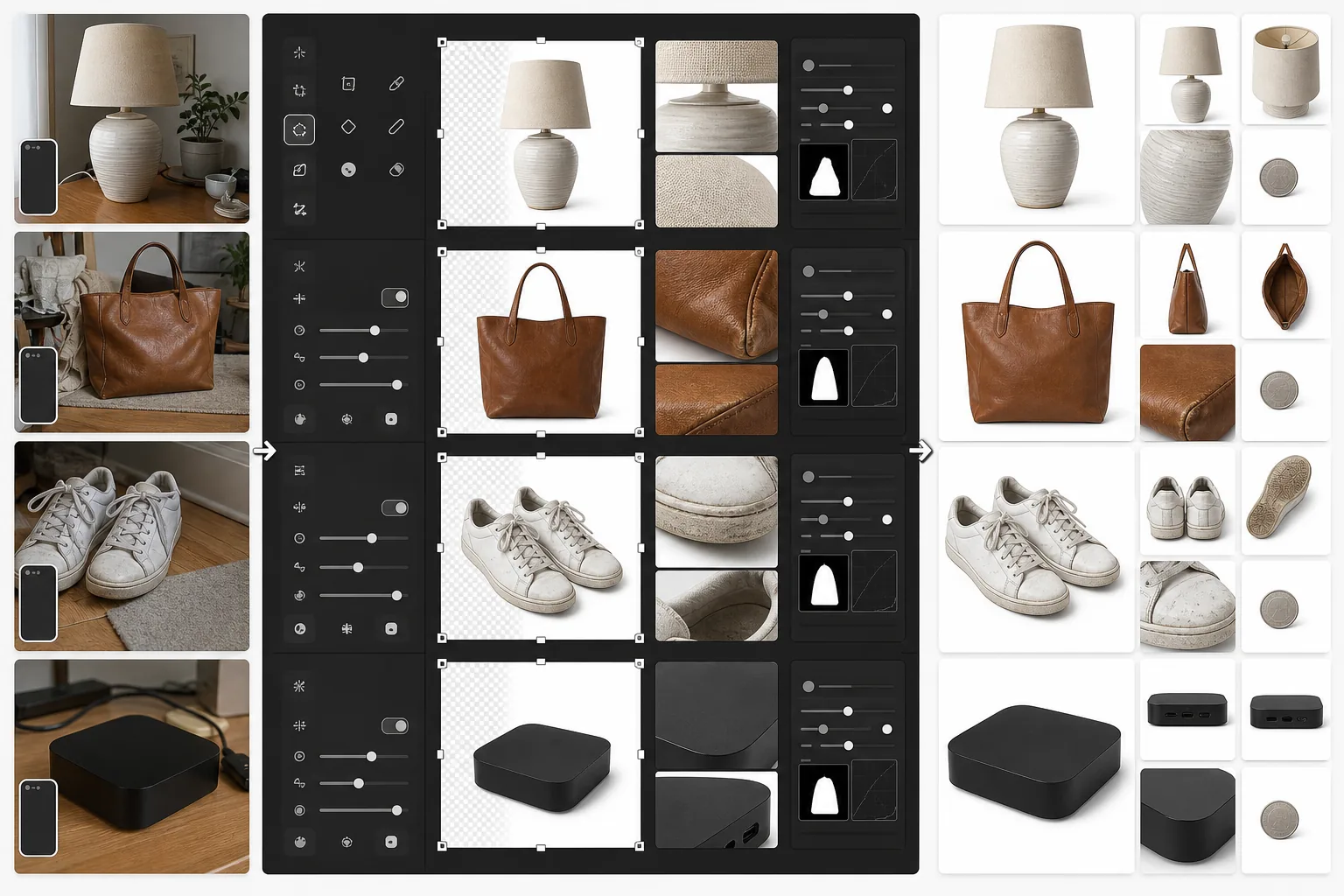
Ce que fait ce modèle
Prépare les photos de produits spécifiquement pour les annonces eBay. L'image principale reçoit un fond blanc net pour bien performer dans les résultats de recherche eBay et la navigation par catégorie. Les images secondaires sont améliorées pour montrer clairement l'état de l'article — les rayures, les marques d'usure, les étiquettes et les numéros de série deviennent nettement visibles. Magic Eraser supprime le désordre d'arrière-plan des photos d'état sans affecter l'article lui-même.
Paramètres du modèle
| Taille de l'image principale | 1600×1600px (carré, dépasse le minimum de 500px d'eBay) |
| Arrière-plan (principal) | Blanc pur (#FFFFFF) pour la vignette de galerie |
| Mode détail d'état | Accentuation du micro-contraste pour les rayures, étiquettes et usure |
| Format de fichier | JPEG qualité 90% (sous la limite de 12MB d'eBay) |
| Profil colorimétrique | sRGB (standard web) |
| Filigrane | Aucun (eBay interdit les filigranes sur les images d'annonce) |
Comment utiliser ce modèle
Téléchargez les photos de votre article
Prenez des photos de votre article de face, de dos, sur les côtés, et des gros plans de tout détail d'état comme les rayures, les étiquettes ou les numéros de série. Utilisez la lumière naturelle et évitez le flash, qui peut estomper les détails et créer des reflets sur les surfaces réfléchissantes.
Créez l'image de galerie
Background Eraser isole l'article et le place sur fond blanc pur pour la photo d'annonce principale. L'algorithme de recherche d'eBay favorise les images sur fond blanc, et elles performent nettement mieux dans les résultats de recherche 'Buy It Now' et aux enchères.
Améliorez la documentation de l'état
Pour les articles d'occasion, reconditionnés ou vintage, AI Enhance applique une accentuation du micro-contraste qui rend les détails d'état clairement visibles — éraflures, patine, bouloches de tissu et marques d'authentification. Magic Eraser supprime le désordre d'arrière-plan des photos détaillées sans toucher à l'article.
Exportez votre série de photos d'annonce
Téléchargez toutes les images en 1600×1600px. eBay autorise jusqu'à 24 photos par annonce — utilisez la série complète pour la meilleure confiance des acheteurs et le taux de retour le plus bas.
Conseils de pro pour de meilleurs résultats
- ✓Pour l'image de galerie principale, photographiez l'article sur n'importe quel fond contrasté. Background Eraser s'occupe du reste. Un article foncé sur une surface claire (ou vice versa) offre la détection des contours la plus nette.
- ✓Documentez chaque défaut des articles d'occasion avec des photos en gros plan. Les images d'état améliorées réduisent les retours 'article non conforme à la description', ce qui protège votre évaluation de vendeur et maintient la visibilité de vos annonces.
- ✓Incluez une photo avec un objet courant pour l'échelle — une pièce de monnaie à côté de petits appareils électroniques, ou un stylo à côté des vêtements. Les acheteurs eBay évaluent souvent mal la taille à partir de photos montrant uniquement le produit.
- ✓Photographiez les appareils électroniques et les objets de collection avec les numéros de série et les marques d'authentification clairement visibles. L'accentuation des détails d'AI Enhance les rend lisibles même à partir de photos de smartphone prises sous un léger angle.
E-commerce workflow
Product photo hub
Use this template with the full ecommerce product photo workflow for marketplace backgrounds, cleanup, compression, resizing, and listing-ready exports.
View ecommerce product photo workflowQuestions fréquentes
eBay exige-t-il un fond blanc ?
+
eBay n'exige pas strictement les fonds blancs, mais son algorithme de recherche et son classement Best Match favorisent les images principales nettes sur fond blanc. Les annonces avec des photos de galerie sur fond blanc reçoivent systématiquement plus d'impressions et des taux de clics plus élevés dans les résultats de recherche d'eBay.
Puis-je supprimer les filigranes ou logos de mes photos ?
+
eBay interdit les filigranes, les bordures et les superpositions de texte sur les images d'annonce. Ce modèle produit des images nettes sans aucun élément ajouté. Si votre appareil photo ajoute un horodatage, Magic Eraser peut le supprimer.
Combien de photos dois-je inclure par annonce ?
+
Utilisez-en autant que l'état le justifie — eBay autorise jusqu'à 24 photos gratuites. Pour les articles neufs, 4 à 6 angles suffisent généralement. Pour les articles d'occasion, incluez chaque angle plus des gros plans de toute usure, étiquette et accessoire. Plus de photos sont corrélées à des taux de vente plus élevés et à moins de litiges avec les acheteurs.
Créez des annonces eBay qui se vendent plus vite
Téléchargez les photos de votre article et obtenez des images de galerie optimisées pour la recherche ainsi qu'une documentation d'état améliorée en quelques secondes.
Essayez gratuitementRelated templates
More e-commerce templates for your workflow.
Modèle de fond blanc pur pour les photos de produits. Paramètres Amazon, Shopify et compatibles avec le marché pour des images de produits claires et professionnelles qui se convertissent.
Modèle de photo de liste optimisé pour Etsy. Convertit les photos de style de vie en arrière-plans blancs purs à 2 000 px, améliore les détails des produits faits à la main et respecte les directives d'image d'Etsy.
Modèle de photographie de bijoux professionnel pour bagues, colliers et montres. Contrôle les reflets, améliore l'éclat des pierres précieuses et fournit des images prêtes à être commercialisées sur des arrière-plans épurés.
Modèle de photo de mobilier professionnel pour les listes de marchés. Supprimez l'encombrement de la pièce, affichez les vraies dimensions et présentez les pièces sur des arrière-plans épurés ou dans des contextes de pièce stylisés.
Nettoyez les photos de vêtements à plat avec l'élimination des plis, le nettoyage des peluches, des arrière-plans d'un blanc pur et une couleur de tissu précise. Prêt pour Shopify, Amazon et les boutiques.
Créez des photos de produits conformes à Amazon avec des arrière-plans d'un blanc pur, une correction d'éclairage appropriée et des dimensions optimisées pour les images des listes principales et secondaires.