
Photo de produit de lunettes de soleil
Produisez des photos de lunettes de soleil prêtes pour le commerce électronique avec des arrière-plans nets, des teintes de verres précises et des surfaces sans reflets. Ce modèle supprime les reflets indésirables des verres et des montures, remplace les arrière-plans encombrés par du blanc pur ou des surfaces stylisées, et accentue les détails des matériaux afin que les clients voient clairement les textures de la monture, la construction des charnières et les transitions de dégradé des verres.
Essayez ce modèle gratuitementE-commerce template preview
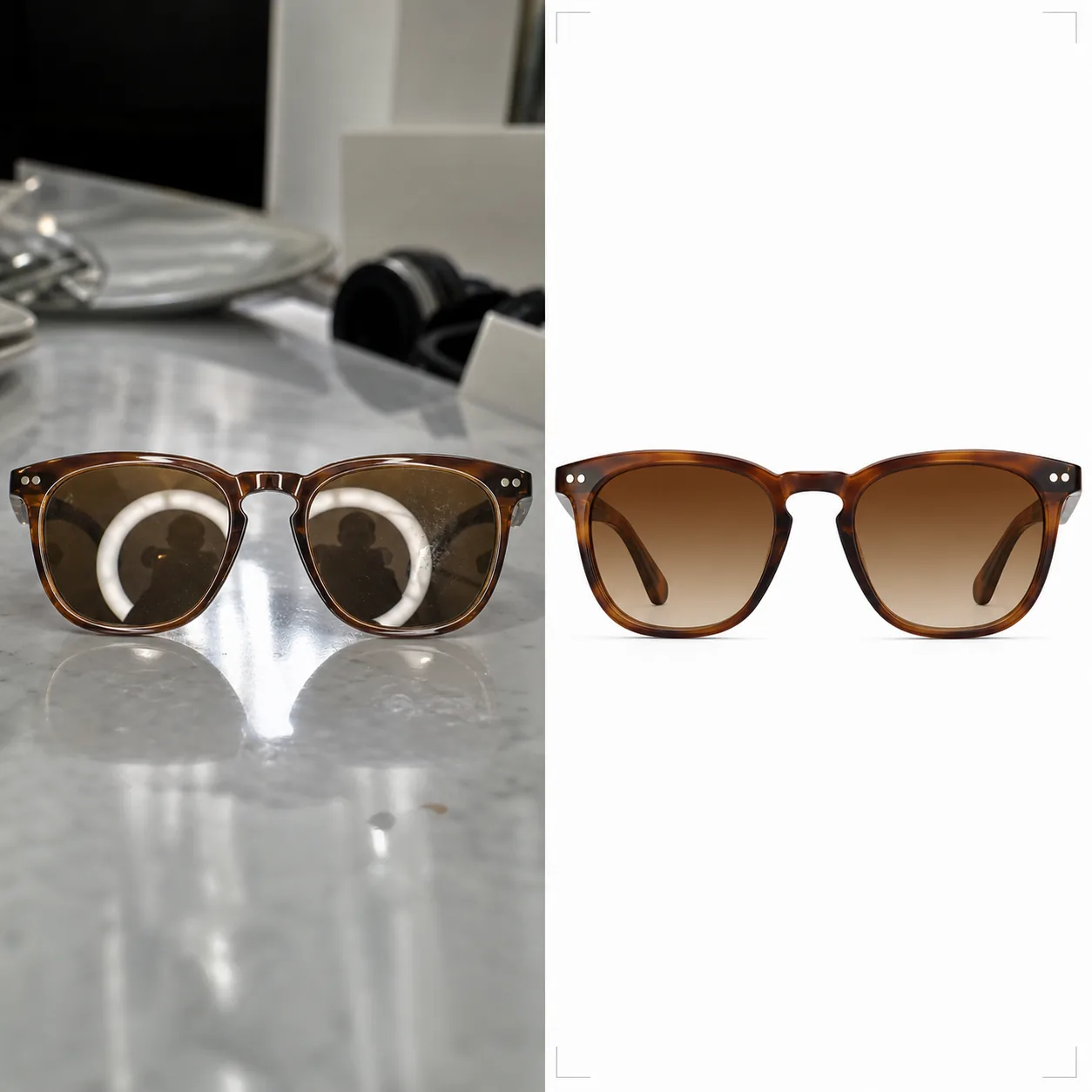
Ce que fait ce modèle
Répond aux défis propres à la photographie de lunettes pour la vente en ligne. Les lunettes de soleil comptent parmi les produits les plus difficiles à photographier, car chaque surface incurvée reflète le studio, l'appareil photo et le photographe. Background Eraser isole les lunettes de toute surface et remplace l'arrière-plan par du blanc pur (conforme aux places de marché), du gris neutre ou une surface stylisée comme le marbre ou le bois. AI Enhance supprime les reflets indésirables des verres et des montures métalliques tout en préservant la réflexion intentionnelle qui rend le produit attrayant. Les teintes des verres sont corrigées pour correspondre aux spécifications du fabricant, afin que les verres ambrés, verts, gris et dégradés affichent leur véritable couleur à l'écran. Les textures des montures — grain de l'acétate, brossage du métal, titane mat — sont accentuées pour offrir aux clients la confiance d'un examen en boutique.
Paramètres du modèle
| Arrière-plan | Blanc pur (#FFFFFF), gris neutre ou surface stylisée (marbre, bois, tissu) |
| Suppression des reflets | Supprimer les reflets du studio, de l'appareil photo et du photographe sur les verres et les montures |
| Correction de la teinte des verres | Faire correspondre la couleur des verres aux spécifications du fabricant (ambre, gris, vert, dégradé) |
| Amélioration des détails de la monture | Accentuer le grain de l'acétate, le brossage du métal, la quincaillerie des charnières et le logo des branches |
| Résolution de sortie | 3000×3000px (carré 1:1 pour les places de marché, ou 4:3 pour les catalogues de marques) |
Comment utiliser ce modèle
Importez votre photo de lunettes de soleil
Importez une photo produit des lunettes de soleil — à plat, en angle, pliées ou portées sur le visage d'un mannequin. Le modèle gère tous les angles. Pour une teinte des verres la plus précise, assurez-vous que la photo d'origine a été prise en lumière du jour neutre ou avec un éclairage de studio à 5500K.
Nettoyez l'arrière-plan et les reflets
Background Eraser isole les lunettes et remplace l'arrière-plan. Les reflets des verres montrant l'installation du studio, le ring light ou le photographe sont supprimés, tout en préservant les reflets spéculaires naturels qui traduisent la qualité du matériau des verres. Les reflets sur l'acétate brillant ou le métal poli des montures sont nettoyés de la même manière.
Corrigez la couleur et accentuez les détails
La teinte des verres est corrigée pour afficher la couleur exacte que les clients verront en personne. AI Enhance accentue la texture de la monture — le motif du grain de l'acétate, la finition brossée du titane, la surface polie de l'acier inoxydable — afin que les clients puissent évaluer la qualité de fabrication à partir de la seule photo.
Exportez pour vos annonces
Téléchargez en 3000×3000px pour les annonces Amazon, Shopify et les places de marché, ou au format 4:3 pour les mises en page de catalogues de marques. La version à fond blanc répond aux exigences d'Amazon et de Google Shopping pour les images produit principales.
Conseils de pro pour de meilleurs résultats
- ✓Photographiez les lunettes de soleil légèrement ouvertes (branches inclinées à environ 20 degrés) plutôt que totalement pliées ou totalement ouvertes. Cet angle montre le plus de détails de la monture — branches, charnières et marquage intérieur des branches — en une seule prise.
- ✓Posez les lunettes de soleil sur une surface mate plutôt que réfléchissante. Les tables en verre et les comptoirs brillants créent des doubles reflets qui compliquent le nettoyage des verres. Une plaque de carton mousse blanc constitue une surface de prise de vue parfaite.
- ✓Photographiez sous plusieurs angles : de face, trois-quarts, de profil et pliées. Le modèle traite chaque image de manière cohérente, et les annonces sur les places de marché comportant quatre angles ou plus convertissent nettement mieux que les annonces à une seule image.
E-commerce workflow
Product photo hub
Use this template with the full ecommerce product photo workflow for marketplace backgrounds, cleanup, compression, resizing, and listing-ready exports.
View ecommerce product photo workflowQuestions fréquentes
La teinte des verres sera-t-elle exacte à l'écran ?
+
Le modèle corrige la teinte des verres pour correspondre à la couleur spécifiée par le fabricant sous une lumière du jour neutre (illuminant D65). Pour les verres dégradés, la transition du foncé au clair est préservée avec un positionnement précis. Le calibrage de l'écran du côté du spectateur reste la variable restante, mais le fichier lui-même est précis en couleur en sRGB.
Puis-je montrer les lunettes de soleil sur le visage d'un mannequin ?
+
Oui. Lorsque le modèle détecte une prise de vue sur le visage, il préserve la peau et les traits du mannequin tout en nettoyant uniquement les reflets des verres et en accentuant les détails de la monture. Le remplacement de l'arrière-plan fonctionne toujours derrière le mannequin.
Cela fonctionne-t-il aussi pour les lunettes de vue ?
+
Oui. Les verres correcteurs transparents présentent les mêmes défis de reflets que les verres teintés. Le modèle supprime les reflets des verres transparents tout en préservant la visibilité du bord du verre, qui montre aux clients l'épaisseur et la qualité de la taille des verres.
Montrez chaque monture sous son aspect le plus net et le plus fidèle
Importez des photos de lunettes de soleil et obtenez des images produit sans reflets et fidèles en couleur, prêtes pour les places de marché et les catalogues de marques.
Essayer gratuitementRelated templates
More e-commerce templates for your workflow.
Modèle de fond blanc pur pour les photos de produits. Paramètres Amazon, Shopify et compatibles avec le marché pour des images de produits claires et professionnelles qui se convertissent.
Modèle de photo de liste optimisé pour Etsy. Convertit les photos de style de vie en arrière-plans blancs purs à 2 000 px, améliore les détails des produits faits à la main et respecte les directives d'image d'Etsy.
Modèle de photo d'annonce optimisé pour eBay. Fond blanc pour les images de la galerie, amélioration de la documentation sur l'état et mises en page multi-angles conformes aux normes d'image d'eBay.
Modèle de photographie de bijoux professionnel pour bagues, colliers et montres. Contrôle les reflets, améliore l'éclat des pierres précieuses et fournit des images prêtes à être commercialisées sur des arrière-plans épurés.
Modèle de photo de mobilier professionnel pour les listes de marchés. Supprimez l'encombrement de la pièce, affichez les vraies dimensions et présentez les pièces sur des arrière-plans épurés ou dans des contextes de pièce stylisés.
Nettoyez les photos de vêtements à plat avec l'élimination des plis, le nettoyage des peluches, des arrière-plans d'un blanc pur et une couleur de tissu précise. Prêt pour Shopify, Amazon et les boutiques.