
Retouche de peau naturelle
Sublimez vos portraits sans l'aspect plastique. Ce modèle élimine les imperfections passagères, uniformise le teint et lisse les irrégularités d'éclairage tout en préservant délibérément les pores, les ridules et la texture naturelle qui rendent la peau réaliste. Le résultat : un portrait où le sujet apparaît sous son meilleur jour — et non comme un mannequin généré par IA.
Essayer ce modèle gratuitementPortrait template preview
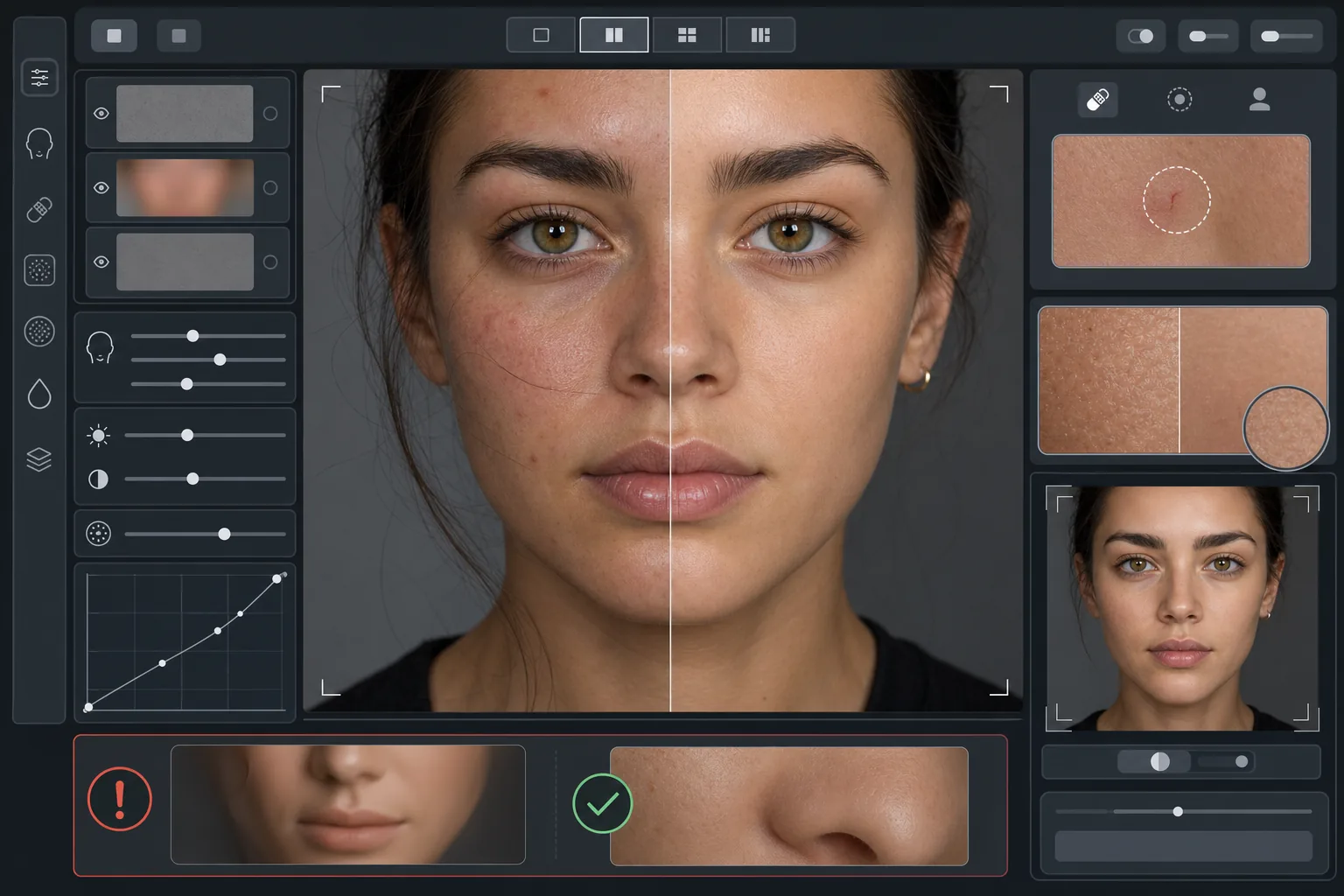
Ce que fait ce modèle
Applique une retouche de peau par fréquences qui sépare la texture du teint. AI Enhance élimine les imperfections passagères (boutons, rougeurs, cernes) tout en préservant la texture fine de la peau — pores, duvet et variations naturelles — que l'œil perçoit comme authentique. Magic Eraser gère la suppression ponctuelle là où l'amélioration par IA est trop large, comme effacer une seule égratignure ou une piqûre d'insecte sans toucher à la peau environnante. L'effet global est une peau uniforme et d'aspect sain qui résiste au test du zoom.
Réglages du modèle
| Intensité de retouche | Naturelle — cible les imperfections et les rougeurs, préserve la texture |
| Préservation des pores | Totale — conserve toute la texture naturelle de la peau au niveau du pixel |
| Uniformisation du teint | Modérée — réduit les marbrures et les rougeurs sans aplatir les variations de couleur |
| Correction des cernes | Subtile — éclaircit les cernes sans supprimer l'ombre naturelle |
| Lissage de l'éclairage | Comble les ombres dures et atténue les zones surexposées dues au flash direct |
| Résolution de sortie | Identique à l'entrée (conserve tous les détails pour le recadrage et le zoom) |
Comment utiliser ce modèle
Importer une photo de portrait
Utilisez un portrait bien éclairé où le visage est parfaitement net. Le modèle donne ses meilleurs résultats lorsque la texture naturelle de la peau est visible dans l'original — les images floues ou fortement compressées offrent moins de texture à préserver pour l'IA.
Appliquer la retouche naturelle
AI Enhance identifie les imperfections passagères, les rougeurs inégales et les irrégularités de teint et les corrige tout en gardant la texture sous-jacente de la peau parfaitement intacte. Les pores, les ridules et les variations de couleur naturelles restent visibles — seules les imperfections changent.
Corriger des zones précises
Utilisez Magic Eraser pour toute marque individuelle restante que vous souhaitez supprimer — une égratignure en voie de guérison, une éruption passagère ou un cheveu en travers du visage. Chaque suppression se fond dans la texture naturelle de la peau environnante.
Vérifier au zoom maximal et exporter
Zoomez à 100 % pour vérifier que la texture de la peau est intacte — les pores doivent rester visibles et naturels. Si une zone paraît trop lisse, réduisez l'intensité de retouche et retraitez. Exportez en pleine résolution pour préserver le détail naturel.
Conseils de pro pour de meilleurs résultats
- ✓Commencez par l'intensité de retouche la plus faible et augmentez seulement si nécessaire — il est plus facile d'ajouter du lissage que de récupérer une texture déjà effacée par le traitement.
- ✓Pour les sujets souffrant d'acné ou de rosacée, le modèle élimine les imperfections individuelles sans altérer le teint sous-jacent — le résultat ressemble à un jour de peau nette, pas à une personne différente.
- ✓Évitez de superposer ce modèle aux filtres beauté de l'appareil photo du téléphone — le lissage intégré de nombreux smartphones réduit déjà la texture, et un double traitement crée l'aspect plastique que ce modèle cherche à éviter.
- ✓Photographiez au format RAW si possible et convertissez en JPEG avant l'import — le RAW capture davantage de données de texture cutanée que l'IA pourra préserver pendant la retouche.
Outils
Questions fréquentes
En quoi est-ce différent des filtres beauté qui lissent la peau ?
+
Les filtres beauté appliquent un flou uniforme qui efface les pores, les ridules et la texture naturelle — créant cet aspect plastique reconnaissable entre tous. Ce modèle utilise un traitement par fréquences qui sépare la texture du teint, supprimant les imperfections de la couche de teint tout en laissant la couche de texture intacte. Le résultat ressemble à une vraie peau, pas à une surface de synthèse.
Cela modifie-t-il la forme des traits du visage ?
+
Non. Le modèle n'affecte que l'apparence de surface de la peau — teint, imperfections et uniformité de l'éclairage. Il ne remodèle jamais le nez, la mâchoire, les yeux ni aucune structure du visage. Le sujet reste exactement lui-même, avec simplement une peau plus nette et un éclairage plus uniforme.
Puis-je l'utiliser pour des photos professionnelles et des portfolios ?
+
Oui. Le standard de retouche naturelle répond aux attentes professionnelles des portraits d'entreprise, des portfolios d'acteurs, des profils de rencontre et des réseaux sociaux où l'authenticité compte. Le sujet ressemblera à sa photo en personne — ce qui est tout l'intérêt de la retouche naturelle.
Une peau plus belle, toujours vous
Importez un portrait et obtenez en quelques secondes une retouche de peau naturelle qui préserve la texture. Pas d'aspect plastique, pas de lissage troublant — juste vous, sous votre meilleur jour.
Essayer gratuitementRelated templates
More portrait templates for your workflow.
Modèle de retouche de portrait scolaire adapté à l'âge. Suppression naturelle des imperfections, arrière-plans cohérents et sortie standard de l'annuaire avec traitement par lots pour des classes entières.
Modèle de portrait d'animal de compagnie de qualité studio. Gère les bords de la fourrure, supprime les laisses et les gestionnaires, remplace les arrière-plans et aiguise les yeux des chiens, des chats et d'autres animaux.
Améliorez les photos de nouveau-nés et de bébés avec des tons doux et chauds, un lissage doux de la peau, la suppression des accessoires et des distractions, et un format prêt à imprimer pour les annonces et les décorations murales.
Retouchez les photos de maternité avec un lissage doux de la peau, un éclairage doux, une simplification de l'arrière-plan et un étalonnage des couleurs chaudes pour un look de portrait de grossesse intemporel.
Nettoyez les portraits de famille en supprimant les distractions d'arrière-plan, en corrigeant l'exposition inégale, en lissant la peau naturellement et en veillant à ce que tout le monde soit à son meilleur dans le même cadre.