
Retouche de photos de maternité
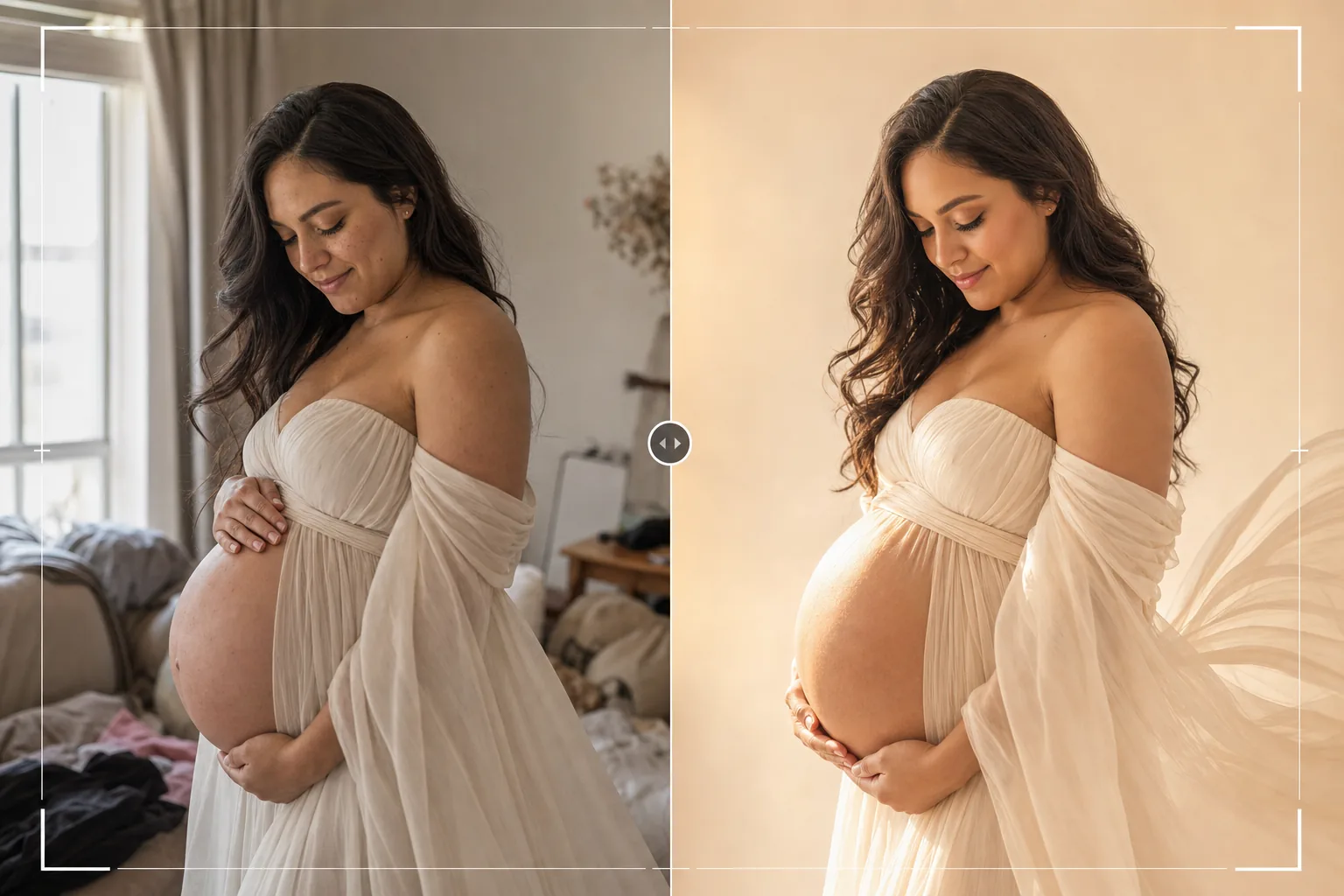
Créez des portraits de maternité intemporels grâce à une retouche douce qui célèbre la beauté de la grossesse. Ce modèle applique un lissage délicat de la peau tout en préservant la texture naturelle, ajoute une lueur chaude et lumineuse, simplifie les arrière-plans pour garder l'attention sur la future maman et met en valeur le drapé du tissu et les courbes du ventre grâce à une mise en lumière subtile.
Essayer ce modèle gratuitementPortrait template preview
Ce que fait ce modèle
Applique une retouche de portrait de maternité de qualité professionnelle qui suit l'esthétique douce et lumineuse populaire dans la photographie de maternité. La peau est lissée en douceur pour atténuer les vergetures et les imperfections tout en préservant l'éclat naturel qu'apporte la grossesse — le résultat évite l'aspect plastique et trop retouché. AI Enhance ajoute une lumière d'appoint chaude et douce qui épouse les courbes du ventre et met en valeur le drapé des robes et écharpes de grossesse. Magic Eraser supprime les distractions de l'arrière-plan — meubles, désordre, autres personnes — pour créer une composition épurée et intemporelle, entièrement centrée sur la future maman.
Paramètres du modèle
| Lissage de la peau | Séparation de fréquences douce (préserve la texture, atténue les marques) |
| Effet de lueur | Lumière enveloppante chaude et lumineuse sur les reflets de la peau |
| Étalonnage des couleurs | Tons terreux chauds (peau dorée, arrière-plan atténué) |
| Arrière-plan | Simplifier et adoucir (flou léger) ou remplacer par un ton neutre |
| Résolution de sortie | Bord long de 5000px (prêt à imprimer en 300 DPI jusqu'à 16×12) |
Comment utiliser ce modèle
Importez votre photo de maternité
Importez un portrait de maternité — prise de vue en studio professionnel, séance en extérieur à l'heure dorée ou installation à domicile avec la lumière d'une fenêtre. Le modèle fonctionne au mieux avec des photos prises entre la 30e et la 38e semaine, lorsque le ventre est bien visible. Les portraits posés en studio comme les moments de vie spontanés sont pris en charge.
Amélioration de la peau et de la lueur
AI Enhance applique un lissage doux de la peau à l'aide d'une approche par séparation de fréquences qui atténue les vergetures, les veines et les imperfections temporaires tout en gardant visible la texture naturelle de la peau. Une lueur chaude est ajoutée aux reflets de la peau, créant l'aspect lumineux et radieux associé à la photographie de maternité professionnelle.
Simplification de l'arrière-plan
Magic Eraser supprime les éléments distrayants de l'arrière-plan — meubles, désordre, prises électriques et autres personnes. L'arrière-plan est adouci et désaturé pour créer une séparation entre le sujet et l'environnement, attirant toute l'attention sur la maman.
Exporter pour l'impression et les albums
Téléchargez en bord long de 5000px pour les grands tirages, les doubles pages d'albums de maternité ou les décorations murales de chambre d'enfant. L'étalonnage en tons terreux chauds s'imprime magnifiquement sur papier photo brillant comme mat et s'harmonise avec les palettes de couleurs neutres des chambres d'enfant.
Conseils de pro pour de meilleurs résultats
- ✓La lumière de l'heure dorée (l'heure précédant le coucher du soleil) crée le point de départ le plus flatteur pour les portraits de maternité. Un éclairage latéral provenant d'un soleil bas sculpte naturellement la courbe du ventre et crée la lueur chaude que le modèle met en valeur plutôt que de la créer artificiellement.
- ✓Les tissus fluides — mousseline, écharpes en soie et robes longues — paraissent nettement plus beaux après amélioration, car le modèle affine la texture du tissu et accentue la lumière captée par les plis et les drapés. Les vêtements ajustés conviennent aussi, mais profitent moins de l'amélioration de la texture du tissu.
- ✓Incluez des prises de vue en silhouette lors de votre séance, en plus des portraits directs. Le modèle gère les silhouettes en contre-jour en renforçant la lumière de contour autour du profil du ventre tout en gardant le corps comme une forme sombre saisissante sur un fond lumineux.
- ✓Pour les photos de maternité en couple ou en famille, placez la future maman comme point focal visuel, avec le partenaire et les enfants légèrement en retrait ou sur le côté. Cette séparation naturelle en profondeur aide le modèle à mettre en valeur et à se concentrer sur la maman tout en gardant les membres de la famille nets.
Outils
Questions fréquentes
Quelle est l'intensité du lissage de la peau ?
+
Le lissage est calibré pour paraître naturel — il réduit l'apparence des vergetures, des veines et des imperfections d'environ 60 à 70 % tout en préservant la texture visible de la peau, les pores et l'éclat naturel de la grossesse. Le résultat ressemble à une belle peau, et non à une peau aérographée.
Cela peut-il améliorer une photo de maternité prise au smartphone ?
+
Oui. Les photos prises au smartphone près d'une fenêtre ou en extérieur donnent d'excellents résultats. Le modèle corrige l'éclairage plat typique des caméras de smartphone en ajoutant une chaleur directionnelle qui simule un éclairage de studio professionnel sur le ventre et le visage.
Est-ce adapté à toutes les morphologies ?
+
Le modèle améliore l'éclairage et la qualité de la peau sans modifier la forme ni les proportions du corps. Aucun amincissement, remodelage ou modification corporelle n'est appliqué. L'objectif est de faire en sorte que chaque future maman paraisse radieuse telle qu'elle est.
Célébrez la grossesse avec des portraits qui rayonnent
Importez vos photos de maternité et obtenez des portraits délicatement retouchés et lumineux, avec une peau douce, des tons chauds et des arrière-plans épurés.
Essayer gratuitementRelated templates
More portrait templates for your workflow.
Modèle de retouche de portrait scolaire adapté à l'âge. Suppression naturelle des imperfections, arrière-plans cohérents et sortie standard de l'annuaire avec traitement par lots pour des classes entières.
Modèle de portrait d'animal de compagnie de qualité studio. Gère les bords de la fourrure, supprime les laisses et les gestionnaires, remplace les arrière-plans et aiguise les yeux des chiens, des chats et d'autres animaux.
Modèle de retouche cutanée naturelle qui élimine les imperfections tout en préservant les pores et la texture. Éclairage uniforme, pas d'aspect plastique, juste une meilleure peau devant la caméra.
Améliorez les photos de nouveau-nés et de bébés avec des tons doux et chauds, un lissage doux de la peau, la suppression des accessoires et des distractions, et un format prêt à imprimer pour les annonces et les décorations murales.
Nettoyez les portraits de famille en supprimant les distractions d'arrière-plan, en corrigeant l'exposition inégale, en lissant la peau naturellement et en veillant à ce que tout le monde soit à son meilleur dans le même cadre.