
Nettoyage de portrait de famille
Obtenez la photo de famille parfaite sans avoir besoin de cent prises. Ce modèle supprime les distractions d'arrière-plan, corrige l'éclairage inégal sur l'ensemble du groupe, réduit naturellement les imperfections sur chaque visage et élimine les petits défauts qui empêchent une bonne photo de groupe d'en devenir une excellente.
Essayer ce modèle gratuitementPortrait template preview
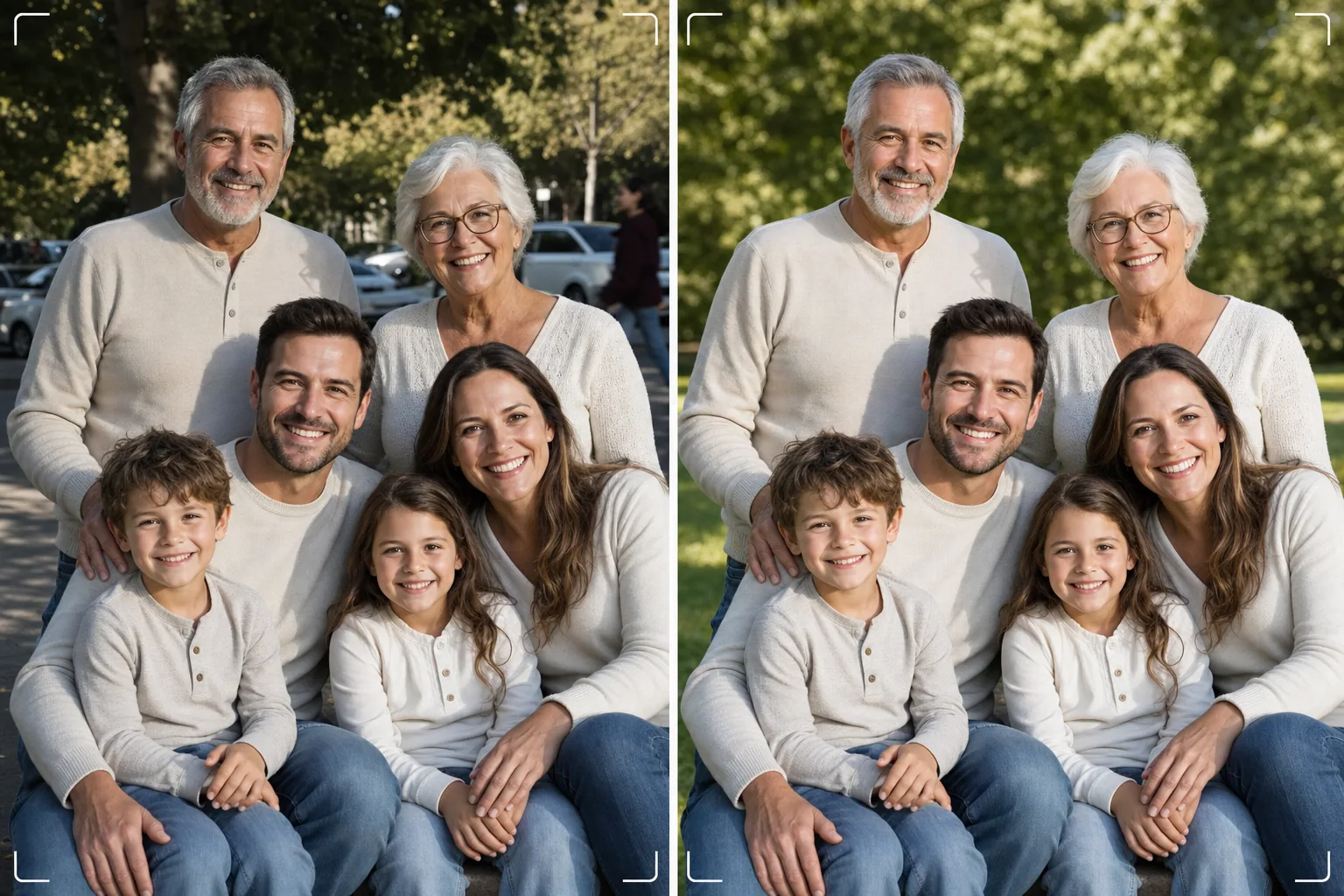
Ce que fait ce modèle
Résout le problème universel de la photo de famille : faire en sorte que tout le monde soit superbe dans un seul cadre. Magic Eraser supprime les intrus, les poubelles, les panneaux de sortie, les lignes électriques, les voitures garées et autres distractions qui gâchent des compositions de groupe par ailleurs réussies. AI Enhance corrige l'éclairage inégal qui survient lorsque certains membres de la famille sont à l'ombre et d'autres en plein soleil, amenant tout le monde à une exposition cohérente et flatteuse. Le lissage naturel de la peau réduit les imperfections, les cernes et les rougeurs sur chaque visage sans donner à quiconque un air artificiellement retouché. Le résultat est le portrait de famille que vous aviez imaginé en réunissant tout le monde.
Paramètres du modèle
| Nettoyage de l'arrière-plan | Détection et suppression automatiques des distractions (personnes, panneaux, objets) |
| Équilibrage de l'exposition | Éclairage uniforme sur tous les sujets (remplissage des ombres + récupération des hautes lumières) |
| Amélioration de la peau | Réduction naturelle des imperfections visage par visage (préserve les traits uniques) |
| Correction des couleurs | Balance des blancs unifiée sur les photos de groupe à éclairage mixte |
| Accentuation | Accentuation tenant compte des visages (priorité aux yeux et aux sourires) |
| Résolution de sortie | 6000 px sur le bord long (impression murale à 300 DPI jusqu'à 20×13 pouces) |
Comment utiliser ce modèle
Téléverser la photo de famille
Téléversez la photo de groupe prise lors d'une réunion de famille, d'une fête, de retrouvailles ou d'une séance de portrait. Le modèle gère les groupes de deux à trente personnes. Pour de meilleurs résultats, choisissez l'image où le plus de visages regardent l'objectif avec une expression agréable : le modèle corrige l'arrière-plan et l'éclairage mais ne peut pas changer les expressions du visage ni les yeux fermés.
Supprimer les distractions d'arrière-plan
Magic Eraser identifie et supprime les inconnus, les panneaux gênants, les déchets, les véhicules et autres éléments indésirables derrière le groupe familial. L'IA reconstruit l'arrière-plan de manière naturelle, en comblant l'herbe, le ciel, les murs ou le sol derrière les objets supprimés.
Équilibrer l'éclairage et améliorer les visages
AI Enhance corrige les différences d'exposition entre les membres de la famille : fini la moitié du groupe à l'ombre et l'autre moitié plissant les yeux au soleil. Chaque visage reçoit une réduction individuelle des imperfections et un subtil éclaircissement des yeux tout en préservant les traits uniques et l'apparence naturelle de chaque personne.
Exporter pour l'impression ou le partage
Téléchargez en 6000 px sur le bord long pour les grandes impressions murales, ou en 2000 px pour les réseaux sociaux et les cartes de vœux numériques. Le modèle exporte en sRGB pour l'affichage à l'écran ou en Adobe RGB pour l'impression professionnelle. Plusieurs ratios de recadrage (4:5, 5:7, 8:10) sont disponibles pour les tailles de cadre courantes.
Conseils de pro pour de meilleurs résultats
- ✓Prenez trois à cinq photos en succession rapide. Choisissez celle où le plus de personnes ont les yeux ouverts et une expression naturelle : le modèle gère tout le reste, mais les expressions et le fait d'avoir les yeux ouverts ne peuvent pas être modifiés après coup.
- ✓Placez la famille à l'ombre dégagée (sous la canopée d'un arbre ou du côté ombragé d'un bâtiment) plutôt qu'entre soleil et ombre. Cela donne au modèle un point de départ uniformément éclairé qui produit l'amélioration la plus naturelle.
- ✓Pour les grands groupes (dix personnes ou plus), disposez les personnes en rangées décalées avec les plus grands à l'arrière. Cette superposition naturelle crée de la profondeur et garantit que chaque visage est visible. Le modèle peut éclaircir les visages des rangées arrière légèrement plus sombres en raison de leur distance par rapport à la source de lumière.
Outils
Questions fréquentes
Cela peut-il corriger les yeux fermés ou les mauvaises expressions ?
+
Non. Le modèle améliore l'éclairage, supprime les distractions et lisse la peau, mais il ne peut pas changer les expressions du visage, ouvrir des yeux fermés ni repositionner les personnes. Choisissez l'image avec la meilleure expression avant de téléverser : le modèle rendra cette image la plus belle possible.
Qu'en est-il des grands groupes de retrouvailles ?
+
Le modèle gère les groupes d'environ trente personnes. Pour les très grands groupes, l'amélioration individuelle des visages devient plus subtile en raison de la plus petite taille des visages dans le cadre, mais le nettoyage de l'arrière-plan et la correction de l'éclairage restent pleinement efficaces quelle que soit la taille du groupe.
Puis-je supprimer une personne de la photo de famille ?
+
Oui, Magic Eraser peut supprimer des individus précis du groupe. Sélectionnez la personne que vous souhaitez supprimer et l'IA reconstruira l'arrière-plan derrière elle. Cela fonctionne mieux lorsque la personne se trouve au bord du groupe plutôt qu'au centre entre les autres.
Le portrait de famille parfait n'est qu'à un nettoyage
Téléversez vos photos de groupe et obtenez des portraits de famille nets, uniformément éclairés et naturellement améliorés, prêts à être accrochés au mur.
Essayer gratuitementRelated templates
More portrait templates for your workflow.
Modèle de retouche de portrait scolaire adapté à l'âge. Suppression naturelle des imperfections, arrière-plans cohérents et sortie standard de l'annuaire avec traitement par lots pour des classes entières.
Modèle de portrait d'animal de compagnie de qualité studio. Gère les bords de la fourrure, supprime les laisses et les gestionnaires, remplace les arrière-plans et aiguise les yeux des chiens, des chats et d'autres animaux.
Modèle de retouche cutanée naturelle qui élimine les imperfections tout en préservant les pores et la texture. Éclairage uniforme, pas d'aspect plastique, juste une meilleure peau devant la caméra.
Améliorez les photos de nouveau-nés et de bébés avec des tons doux et chauds, un lissage doux de la peau, la suppression des accessoires et des distractions, et un format prêt à imprimer pour les annonces et les décorations murales.
Retouchez les photos de maternité avec un lissage doux de la peau, un éclairage doux, une simplification de l'arrière-plan et un étalonnage des couleurs chaudes pour un look de portrait de grossesse intemporel.