
Retouche de portraits scolaires
Offrez à chaque élève un portrait dont il sera fier, tout en conservant un rendu naturel et adapté à son âge. Ce modèle gère les problèmes courants de la photographie scolaire — imperfections temporaires, éclairage irrégulier au fil d'une séance et arrière-plans hétérogènes — et produit des images prêtes pour l'annuaire, d'une qualité professionnelle uniforme pour chaque élève d'une classe.
Essayer ce modèle gratuitementPortrait template preview
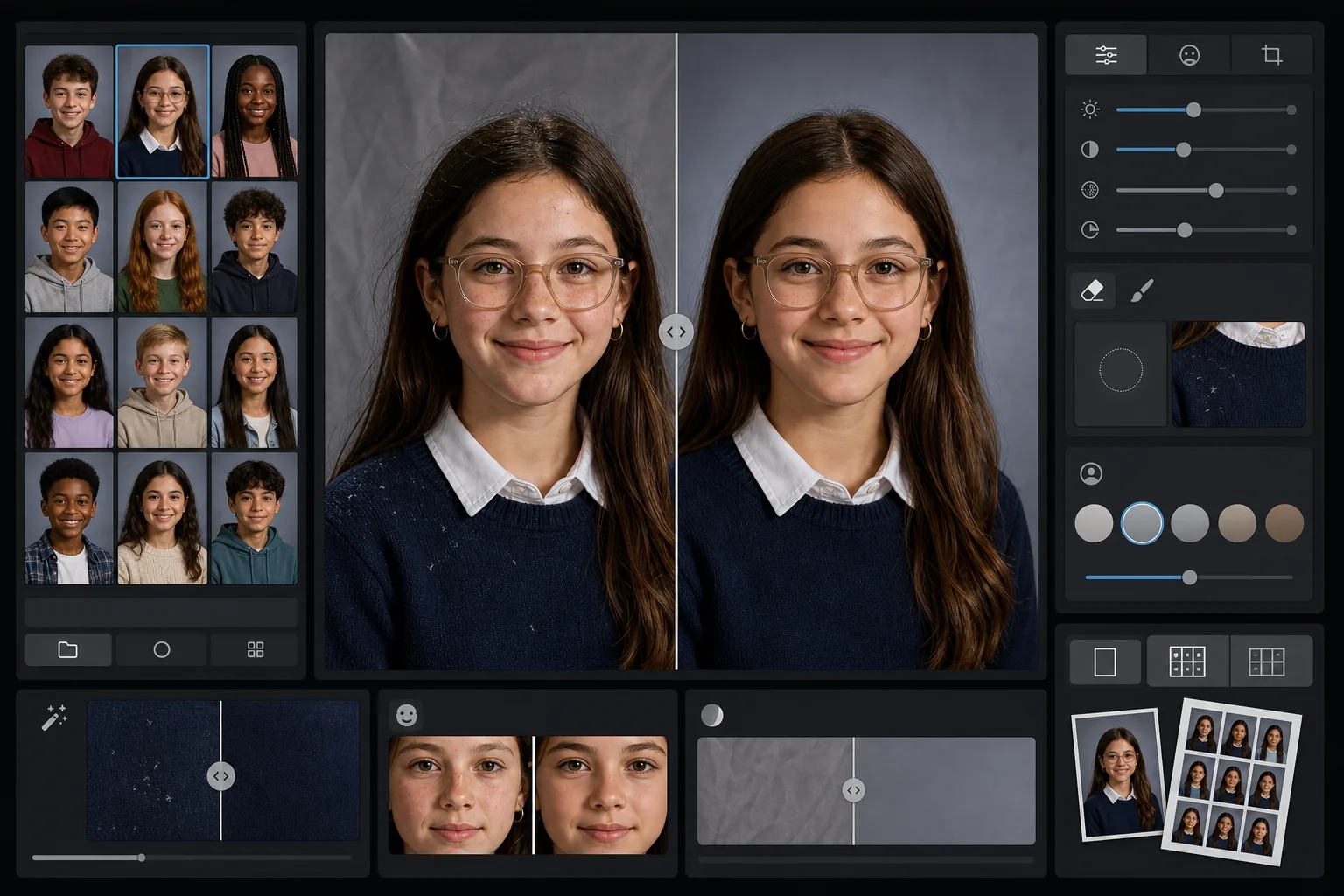
Ce que fait ce modèle
Applique aux portraits scolaires une retouche douce et adaptée à l'âge qui atténue les imperfections temporaires tout en préservant l'apparence naturelle de chaque élève. AI Enhance corrige les expositions irrégulières et les variations de couleur qui surviennent lorsqu'on photographie des dizaines d'élèves sous le même éclairage tout au long d'une séance. Magic Eraser supprime les cheveux égarés sur les vêtements, les bords de col de travers et les plis d'arrière-plan sur les toiles de fond portables.
Paramètres du modèle
| Niveau de retouche | Léger — supprime uniquement les imperfections temporaires, préserve les taches de rousseur et les traits naturels |
| Taille de sortie | 1200×1500px (portrait standard 4:5, 300 DPI au format portefeuille) |
| Normalisation de l'arrière-plan | Harmonise la teinte de la toile de fond sur toutes les images d'un lot |
| Correction de l'exposition | Auto — compense les variations d'éclairage au cours d'une séance de prise de vue |
| Cohérence des couleurs | Balance des blancs uniforme sur tous les portraits traités |
| Nettoyage des détails parasites | Supprime les cheveux volants sur les épaules, les peluches et les plis de la toile de fond |
Comment utiliser ce modèle
Importez les portraits de la classe
Importez un seul portrait ou tout un lot de classe. Le modèle gère les images individuelles comme les groupes, en appliquant la même norme de retouche à toutes les photos pour une section d'annuaire cohérente.
Appliquez une retouche adaptée à l'âge
AI Enhance atténue en douceur les imperfections temporaires comme un bouton ou une éraflure tout en gardant à chaque élève son apparence. Les taches de rousseur, les grains de beauté, les appareils dentaires et les lunettes sont toujours préservés — l'objectif est une version soignée de leur apparence réelle.
Normalisez l'exposition et l'arrière-plan
Les conditions d'éclairage évoluent tout au long d'une séance de portraits, à mesure que les réglages dérivent. Le modèle corrige l'exposition et la balance des blancs pour que chaque élève apparaisse éclairé de façon homogène, et la teinte de la toile de fond reste cohérente sur tout le lot.
Nettoyez et exportez
Magic Eraser supprime les petites distractions — une peluche sur un pull sombre, un cheveu égaré sur le front, un pli dans la toile de fond portable. Exportez à la résolution standard de l'annuaire pour l'impression ou en JPEG plus léger pour la galerie en ligne de l'école.
Conseils de pro pour de meilleurs résultats
- ✓Traitez tout le lot de la classe ensemble plutôt qu'une image à la fois — le modèle s'appuie sur le groupe pour calibrer une exposition et des couleurs cohérentes sur tous les portraits.
- ✓Pour les élèves portant des lunettes, la photo d'origine devrait montrer l'élève inclinant légèrement le menton vers le bas pour réduire les reflets — l'amélioration par IA fonctionne mieux lorsque les yeux sont visibles derrière les verres.
- ✓Lancez un lot test de 5 à 10 portraits avant de traiter toute une école afin de confirmer que le niveau de retouche répond aux exigences de votre comité d'annuaire.
- ✓Conservez les fichiers originaux non retouchés à côté des versions traitées — certains parents préfèrent la photo entièrement non modifiée pour un usage personnel.
Outils
Questions fréquentes
La retouche est-elle adaptée aux enfants et aux adolescents ?
+
Oui. Le modèle est spécialement conçu pour les sujets en âge scolaire. Il supprime uniquement les imperfections temporaires comme un bouton le jour de la photo — il ne remodèle jamais les traits, ne modifie pas le teint et n'applique pas le type de lissage utilisé dans la retouche beauté pour adultes. Chaque élève reste lui-même.
Puis-je traiter toute une classe ou toute une école en une fois ?
+
Oui. Importez jusqu'à des centaines de portraits dans un seul lot. Le modèle applique des normes de retouche identiques et normalise l'exposition, la couleur et la cohérence de l'arrière-plan sur chaque image, afin que la section d'annuaire paraisse uniforme.
Cela supprimera-t-il les appareils dentaires, les lunettes ou les prothèses auditives ?
+
Non. Le modèle est conçu pour préserver toutes les caractéristiques permanentes et semi-permanentes, y compris les appareils dentaires, les lunettes, les prothèses auditives et les dispositifs médicaux. Il ne traite que les imperfections de surface temporaires et les distractions environnementales comme les peluches et les plis de la toile de fond.
Livrez des portraits prêts pour l'annuaire en quelques minutes
Importez les portraits scolaires individuellement ou par classe et obtenez des images cohérentes, retouchées naturellement et prêtes à imprimer. Chaque élève est à son avantage.
Essayer gratuitementRelated templates
More portrait templates for your workflow.
Modèle de portrait d'animal de compagnie de qualité studio. Gère les bords de la fourrure, supprime les laisses et les gestionnaires, remplace les arrière-plans et aiguise les yeux des chiens, des chats et d'autres animaux.
Modèle de retouche cutanée naturelle qui élimine les imperfections tout en préservant les pores et la texture. Éclairage uniforme, pas d'aspect plastique, juste une meilleure peau devant la caméra.
Améliorez les photos de nouveau-nés et de bébés avec des tons doux et chauds, un lissage doux de la peau, la suppression des accessoires et des distractions, et un format prêt à imprimer pour les annonces et les décorations murales.
Retouchez les photos de maternité avec un lissage doux de la peau, un éclairage doux, une simplification de l'arrière-plan et un étalonnage des couleurs chaudes pour un look de portrait de grossesse intemporel.
Nettoyez les portraits de famille en supprimant les distractions d'arrière-plan, en corrigeant l'exposition inégale, en lissant la peau naturellement et en veillant à ce que tout le monde soit à son meilleur dans le même cadre.