
Lueur douce bébé et nouveau-né
Donnez aux photos de nouveau-nés et de bébés la qualité douce, chaude et éthérée d'une séance en studio professionnel. Ce modèle applique un rehaussement délicat de la chaleur, un lissage subtil de la peau adapté à la photographie de nourrissons, supprime les accessoires distrayants et le désordre de l'arrière-plan, et dimensionne le résultat pour les faire-part de naissance, les tirages muraux et le partage sur les réseaux sociaux.
Essayer ce modèle gratuitementPortrait template preview
Ce que fait ce modèle
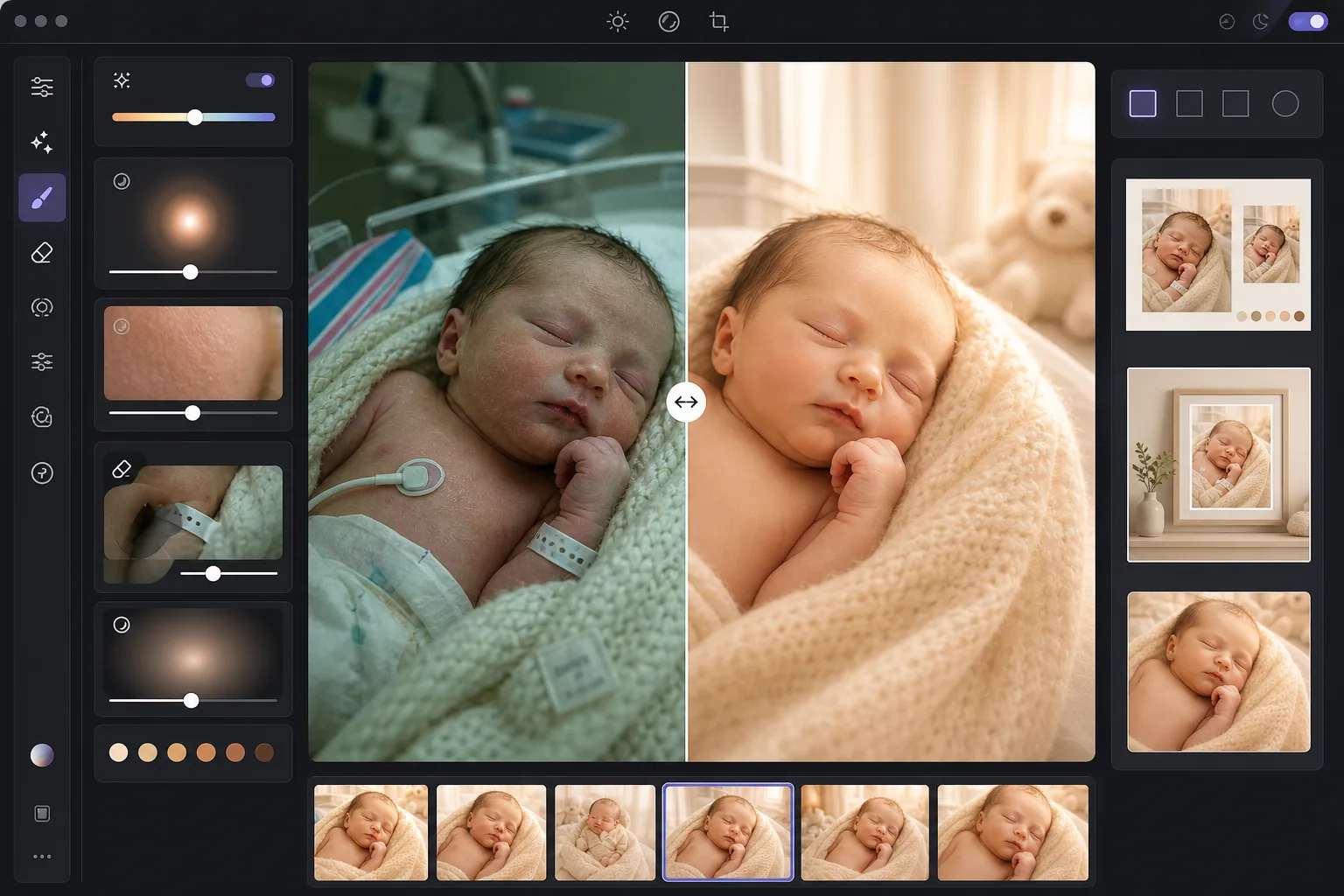
Transforme les photos brutes de nouveau-nés et de bébés — qu'elles proviennent d'un smartphone à l'hôpital ou d'une séance à la maison — en images douces et lumineuses que les parents chérissent. AI Enhance ajoute un ton chaud délicat qui flatte la peau du nouveau-né, éclaircit les ombres sans perdre l'ambiance douce, et applique une subtile lueur lumineuse qui enveloppe l'image de chaleur. Le lissage de la peau est calibré spécifiquement pour les nourrissons — il uniformise les rougeurs marbrées courantes sur la peau des nouveau-nés tout en préservant le fin duvet qui rend les photos de bébé authentiques. Magic Eraser supprime les bracelets d'hôpital, les perfusions, les câbles de moniteur, les bords de couches, les attaches de tétine et le désordre de l'arrière-plan de la chambre.
Réglages du modèle
| Warmth | +10 de chaleur avec décalage doré des tons moyens (optimisé pour la peau du nouveau-né) |
| Soft glow | Halo lumineux des hautes lumières (rayon 40px, opacité 25%) |
| Skin smoothing | Calibré pour nourrisson (réduit les marbrures, préserve le duvet) |
| Shadow lift | +0,5 EV dans les ombres avec transition douce (pas de récupération brutale) |
| Vignette | Vignettage chaud délicat (attire l'œil vers le centre, assombrissement des bords de 15%) |
Comment utiliser ce modèle
Importer des photos de bébé ou de nouveau-né
Importez des photos de nouveau-nés, de nourrissons ou de tout-petits prises à l'hôpital, à la maison ou en studio. Le modèle s'adapte aux différents environnements lumineux — néons d'hôpital crus, douce lumière de fenêtre de la chambre d'enfant ou éclairage domestique mixte. Les images de smartphone comme celles d'appareils photo professionnels sont prises en charge.
Appliquer la chaleur et la lueur douce
AI Enhance ajoute un ton doré chaud aux tons moyens et une douce lueur lumineuse aux hautes lumières, créant la qualité onirique et éthérée associée à la photographie professionnelle de nouveau-nés. Les zones d'ombre sont délicatement éclaircies pour révéler les détails des couvertures enroulées et des cheveux foncés sans donner un aspect plat et trop retouché.
Lisser la peau et supprimer les distractions
Le lissage de la peau du nourrisson uniformise les rougeurs marbrées et les desquamations sèches courantes sur la peau des nouveau-nés tout en préservant le fin duvet et la texture naturelle de la peau. Magic Eraser supprime les bracelets d'hôpital, les fils de moniteur, les bords de couches qui dépassent des langes, les étiquettes sur les couvertures et les objets d'arrière-plan comme les paniers à linge ou les prises électriques.
Exporter pour les tirages et les faire-part
Téléchargez en plusieurs formats : 5x7 et 4x6 pour les cartes de faire-part de naissance, 8x10 et 11x14 pour les tirages muraux encadrés, et 1080x1080 carré pour les annonces de naissance sur Instagram. Toutes les sorties sont en 300 DPI pour une impression nette sur papier photo ou cartonné.
Conseils de pro pour de meilleurs résultats
- ✓La meilleure lumière pour les photos de nouveau-nés est une lumière de fenêtre douce et indirecte venant d'une seule direction. Si vous photographiez à la maison, placez le bébé près d'une grande fenêtre avec des voilages le matin ou en fin d'après-midi. Le modèle rehausse magnifiquement cette lumière naturelle, alors que le soleil direct et cru crée des ombres qu'il doit corriger plus laborieusement.
- ✓Pour les photos d'hôpital avec un éclairage fluorescent au plafond, le modèle supprime la dominante verte et réchauffe considérablement l'image. Cependant, les ombres dures des néons au plafond resteront visibles sous forme de zones sombres légèrement éclaircies sous le menton et le nez. Demander à une infirmière d'éteindre le plafonnier et utiliser la lumière de la fenêtre ou une lampe douce donne un bien meilleur point de départ.
- ✓Lorsque vous supprimez les bracelets d'hôpital, positionnez le bracelet sur la surface visible du poignet plutôt qu'enroulé autour et partiellement caché. Un bracelet entièrement visible est plus facile à supprimer proprement par l'IA qu'un bracelet qui disparaît derrière les plis de la peau.
- ✓Pour les photos de nouveau-nés posés avec des langes et des accessoires, le modèle préserve la texture des couvertures tricotées, des paniers tressés et des plaids en fourrure tout en lissant uniquement la peau du bébé. Traitez d'abord une image test pour confirmer que la texture du lange est conservée avant de lancer le traitement par lots de toute la séance.
Outils
Questions fréquentes
Le lissage de la peau est-il sûr pour les photos de nouveau-nés ?
+
Le lissage de la peau est spécifiquement calibré pour la peau des nourrissons. Il réduit les plaques rouges marbrées, les angiomes et la desquamation sèche courantes durant les premières semaines sans supprimer le fin duvet (lanugo), le détail des sourcils et les minuscules cils qui rendent les photos de nouveau-nés réalistes. Le résultat ressemble à une peau saine et uniforme plutôt qu'à une poupée aérographiée.
Peut-il améliorer les photos d'hôpital prises au smartphone ?
+
Oui, et c'est l'un des cas d'usage les plus courants. Les chambres d'hôpital ont un éclairage fluorescent cru qui donne à la peau du nouveau-né un aspect verdâtre et crée des ombres peu flatteuses venant du plafond. Le modèle corrige la dominante de couleur, adoucit les ombres, réchauffe la tonalité générale et supprime le matériel médical visible, transformant une photo de smartphone à l'aspect clinique en un portrait chaleureux et intime.
Quels formats d'impression la sortie prend-elle en charge ?
+
Le modèle produit en 300 DPI, ce qui permet une impression nette en 5x7, 8x10, 11x14 et 16x20 pouces selon la résolution de l'image d'origine. Une photo de smartphone standard de 12 mégapixels peut donner des tirages nets jusqu'à 11x14 pouces. Les images d'appareils photo à plus haute résolution prennent en charge le 16x20 et davantage.
Transformez les moments précieux en portraits intemporels
Importez des photos de nouveau-nés et de bébés et obtenez des images douces, chaudes et stylées de façon professionnelle, prêtes pour les faire-part de naissance, les tirages muraux et le partage sur les réseaux sociaux.
Essayer gratuitementRelated templates
More portrait templates for your workflow.
Modèle de retouche de portrait scolaire adapté à l'âge. Suppression naturelle des imperfections, arrière-plans cohérents et sortie standard de l'annuaire avec traitement par lots pour des classes entières.
Modèle de portrait d'animal de compagnie de qualité studio. Gère les bords de la fourrure, supprime les laisses et les gestionnaires, remplace les arrière-plans et aiguise les yeux des chiens, des chats et d'autres animaux.
Modèle de retouche cutanée naturelle qui élimine les imperfections tout en préservant les pores et la texture. Éclairage uniforme, pas d'aspect plastique, juste une meilleure peau devant la caméra.
Retouchez les photos de maternité avec un lissage doux de la peau, un éclairage doux, une simplification de l'arrière-plan et un étalonnage des couleurs chaudes pour un look de portrait de grossesse intemporel.
Nettoyez les portraits de famille en supprimant les distractions d'arrière-plan, en corrigeant l'exposition inégale, en lissant la peau naturellement et en veillant à ce que tout le monde soit à son meilleur dans le même cadre.