
Photo de produit de chaussure
Présentez vos chaussures comme un grand détaillant de marque. Ce modèle supprime l'arrière-plan de n'importe quelle photo de chaussure, sublime les textures du cuir et du tissu, accentue la netteté des détails de la bande de roulement, élimine les éraflures et la poussière des paires d'échantillons et produit des images conformes aux places de marché avec un cadrage cohérent sous tous les angles.
Essayer ce modèle gratuitementE-commerce template preview
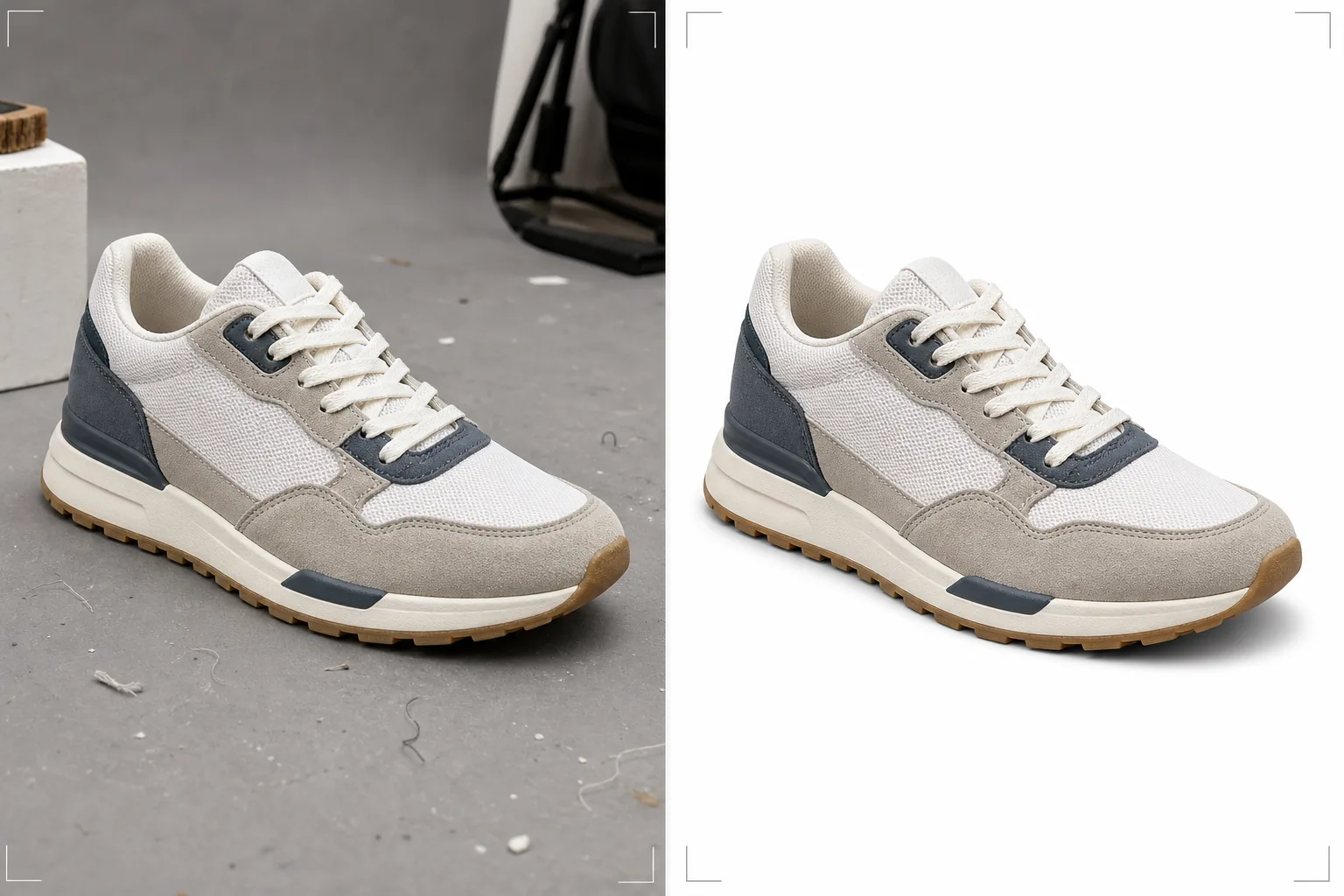
Ce que fait ce modèle
Prépare les images de chaussures pour les plateformes de commerce électronique où les acheteurs se fient entièrement aux photos pour évaluer la qualité, les matériaux et la fabrication des chaussures. Background Eraser isole la chaussure grâce à une détection précise des contours qui gère les silhouettes complexes comme les sandales ouvertes, les baskets en maille et les bottes doublées de fourrure sans perdre les détails fins des matériaux sur les bords. Magic Eraser élimine la poussière, les petites éraflures sur les échantillons, les fils qui dépassent et les imperfections de surface que les paires d'échantillons accumulent avant la prise de vue produit. AI Enhance accentue la netteté des textures des matériaux pour que les acheteurs voient clairement le grain du cuir, le tissage de la toile, la qualité des coutures et le motif de la bande de roulement — les détails qui transforment les curieux en acheteurs.
Paramètres du modèle
| Arrière-plan | Blanc pur (#FFFFFF) pour les places de marché ou gris clair pour les sites de marque |
| Amélioration des matériaux | Accentuation de la texture pour le cuir, le daim, la toile et la maille |
| Détail de la semelle | Amélioration de la netteté du motif de la bande de roulement pour les vues de dessous |
| Nettoyage de surface | Supprime la poussière, les éraflures et les fils qui dépassent des paires d'échantillons |
| Dimensions de sortie | 2000 × 2000 px (carré, prêt pour le zoom des places de marché) |
Comment utiliser ce modèle
Importez des photos de chaussures sous tous les angles
Importez les vues de profil, trois-quarts, de dessus, du talon et de la semelle. Le modèle traite chaque angle individuellement tout en conservant un arrière-plan, un éclairage et des couleurs cohérents sur l'ensemble du jeu. Les chaussures individuelles comme les paires peuvent être traitées.
Suppression de l'arrière-plan et affinage des contours
Background Eraser isole la chaussure de toute surface ou de tout fond. La détection des contours est réglée pour les matériaux de chaussures — bords nets sur le cuir, transitions naturelles sur le poil du daim et transparence préservée pour la maille et les lanières de sandales ouvertes. Une ombre de contact subtile est ajoutée en dessous pour ancrer la chaussure.
Amélioration des matériaux et des détails
AI Enhance accentue le grain du cuir, le détail des coutures, les motifs de la bande de roulement et la quincaillerie (boucles, œillets, fermetures éclair). Magic Eraser élimine les imperfections des paires d'échantillons, notamment la poussière, les petites éraflures, les résidus de colle près de la semelle et les bouts de fil qui dépassent.
Exportez pour votre boutique
Téléchargez le jeu complet d'angles en 2000 × 2000 px pour les fiches de places de marché avec capacité de zoom, ou dans des dimensions personnalisées pour le site web de votre marque. Toutes les images du jeu partagent un cadrage, un arrière-plan et des couleurs cohérents pour une page produit soignée.
Conseils de pro pour de meilleurs résultats
- ✓Rembourrez les chaussures avec du papier de soie avant de les photographier pour conserver leur forme naturelle. Des chaussures qui s'affaissent ou penchent parce qu'elles sont vides paraissent moins attrayantes que des chaussures bien structurées ; le modèle sublime la forme existante mais ne peut pas regonfler une chaussure affaissée.
- ✓Incluez une photo de la semelle dans chaque fiche de chaussure. La bande de roulement est l'un des principaux détails que les acheteurs vérifient pour la qualité, l'adhérence et l'authenticité de la marque. Le modèle accentue les motifs de la bande de roulement pour rendre chaque détail visible.
- ✓Pour les chaussures en daim et en nubuck, brossez le poil dans une seule direction cohérente avant de photographier tous les angles. Le modèle préserve et sublime la texture naturelle du poil, mais photographier avec un poil orienté de façon aléatoire selon les angles crée une incohérence visuelle.
- ✓Photographiez la chaussure sous un léger angle trois-quarts pour l'image principale plutôt qu'un profil latéral plat. La vue trois-quarts montre la profondeur, la fabrication et la transition entre la tige et la semelle — le modèle sublime tous ces détails en relief.
E-commerce workflow
Product photo hub
Use this template with the full ecommerce product photo workflow for marketplace backgrounds, cleanup, compression, resizing, and listing-ready exports.
View ecommerce product photo workflowQuestions fréquentes
Cela fonctionne-t-il avec tous les types de chaussures ?
+
Oui. Le modèle est calibré pour les baskets, les chaussures habillées, les bottes, les sandales, les talons et les chaussures de sport. La détection des contours s'adapte au matériau spécifique — bords de cuir lisses, bords de daim duveteux, maille transparente et espaces des sandales à bout ouvert sont tous traités avec un soin adapté au matériau.
Dois-je photographier des chaussures seules ou des paires ?
+
Photographiez au moins l'image principale en chaussure seule (pied droit, vue interne ou externe selon la convention de la marque). Incluez une photo de la paire pour la fiche. Le modèle traite à la fois les chaussures seules et les paires, en conservant un cadrage cohérent pour chacune.
Et les photos lifestyle portées aux pieds ?
+
Ce modèle est conçu pour les prises de vue catalogue sur fond blanc. Pour les images lifestyle portées aux pieds, le modèle peut sublimer les détails et la couleur de la chaussure, mais il fonctionne mieux comme processeur d'images produit que comme éditeur lifestyle.
Présentez des chaussures qui se vendent dès la première image
Importez des photos de chaussures sous n'importe quel angle et obtenez des images prêtes pour les places de marché, avec des arrière-plans nets, des textures de matériaux précises et une cohérence professionnelle.
Essayer gratuitementRelated templates
More e-commerce templates for your workflow.
Modèle de fond blanc pur pour les photos de produits. Paramètres Amazon, Shopify et compatibles avec le marché pour des images de produits claires et professionnelles qui se convertissent.
Modèle de photo de liste optimisé pour Etsy. Convertit les photos de style de vie en arrière-plans blancs purs à 2 000 px, améliore les détails des produits faits à la main et respecte les directives d'image d'Etsy.
Modèle de photo d'annonce optimisé pour eBay. Fond blanc pour les images de la galerie, amélioration de la documentation sur l'état et mises en page multi-angles conformes aux normes d'image d'eBay.
Modèle de photographie de bijoux professionnel pour bagues, colliers et montres. Contrôle les reflets, améliore l'éclat des pierres précieuses et fournit des images prêtes à être commercialisées sur des arrière-plans épurés.
Modèle de photo de mobilier professionnel pour les listes de marchés. Supprimez l'encombrement de la pièce, affichez les vraies dimensions et présentez les pièces sur des arrière-plans épurés ou dans des contextes de pièce stylisés.
Nettoyez les photos de vêtements à plat avec l'élimination des plis, le nettoyage des peluches, des arrière-plans d'un blanc pur et une couleur de tissu précise. Prêt pour Shopify, Amazon et les boutiques.