
Home staging virtuel immobilier
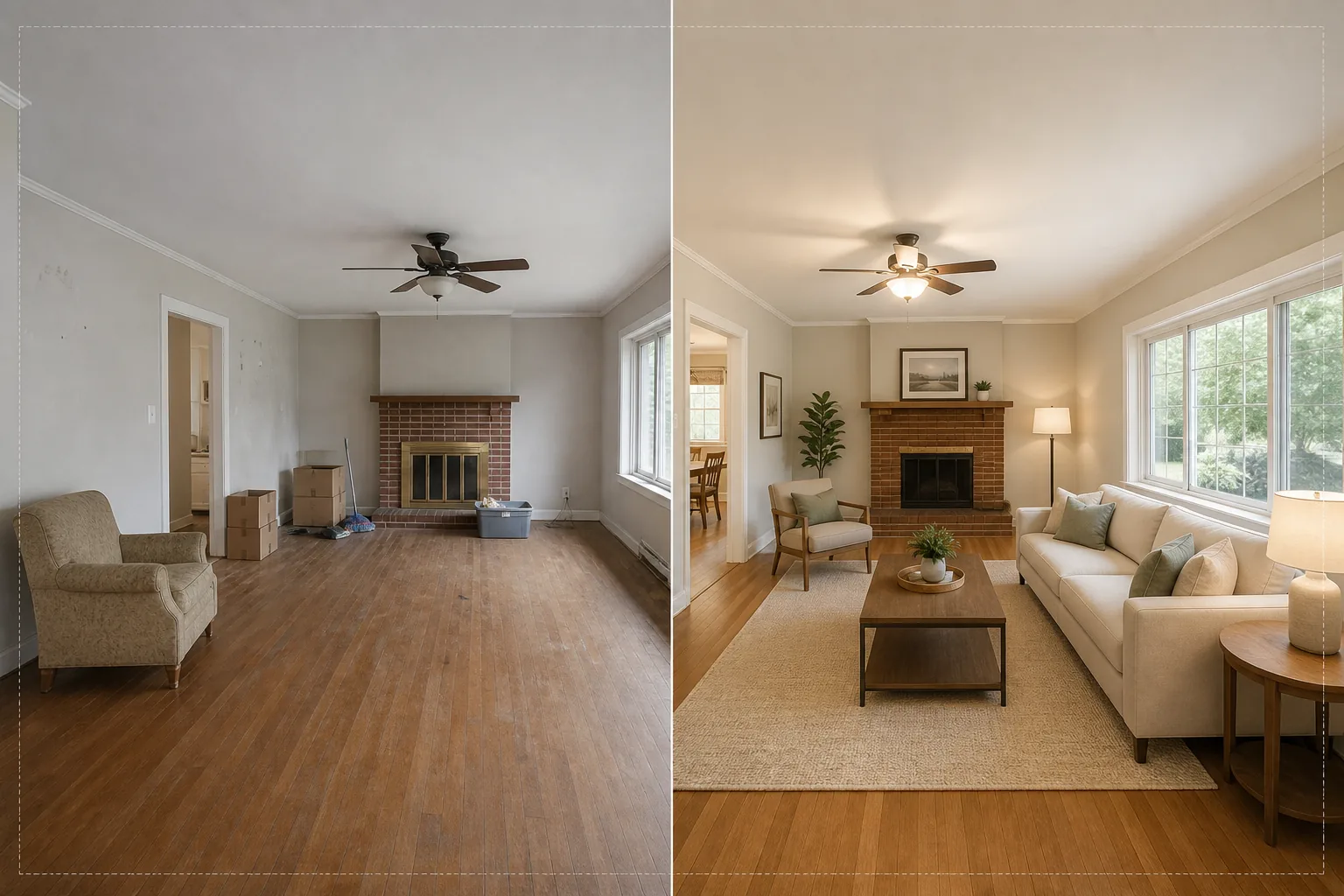
Mettez en scène des pièces vides avec des meubles et une décoration photoréalistes sans déplacer un seul meuble physique. Ce modèle utilise AI Fill pour placer canapés, tables, tapis et œuvres d'art dans des pièces inoccupées, tandis que Magic Eraser élimine le désordre existant, les vieux meubles et les objets personnels avant le début de la mise en scène. Le résultat : une photo d'annonce chaleureuse et accueillante qui aide les acheteurs à s'imaginer vivre dans l'espace.
Essayer ce modèle gratuitementReal Estate template preview
Ce que fait ce modèle
Il résout le plus grand défi de la photographie immobilière : faire en sorte qu'une pièce vide ou encombrée donne une impression de foyer. Magic Eraser commence par éliminer tout encombrement existant — vieux meubles, cartons de déménagement, effets personnels, marques sur les murs et éraflures au sol. AI Fill place ensuite des meubles adaptés au contexte dans la pièce nettoyée, en harmonisant le style avec l'architecture. Un loft moderne reçoit des pièces au style mid-century avec des touches industrielles, tandis qu'une maison coloniale traditionnelle est dotée de meubles classiques rembourrés et de tons de bois chaleureux. L'éclairage et les ombres des meubles virtuels sont calculés à partir de la lumière de la fenêtre déjà présente sur la photo, si bien que la mise en scène semble réellement présente plutôt que collée.
Paramètres du modèle
| Style de mise en scène | Moderne, Traditionnel, Scandinave, Mid-Century ou Bord de mer |
| Type de pièce | Détecté automatiquement (salon, chambre, salle à manger, bureau, cuisine) |
| Suppression du désordre | Suppression automatique des cartons, objets personnels et vieux meubles avant la mise en scène |
| Rendu des ombres | Adapté à la direction et à l'intensité de la lumière de la fenêtre existante |
| Résolution de sortie | 4000×3000px (conforme MLS à 300 DPI) |
| Température de couleur | Intérieur chaud (3200K–4000K pour correspondre à un éclairage intérieur typique) |
Comment utiliser ce modèle
Téléversez la photo de la pièce vide ou encombrée
Téléversez une photo grand angle de la pièce. Photographiez depuis un coin pour capturer deux murs et le sol afin d'obtenir la mise en scène la plus réaliste. Le modèle fonctionne avec les photos de smartphones, de reflex numériques et d'appareils immobiliers professionnels, y compris les objectifs ultra grand-angle.
Supprimez le désordre existant
Magic Eraser détecte et supprime automatiquement les cartons de déménagement, les vieux meubles, les photos personnelles sur les murs et le désordre au sol. L'IA reconstruit le revêtement de sol, la peinture des murs et les plinthes derrière les objets supprimés, afin que la pièce paraisse propre et inoccupée.
Mettez en scène avec des meubles virtuels
AI Fill place des meubles adaptés au type de pièce détecté et au style sélectionné. Un salon reçoit un canapé, une table basse, un tapis, des tables d'appoint et des œuvres murales. Une chambre reçoit un lit, des tables de chevet, des lampes et des coussins décoratifs. Les meubles s'adaptent aux dimensions de la pièce et projettent des ombres réalistes.
Exportez pour le MLS et les annonces
Téléchargez la photo mise en scène en 4000×3000px, prête pour les téléversements MLS, Zillow, Realtor.com et les brochures imprimées. L'image inclut des balises de métadonnées pour un catalogage facile dans votre système de gestion des annonces.
Conseils de pro pour de meilleurs résultats
- ✓Photographiez depuis un coin à environ 1,20 m de hauteur — cela capture deux murs et une surface de sol suffisante pour que l'IA place les meubles avec une perspective correcte et des ombres de contact au sol.
- ✓Allumez toutes les lumières de la pièce avant de photographier. L'IA utilise les sources de lumière visibles et les reflets des fenêtres pour calculer où les ombres doivent tomber sur les meubles mis en scène.
- ✓Pour les annonces à plusieurs pièces, utilisez le même style de mise en scène dans toutes les pièces afin de créer une histoire de design cohérente, comme si un véritable décorateur avait aménagé toute la maison.
Outils
Questions fréquentes
Le home staging virtuel est-il conforme aux règles du MLS ?
+
La plupart des systèmes MLS autorisent les photos en home staging virtuel à condition qu'elles soient identifiées comme telles. Le modèle n'ajoute pas l'étiquette automatiquement — vérifiez les règles de votre MLS local et ajoutez une mention comme « Mise en scène virtuelle » lors du téléversement.
Puis-je aménager une terrasse ou un balcon extérieur ?
+
Oui. Le modèle détecte les espaces de vie extérieurs et les aménage avec du mobilier de terrasse, des jardinières et des tapis d'extérieur appropriés. Les calculs d'éclairage tiennent compte du ciel ouvert et de la lumière directe du soleil plutôt que de la lumière ambiante intérieure.
À quel point les meubles sont-ils réalistes ?
+
Les meubles mis en scène projettent des ombres qui correspondent à la direction de la lumière existante de la pièce, reposent sur le plan du sol avec une perspective correcte et reflètent la couleur ambiante des murs environnants. À une distance d'observation normale, la mise en scène est indiscernable d'une photographie réellement meublée.
Aménagez n'importe quelle pièce en quelques secondes, pas en quelques heures
Téléversez des photos de pièces vides et obtenez de superbes images d'annonce meublées qui font tomber les acheteurs amoureux de chaque espace.
Essayer gratuitementRelated templates
More real estate templates for your workflow.
Modèle de photo immobilière professionnelle pour les annonces MLS. Amélioration de type HDR, remplacement du ciel, suppression de l'encombrement et correction des couleurs pour des photos de propriété qui se vendent plus rapidement.
Sublimez vos photos d'extérieur architectural avec correction des lignes verticales, remplacement du ciel, suppression des voitures et piétons, et étalonnage heure dorée pour annonces et portfolios.
Transformez les photos Airbnb et de location de vacances avec l'éclaircissement de la pièce, la suppression de l'encombrement, Color correction et la correction de la distorsion de l'objectif grand angle pour des tarifs de réservation plus élevés.
Améliorez les photos de votre portefeuille de décoration d'intérieur en éclaircissant la pièce, en supprimant l'encombrement, en accentuant la texture des matériaux et en rendant les couleurs précises des finitions et des tissus.
Améliorez la photographie aérienne par drone avec le remplacement du ciel, la mise en évidence des limites de propriété, l'éclat des couleurs Boost et la suppression des distractions pour les enquêtes immobilières et foncières.
Nettoyez, améliorez et standardisez les images de plans d'étage pour les annonces immobilières avec l'élimination des taches, la netteté des lignes et un style cohérent.