
Extérieur d'architecture
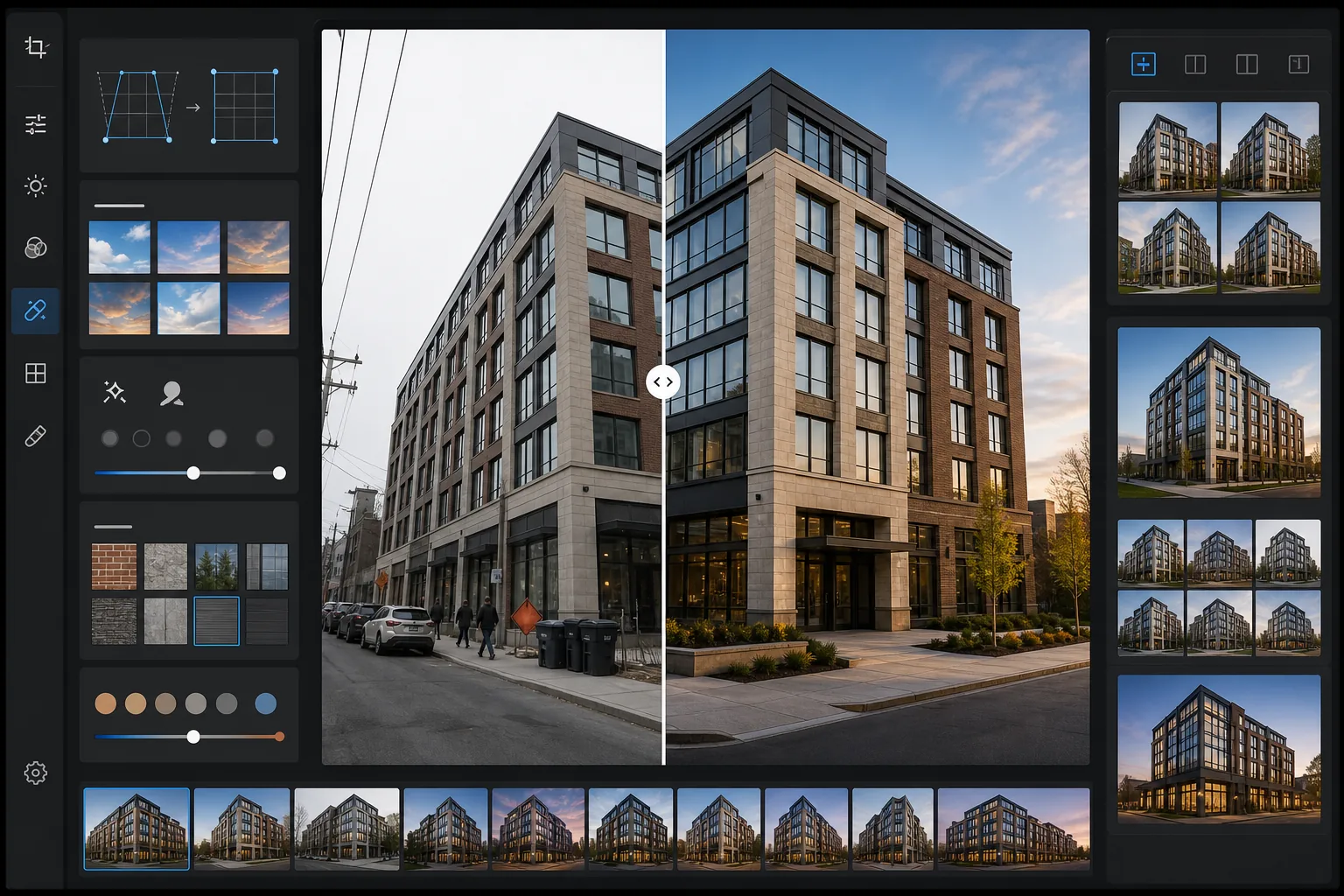
Transformez les photos d'extérieur de bâtiment en images architecturales dignes d'un portfolio. Ce modèle corrige les lignes verticales convergentes dues à un appareil incliné, remplace les ciels couverts ou surexposés par des alternatives bleu net ou heure dorée, supprime les voitures stationnées et les piétons de la scène, et applique un étalonnage qui met en valeur la texture des matériaux dans la pierre, le verre et le métal.
Essayer ce modèle gratuitementReal Estate template preview
Ce que fait ce modèle
Résout les problèmes les plus courants de la photographie d'extérieur architectural. Les verticales convergentes — où les arêtes du bâtiment penchent vers l'intérieur parce que l'appareil était incliné vers le haut — sont corrigées pour rendre les murs parfaitement droits. Les ciels blancs surexposés des jours couverts sont remplacés par un ciel bleu naturel ou des tons heure dorée qui correspondent à la direction de la lumière déjà présente sur le bâtiment. Magic Eraser supprime les voitures stationnées, les piétons, les poubelles, les engins de chantier et la signalétique temporaire qui encombrent la composition. AI Enhance applique un étalonnage subtil qui révèle la chaleur de la brique, la réflectivité des murs-rideaux en verre et la texture du béton et des façades en pierre.
Paramètres du modèle
| Correction verticale | Ajustement keystone automatique (correction d'inclinaison ±15°) |
| Remplacement du ciel | Ciel bleu naturel à direction de lumière concordante (ou heure dorée) |
| Mise en valeur des matériaux | Netteté de la texture pour brique, pierre, verre et métal |
| Étalonnage des couleurs | Architecture chaude (tons heure dorée sur les façades, ombres froides) |
| Suppression des distractions | Détection et suppression auto des véhicules, piétons et poubelles |
| Résolution de sortie | 6000px sur le grand côté (portfolio et impression à 300 DPI jusqu'à 20×13) |
Comment utiliser ce modèle
Importez votre photo d'extérieur
Importez une photo de l'extérieur du bâtiment prise depuis la rue, une position en hauteur ou un drone. Le modèle gère les images de smartphones, de reflex et d'objectifs grand-angle. La distorsion en barillet du grand-angle est corrigée automatiquement, tout comme la distorsion keystone verticale.
Corrigez la perspective et le ciel
Les lignes verticales sont redressées pour que les arêtes du bâtiment soient parallèles et justes. Si le ciel d'origine est surexposé en blanc ou d'un gris terne, il est remplacé par un ciel naturel correspondant à la direction de la lumière déjà visible sur la façade. Vous pouvez choisir entre un ciel bleu clair et des tons chauds d'heure dorée.
Supprimez les éléments parasites
Magic Eraser supprime les voitures stationnées, les piétons, les conteneurs à déchets, la signalétique temporaire, les échafaudages de chantier et les lignes électriques aériennes. L'IA reconstruit le trottoir, les aménagements paysagers et les surfaces du bâtiment derrière les objets supprimés à partir du contexte environnant.
Exportez pour portfolio ou annonce
Téléchargez l'image corrigée à 6000px sur le grand côté pour des tirages de portfolio architectural, des annonces immobilières ou des supports marketing de promoteur. Le profil colorimétrique est réglé sur Adobe RGB pour l'impression ou sRGB pour le web, selon la sortie souhaitée.
Conseils de pro pour les meilleurs résultats
- ✓Pour le remplacement de ciel le plus naturel, cadrez de sorte que le bâtiment n'occupe pas plus de 60 à 70 % de la hauteur de l'image. Cela laisse assez de ciel d'origine pour que l'IA fasse correspondre l'angle d'éclairage et la direction du dégradé du ciel de remplacement à la scène existante.
- ✓Lors de la prise de vue de façades très vitrées, le reflet dans les fenêtres affecte le remplacement du ciel. Si le ciel couvert d'origine est visible en reflet dans le verre, le ciel de remplacement ne modifiera pas les reflets — les bâtiments très vitrés paraissent donc plus naturels photographiés par temps présentant au moins un peu de ciel bleu.
- ✓Supprimez les voitures et les personnes d'un côté du cadre à la fois. Pour les scènes complexes comme un parking plein de voitures devant un bâtiment, l'IA produit des résultats plus nets quand vous travaillez par sections plutôt qu'en sélectionnant tout le premier plan d'un coup.
- ✓Photographiez si possible pendant l'heure dorée du matin ou de fin d'après-midi. Le modèle peut appliquer un étalonnage heure dorée aux photos de milieu de journée, mais la vraie lumière de l'heure dorée crée des ombres directionnelles sur les façades qui ajoutent une profondeur qu'aucun étalonnage ne peut reproduire.
Outils
Questions fréquentes
Quelle inclinaison verticale peut être corrigée ?
+
Le modèle corrige jusqu'à 15 degrés de distorsion keystone verticale, ce qui couvre la plupart des prises de vue à main levée faites depuis la rue en regardant un bâtiment vers le haut. Une inclinaison extrême au-delà de 15 degrés peut être corrigée, mais peut rogner une part importante des bords de l'image, réduisant la zone utilisable du cadre.
Le ciel remplacé aura-t-il l'air naturel ?
+
Le ciel de remplacement est accordé à la direction de la lumière tombant déjà sur le bâtiment. Si le soleil vient de la gauche sur la photo d'origine, le dégradé du ciel de remplacement et la disposition des nuages sont orientés de façon cohérente. La transition à l'horizon, là où le ciel rencontre la ligne de toit, est fondue pour correspondre à la brume atmosphérique et à la douceur des contours d'origine.
Cela peut-il supprimer un échafaudage sur un bâtiment en rénovation ?
+
Un échafaudage couvrant une petite partie de la façade (jusqu'à environ 20 % de la surface du bâtiment) peut être supprimé, l'IA reconstruisant le matériau et le motif des fenêtres derrière lui. Un échafaudage couvrant tout le bâtiment est trop étendu pour un retrait propre, car il ne reste pas assez de façade visible pour que l'IA s'y réfère lors de la reconstruction.
Présentez chaque bâtiment sous son meilleur jour architectural
Importez vos photos d'extérieur et obtenez des images à perspective corrigée, ciel sublimé et sans éléments parasites, prêtes pour portfolios, annonces et marketing de promoteur.
Essayer gratuitementRelated templates
More real estate templates for your workflow.
Modèle de photo immobilière professionnelle pour les annonces MLS. Amélioration de type HDR, remplacement du ciel, suppression de l'encombrement et correction des couleurs pour des photos de propriété qui se vendent plus rapidement.
Transformez les photos Airbnb et de location de vacances avec l'éclaircissement de la pièce, la suppression de l'encombrement, Color correction et la correction de la distorsion de l'objectif grand angle pour des tarifs de réservation plus élevés.
Améliorez les photos de votre portefeuille de décoration d'intérieur en éclaircissant la pièce, en supprimant l'encombrement, en accentuant la texture des matériaux et en rendant les couleurs précises des finitions et des tissus.
Améliorez la photographie aérienne par drone avec le remplacement du ciel, la mise en évidence des limites de propriété, l'éclat des couleurs Boost et la suppression des distractions pour les enquêtes immobilières et foncières.
Mettez en scène virtuellement des pièces vides avec des meubles, une décoration et un éclairage réalistes. Aidez les acheteurs à visualiser les espaces de vie sans frais de mise en scène physique.
Nettoyez, améliorez et standardisez les images de plans d'étage pour les annonces immobilières avec l'élimination des taches, la netteté des lignes et un style cohérent.