
Plan d'étage immobilier
Transformez les plans d'étage scannés ou photographiés en diagrammes nets et professionnels adaptés aux annonces MLS, aux brochures immobilières et aux intégrations de visites virtuelles. Ce modèle élimine les taches, les ombres et les plis des plans papier, affine les lignes de murs et les annotations de cotes, et standardise le style visuel pour que chaque plan d'étage de votre portefeuille d'annonces paraisse cohérent.
Essayez ce modèle gratuitementReal Estate template preview
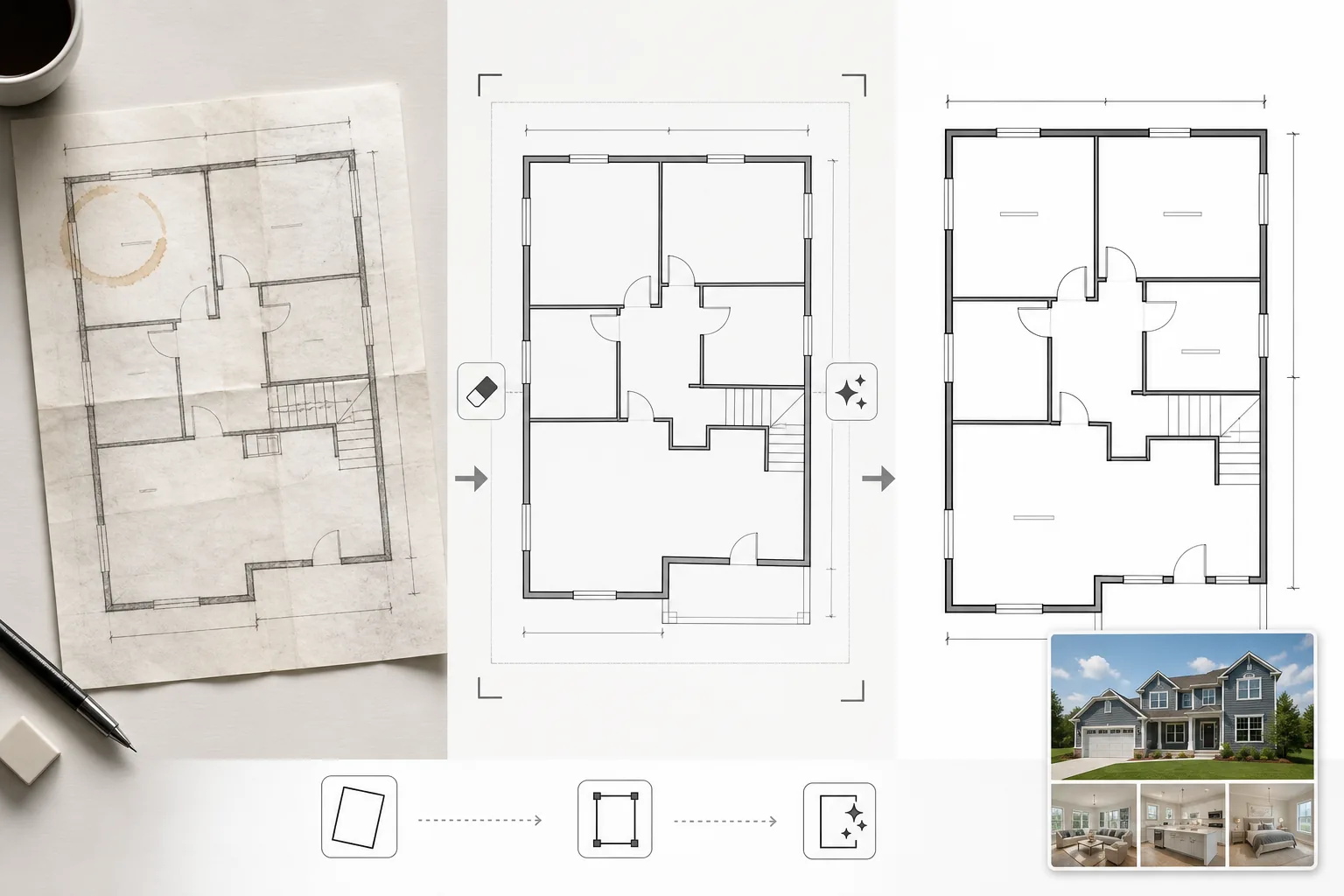
Ce que fait ce modèle
Nettoie les images de plans d'étage photographiées à partir de plans papier, exportées depuis un logiciel CAO obsolète ou scannées en basse qualité. Magic Eraser élimine les taches de café, les annotations au crayon, les plis et les artefacts d'ombre des photos de plans papier prises au téléphone. AI Enhance affine les lignes de murs, les ouvertures de portes et le texte des cotes afin qu'ils restent lisibles une fois réduits pour l'affichage web ou imprimés dans des brochures. La perspective est corrigée pour les plans d'étage photographiés en angle plutôt que scannés à plat. La couleur de fond est normalisée en un blanc net et les lignes de murs sont assombries à une épaisseur cohérente pour un aspect uniforme sur tous les plans d'une annonce.
Paramètres du modèle
| Nettoyage de l'arrière-plan | Éliminer les taches, les plis, les ombres et normaliser en un blanc net |
| Amélioration des lignes | Affiner et assombrir les lignes de murs à une épaisseur cohérente |
| Clarté du texte | Améliorer les étiquettes de cotes, les noms des pièces et les annotations de mesures |
| Correction de perspective | Redresser les plans photographiés vers une vue de dessus réelle |
| Résolution de sortie | 3000×2000px (paysage) ou personnalisée pour correspondre au rapport d'aspect d'origine |
Comment utiliser ce modèle
Téléchargez l'image de votre plan d'étage
Téléchargez un plan d'étage scanné, photographié ou numérique. Le modèle gère les plans papier photographiés avec l'appareil photo d'un téléphone, les numérisations à plat, les exports PDF et les captures d'écran de logiciels d'architecture. La distorsion de perspective des photos prises en angle au téléphone est corrigée automatiquement.
Éliminez les artefacts et les taches
Magic Eraser identifie et élimine les taches de café, les traces de crayon, les plis, les rayures du scanner et les dégradés d'ombre dus à un éclairage inégal. L'arrière-plan est normalisé en un blanc net tout en préservant toutes les lignes et annotations architecturales.
Améliorez les lignes et le texte
AI Enhance affine les contours des murs, les arcs de portes, les symboles de fenêtres et les indicateurs d'escaliers. Le texte des cotes et les étiquettes des pièces sont améliorés pour la lisibilité. Les épaisseurs de lignes sont normalisées afin que les murs extérieurs épais et les cloisons intérieures plus fines aient une hiérarchie visuelle cohérente.
Exportez pour les annonces et l'impression
Téléchargez le plan d'étage nettoyé en haute résolution pour les téléchargements MLS, les brochures immobilières et les superpositions de visites virtuelles. Le style visuel standardisé garantit que tous les plans d'étage de vos annonces paraissent professionnels et cohérents.
Conseils de pro pour de meilleurs résultats
- ✓Lorsque vous photographiez un plan d'étage papier, placez-le sur une surface plane et photographiez directement par-dessus avec un éclairage uniforme. La correction de perspective gère les angles modérés, mais un point de départ presque en vue de dessus produit le résultat le plus net.
- ✓Retirez les notes autocollantes et les trombones du plan avant de le photographier. L'IA peut les effacer, mais les résidus d'adhésif et les ombres des trombones laissent parfois de légères marques nécessitant un nettoyage supplémentaire.
- ✓Pour les propriétés à plusieurs étages, traitez chaque étage séparément et utilisez les mêmes paramètres d'amélioration. Cela garantit que les épaisseurs des lignes de murs, les tailles de texte et les tons de fond correspondent d'un étage à l'autre pour une présentation d'annonce cohérente.
Outils
Questions fréquentes
Cela peut-il convertir un croquis approximatif en un plan d'étage professionnel ?
+
Le modèle nettoie et améliore les dessins de plans d'étage existants — il ne génère pas de plans architecturaux à partir de zéro. Un croquis approximatif avec des murs et des formes de pièces clairement dessinés peut être nettoyé et affiné, mais les courbes dessinées à la main et les lignes irrégulières conserveront leur caractère manuscrit, simplement plus propres.
Le texte des cotes sera-t-il préservé avec précision ?
+
Oui. L'amélioration affine les étiquettes de cotes existantes sans altérer les chiffres. Si le texte original est trop flou pour être lu, l'IA tente de restaurer la lisibilité mais ne peut garantir l'exactitude d'un texte fortement dégradé — vérifiez toujours les cotes par rapport au document source.
Puis-je ajouter des étiquettes de pièces après le traitement ?
+
Oui. L'arrière-plan blanc net et les lignes nettes facilitent la superposition d'étiquettes de pièces, d'icônes de meubles ou d'un code couleur à l'aide de n'importe quel éditeur d'images ou logiciel d'annonces.
Présentez chaque annonce avec un plan d'étage net et professionnel
Téléchargez des plans d'étage scannés ou photographiés et obtenez des diagrammes nets, précis et prêts à publier en quelques secondes.
Essayez gratuitementRelated templates
More real estate templates for your workflow.
Modèle de photo immobilière professionnelle pour les annonces MLS. Amélioration de type HDR, remplacement du ciel, suppression de l'encombrement et correction des couleurs pour des photos de propriété qui se vendent plus rapidement.
Sublimez vos photos d'extérieur architectural avec correction des lignes verticales, remplacement du ciel, suppression des voitures et piétons, et étalonnage heure dorée pour annonces et portfolios.
Transformez les photos Airbnb et de location de vacances avec l'éclaircissement de la pièce, la suppression de l'encombrement, Color correction et la correction de la distorsion de l'objectif grand angle pour des tarifs de réservation plus élevés.
Améliorez les photos de votre portefeuille de décoration d'intérieur en éclaircissant la pièce, en supprimant l'encombrement, en accentuant la texture des matériaux et en rendant les couleurs précises des finitions et des tissus.
Améliorez la photographie aérienne par drone avec le remplacement du ciel, la mise en évidence des limites de propriété, l'éclat des couleurs Boost et la suppression des distractions pour les enquêtes immobilières et foncières.
Mettez en scène virtuellement des pièces vides avec des meubles, une décoration et un éclairage réalistes. Aidez les acheteurs à visualiser les espaces de vie sans frais de mise en scène physique.