
Portfolio de design d'intérieur
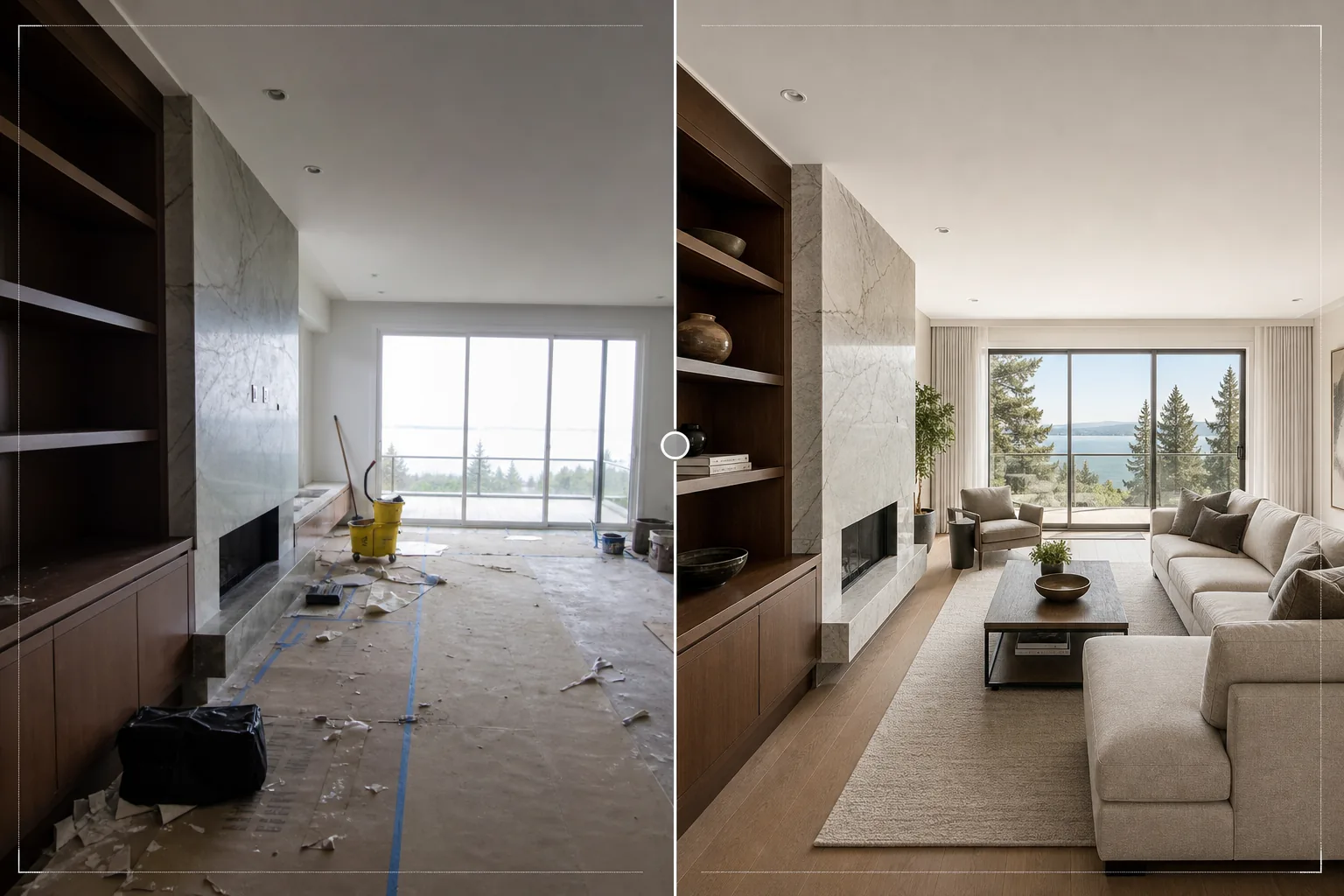
Présentez vos projets de design d'intérieur avec la qualité visuelle qu'ils méritent. Ce modèle éclaircit les pièces pour montrer la circulation de la lumière naturelle, supprime les gravats de chantier et les objets personnels, accentue la texture des matériaux pour le bois, la pierre et les tissus, et corrige la précision des couleurs afin que les finitions correspondent fidèlement aux spécifications du designer.
Essayez ce modèle gratuitementReal Estate template preview
Ce que fait ce modèle
Sublime les photos de projets de design d'intérieur pour les portfolios, les profils Houzz, les fils Instagram et les présentations clients. La photographie de design d'intérieur exige de représenter fidèlement les choix de matériaux et de couleurs du designer : un sol en noyer doit ressembler à du noyer, pas à de l'acajou. Ce modèle utilise AI Enhance pour appliquer une correction colorimétrique précise qui préserve les tons réels du veinage du bois, des veines de la pierre, des textures des tissus et des couleurs de peinture telles que spécifiées par le designer. Magic Eraser supprime les gravats laissés par une installation récente, les objets personnels des clients non rangés avant la séance photo, les prises et interrupteurs visibles qui interrompent la pureté des murs, ainsi que tout autre élément qui nuit au design lui-même. L'éclaircissement de la pièce garantit des espaces lumineux et ouverts à l'aspect naturel.
Paramètres du modèle
| Éclaircissement de la pièce | Remplissage des ombres + récupération de l'exposition des fenêtres (rendu en lumière naturelle) |
| Fidélité des matériaux | Rendu colorimétrique fidèle pour le bois, la pierre, le carrelage et les tissus |
| Accentuation des textures | Amélioration des détails du grain, du tissage et du veinage |
| Suppression de l'encombrement | Supprime les objets personnels, les gravats de chantier et les distractions |
| Résolution de sortie | 6000px sur le grand côté (prêt pour l'impression de portfolio et le téléversement Houzz) |
| Correction de l'objectif | Redressement vertical et correction de la distorsion en barillet du grand-angle |
Comment utiliser ce modèle
Téléversez votre photo d'intérieur
Téléversez des photos de pièces à n'importe quelle étape du projet : installation fraîchement terminée, séance photo mise en scène, ou même un chantier en cours si les éléments de design sont en place. Le modèle gère les photos prises avec des smartphones, des appareils à objectifs interchangeables et des objectifs d'architecture à décentrement.
Éclaircir et corriger la couleur
Le modèle augmente la luminosité de la pièce pour révéler toute la qualité spatiale du design, récupère les fenêtres surexposées pour montrer la vue au-delà, et corrige la température de couleur afin que les finitions des matériaux paraissent fidèles à leur apparence réelle. Les lignes verticales sont redressées et la distorsion du grand-angle est corrigée.
Supprimer les distractions
Magic Eraser supprime les effets personnels, les outils de chantier, les produits de nettoyage, les prises électriques visibles et autres éléments qui interrompent l'espace conçu. L'IA reconstruit le mur, le sol ou la surface derrière les objets supprimés en s'appuyant sur le motif du matériau environnant.
Exporter pour le portfolio
Téléchargez en 6000px sur le grand côté pour les tirages de portfolio, les téléversements de projets Houzz et les présentations haute résolution. La sortie Adobe RGB préserve les subtiles différences de couleur entre des finitions similaires, qui sont importantes dans la documentation de design d'intérieur.
Conseils de pro pour de meilleurs résultats
- ✓Photographiez en journée avec tous les rideaux et stores ouverts. La lumière naturelle du jour montre comment un espace conçu est réellement ressenti par ses occupants et révèle les vraies couleurs des finitions. Le modèle accentue la lumière naturelle mais ne peut pas reproduire la qualité d'une vraie lumière du jour sur une photo prise de nuit.
- ✓Incluez à la fois des plans larges de la pièce et des gros plans serrés sur les combinaisons de matériaux : là où le sol en bois rejoint le pourtour en pierre de la cheminée, là où la crédence rejoint le plan de travail. Le modèle accentue ces jonctions de matériaux qui mettent en valeur l'expertise du designer dans le choix des spécifications.
- ✓Éteignez si possible toutes les lumières artificielles et fiez-vous uniquement à la lumière du jour. Un éclairage mixte (lumière du jour par les fenêtres plus lumière artificielle chaude) crée des zones de température de couleur dans la pièce que le modèle doit moyenner, ce qui peut compromettre la précision des couleurs des matériaux dans l'une ou l'autre zone.
Outils
Questions fréquentes
Peut-il aménager virtuellement une pièce vide ?
+
Non. Le modèle améliore les photos de pièces qui contiennent déjà les éléments de design : mobilier, finitions, équipements. Il n'ajoute pas de meubles ni d'accessoires virtuels dans des espaces vides. Pour l'aménagement virtuel, utilisez un service de home staging dédié, puis traitez le résultat avec ce modèle pour affiner la couleur et l'éclairage.
Avec quelle précision reproduit-il les couleurs des matériaux ?
+
Le modèle utilise une correction colorimétrique équilibrée sur la lumière du jour qui préserve les sous-tons spécifiques des matériaux : gris chauds versus gris froids, tons de bois rougeâtres versus dorés, veinage de pierre bleuté versus verdâtre. Sur un écran calibré, les images traitées correspondent à l'apparence réelle des matériaux d'assez près pour un usage en portfolio et en spécification.
Qu'en est-il du carrelage de salle de bain et de cuisine ?
+
Les joints et les motifs du carrelage sont accentués pour montrer la qualité de pose. Le modèle gère aussi bien les carreaux grand format que les motifs de mosaïque détaillés, en accentuant la précision géométrique qui témoigne d'un savoir-faire de qualité.
Montrez chaque projet sous son meilleur jour
Téléversez vos photos d'intérieur et obtenez des images de qualité portfolio avec des couleurs de matériaux fidèles, une lumière naturelle éclatante et des compositions sans distraction.
Essayer gratuitementRelated templates
More real estate templates for your workflow.
Modèle de photo immobilière professionnelle pour les annonces MLS. Amélioration de type HDR, remplacement du ciel, suppression de l'encombrement et correction des couleurs pour des photos de propriété qui se vendent plus rapidement.
Sublimez vos photos d'extérieur architectural avec correction des lignes verticales, remplacement du ciel, suppression des voitures et piétons, et étalonnage heure dorée pour annonces et portfolios.
Transformez les photos Airbnb et de location de vacances avec l'éclaircissement de la pièce, la suppression de l'encombrement, Color correction et la correction de la distorsion de l'objectif grand angle pour des tarifs de réservation plus élevés.
Améliorez la photographie aérienne par drone avec le remplacement du ciel, la mise en évidence des limites de propriété, l'éclat des couleurs Boost et la suppression des distractions pour les enquêtes immobilières et foncières.
Mettez en scène virtuellement des pièces vides avec des meubles, une décoration et un éclairage réalistes. Aidez les acheteurs à visualiser les espaces de vie sans frais de mise en scène physique.
Nettoyez, améliorez et standardisez les images de plans d'étage pour les annonces immobilières avec l'élimination des taches, la netteté des lignes et un style cohérent.