
Photo de produit électronique
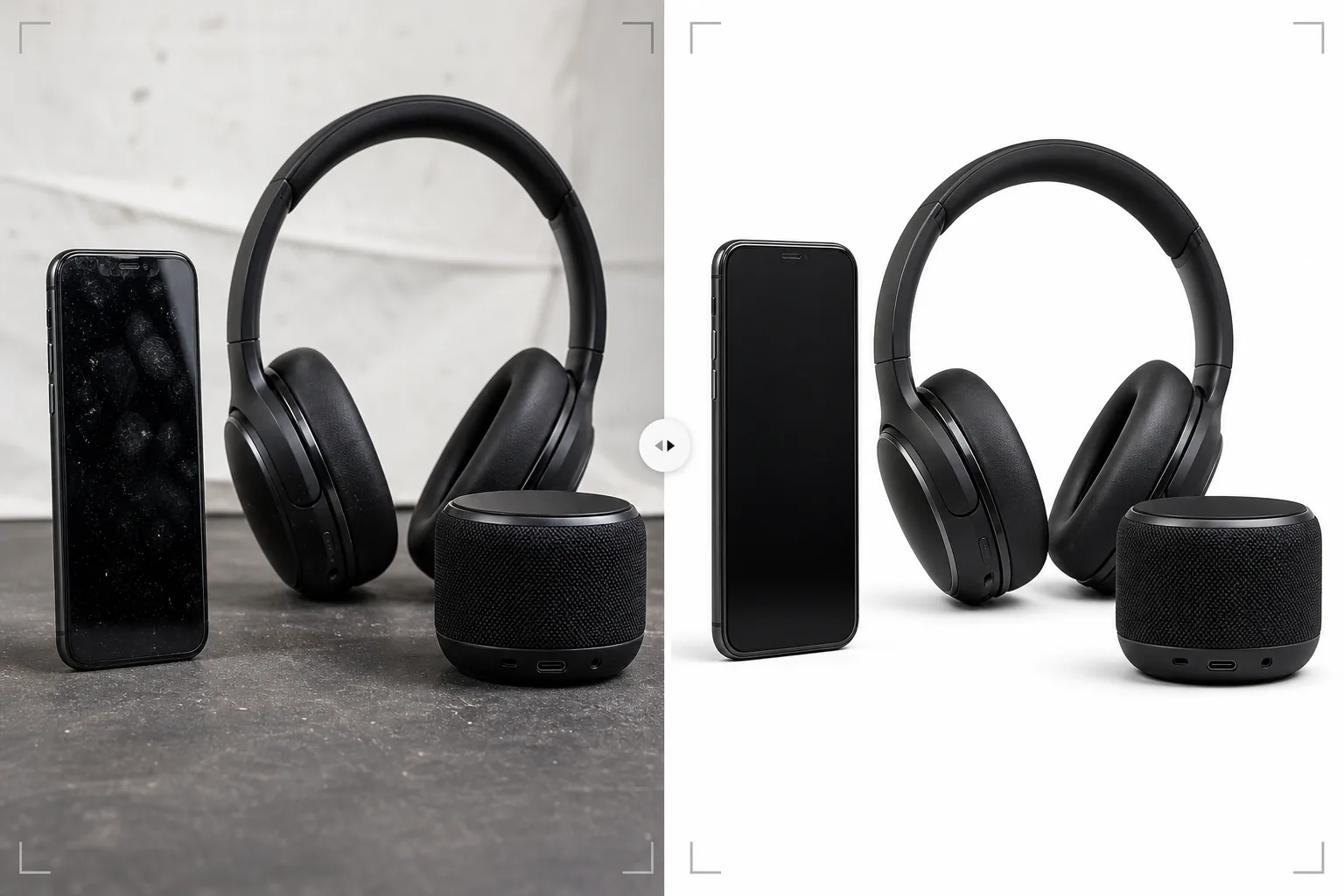
Présentez l'électronique grand public avec une netteté digne d'un showroom. Ce modèle supprime les empreintes et les traces sur les écrans et les surfaces brillantes, affine les détails des ports et des boutons, améliore l'affichage des écrans pour rendre les éléments d'interface visibles et produit des images de produit nettes, prêtes pour les fiches de marketplace et les pages de marque.
Essayer ce modèle gratuitementE-commerce template preview
Ce que fait ce modèle
Gère les défis photographiques spécifiques de l'électronique grand public — smartphones, ordinateurs portables, tablettes, casques, enceintes et accessoires — où les surfaces réfléchissantes, les ports complexes et les écrans exigent un traitement spécialisé. Les écrans brillants et les boîtiers métalliques accumulent instantanément les empreintes lors de la manipulation, et Magic Eraser les supprime avec les particules de poussière et les micro-rayures de surface qui apparaissent à fort grossissement. AI Enhance affine les détails fins comme l'intérieur des ports USB, la texture des boutons, le motif des grilles de haut-parleur et le texte de marque que les acheteurs examinent attentivement pour évaluer la qualité de fabrication. Background Eraser isole les produits avec des bords nets autour des formes complexes, y compris les antennes, les ports et les ouvertures de câbles.
Paramètres du modèle
| Nettoyage de surface | Supprimer les empreintes, la poussière et les micro-rayures des écrans et du châssis |
| Netteté des détails | Amélioration des ports, boutons, grilles de haut-parleur et texte de marque |
| Affichage de l'écran | Éclaircir et affiner l'interface à l'écran (ou la remplacer par une capture d'écran propre) |
| Arrière-plan | Blanc pur (#FFFFFF) ou dégradé pour un positionnement haut de gamme |
| Dimensions de sortie | 2500 × 2500 px (zoom haute résolution pour l'inspection par l'acheteur) |
| Finition métallique | Améliorer les textures de l'aluminium anodisé, de l'acier brossé et du plastique mat |
Comment utiliser ce modèle
Téléchargez votre photo d'électronique
Téléchargez les photos du produit — vues de face, de dos, de côté et en détail des ports et des boutons. Le modèle prend en charge les smartphones, ordinateurs portables, tablettes, casques, enceintes, montres connectées et accessoires. Incluez au moins un angle montrant l'écran allumé si l'appareil possède un écran.
Nettoyage de surface et suppression des empreintes
Magic Eraser supprime les empreintes, les traces et la poussière des écrans, châssis métalliques et surfaces en plastique brillant. Les petites rayures et éraflures dues à la manipulation des unités de démonstration sont également supprimées. L'IA préserve les caractéristiques de surface intentionnelles comme le grain du métal brossé et les textures mates.
Amélioration des détails et de l'écran
AI Enhance affine les ouvertures de ports, les bords des boutons, les motifs des grilles de haut-parleur et le texte de marque. Si l'appareil a un écran, l'affichage est éclairci et affiné afin que les éléments d'interface soient visibles et attrayants. Les reflets de l'éclairage de studio sur l'écran sont réduits tout en conservant l'aspect actif de l'affichage.
Exporter pour une marketplace ou un site de marque
Téléchargez en 2500 × 2500 px pour les fiches de marketplace avec zoom complet, ou dans des dimensions personnalisées pour les sites de marque et les supports marketing. Les options d'arrière-plan incluent le blanc pur pour les marketplaces et un dégradé ou un fond sombre pour un positionnement de marque haut de gamme.
Conseils de pro pour de meilleurs résultats
- ✓Portez des gants en coton lors de la manipulation du produit pour la photographie. Les empreintes sur l'électronique sont le problème de retouche le plus fréquent, et bien que le modèle les supprime efficacement, une photo source sans empreinte préserve davantage de texture de surface d'origine dans l'image finale.
- ✓Photographiez les écrans avec une véritable interface affichée plutôt qu'un écran vide ou éteint. Un écran actif montre aux acheteurs à quoi ressemble l'appareil en utilisation. Le modèle affine et éclaircit le contenu affiché tout en réduisant les reflets de l'éclairage de studio sur la surface de l'écran.
- ✓Incluez une photo montrant spécifiquement la disposition des ports — USB, prise casque, lecteur de carte, port de charge. Ces clichés de détail figurent parmi les images les plus consultées dans les fiches d'électronique, et le modèle affine l'intérieur des ports pour montrer clairement le détail des connecteurs.
- ✓Pour les casques et enceintes, incluez un angle montrant clairement le détail du haut-parleur ou de la grille. Le modèle améliore les textures de maille et de grille pour transmettre la qualité de fabrication et la sophistication de la conception acoustique.
E-commerce workflow
Product photo hub
Use this template with the full ecommerce product photo workflow for marketplace backgrounds, cleanup, compression, resizing, and listing-ready exports.
View ecommerce product photo workflowQuestions fréquentes
Peut-il gérer l'électronique noire brillante ?
+
Les surfaces noires brillantes (comme les smartphones noir piano et les cadres d'écran d'ordinateur portable) sont difficiles car elles reflètent tout. Le modèle supprime les empreintes et réduit les reflets de l'environnement, mais une partie du reflet est conservée pour transmettre la qualité de la surface brillante. Pour de meilleurs résultats, photographiez les produits noirs brillants dans un environnement contrôlé avec un minimum de sources de reflet ambiantes.
Et les produits avec des indicateurs LED ?
+
Les voyants d'état LED, l'éclairage RGB des périphériques et les écrans sont préservés et améliorés. Le modèle reconnaît les éléments lumineux et les affine tout en conservant leur effet de lueur sur la surface du produit.
Puis-je ajouter une capture d'écran sur un écran vide ?
+
Le modèle optimise les photos avec un contenu d'écran existant mais ne compose pas de nouvelles captures d'écran sur des écrans vides. Pour le remplacement d'écran par composition, photographiez l'appareil avec l'écran allumé et le modèle améliorera le contenu affiché.
Une électronique aussi belle en ligne qu'en main
Téléchargez les photos de produit et obtenez des images sans empreinte, nettes dans les détails, prêtes pour les fiches de marketplace et les pages produit de marque.
Essayer gratuitementRelated templates
More e-commerce templates for your workflow.
Modèle de fond blanc pur pour les photos de produits. Paramètres Amazon, Shopify et compatibles avec le marché pour des images de produits claires et professionnelles qui se convertissent.
Modèle de photo de liste optimisé pour Etsy. Convertit les photos de style de vie en arrière-plans blancs purs à 2 000 px, améliore les détails des produits faits à la main et respecte les directives d'image d'Etsy.
Modèle de photo d'annonce optimisé pour eBay. Fond blanc pour les images de la galerie, amélioration de la documentation sur l'état et mises en page multi-angles conformes aux normes d'image d'eBay.
Modèle de photographie de bijoux professionnel pour bagues, colliers et montres. Contrôle les reflets, améliore l'éclat des pierres précieuses et fournit des images prêtes à être commercialisées sur des arrière-plans épurés.
Modèle de photo de mobilier professionnel pour les listes de marchés. Supprimez l'encombrement de la pièce, affichez les vraies dimensions et présentez les pièces sur des arrière-plans épurés ou dans des contextes de pièce stylisés.
Nettoyez les photos de vêtements à plat avec l'élimination des plis, le nettoyage des peluches, des arrière-plans d'un blanc pur et une couleur de tissu précise. Prêt pour Shopify, Amazon et les boutiques.