
Photo de style de vie e-commerce
Transformez de simples photos de produits en images de style de vie qui montrent vos articles dans un contexte réel — sur des plans de travail de cuisine, dans des salons, sur des bureaux ou en extérieur. Ce modèle supprime l'arrière-plan d'origine et place votre produit dans des scènes de style de vie soigneusement composées avec un éclairage assorti et des ombres naturelles, offrant à vos fiches produits l'imagerie contextuelle qui favorise les décisions d'achat, sans séance photo coûteuse.
Essayer ce modèle gratuitementE-commerce template preview
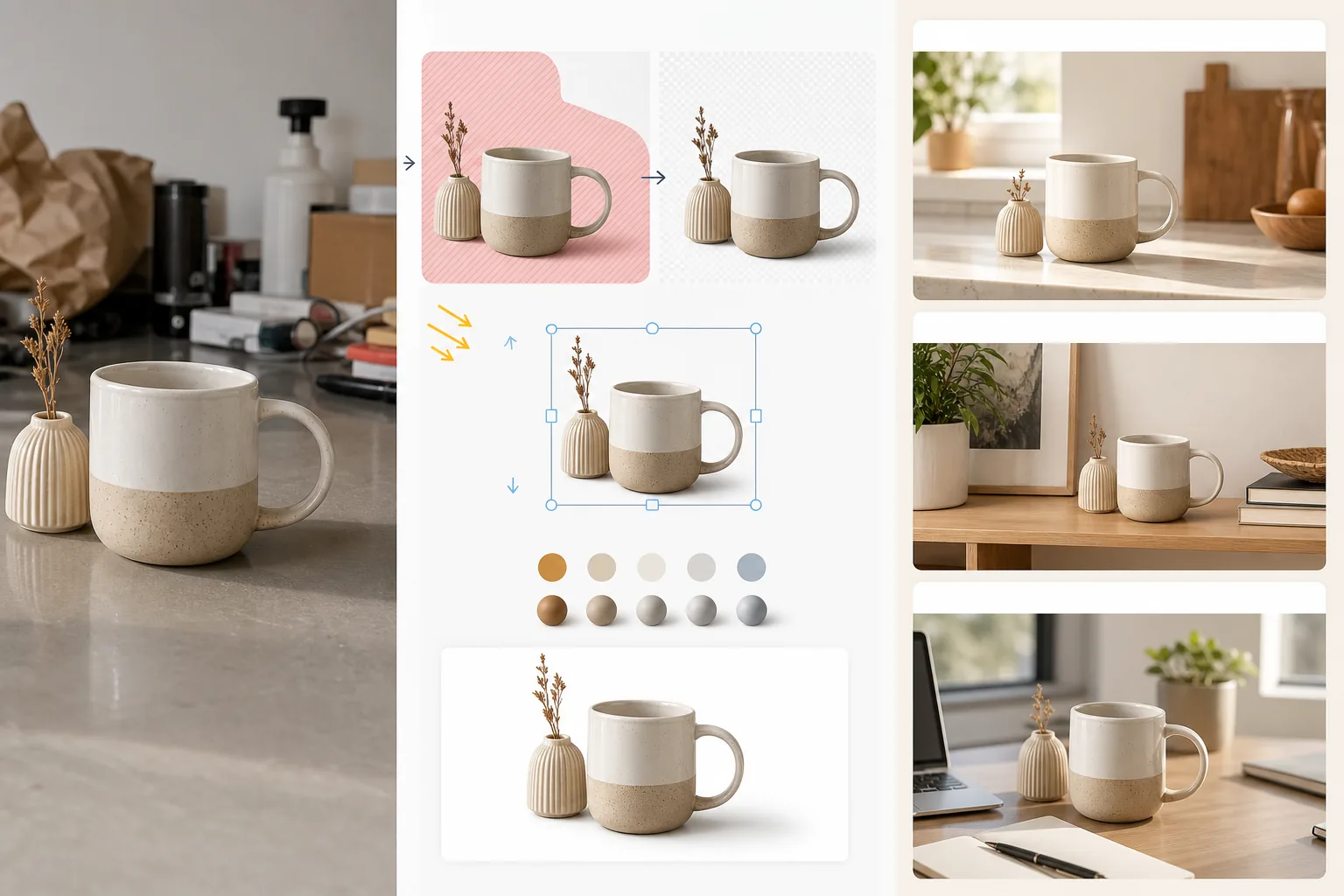
Ce que fait ce modèle
Convertit les images standard de produit sur fond blanc ou les photos de produit informelles en scènes de style de vie qui aident les clients à se projeter dans la possession et l'utilisation de l'article. Magic Eraser supprime l'arrière-plan d'origine et tout élément distrayant autour du produit. AI Enhance place ensuite le produit dans un environnement de style de vie soigneusement composé — un plan de travail de cuisine pour les ustensiles, une étagère de salon pour la décoration, un bureau pour l'électronique, une terrasse extérieure pour les articles de jardin — avec une direction d'éclairage et un rendu des ombres adaptés à la scène. La couleur et l'exposition du produit sont harmonisées avec l'environnement afin que le montage ressemble à une seule photographie prise dans un décor mis en scène. Cela comble l'écart entre l'exigence du fond blanc pur des places de marché (qui vend la fonction) et le contexte de style de vie (qui vend le désir) que les études de conversion en e-commerce montrent systématiquement comme stimulant des taux d'ajout au panier plus élevés.
Paramètres du modèle
| Catégorie de scène | Cuisine, salon, salle de bain, bureau, extérieur ou surface à plat |
| Harmonisation de l'éclairage | Faire correspondre la direction d'éclairage et la température de couleur du produit à la scène |
| Rendu des ombres | Ombre de contact naturelle et occlusion ambiante adaptées à la géométrie de la scène |
| Échelle du produit | Détection automatique ou dimensionnement manuel par rapport au mobilier et aux objets de la scène |
| Harmonisation des couleurs | Ajuster la balance des blancs du produit pour correspondre à la lumière ambiante de la scène |
| Résolution de sortie | 3000×3000px (carré 1:1) ou 3000×2250px (4:3 pour les sites de marque) |
Comment utiliser ce modèle
Téléchargez la photo de votre produit
Téléchargez une photo de produit prise sur n'importe quel arrière-plan — studio blanc, plan de table ou même votre plan de travail de cuisine. Plus l'arrière-plan d'origine est net, meilleure est l'isolation du produit, mais le modèle gère aussi les environnements encombrés. Incluez le produit entier sans en couper les bords.
Sélectionnez une scène de style de vie
Choisissez une catégorie de scène correspondant à la façon dont les clients utiliseraient le produit. L'IA sélectionne un environnement précis au sein de cette catégorie en fonction du type et de la taille du produit. Vous pouvez parcourir d'autres options si la première suggestion ne correspond pas à l'esthétique de votre marque.
Harmonisez le produit dans la scène
Le produit est intégré à la scène avec une direction d'éclairage assortie, un rendu des ombres approprié et un ajustement de la température de couleur. L'IA garantit que le produit semble physiquement présent — posé sur le plan de travail, sur l'étagère, debout sur le bureau — plutôt que flottant au-dessus de la surface.
Exportez pour les fiches produits et le marketing
Téléchargez en 3000×3000px pour les emplacements d'images de style de vie des places de marché ou en 4:3 pour les pages produits des sites de marque. Utilisez-la en complément de votre image principale sur fond blanc — la photo de style de vie montre le contexte et le désir, tandis que l'image sur fond blanc montre les détails et les spécifications.
Conseils de pro pour de meilleurs résultats
- ✓Photographiez votre produit avec la lumière venant du coin supérieur gauche. La plupart des environnements de scènes de style de vie sont éclairés depuis le coin supérieur gauche ; faire correspondre cette direction dès le départ produit le montage le plus convaincant, où la direction des ombres est cohérente entre le produit et l'environnement.
- ✓Incluez une petite portion de surface au sol dans la photo originale du produit. Le point de contact entre la base du produit et la surface aide l'IA à comprendre la perspective du produit et à le placer de manière convaincante sur la nouvelle surface de la scène.
- ✓Utilisez les images de style de vie pour les emplacements secondaires des fiches sur les places de marché. Conservez l'image principale en tant que visuel sur fond blanc épuré pour respecter les règles des places de marché, et utilisez les images de style de vie dans les emplacements 2 à 5 pour montrer le produit en contexte. Cette combinaison surpasse systématiquement les approches tout blanc ou tout style de vie.
Outils
E-commerce workflow
Product photo hub
Use this template with the full ecommerce product photo workflow for marketplace backgrounds, cleanup, compression, resizing, and listing-ready exports.
View ecommerce product photo workflowQuestions fréquentes
Le produit aura-t-il l'air collé sur la scène ?
+
Non. Le modèle fait correspondre la direction d'éclairage, la température de couleur et l'angle des ombres du produit à l'environnement de la scène. Les ombres de contact, là où le produit rencontre la surface, sont rendues avec une pénombre douce assortie à la lumière ambiante de la scène. Le résultat donne l'impression que le produit a été photographié dans ce décor.
Puis-je utiliser mes propres photos de scène personnalisées ?
+
Oui. Vous pouvez télécharger votre propre photo de scène de style de vie comme environnement d'arrière-plan. L'IA harmonisera l'éclairage et la couleur du produit pour les adapter à votre scène personnalisée, exactement comme elle le fait avec la bibliothèque de scènes intégrée.
L'échelle du produit est-elle gérée automatiquement ?
+
Oui. L'IA estime la taille réelle du produit à partir de la photo originale et l'ajuste de façon appropriée par rapport au mobilier et aux objets de la scène. Une tasse à café apparaîtra à la taille d'une tasse sur un plan de travail de cuisine, et non de la taille d'un abat-jour. Vous pouvez ajuster l'échelle manuellement si la détection automatique nécessite une correction.
Montrez aux clients à quoi ressemble la possession de votre produit
Téléchargez des photos de produits et obtenez des images de style de vie qui favorisent les décisions d'achat grâce à un contexte réel.
Essayer gratuitementRelated templates
More e-commerce templates for your workflow.
Modèle de fond blanc pur pour les photos de produits. Paramètres Amazon, Shopify et compatibles avec le marché pour des images de produits claires et professionnelles qui se convertissent.
Modèle de photo de liste optimisé pour Etsy. Convertit les photos de style de vie en arrière-plans blancs purs à 2 000 px, améliore les détails des produits faits à la main et respecte les directives d'image d'Etsy.
Modèle de photo d'annonce optimisé pour eBay. Fond blanc pour les images de la galerie, amélioration de la documentation sur l'état et mises en page multi-angles conformes aux normes d'image d'eBay.
Modèle de photographie de bijoux professionnel pour bagues, colliers et montres. Contrôle les reflets, améliore l'éclat des pierres précieuses et fournit des images prêtes à être commercialisées sur des arrière-plans épurés.
Modèle de photo de mobilier professionnel pour les listes de marchés. Supprimez l'encombrement de la pièce, affichez les vraies dimensions et présentez les pièces sur des arrière-plans épurés ou dans des contextes de pièce stylisés.
Nettoyez les photos de vêtements à plat avec l'élimination des plis, le nettoyage des peluches, des arrière-plans d'un blanc pur et une couleur de tissu précise. Prêt pour Shopify, Amazon et les boutiques.