
Edición profesional de fotografías de rostros simplificada
Una foto limpia y profesional es importante para los perfiles de LinkedIn, las páginas de equipos y los directorios corporativos. Magic Eraser ayuda a individuos y empresas a producir retratos pulidos sin necesidad de volver a tomar la foto en el estudio.
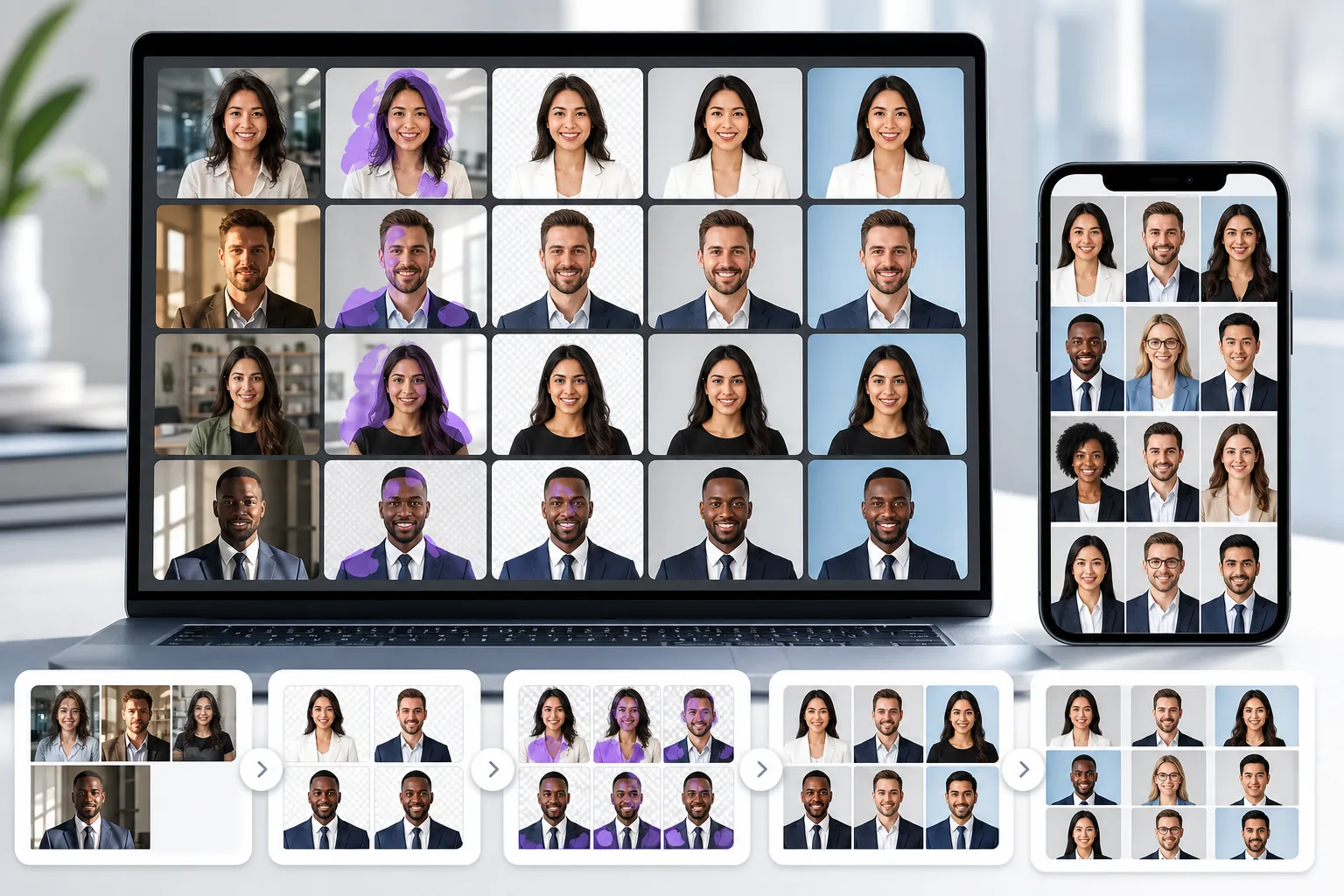
Antecedentes que distraen o no son profesionales
Las fotografías tomadas en escritorios, pasillos o en casa a menudo tienen fondos desordenados que socavan el aspecto profesional.
Problemas de iluminación desigual y detalles de la piel.
La iluminación de la oficina crea sombras marcadas, tonos de piel desiguales y detalles suaves que hacen que los retratos parezcan amateurs en comparación con los retratos de estudio.
Fotos de equipo inconsistentes en toda la empresa
Cuando los miembros del equipo envían fotografías tomadas en diferentes momentos y ubicaciones, la página de la empresa parece inconsistente y menos pulida.
Cómo ayuda Magic Eraser con los retratos profesionales
Sube el retrato
Abre Magic Eraser y sube la foto de la cabeza que necesita un pulido profesional.
Eliminar o reemplazar el fondo
Utilice la eliminación de fondo para colocar al sujeto sobre un fondo blanco, gris o de marca limpio que se vea consistente y profesional.
Limpiar las distracciones
Elimine los pelos sueltos, las arrugas de la ropa o las imperfecciones de la piel con la herramienta de borrador para obtener un retrato final más limpio.
Mejorar y descargar
Aplique AI Enhancement para afinar los detalles y equilibrar la iluminación, luego exporte la foto pulida a la resolución que necesita.
Removal tools for this workflow
Herramientas
Preguntas frecuentes
¿Puede Magic Eraser crear un fondo de retrato profesional?
+
Sí. Elimine el fondo existente y reemplácelo con un color sólido o un degradado que coincida con los estándares profesionales de fotografías de rostros para LinkedIn, páginas de equipo y uso corporativo.
¿Es esto útil para las fotografías de páginas de equipo y recursos humanos?
+
Sí. Las empresas utilizan Magic Eraser para estandarizar las fotografías de los equipos con fondos e iluminación consistentes, incluso cuando las fotografías se tomaron en diferentes momentos y ubicaciones.
¿Puedo solucionar problemas de iluminación en disparos a la cabeza?
+
AI Enhancement puede equilibrar la exposición, reducir las sombras intensas y mejorar los detalles de la piel para que los disparos a la cabeza luzcan más iluminados profesionalmente.
¿Magic Eraser funciona para las fotos de perfil de LinkedIn?
+
Sí. Limpiar el fondo y mejorar la calidad de los detalles son las dos mejoras más comunes para los retratos de LinkedIn, y Magic Eraser se encarga de ambas.
¿Puedo editar fotografías de rostros en mi teléfono?
+
Sí. Magic Eraser funciona tanto en la web como en dispositivos móviles, por lo que puedes limpiar y mejorar una foto de la cabeza desde cualquier dispositivo.
Obtenga una fotografía profesional en la cabeza sin tener que volver a grabarla en el estudio
Pruebe Magic Eraser gratis y cree retratos limpios y pulidos con fondos consistentes y detalles mejorados.
Prueba Magic Eraser gratisCasos de uso relacionados
Descubre cómo los profesionales utilizan estas herramientas en flujos de trabajo reales.
Las fotos de anuncios llenas de objetos personales, coches aparcados o material de obra espantan a los compradores. Magic Eraser usa IA para limpiar tus fotos de propiedades al instante — sin necesidad de Photoshop.
Los fondos desordenados y las fotos de producto descuidadas te cuestan ventas todos los días. Magic Eraser te ayuda a crear imágenes de producto profesionales en segundos — sin necesidad de saber Photoshop. Sube la foto, borra las distracciones y publica con confianza.
Las oficinas de pasaportes rechazan miles de fotos cada día por fondos incorrectos. Magic Eraser elimina cualquier fondo y lo reemplaza con el color exacto que necesitas — blanco, gris claro o azul — en segundos.
Comparaciones relacionadas
Mira cómo Magic Eraser se compara con herramientas similares.
TouchRetouch es una popular app móvil de pago para eliminar objetos e imperfecciones. Magic Eraser ofrece edición IA gratuita en cualquier dispositivo sin instalación. Compara funciones, precios y facilidad de uso.
Cleanup.pictures es una herramienta web gratuita para eliminar objetos rápidamente. Magic Eraser ofrece 8 herramientas de edición IA, apps móviles y procesamiento avanzado. Mira la comparación.
remove.bg es el líder del mercado en eliminación de fondos, con una potente API e integraciones con Photoshop y Figma. Magic Eraser ofrece ocho herramientas IA — desde eliminación de objetos y relleno generativo hasta mejora IA y diseño — todo en un editor.
Dos potentes editores de fotos con IA y fortalezas diferentes. Magic Eraser ofrece un conjunto más amplio de herramientas de IA generativa, mientras que Photoroom destaca en fotografía de productos para e-commerce y procesamiento por lotes.
Guías relacionadas
Explora más guías y contenido editorial relacionado con este flujo de trabajo.
Descubre cómo la IA está transformando las operaciones, desde la automatización hasta el análisis de datos y experiencias de cliente más personalizadas.
Aprende a usar Magic Eraser para quitar objetos, personas, texto y distracciones de fotos con resultados de IA más limpios.
Aprende a eliminar personas de fotos con IA en segundos. Guía para fotos de viaje, inmobiliaria y productos.