
Foto de portafolio de tatuajes
Muestre su trabajo de tatuaje con el detalle y la precisión de color que atrae a nuevos clientes. Esta plantilla realza la saturación de la tinta y la nitidez de las líneas, reduce el enrojecimiento y la hinchazón de la piel tras la sesión, corrige la iluminación del estudio para obtener colores de tinta fieles y crea presentaciones de portafolio limpias que dejan que la obra hable por sí misma.
Prueba esta plantilla gratisBusiness template preview
Qué hace esta plantilla
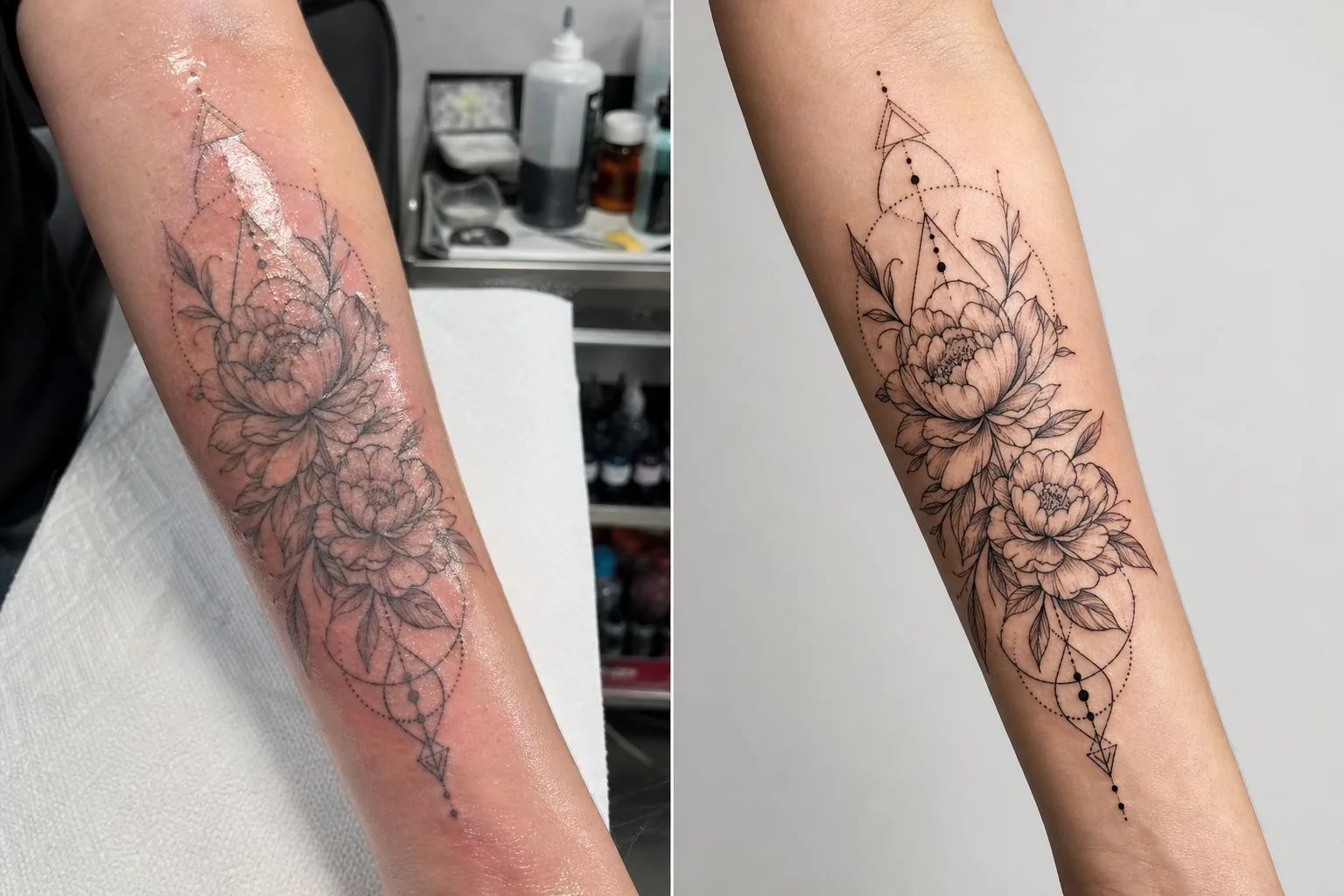
Aborda los desafíos fotográficos específicos a los que se enfrentan los tatuadores al documentar su trabajo. Los tatuajes recientes se fotografían en condiciones de estudio con iluminación mixta, y la piel alrededor de la tinta nueva está roja, hinchada y cubierta de exceso de tinta y pomada — nada de lo cual representa el resultado final cicatrizado. Esta plantilla usa AI Enhance para corregir la iluminación de modo que los colores de la tinta se vean como serán una vez cicatrizados, agudiza el trabajo de líneas finas y el detalle del dotwork, y reduce el enrojecimiento y la hinchazón alrededor de los tatuajes recientes. Magic Eraser elimina el desorden del fondo de la estación de tatuaje, incluidos frascos de tinta, toallas de papel, guantes y equipo, creando un fondo limpio que centra toda la atención en la obra.
Configuración de la plantilla
| Realce de tinta | Aumento de saturación de color para estilos de tatuaje en negro, color y acuarela |
| Nitidez de líneas | Realce de microdetalle para líneas finas y dotwork |
| Corrección de piel | Reduce el enrojecimiento, la hinchazón y el brillo de la pomada alrededor de los tatuajes recientes |
| Corrección de iluminación | Corrige la iluminación mixta de estudio a luz de día neutra para colores de tinta fieles |
| Fondo | Fondo sólido o desenfocado limpio (eliminar el desorden de la estación) |
| Dimensiones de salida | 2000 × 2000 px (cuadrado de Instagram) o 4000px para impresión de portafolio |
Cómo usar esta plantilla
Sube tu foto de tatuaje
Sube una foto del tatuaje terminado — reciente o cicatrizado. Fotografía el tatuaje de frente para minimizar la distorsión de perspectiva. La plantilla maneja primeros planos de detalle, tomas generales de la pieza completa y composiciones envolventes en superficies corporales curvas como brazos, piernas y costillas.
Realce de tinta y líneas
AI Enhance aumenta la saturación de la tinta para que los tatuajes en negro se vean profundos e intensos, mientras que los tatuajes en color muestran toda su vivacidad. Las líneas finas, el dotwork y los patrones geométricos se agudizan para mostrar la precisión de tu trabajo con la aguja. El realce respeta los distintos estilos de tatuaje — tradicional marcado, línea fina, acuarela y blackwork reciben cada uno un tratamiento adecuado.
Corrección de piel y fondo
En los tatuajes recientes, el enrojecimiento y la hinchazón alrededor de la tinta se reducen para aproximarse al aspecto cicatrizado. El brillo de la pomada y el exceso de tinta en la piel circundante se atenúan. Magic Eraser elimina el fondo de la estación de tatuaje — vasitos de tinta, toallas de papel, guantes y equipo — reemplazándolo por un fondo limpio.
Exporta para portafolio y redes sociales
Descarga en cuadrado de 2000 × 2000 px para publicaciones de portafolio en Instagram, o a 4000px en el lado largo para portafolios web y lookbooks impresos. El perfil de color conserva toda la gama de colores de tinta de tatuaje, incluidas las sutiles variaciones de tono de los estilos acuarela y neotradicional.
Consejos profesionales para mejores resultados
- ✓Fotografía el tatuaje bajo una luz equilibrada de día (5000–5500K) desde un ángulo constante. Esto le da a la plantilla los datos de color más precisos con los que trabajar. Las luces de tungsteno cálidas hacen que la tinta se vea más amarillo-anaranjada, y la corrección, aunque eficaz, produce mejores resultados partiendo de una iluminación neutra.
- ✓Limpia el exceso de tinta y pomada de la superficie de la piel antes de fotografiar. La plantilla reduce el brillo de la pomada, pero una superficie limpia y secada con golpecitos muestra el trabajo de tinta con más claridad y produce un mejor resultado realzado.
- ✓Fotografía las versiones reciente y cicatrizada del mismo tatuaje cuando sea posible. La foto reciente procesada con la plantilla te da contenido de portafolio inmediato, y la foto cicatrizada confirma el resultado real ya asentado. Ambas versiones en tu portafolio demuestran profesionalismo.
- ✓Para piezas grandes que envuelven extremidades, toma varios primeros planos de detalle superpuestos además de la vista general de la pieza completa. La plantilla agudiza el detalle que se pierde en las tomas generales amplias, y los primeros planos de los elementos destacados crean publicaciones de portafolio individuales convincentes.
Herramientas
Preguntas frecuentes
¿Puede esto hacer que un tatuaje reciente parezca cicatrizado?
+
La plantilla reduce el enrojecimiento y la hinchazón para aproximarse al aspecto cicatrizado, pero el resultado es una mejora, no una predicción perfecta de la cicatrización. La cicatrización individual varía según el tipo de piel, el tipo de tinta y la ubicación en el cuerpo. La foto reciente mejorada se verá cercana a lo cicatrizado, pero puede no ser idéntica al resultado cicatrizado real.
¿Funciona esto para todos los estilos de tatuaje?
+
Sí. La plantilla reconoce y realza adecuadamente los estilos tradicional marcado, japonés, línea fina, dotwork, geométrico, acuarela, neotradicional, blackwork y retrato realista. Cada estilo recibe una nitidez y un tratamiento de color distintos, calibrados para lograr lo que mejor luce en esa estética.
¿Qué pasa con los tatuajes de cobertura?
+
Los tatuajes de cobertura se procesan igual que cualquier otro tatuaje. La plantilla realza la tinta visible, que es el diseño de cobertura. Si quieres mostrar el antes y el después (original frente a cobertura), procesa cada foto por separado para la presentación de portafolio más coherente.
Un portafolio que llena tu agenda
Sube fotos de tatuajes y obtén imágenes de portafolio nítidas en detalle y fieles en color que muestran tu arte y atraen a nuevos clientes.
Pruébalo gratisRelated templates
More business templates for your workflow.
Fotografías polacas del equipo corporativo con fondos consistentes, corrección de iluminación profesional, gradación de color apropiada para la marca y calidad de imagen uniforme en todo el equipo.
Mejore las fotografías de gimnasios y fitness con mejora de la definición muscular, corrección de iluminación dinámica, limpieza de fondo y gradación de colores atléticos de alto contraste.
Cree una foto de cabeza de currículum pulida con reemplazo de fondo, suavizado de piel y corrección de iluminación. Ideal para CV, portales de empleo y directorios corporativos.
Cree fotografías profesionales de equipos y jugadores individuales con reemplazo de fondo, mejora del color de las camisetas y fondos de estadio o estudio para plantillas y programas.
Cree fotografías promocionales de bandas y músicos profesionales con reemplazo de fondo, mejora espectacular de la iluminación y resultados listos para imprimir para kits de prensa y presentaciones de lugares.
Muestre arte de uñas con mejora de detalles a nivel macro, verdadera precisión de color de gel y esmalte y posicionamiento limpio de las manos para portafolios de Instagram y páginas de reservas.