
Foto de currículum
Convierte cualquier foto informal en un retrato listo para la contratación, ideal para currículums, perfiles de LinkedIn y portales de empleo. Esta plantilla elimina los fondos que distraen, los reemplaza por un fondo limpio de color sólido o degradado, aplica un retoque natural de la piel y corrige la iluminación irregular para que luzcas seguro y cercano en cada candidatura.
Prueba esta plantilla gratisBusiness template preview
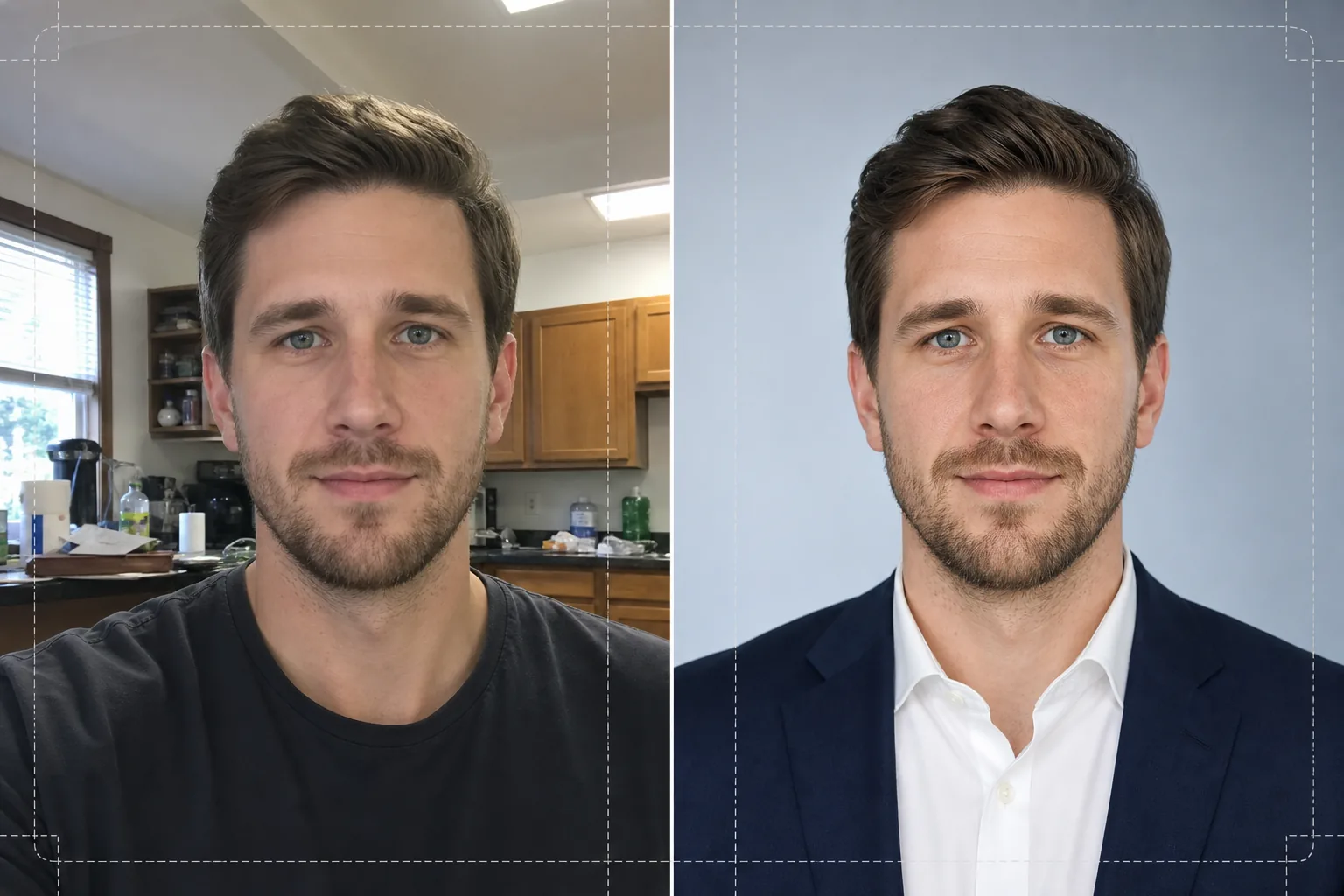
Qué hace esta plantilla
Transforma selfies, fotos rápidas de móvil y retratos informales en fotos pulidas, adecuadas para currículums y perfiles profesionales. Background Eraser recorta tu cabeza y tus hombros de cualquier entorno — cocina, parque, cubículo de oficina — y los reemplaza por un fondo blanco sólido, gris claro o un suave degradado azul acorde con las normas corporativas. Luego AI Enhance corrige los desequilibrios de exposición causados por los fluorescentes del techo o la luz dura de una ventana, suaviza la textura de la piel conservando el detalle natural de los poros y enfoca los ojos para que la atención del espectador se dirija a tu rostro. El resultado es un retrato con iluminación uniforme y sin distracciones que se imprime con nitidez a 2x2 pulgadas en un currículum o se muestra claramente como un avatar de 400x400 en los portales de empleo.
Ajustes de la plantilla
| Fondo | Blanco sólido, gris claro (#F0F0F0) o suave degradado azul |
| Retoque de la piel | Suavizado natural (reduce imperfecciones, conserva la textura de los poros) |
| Corrección de iluminación | Luz frontal uniforme con un sutil brillo en los ojos |
| Relación de recorte | Retrato 3:4 (proporción estándar de una foto de currículum) |
| Resolución de salida | 1200x1600px (se imprime a 300 DPI hasta 4x5.3 pulgadas) |
Cómo usar esta plantilla
Sube tu foto
Sube cualquier foto en la que tu rostro y tus hombros se vean con claridad. Funcionan los selfies, las capturas de webcam y las fotos de grupo recortadas. La plantilla procesa imágenes de cualquier dispositivo y compensa la distorsión de lente habitual en las cámaras frontales de los móviles.
Eliminar y reemplazar el fondo
Background Eraser detecta automáticamente tu cabeza y tus hombros y elimina todo lo que está detrás de ti. Elige un fondo blanco sólido, gris neutro o de degradado azul sutil. La detección de bordes conserva los mechones sueltos y los detalles del cuello para un recorte natural.
Mejorar y retocar
AI Enhance equilibra la iluminación de todo tu rostro, reduciendo las sombras marcadas bajo la barbilla y la nariz. El retoque de la piel elimina imperfecciones temporales y unifica el tono sin crear un aspecto artificial. El enfoque de los ojos añade un sutil brillo que hace que el retrato se vea vivo y atento.
Descargar y usar
Exporta el retrato terminado a 1200x1600px. El archivo está optimizado tanto para impresión (inserción en el currículum a 300 DPI) como para uso digital (fotos de perfil de LinkedIn, Indeed, Glassdoor). Hay formatos JPEG y PNG disponibles — usa PNG si necesitas que el fondo permanezca transparente para diseños personalizados.
Consejos profesionales para mejores resultados
- ✓Usa una foto en la que mires a la cámara con los hombros ligeramente ladeados. Un leve giro de tres cuartos aporta dimensión y se ve más natural que una pose totalmente de frente.
- ✓Evita las fotos con mucha contraluz — estar de pie frente a una ventana brillante deja tu rostro en silueta y limita cuánto detalle puede recuperar la IA en las zonas de sombra.
- ✓Lleva una prenda de color liso que contraste con el fondo que piensas usar. Una camisa blanca sobre un fondo blanco se funde en los hombros y pierde el contorno de tu figura.
Herramientas
Preguntas frecuentes
¿Puedo usar un selfie tomado con mi móvil?
+
Sí. La plantilla corrige la ligera distorsión de barril de las cámaras frontales que hace que las narices parezcan más anchas de lo que son. También gestiona la menor profundidad de campo típica de las cámaras de móvil para que tus orejas y hombros se mantengan nítidos.
¿Se notará el retoque?
+
No. El retoque de la piel conserva la textura natural de los poros y solo elimina imperfecciones temporales como granos y rojeces. El resultado se parece a ti en un buen día con buena luz, no a una foto retocada con aerógrafo.
¿Qué color de fondo debo elegir para un currículum corporativo?
+
El blanco sólido es la opción más segura para los currículums impresos. El gris claro funciona bien para los perfiles que se ven en pantalla, ya que evita el contraste duro del blanco puro en una pantalla retroiluminada. El degradado azul es apropiado para los sectores tecnológico y creativo.
Consigue tu próxima entrevista con un retrato profesional
Sube cualquier foto y obtén en segundos un retrato pulido y listo para la contratación para tu currículum, LinkedIn y portales de empleo.
Pruébalo gratisRelated templates
More business templates for your workflow.
Fotografías polacas del equipo corporativo con fondos consistentes, corrección de iluminación profesional, gradación de color apropiada para la marca y calidad de imagen uniforme en todo el equipo.
Mejore las fotografías de gimnasios y fitness con mejora de la definición muscular, corrección de iluminación dinámica, limpieza de fondo y gradación de colores atléticos de alto contraste.
Mejore las fotografías de portafolios de tatuajes con intensidad de color de tinta, nitidez de detalles de líneas, reducción del enrojecimiento de la piel y fondos limpios para portafolios de artistas e Instagram.
Cree fotografías profesionales de equipos y jugadores individuales con reemplazo de fondo, mejora del color de las camisetas y fondos de estadio o estudio para plantillas y programas.
Cree fotografías promocionales de bandas y músicos profesionales con reemplazo de fondo, mejora espectacular de la iluminación y resultados listos para imprimir para kits de prensa y presentaciones de lugares.
Muestre arte de uñas con mejora de detalles a nivel macro, verdadera precisión de color de gel y esmalte y posicionamiento limpio de las manos para portafolios de Instagram y páginas de reservas.