
Foto de equipo corporativo
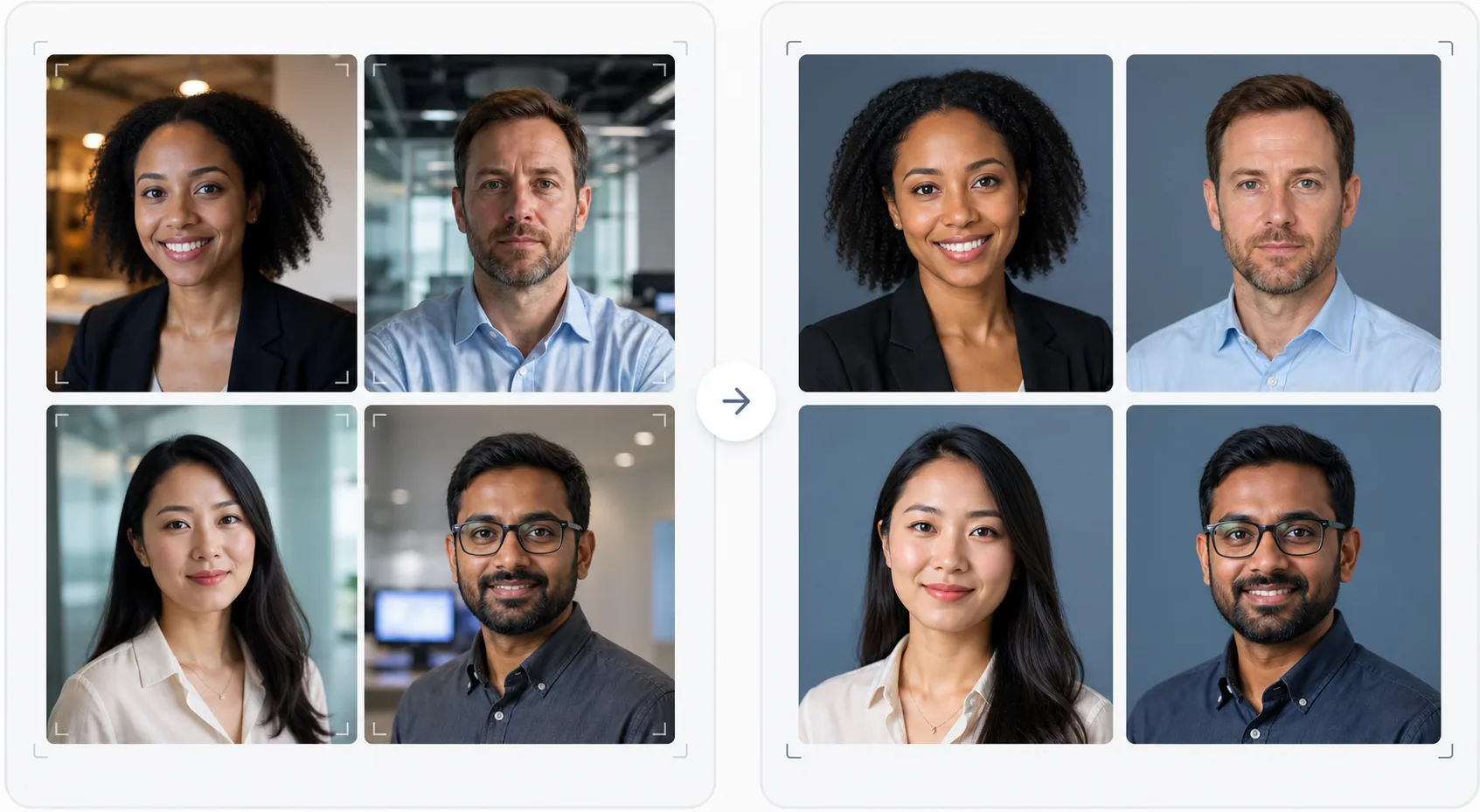
Dale a tu página de equipo un aspecto profesional y uniforme sin un fotógrafo costoso. Esta plantilla estandariza los fondos de los retratos individuales, corrige la iluminación mixta de oficina hacia tonos profesionales neutros, aplica un suavizado sutil de la piel y garantiza que la foto de cada miembro del equipo tenga el mismo estilo y calidad.
Prueba esta plantilla gratisBusiness template preview
Qué hace esta plantilla
Crea fotos de equipo visualmente uniformes para sitios web de empresas, páginas de empresa en LinkedIn y materiales de marketing. Cuando los retratos del equipo se toman en momentos diferentes, por personas diferentes y con cámaras diferentes, el resultado es una página de equipo dispar que parece poco profesional. Esta plantilla lo resuelve estandarizando los fondos, la temperatura de color, el estilo de iluminación y el encuadre en todos los retratos. Background Eraser elimina los variados fondos de oficina y los reemplaza por un fondo sólido o degradado uniforme en el color de tu marca. AI Enhance normaliza la exposición, corrige el tinte verde de las luces fluorescentes de oficina y aplica un suavizado sutil de la piel para que cada miembro del equipo luzca pulido y profesional.
Configuración de la plantilla
| Fondo | Color sólido, degradado o desenfoque de oficina uniforme (configurable según la marca) |
| Encuadre | Cabeza y hombros, centrado, uniforme en todas las fotos del equipo |
| Normalización de iluminación | Profesional neutro (corrige la mezcla de fluorescente, LED y luz de ventana) |
| Mejora de la piel | Reducción sutil de imperfecciones y corrección de ojeras |
| Dimensiones de salida | 800 × 800 px (página de equipo web) y 400 × 400 px (directorio) |
Cómo usar esta plantilla
Sube las fotos de los miembros del equipo
Sube los retratos de los miembros del equipo: pueden ser de cámaras, lugares y períodos diferentes. La plantilla gestiona todo, desde retratos profesionales hasta selfies de smartphone tomados en un escritorio. Sube todo el equipo por lotes para un procesamiento eficiente.
Estandariza los fondos
Background Eraser elimina el fondo original de cada foto y lo reemplaza por una opción uniforme para todos los miembros del equipo. Elige entre colores sólidos de marca, degradados profesionales o un efecto de desenfoque de oficina estandarizado. Todas las fotos reciben el mismo tratamiento de fondo para lograr uniformidad visual.
Normaliza la iluminación y mejora
AI Enhance corrige la iluminación de cada foto hacia un tono profesional neutro y uniforme. Los tintes verdes fluorescentes, los tintes cálidos incandescentes y la iluminación mixta se corrigen todos. El suavizado sutil de la piel reduce las imperfecciones y las ojeras. Los ojos se iluminan suavemente para crear una apariencia atractiva y cercana.
Exporta para web y directorio
Descarga el conjunto completo en 800 × 800 px para las páginas de equipo del sitio web y en 400 × 400 px para directorios internos y firmas de correo electrónico. Todas las imágenes se exportan con el mismo perfil de color, compresión y convención de nomenclatura de archivos para facilitar la subida por lotes a tu CMS.
Consejos profesionales para mejores resultados
- ✓Envía a los miembros del equipo un briefing fotográfico sencillo: mirar directamente a la cámara, llevar una prenda superior de color sólido que contraste con el fondo, asegurar buena iluminación en el rostro (mirar hacia una ventana si es posible) y mantener una expresión natural con una ligera sonrisa. Mejores fotos de origen requieren menos corrección con IA.
- ✓Elige un color de fondo que aparezca en las directrices de tu marca: normalmente un gris neutro, azul marino o el color secundario de tu marca. Esto convierte la página de equipo en un activo de marca en lugar de una simple colección de fotos.
- ✓Procesa a los nuevos miembros del equipo a través de la plantilla cuando se incorporen, usando la misma configuración. Esto mantiene la uniformidad visual a lo largo del tiempo, incluso a medida que el equipo crece y cambia.
- ✓Para la alta dirección y los líderes, considera un encuadre ligeramente diferente (recorte más cerrado, tono algo más cálido) para diferenciar visualmente al liderazgo del resto del equipo, manteniendo el mismo fondo y estilo.
Herramientas
Preguntas frecuentes
¿Puedo procesar todo el equipo a la vez?
+
Sí. Sube todas las fotos de los miembros del equipo en un solo lote. La plantilla aplica el mismo fondo, corrección de iluminación y encuadre a cada imagen, garantizando una uniformidad perfecta. Las fotos se devuelven con dimensiones, compresión y perfiles de color coincidentes.
¿Qué pasa si los miembros del equipo tienen una calidad de foto muy distinta?
+
La plantilla normaliza las diferencias de calidad entre los selfies de smartphone y los retratos con réflex DSLR ajustando la nitidez, la reducción de ruido y la compresión. Aunque una fuente DSLR siempre producirá un resultado algo más nítido, las salidas procesadas son lo suficientemente uniformes a nivel visual como para que las diferencias de calidad no resulten evidentes en una cuadrícula de un sitio web.
¿Funciona esto para equipos remotos?
+
Este es el caso de uso ideal para equipos remotos en los que una sesión de fotos presencial no es práctica. Cada miembro del equipo se hace un selfie o pide que le tomen la foto en casa, y la plantilla las estandariza todas para que parezcan tomadas en la misma sesión de estudio.
Una página de equipo profesional sin sesión de fotos
Sube retratos individuales de cualquier fuente y obtén un conjunto de fotos de equipo visualmente uniforme y alineado con tu marca, listo para tu sitio web.
Pruébalo gratisRelated templates
More business templates for your workflow.
Mejore las fotografías de gimnasios y fitness con mejora de la definición muscular, corrección de iluminación dinámica, limpieza de fondo y gradación de colores atléticos de alto contraste.
Mejore las fotografías de portafolios de tatuajes con intensidad de color de tinta, nitidez de detalles de líneas, reducción del enrojecimiento de la piel y fondos limpios para portafolios de artistas e Instagram.
Cree una foto de cabeza de currículum pulida con reemplazo de fondo, suavizado de piel y corrección de iluminación. Ideal para CV, portales de empleo y directorios corporativos.
Cree fotografías profesionales de equipos y jugadores individuales con reemplazo de fondo, mejora del color de las camisetas y fondos de estadio o estudio para plantillas y programas.
Cree fotografías promocionales de bandas y músicos profesionales con reemplazo de fondo, mejora espectacular de la iluminación y resultados listos para imprimir para kits de prensa y presentaciones de lugares.
Muestre arte de uñas con mejora de detalles a nivel macro, verdadera precisión de color de gel y esmalte y posicionamiento limpio de las manos para portafolios de Instagram y páginas de reservas.