
Retoque de piel natural
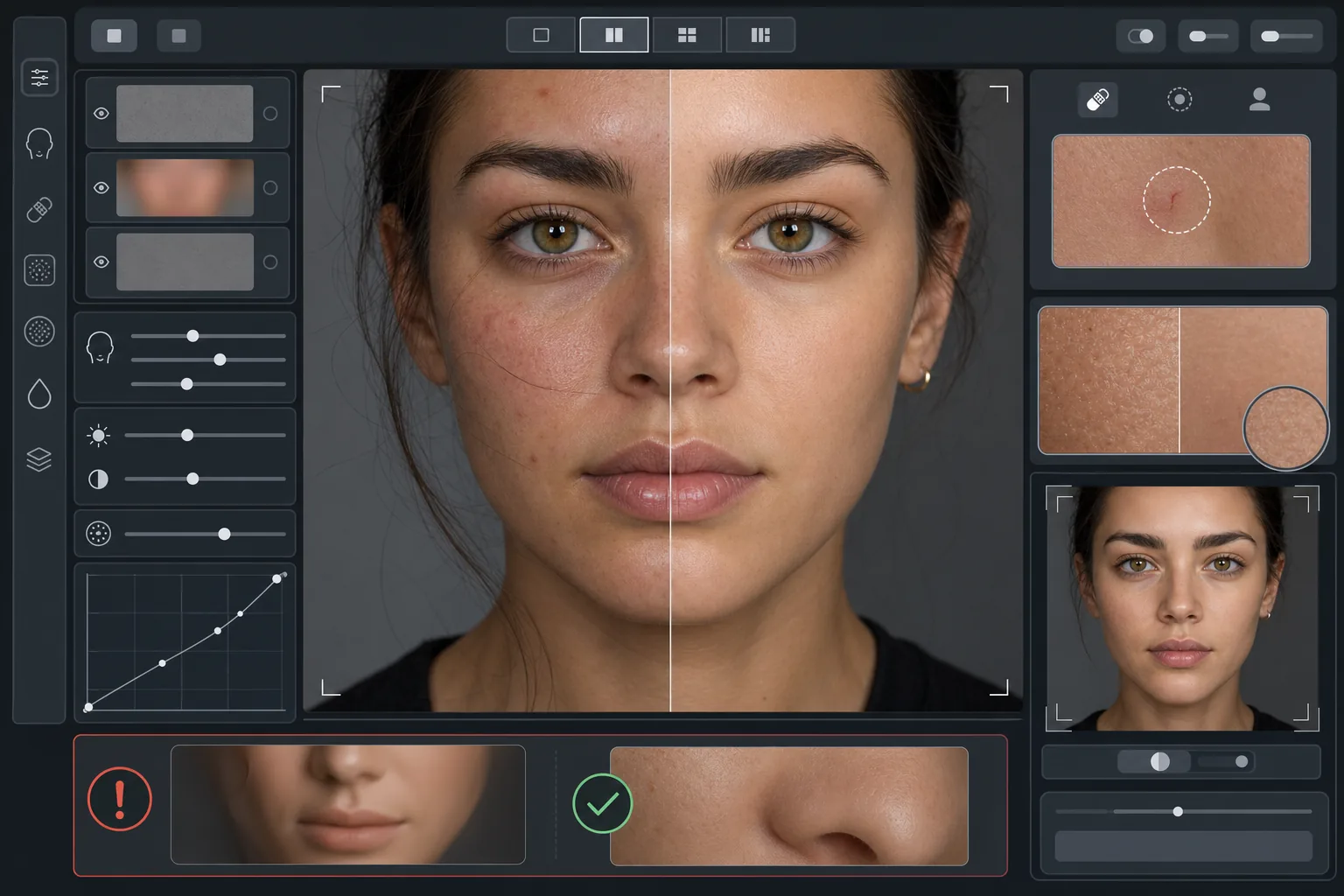
Mejora tus retratos sin el aspecto plástico. Esta plantilla elimina las imperfecciones temporales, uniforma el tono de la piel y suaviza las irregularidades de iluminación, conservando deliberadamente los poros, las líneas finas y la textura natural que hacen que la piel parezca real. El resultado es un retrato en el que la persona luce su mejor versión en su mejor día, no un maniquí generado por IA.
Prueba esta plantilla gratisPortrait template preview
Qué hace esta plantilla
Aplica un retoque de piel por frecuencias que separa la textura del tono. AI Enhance elimina las imperfecciones temporales (granos, rojeces, ojeras) mientras conserva la fina textura de la piel —poros, vello suave y variación natural— que el ojo percibe como auténtica. Magic Eraser se encarga de la eliminación puntual cuando la mejora con IA resulta demasiado amplia, como borrar un solo arañazo o una picadura de insecto sin afectar a la piel circundante. El efecto general es una piel uniforme y de aspecto saludable que supera la prueba del zoom.
Configuración de la plantilla
| Intensidad de retoque | Natural — apunta a las imperfecciones y las rojeces, conserva la textura |
| Conservación de poros | Total — mantiene toda la textura natural de la piel a nivel de píxel |
| Uniformidad del tono | Moderada — reduce las manchas y las rojeces sin aplanar la variación de color |
| Corrección de ojeras | Sutil — aclara las ojeras sin eliminar la sombra natural |
| Suavizado de iluminación | Rellena las sombras duras y reduce los reflejos por flash directo |
| Resolución de salida | Coincide con la entrada (conserva todo el detalle para recorte y zoom) |
Cómo usar esta plantilla
Sube una foto de retrato
Usa un retrato bien iluminado con el rostro enfocado con nitidez. La plantilla funciona mejor cuando la textura natural de la piel es visible en el original: las imágenes con enfoque suave o muy comprimidas ofrecen menos textura que la IA pueda conservar.
Aplica el retoque natural
AI Enhance identifica las imperfecciones temporales, las rojeces desiguales y las irregularidades de tono y las corrige manteniendo intacta la textura de la piel subyacente. Los poros, las líneas finas y la variación de color natural siguen siendo visibles: solo cambian las imperfecciones.
Corrige zonas específicas
Usa Magic Eraser para cualquier marca individual restante que quieras eliminar: un arañazo que cicatriza, un sarpullido temporal o un cabello suelto sobre el rostro. Cada eliminación se funde con la textura natural de la piel que la rodea.
Revisa con el zoom máximo y exporta
Amplía al 100 % para verificar que la textura de la piel está intacta: los poros deben verse visibles y naturales. Si alguna zona parece demasiado lisa, reduce la intensidad del retoque y vuelve a procesar. Exporta a resolución completa para conservar el detalle natural.
Consejos profesionales para mejores resultados
- ✓Empieza con la intensidad de retoque más baja y auméntala solo si es necesario: es más fácil añadir suavizado que recuperar una textura que ya se ha eliminado en el procesado.
- ✓Para personas con acné o rosácea, la plantilla elimina las imperfecciones individuales sin alterar el tono de piel subyacente: el resultado parece un día de piel limpia, no una persona distinta.
- ✓Evita combinar esta plantilla con los filtros de belleza de la cámara del teléfono: el suavizado integrado de muchas cámaras de móvil ya reduce la textura, y el doble procesado crea el aspecto plástico que esta plantilla busca evitar.
- ✓Fotografía en formato RAW si es posible y convierte a JPEG antes de subir: el RAW captura más datos de textura de la piel que la IA puede conservar durante el retoque.
Herramientas
Preguntas frecuentes
¿En qué se diferencia esto de los filtros de belleza que suavizan la piel?
+
Los filtros de belleza aplican un desenfoque uniforme que borra los poros, las líneas finas y la textura natural, creando ese inconfundible aspecto plástico. Esta plantilla usa un procesado por frecuencias que separa la textura del tono, eliminando las imperfecciones de la capa de tono y dejando intacta la capa de textura. El resultado parece piel real, no una superficie renderizada.
¿Esto cambia la forma de los rasgos faciales?
+
No. La plantilla solo afecta a la apariencia superficial de la piel: tono, imperfecciones y uniformidad de la iluminación. Nunca remodela la nariz, la mandíbula, los ojos ni ninguna estructura facial. La persona se ve exactamente como es, solo con una piel más limpia e iluminada de forma más uniforme.
¿Puedo usar esto para retratos profesionales y trabajo de portafolio?
+
Sí. El estándar de retoque natural cumple con las expectativas profesionales de retratos corporativos, portafolios de actuación, perfiles de citas y redes sociales donde la autenticidad importa. La persona se verá como en su foto en persona, que es precisamente el objetivo del retoque natural.
Mejor piel, sigues siendo tú
Sube un retrato y obtén en segundos un retoque de piel natural que conserva la textura. Sin aspecto plástico, sin suavizados inquietantes: solo tú en tu mejor día.
Pruébalo gratisRelated templates
More portrait templates for your workflow.
Plantilla de retoque de retratos escolares apropiada para la edad. Eliminación natural de imperfecciones, fondos consistentes y producción estándar de anuario con procesamiento por lotes para clases enteras.
Plantilla de retrato de mascota con calidad de estudio. Maneja los bordes del pelaje, quita correas y adiestradores, reemplaza fondos y agudiza los ojos de perros, gatos y otros animales.
Mejore las fotografías de recién nacidos y bebés con tonos suaves y cálidos, suave suavidad de la piel, eliminación de objetos y distracciones, y tamaños listos para imprimir para anuncios y arte mural.
Retoque fotografías de maternidad con un suave suavizado de la piel, iluminación suave, simplificación del fondo y gradación de colores cálidos para lograr un retrato de embarazo atemporal.
Limpie los retratos familiares eliminando las distracciones del fondo, corrigiendo la exposición desigual, suavizando la piel de forma natural y asegurándose de que todos luzcan lo mejor posible en el mismo encuadre.