
Retoque de retratos escolares
Dale a cada estudiante un retrato con el que se sienta a gusto, manteniendo un aspecto natural y apropiado para su edad. Esta plantilla resuelve los problemas habituales de la fotografía escolar — imperfecciones temporales, iluminación desigual a lo largo de una sesión y fondos inconsistentes — y produce imágenes listas para el anuario, con una calidad profesional uniforme para cada estudiante de la clase.
Prueba esta plantilla gratisPortrait template preview
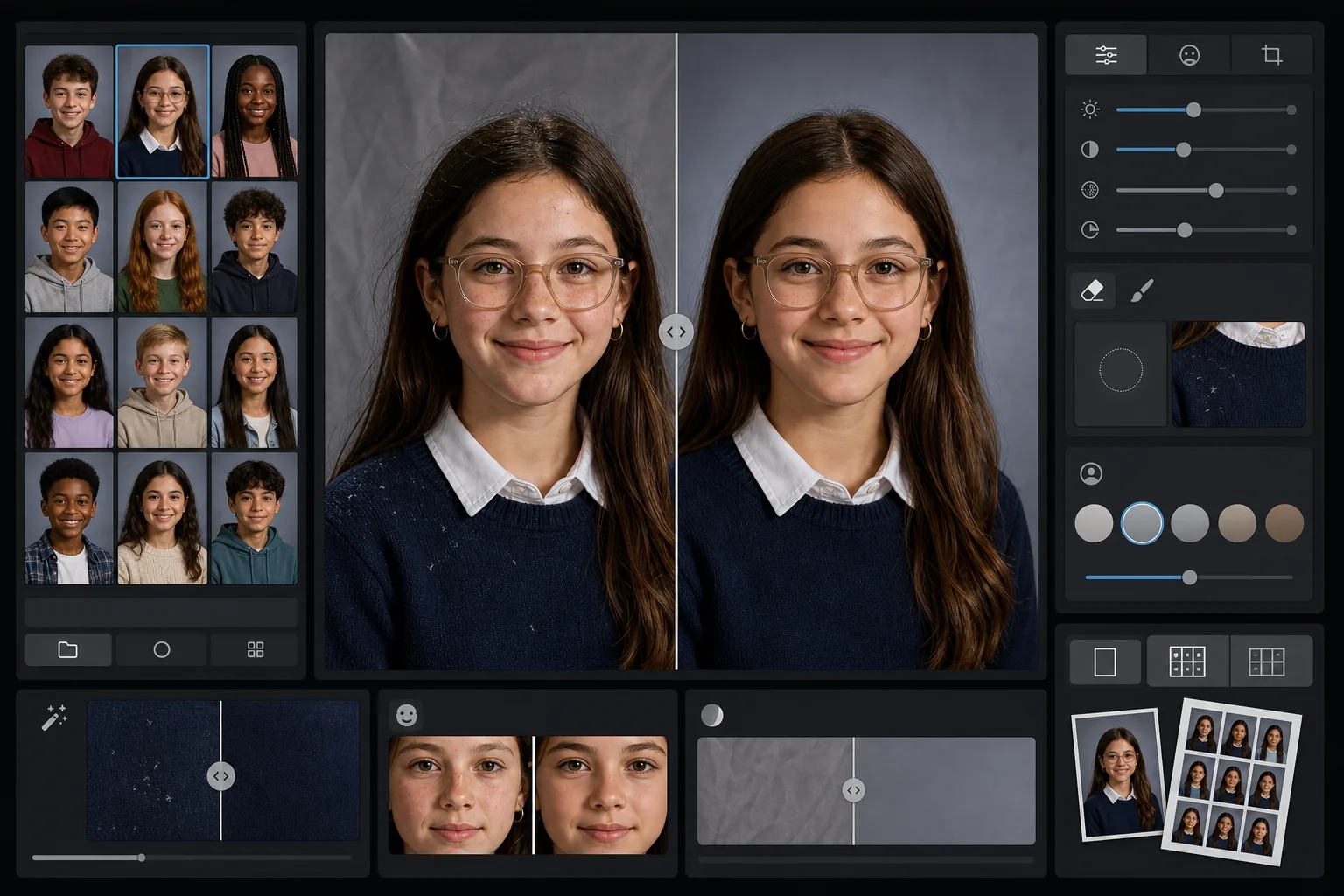
Qué hace esta plantilla
Aplica a los retratos escolares un retoque suave y apropiado para la edad que difumina las imperfecciones temporales conservando la apariencia natural de cada estudiante. AI Enhance corrige la exposición desigual y los cambios de color que se producen al fotografiar a decenas de estudiantes con la misma configuración de iluminación a lo largo de una sesión. Magic Eraser elimina los cabellos sueltos sobre la ropa, los bordes de cuello torcidos y las arrugas del fondo en los telones portátiles.
Configuración de la plantilla
| Nivel de retoque | Ligero — elimina solo las imperfecciones temporales, conserva las pecas y los rasgos naturales |
| Tamaño de salida | 1200×1500px (retrato estándar 4:5, 300 DPI en tamaño cartera) |
| Normalización del fondo | Iguala el tono del telón en todas las imágenes de un lote |
| Corrección de exposición | Automática — compensa las variaciones de iluminación a lo largo de una sesión de fotos |
| Consistencia del color | Balance de blancos uniforme en todos los retratos procesados |
| Limpieza de detalles sueltos | Elimina cabellos volados en los hombros, pelusa y arrugas del telón |
Cómo usar esta plantilla
Sube los retratos de la clase
Sube un solo retrato o todo un lote de la clase. La plantilla gestiona imágenes individuales o grupos, aplicando el mismo estándar de retoque a todas las fotos para lograr una sección de anuario coherente.
Aplica un retoque apropiado para la edad
AI Enhance difumina suavemente las imperfecciones temporales como un grano o un rasguño manteniendo a cada estudiante con su propio aspecto. Las pecas, los lunares, los aparatos de ortodoncia y las gafas siempre se conservan: el objetivo es una versión pulida de su apariencia real.
Normaliza la exposición y el fondo
Las condiciones de iluminación cambian a lo largo de una sesión de retratos a medida que la configuración se desplaza. La plantilla corrige la exposición y el balance de blancos para que cada estudiante aparezca iluminado de forma uniforme, y el tono del telón coincide en todo el lote.
Limpia y exporta
Magic Eraser elimina las pequeñas distracciones: una pelusa en un suéter oscuro, un cabello suelto sobre la frente, una arruga en el telón portátil. Exporta a la resolución estándar de anuario para impresión o en JPEG de menor resolución para la galería en línea de la escuela.
Consejos de experto para obtener los mejores resultados
- ✓Procesa todo el lote de la clase junto en lugar de uno a uno: la plantilla usa el grupo para calibrar una exposición y un color consistentes en todos los retratos.
- ✓Para los estudiantes que usan gafas, la foto original debe mostrar al estudiante inclinando ligeramente la barbilla hacia abajo para minimizar los reflejos: la mejora con IA funciona mejor cuando los ojos son visibles detrás de los cristales.
- ✓Ejecuta un lote de prueba de 5 a 10 retratos antes de procesar toda una escuela para confirmar que el nivel de retoque cumple con los estándares de tu comité de anuario.
- ✓Conserva los archivos originales sin retocar junto a las versiones procesadas: algunos padres prefieren la foto completamente sin editar para uso personal.
Herramientas
Preguntas frecuentes
¿El retoque es apropiado para niños y adolescentes?
+
Sí. La plantilla está diseñada específicamente para sujetos en edad escolar. Solo elimina imperfecciones temporales, como un grano el día de la foto: nunca remodela los rasgos, cambia el tono de piel ni aplica el tipo de suavizado usado en el retoque de belleza para adultos. Cada estudiante se ve como es.
¿Puedo procesar una clase o una escuela entera a la vez?
+
Sí. Sube hasta cientos de retratos en un solo lote. La plantilla aplica estándares de retoque idénticos y normaliza la exposición, el color y la consistencia del fondo en cada imagen para que la sección del anuario se vea uniforme.
¿Esto eliminará los aparatos de ortodoncia, las gafas o los audífonos?
+
No. La plantilla está diseñada para conservar todos los rasgos permanentes y semipermanentes, incluidos los aparatos de ortodoncia, las gafas, los audífonos y los dispositivos médicos. Solo aborda las imperfecciones superficiales temporales y las distracciones del entorno como la pelusa y las arrugas del telón.
Entrega retratos listos para el anuario en minutos
Sube los retratos escolares de forma individual o por clase y obtén imágenes consistentes, retocadas con naturalidad y listas para imprimir. Cada estudiante luce lo mejor posible.
Pruébalo gratisRelated templates
More portrait templates for your workflow.
Plantilla de retrato de mascota con calidad de estudio. Maneja los bordes del pelaje, quita correas y adiestradores, reemplaza fondos y agudiza los ojos de perros, gatos y otros animales.
Plantilla de retoque de piel natural que elimina las imperfecciones conservando los poros y la textura. Iluminación uniforme, sin aspecto plástico, solo una mejor piel ante la cámara.
Mejore las fotografías de recién nacidos y bebés con tonos suaves y cálidos, suave suavidad de la piel, eliminación de objetos y distracciones, y tamaños listos para imprimir para anuncios y arte mural.
Retoque fotografías de maternidad con un suave suavizado de la piel, iluminación suave, simplificación del fondo y gradación de colores cálidos para lograr un retrato de embarazo atemporal.
Limpie los retratos familiares eliminando las distracciones del fondo, corrigiendo la exposición desigual, suavizando la piel de forma natural y asegurándose de que todos luzcan lo mejor posible en el mismo encuadre.