
Limpieza de retrato familiar
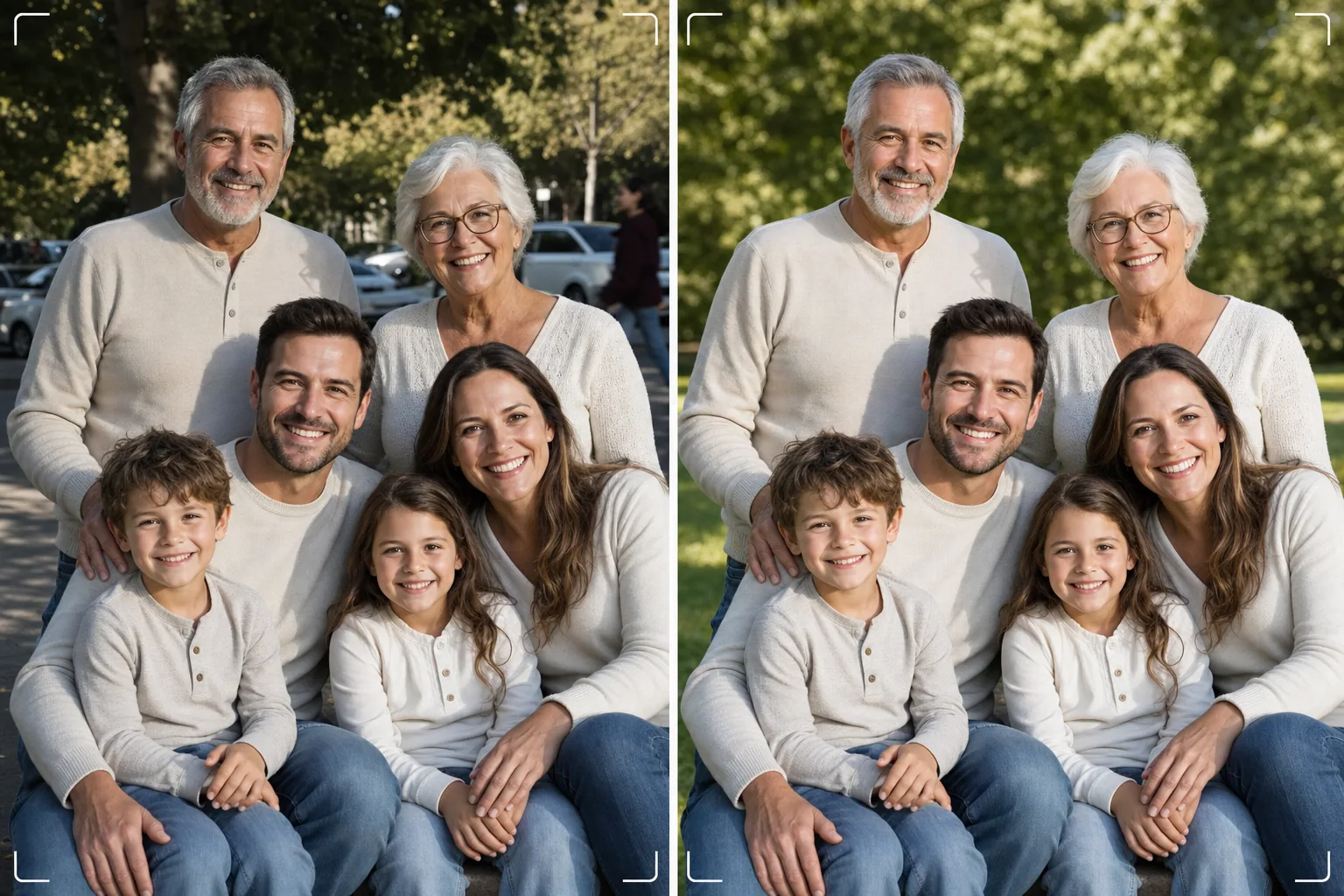
Consigue la foto familiar perfecta sin necesidad de cien tomas. Esta plantilla elimina las distracciones del fondo, corrige la iluminación desigual en todo el grupo, reduce las imperfecciones de forma natural en cada rostro y limpia los pequeños defectos que impiden que una buena foto de grupo se convierta en una excelente.
Prueba esta plantilla gratisPortrait template preview
Qué hace esta plantilla
Resuelve el problema universal de las fotos familiares: lograr que todos luzcan estupendos en un solo encuadre. Magic Eraser elimina a los intrusos, los botes de basura, los letreros de salida, los cables eléctricos, los autos estacionados y otras distracciones que arruinan composiciones de grupo que de otro modo serían buenas. AI Enhance corrige la iluminación desigual que ocurre cuando algunos familiares están a la sombra mientras otros están bajo el sol directo, llevando a todos a una exposición uniforme y favorecedora. El suavizado natural de la piel reduce imperfecciones, ojeras y rojeces en cada rostro sin que nadie parezca retocado artificialmente. El resultado es el retrato familiar que imaginaste cuando reuniste a todos.
Ajustes de la plantilla
| Limpieza del fondo | Detecta y elimina automáticamente las distracciones (personas, letreros, objetos) |
| Equilibrio de exposición | Iluminación uniforme en todos los sujetos (relleno de sombras + recuperación de altas luces) |
| Mejora de la piel | Reducción natural de imperfecciones rostro por rostro (conserva los rasgos únicos) |
| Corrección de color | Balance de blancos unificado en fotos de grupo con iluminación mixta |
| Enfoque | Enfoque consciente del rostro (prioriza los ojos y las sonrisas) |
| Resolución de salida | 6000px en el lado largo (impresión de pared a 300 DPI hasta 20×13 pulgadas) |
Cómo usar esta plantilla
Sube la foto familiar
Sube la foto de grupo tomada en una reunión familiar, una fiesta, un reencuentro o una sesión de retratos. La plantilla maneja grupos de dos a treinta personas. Para obtener los mejores resultados, elige el encuadre en el que la mayoría de los rostros miran a la cámara con expresiones agradables: la plantilla corrige el fondo y la iluminación, pero no puede cambiar las expresiones faciales ni los ojos cerrados.
Elimina las distracciones del fondo
Magic Eraser identifica y elimina a desconocidos, letreros que distraen, basura, vehículos y otros elementos no deseados detrás del grupo familiar. La IA reconstruye el fondo de forma natural, rellenando césped, cielo, paredes o suelo detrás de los objetos eliminados.
Equilibra la iluminación y mejora los rostros
AI Enhance corrige las diferencias de exposición entre los familiares: se acabó que la mitad del grupo esté a la sombra y la otra mitad entrecerrando los ojos bajo el sol. Cada rostro recibe una reducción individual de imperfecciones y una sutil iluminación de los ojos, conservando los rasgos únicos y la apariencia natural de cada persona.
Exporta para imprimir o compartir
Descarga a 6000px en el lado largo para grandes impresiones de pared, o a 2000px para redes sociales y tarjetas digitales de felicitación. La plantilla exporta en sRGB para visualización en pantalla o en Adobe RGB para impresión profesional. Hay varias proporciones de recorte (4:5, 5:7, 8:10) disponibles para los tamaños de marco comunes.
Consejos de experto para mejores resultados
- ✓Toma de tres a cinco fotos en sucesión rápida. Elige aquella en la que la mayoría de las personas tengan los ojos abiertos y una expresión natural: la plantilla se encarga de todo lo demás, pero las expresiones y el estado de los ojos abiertos no se pueden cambiar después.
- ✓Coloca a la familia en sombra abierta (bajo la copa de un árbol o en el lado sombreado de un edificio) en lugar de en una mezcla de sol y sombra. Esto le da a la plantilla un punto de partida con iluminación uniforme que produce la mejora más natural.
- ✓Para grupos grandes (diez o más), coloca a las personas en filas escalonadas con los más altos atrás. Esta superposición natural crea profundidad y garantiza que cada rostro sea visible. La plantilla puede aclarar los rostros de las filas traseras que están un poco más oscuros debido a la distancia de la fuente de luz.
Herramientas
Preguntas frecuentes
¿Puede esto corregir ojos cerrados o malas expresiones?
+
No. La plantilla mejora la iluminación, elimina distracciones y suaviza la piel, pero no puede cambiar las expresiones faciales, abrir ojos cerrados ni reposicionar a las personas. Elige el encuadre con la mejor expresión antes de subirlo: la plantilla hará que ese encuadre luzca lo mejor posible.
¿Y los grupos grandes de reencuentros?
+
La plantilla maneja grupos de hasta unas treinta personas. En grupos muy grandes, la mejora individual de los rostros se vuelve más sutil debido al menor tamaño de los rostros en el encuadre, pero la limpieza del fondo y la corrección de la iluminación son plenamente eficaces en cualquier tamaño de grupo.
¿Puedo eliminar a una persona de la foto familiar?
+
Sí, Magic Eraser puede eliminar a personas específicas del grupo. Selecciona a la persona que deseas eliminar y la IA reconstruirá el fondo detrás de ella. Esto funciona mejor cuando la persona está en el borde del grupo en lugar de en el centro entre otras.
El retrato familiar perfecto está a una limpieza de distancia
Sube tus fotos de grupo y obtén retratos familiares limpios, uniformemente iluminados y mejorados de forma natural, listos para colgar en la pared.
Pruébalo gratisRelated templates
More portrait templates for your workflow.
Plantilla de retoque de retratos escolares apropiada para la edad. Eliminación natural de imperfecciones, fondos consistentes y producción estándar de anuario con procesamiento por lotes para clases enteras.
Plantilla de retrato de mascota con calidad de estudio. Maneja los bordes del pelaje, quita correas y adiestradores, reemplaza fondos y agudiza los ojos de perros, gatos y otros animales.
Plantilla de retoque de piel natural que elimina las imperfecciones conservando los poros y la textura. Iluminación uniforme, sin aspecto plástico, solo una mejor piel ante la cámara.
Mejore las fotografías de recién nacidos y bebés con tonos suaves y cálidos, suave suavidad de la piel, eliminación de objetos y distracciones, y tamaños listos para imprimir para anuncios y arte mural.
Retoque fotografías de maternidad con un suave suavizado de la piel, iluminación suave, simplificación del fondo y gradación de colores cálidos para lograr un retrato de embarazo atemporal.