
Foto para recaudación de fondos sin fines de lucro
Convierta las instantáneas de eventos y las fotos de documentación de programas en imágenes convincentes para llamamientos a donantes, informes anuales y solicitudes de subvenciones. Esta plantilla corrige la difícil iluminación de salones de banquetes, eventos al aire libre y sitios de programas, elimina el desorden visual y aplica una gradación de color cálida que transmite la energía y el impacto del trabajo de su organización.
Pruebe esta plantilla gratisBusiness template preview
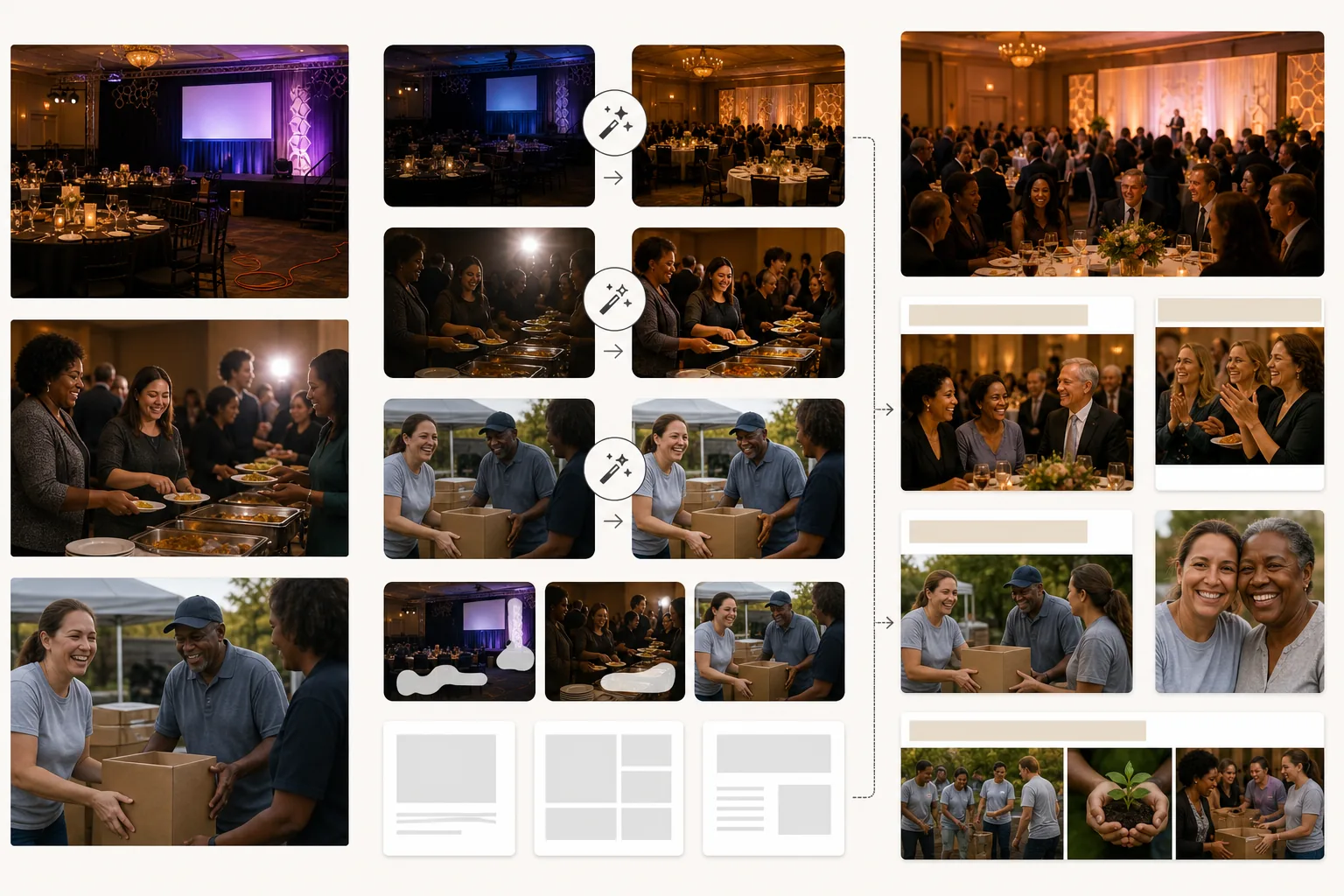
Qué hace esta plantilla
Eleva la calidad visual de las comunicaciones de organizaciones sin fines de lucro sin necesidad de un presupuesto de fotografía profesional. La mayoría de las fotos de organizaciones sin fines de lucro las toman voluntarios o personal con teléfonos personales en entornos difíciles: salones de banquetes con poca luz, eventos al aire libre concurridos, sitios de programas abarrotados. AI Enhance corrige la subexposición, normaliza la iluminación mixta de candelabros, focos de escenario y velas de mesa, y recupera el detalle de los rostros que se pierden en la sombra o quedan sobreexpuestos por el flash de la cámara. Magic Eraser elimina las distracciones que socavan la calidad profesional de los materiales de recaudación de fondos: cables y alargadores visibles en las galas, basura y platos de papel en eventos al aire libre, equipos de construcción en sitios de obra, y la señalización de marca de patrocinadores corporativos que no debería aparecer en ciertas comunicaciones. La gradación de color cálida transmite conexión humana e impacto positivo, lo que, según las investigaciones sobre comunicación sin fines de lucro, impulsa la respuesta de los donantes.
Configuración de la plantilla
| Corrección de iluminación | Preajustes para salón de banquetes, evento al aire libre y sitio de programa en interiores |
| Corrección de flash | Reduce los puntos calientes intensos del flash y los ojos rojos conservando la calidez ambiental |
| Limpieza de fondo | Elimina cables, señalización temporal y desorden del evento |
| Gradación de color | Comunidad cálida (resalta la conexión humana y la energía positiva) |
| Resolución de salida | 3000×2000px (3:2 para informes anuales, boletines y web) |
Cómo usar esta plantilla
Suba fotos de eventos o programas
Suba fotos de galas de recaudación de fondos, eventos de voluntariado, actividades de programas, actividades comunitarias y cualquier actividad organizacional. Las fotos de teléfono, las instantáneas de cámaras compactas y las imágenes de réflex digitales funcionan todas. La plantilla maneja la amplia gama de condiciones de iluminación que encuentran las organizaciones sin fines de lucro.
Corrija la iluminación y la exposición
AI Enhance aclara las fotos subexpuestas de salones de banquetes y eventos nocturnos, corrige las dominantes de color mixtas de candelabros e iluminación de escenario y reduce los artefactos intensos del flash. Los rostros entre la multitud que estaban demasiado oscuros o demasiado brillantes se equilibran para lograr una apariencia natural y cálida.
Elimine las distracciones
Magic Eraser elimina el desorden visual que socava la calidad profesional de sus comunicaciones: alargadores, equipos de catering, pancartas de patrocinadores (cuando sea inapropiado) y materiales de montaje del evento. La IA reconstruye el suelo, las paredes y el fondo detrás de los elementos eliminados.
Exporte para comunicaciones con donantes
Descargue en 3000×2000px para informes anuales y solicitudes de subvenciones, o en tamaños optimizados para web para campañas de correo electrónico, redes sociales y el sitio web de la organización. La calidad cálida y profesional indica a los donantes que sus contribuciones financian programas bien gestionados.
Consejos de expertos para obtener los mejores resultados
- ✓Capte momentos de interacción genuina: un voluntario y un participante riendo juntos, un donante estrechando la mano de un líder de programa, niños absortos en una actividad. Esos momentos de conexión auténtica son los que conmueven a los donantes, y la mejora con IA hace que brillen incluso cuando se captan en condiciones oscuras e imperfectas.
- ✓Asigne a una persona como fotógrafo en cada evento. Incluso un miembro del personal con un teléfono produce mejores resultados que confiar en instantáneas al azar, porque el encuadre y la sincronización intencionados captan los momentos que cuentan la historia de su organización.
- ✓Procese todas las fotos de un mismo evento con la misma configuración. Una corrección de iluminación y una gradación de color coherentes en un conjunto de fotos crean una historia visual cohesiva para el informe anual o la página de campaña, en lugar de una colección dispar de instantáneas al azar.
Herramientas
Preguntas frecuentes
¿Puedo eliminar logotipos de patrocinadores de las fotos de eventos?
+
Sí. Magic Eraser puede eliminar pancartas de marca, exhibiciones de logotipos y señalización de patrocinadores de las fotos de eventos. Esto resulta útil cuando las fotos de un evento patrocinado se utilizan en contextos en los que destacar a ese patrocinador concreto es inapropiado, como solicitudes de subvenciones a financiadores competidores o el marketing general de la organización.
¿Funciona para eventos de construcción y voluntariado al aire libre?
+
Sí. Los eventos de voluntariado al aire libre (construcción de viviendas, limpieza de parques, huertos comunitarios) tienen sus propios desafíos, como el sol intenso, la sombra mixta y los fondos cargados con materiales de construcción. La plantilla corrige estas condiciones y elimina equipos y materiales que distraen del encuadre.
¿Puedo usar esto para fotos de solicitudes de subvenciones?
+
Por supuesto. Las solicitudes de subvenciones con fotos de programas de calidad profesional demuestran la competencia organizacional y la implementación eficaz del programa. La plantilla produce imágenes que cumplen el estándar visual que los financiadores esperan de las organizaciones consolidadas.
Muestre a los donantes el impacto de cada dólar
Suba fotos de eventos y programas y obtenga imágenes pulidas que refuercen los llamamientos a donantes, los informes anuales y las solicitudes de subvenciones.
Pruébelo gratisRelated templates
More business templates for your workflow.
Fotografías polacas del equipo corporativo con fondos consistentes, corrección de iluminación profesional, gradación de color apropiada para la marca y calidad de imagen uniforme en todo el equipo.
Mejore las fotografías de gimnasios y fitness con mejora de la definición muscular, corrección de iluminación dinámica, limpieza de fondo y gradación de colores atléticos de alto contraste.
Mejore las fotografías de portafolios de tatuajes con intensidad de color de tinta, nitidez de detalles de líneas, reducción del enrojecimiento de la piel y fondos limpios para portafolios de artistas e Instagram.
Cree una foto de cabeza de currículum pulida con reemplazo de fondo, suavizado de piel y corrección de iluminación. Ideal para CV, portales de empleo y directorios corporativos.
Cree fotografías profesionales de equipos y jugadores individuales con reemplazo de fondo, mejora del color de las camisetas y fondos de estadio o estudio para plantillas y programas.
Cree fotografías promocionales de bandas y músicos profesionales con reemplazo de fondo, mejora espectacular de la iluminación y resultados listos para imprimir para kits de prensa y presentaciones de lugares.