
Médico antes y después
Produzca fotografías de antes y después estandarizadas a nivel clínico para consultas de dermatología, cirugía plástica, odontología y medicina estética. Esta plantilla normaliza la iluminación y el color en los pares de comparación, reemplaza los fondos inconsistentes de la sala de examen por fondos clínicos limpios y proporciona herramientas de recorte y censura conscientes de la privacidad, lo que aporta a las imágenes de marketing de su consulta la coherencia y el profesionalismo que generan la confianza del paciente.
Pruebe esta plantilla gratisBusiness template preview
Qué hace esta plantilla
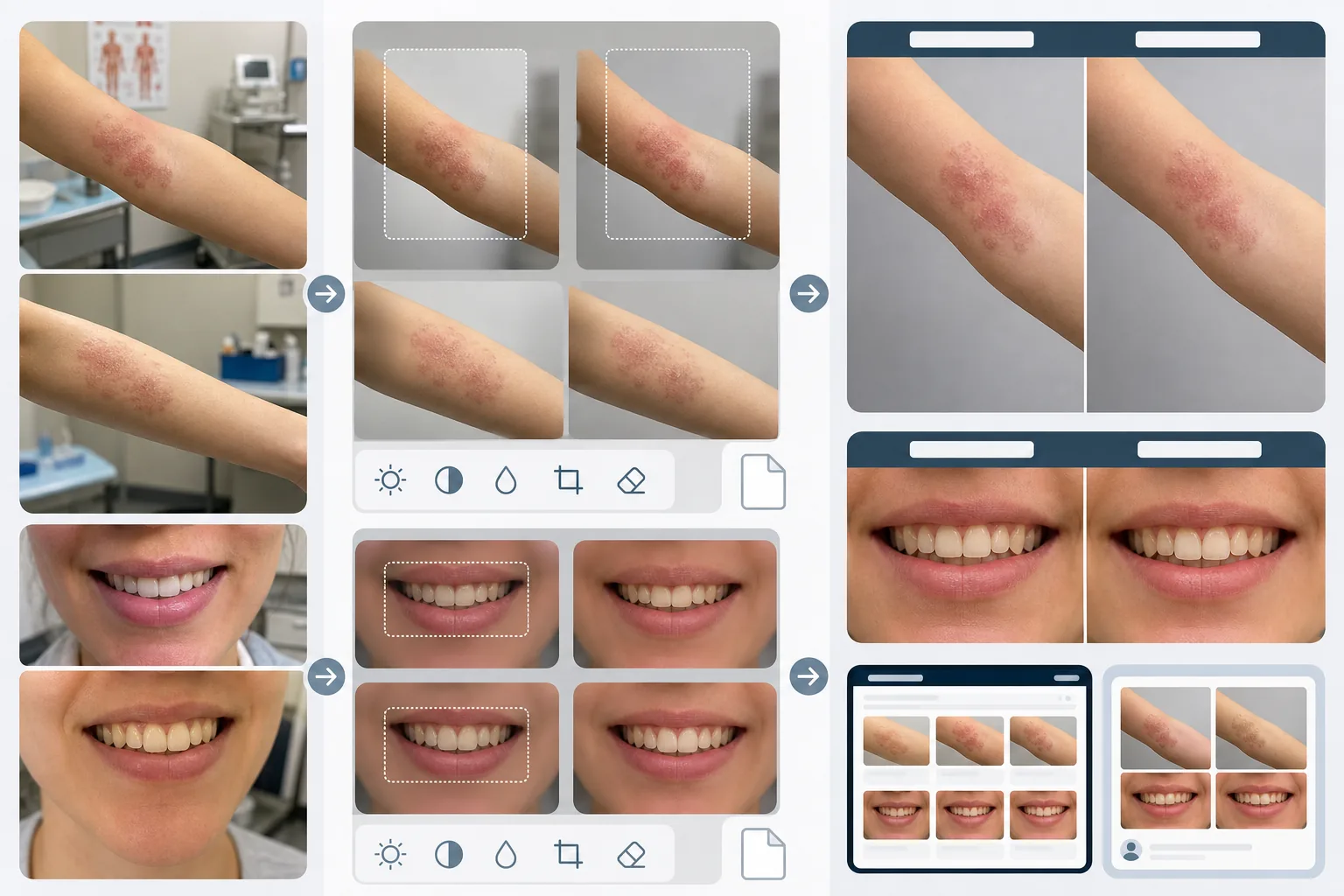
Crea la coherencia visual que hace que las comparaciones médicas de antes y después sean creíbles y convincentes. El mayor problema de la fotografía clínica es que las imágenes de antes y después se toman con semanas o meses de diferencia, en distintas condiciones de iluminación, con distintas cámaras y, a veces, en distintas salas. AI Enhance normaliza la exposición, la temperatura de color y el balance de blancos en ambas imágenes, de modo que cualquier diferencia visible se deba al procedimiento y no a la fotografía. Magic Eraser elimina el desorden de la sala de examen —instrumentos médicos sobre los mostradores, gráficos en las paredes, carros de equipo al fondo— y lo reemplaza por un fondo clínico neutro. Las funciones de privacidad incluyen la detección y censura automáticas de marcas identificativas, la posibilidad de recortar a regiones corporales específicas y la eliminación de metadatos para la protección de los datos del paciente.
Configuración de la plantilla
| Normalización de la iluminación | Igualar la exposición, la temperatura de color y el balance de blancos entre el par de antes/después |
| Fondo | Gris neutro clínico, blanco limpio o campo quirúrgico azul |
| Censura de privacidad | Difuminar automáticamente los rasgos identificativos fuera del área de tratamiento |
| Coherencia de escala | Igualar el encuadre y la ampliación entre las imágenes de antes y después |
| Eliminación de metadatos | Eliminar los datos EXIF de ubicación, dispositivo y marca de tiempo por conciencia de HIPAA |
| Resolución de salida | 2400×1600px por imagen (compuesto lado a lado a 4800×1600px) |
Cómo usar esta plantilla
Suba las fotos de antes y después
Suba la imagen de antes y la imagen de después correspondiente. La plantilla admite fotos tomadas con configuraciones de cámara clínica, teléfonos inteligentes y cámaras compactas. Súbalas como un par para que la IA pueda igualar la configuración de normalización entre ambas imágenes.
Normalice la iluminación y el encuadre
AI Enhance iguala la exposición, la temperatura de color y el balance de blancos entre las dos imágenes. Si el encuadre difiere —más cerrado en una toma, más amplio en la otra— la plantilla ajusta el recorte para que el área de tratamiento esté a la misma escala y posición en ambas imágenes, para una comparación visual justa.
Limpie el fondo y aplique la privacidad
Magic Eraser elimina el desorden de la sala de examen y reemplaza el fondo por un fondo clínico neutro. La censura de privacidad difumina o recorta los rasgos identificativos fuera del área de tratamiento. Se eliminan los metadatos EXIF que contienen ubicación, información del dispositivo y marcas de tiempo.
Exporte para el marketing de la consulta
Descargue imágenes individuales o un compuesto lado a lado con encabezados etiquetados 'Before' y 'After'. Las salidas están dimensionadas para galerías de sitios web, pantallas de salas de consulta y redes sociales. La presentación clínica coherente genera credibilidad ante los pacientes potenciales que exploran su galería de resultados.
Consejos profesionales para obtener los mejores resultados
- ✓Establezca una estación de fotos coherente en su consulta con iluminación fija y un fondo neutro. Aunque la plantilla puede normalizar distintas condiciones de iluminación, partir de una configuración coherente produce la comparación más precisa y reduce el riesgo de artefactos de normalización.
- ✓Use la misma distancia focal y la misma distancia de cámara para las tomas de antes y después. La plantilla ajusta las diferencias de encuadre, pero la distorsión de perspectiva por distintas distancias entre el objetivo y el sujeto puede cambiar sutilmente el aspecto de los rasgos faciales o los contornos corporales, lo que puede socavar la credibilidad de la comparación.
- ✓Obtenga siempre el consentimiento por escrito del paciente para la fotografía de antes y después y su uso previsto antes de procesar las imágenes. La plantilla ofrece funciones de privacidad, pero no reemplaza el requisito legal del consentimiento informado.
Herramientas
Preguntas frecuentes
¿Cumple con HIPAA?
+
La plantilla ofrece funciones conscientes de la privacidad —eliminación de metadatos, censura de rasgos identificativos y recorte al área de tratamiento— que respaldan el cumplimiento de HIPAA. Sin embargo, el cumplimiento de HIPAA es una responsabilidad organizativa. La plantilla es una herramienta, no un programa de cumplimiento. Consulte con su responsable de cumplimiento sobre los requisitos específicos de su consulta.
¿Puedo procesar fotos dentales de antes y después?
+
Sí. La plantilla admite fotos intraorales, primeros planos de la sonrisa y fotografía dental de rostro completo. La normalización de la iluminación es especialmente valiosa para las fotos dentales, donde la imagen de antes suele tomarse bajo la luz de la sala de examen mientras que la de después se toma con un flash anular.
¿Se conservarán con precisión las diferencias de textura de la piel?
+
Sí. La normalización ajusta la iluminación y el color sin suavizar la textura de la piel. Esto es fundamental: las mejoras en la textura de la piel derivadas de los procedimientos dermatológicos deben ser visibles en la comparación. La plantilla, de forma intencionada, no aplica retoque de piel a las imágenes médicas de antes y después.
Genere la confianza del paciente con una fotografía clínica coherente
Suba fotos de antes y después y obtenga imágenes de comparación estandarizadas y conscientes de la privacidad para el marketing de su consulta.
Pruébelo gratisRelated templates
More business templates for your workflow.
Fotografías polacas del equipo corporativo con fondos consistentes, corrección de iluminación profesional, gradación de color apropiada para la marca y calidad de imagen uniforme en todo el equipo.
Mejore las fotografías de gimnasios y fitness con mejora de la definición muscular, corrección de iluminación dinámica, limpieza de fondo y gradación de colores atléticos de alto contraste.
Mejore las fotografías de portafolios de tatuajes con intensidad de color de tinta, nitidez de detalles de líneas, reducción del enrojecimiento de la piel y fondos limpios para portafolios de artistas e Instagram.
Cree una foto de cabeza de currículum pulida con reemplazo de fondo, suavizado de piel y corrección de iluminación. Ideal para CV, portales de empleo y directorios corporativos.
Cree fotografías profesionales de equipos y jugadores individuales con reemplazo de fondo, mejora del color de las camisetas y fondos de estadio o estudio para plantillas y programas.
Cree fotografías promocionales de bandas y músicos profesionales con reemplazo de fondo, mejora espectacular de la iluminación y resultados listos para imprimir para kits de prensa y presentaciones de lugares.