
Quitar cicatrices de fotos
Borre cicatrices quirúrgicas, cicatrices de acné, marcas de lesiones y otras cicatrices visibles de retratos, fotografías de rostros y fotografías corporales. Magic Eraser elimina el tejido cicatricial y reconstruye el tono y la textura naturales de la piel, produciendo un resultado limpio que parece inédito.
Última actualización
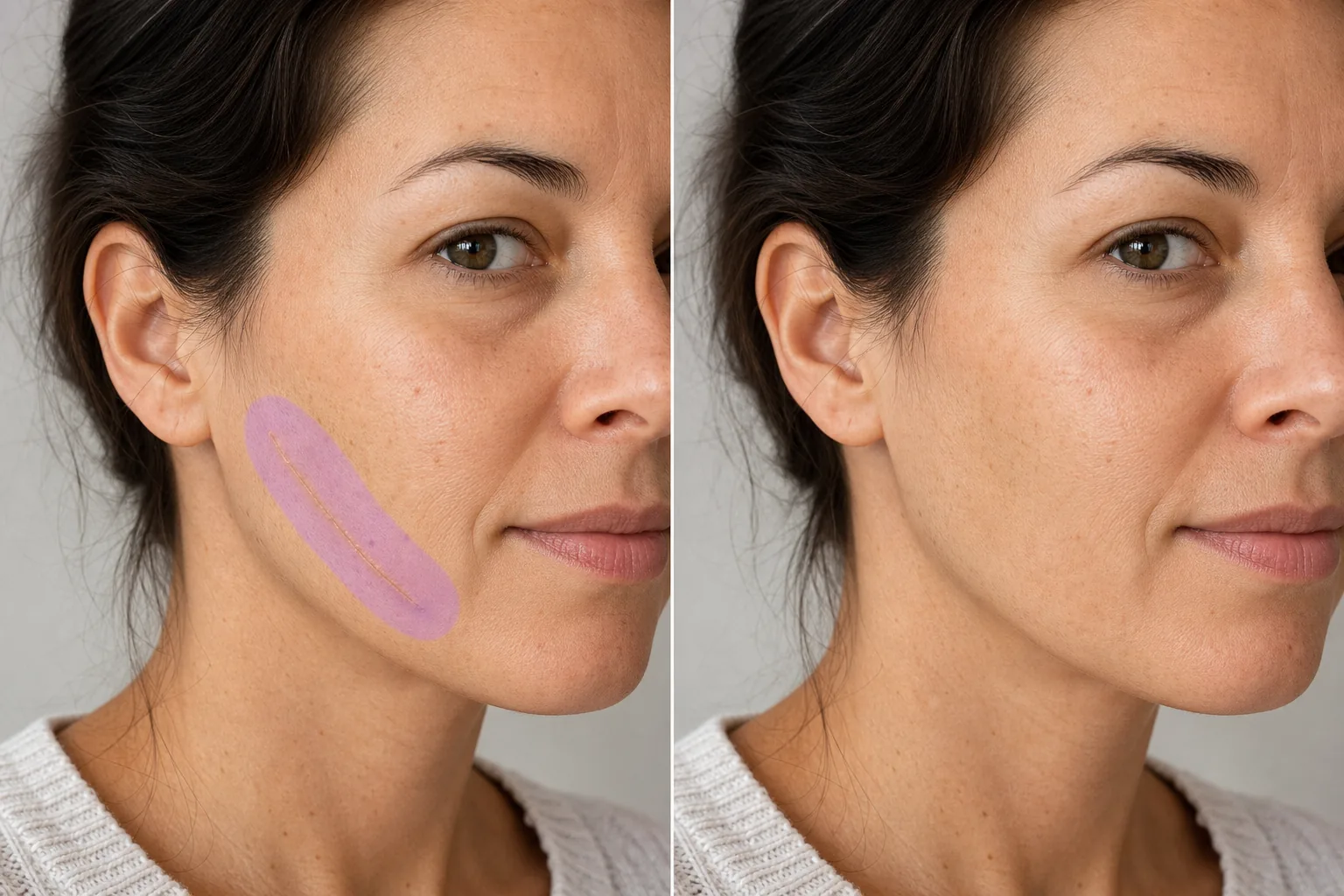
Cómo quitar una cicatriz de una foto
Para quitar una cicatriz de una foto, abre Magic Eraser en la web, iOS o Android, pinta sobre la cicatriz y un margen fino de la piel que la rodea, y toca Borrar: la IA reconstruye el tono y la textura natural de la piel en su lugar. Es gratis y sin registro. Reduce u oculta la apariencia de la cicatriz manteniendo la textura real de la piel; los resultados son mejores en marcas planas y descoloridas, y en fotos nítidas y bien iluminadas. Las cicatrices cuentan historias, pero en retratos profesionales, portafolios de modelos y retratos formales, pueden convertirse en el punto focal en lugar de la persona. Una cicatriz quirúrgica en la frente, una cicatriz de acné en las mejillas o una marca de lesión en un brazo desvían la mirada del espectador de la expresión y composición que pretendía el fotógrafo. Los clientes solicitan regularmente la reducción o eliminación de cicatrices en sus fotografías retocadas, no porque les dé vergüenza, sino porque quieren que la imagen represente cómo se ven a sí mismos, no un solo momento de su historial médico. La IA de Magic Eraser analiza la textura de la cicatriz (elevada, dentada, descolorida o lisa) y la piel sana circundante, luego reconstruye el área con piel natural que coincide en tono, textura, patrón de poros e iluminación. El resultado preserva el aspecto natural de la piel sin la apariencia demasiado suavizada de los retoques intensos.
Quitar una cicatriz en tres pasos
- 1
Sube tu foto
Abra Magic Eraser en la web, iOS o Android y cargue el retrato o la foto que contiene la cicatriz que desea eliminar.
- 2
Cepilla la cicatriz
Pinte sobre el tejido cicatricial con un pincel que cubra todo el ancho de la cicatriz más un pequeño margen de piel sana. Para cicatrices largas, cepille en toda su longitud de una sola vez para una reconstrucción consistente.
- 3
Borrar y verificar
Toque Borrar y la IA reemplazará la cicatriz con la textura natural de la piel. Acérquese para confirmar que el área reconstruida se mezcla perfectamente con la piel circundante; verifique que el tono, la textura y la iluminación sean consistentes. Exporta la foto retocada.
Lo mejor para
- Fotografías profesionales en la cabeza donde los clientes solicitan la eliminación de cicatrices.
- Portafolios de modelado que requieren una presentación de piel limpia.
- Retratos de bodas y eventos con solicitudes de retoque.
- Fotografías de rostros en funciones para roles que requieren una apariencia específica.
- Fotografías del equipo corporativo con estándares de retoque uniformes.
- Fotos de perfil de redes sociales con una apariencia refinada
- Dermatología y cirugía estética documentación antes/después
- Restauración de fotografías donde aparecieron cicatrices después de la foto original.
Consejos para eliminar cicatrices de forma natural
La calidad de la eliminación de cicatrices depende del tipo de cicatriz. Las cicatrices planas y descoloridas (más claras o más oscuras que la piel circundante) son las más fáciles de corregir: la IA iguala el tono circundante y el resultado es prácticamente invisible. Las cicatrices elevadas (queloides o hipertróficas) proyectan sombras sutiles que la IA también elimina, pero incluye el área de sombra en tu selección de pincel para una corrección completa. Las cicatrices marcadas (atróficas, como las cicatrices del acné al picahielos) requieren que la IA reconstruya tanto la superficie de la piel como la profundidad de la textura; los resultados son mejores cuando la piel circundante proporciona una referencia clara. Para áreas de cicatrices grandes que cubren una superficie importante de la piel, trabaje en secciones y verifique que el tono de la piel se mantenga constante en todas las secciones. La IA produce resultados que preservan la textura natural de la piel, incluidos los poros y las líneas finas, evitando la apariencia plástica suave que crean los filtros de belleza agresivos.
Preguntas frecuentes
- ¿Puede eliminar grandes cicatrices quirúrgicas?
- Sí. Cepille a lo largo y ancho de la cicatriz. La IA reconstruye la piel natural en toda el área. Las cicatrices muy grandes en áreas del cuerpo contorneadas (como un torso curvo) pueden beneficiarse del procesamiento en secciones.
- ¿Funciona en cicatrices de acné?
- Sí. Tanto las cicatrices del acné elevadas como las marcadas se pueden corregir. Para cicatrices de acné dispersas en la cara, cepille cada área con cicatrices. La IA reconstruye la piel suave con una textura natural de los poros.
- ¿El resultado parecerá retocado?
- No. La IA preserva las características naturales de la piel: poros, líneas finas y variación de color. El área corregida coincide con la textura real de la piel circundante en lugar de producir una apariencia suave y filtrada.
- ¿La eliminación de cicatrices es gratuita?
- Sí. El nivel gratuito de Magic Eraser cubre la eliminación de cicatrices de retratos. Sube tu foto, pincela sobre la cicatriz y exporta el resultado retocado sin coste alguno.
- ¿Es un editor de fotos gratuito para quitar cicatrices que puedo usar en línea?
- Sí. Magic Eraser funciona en el navegador como un editor gratuito en línea para quitar cicatrices: sin descargas, sin registro y sin marca de agua en el resultado. Ábrelo en la web, sube tu foto, pinta sobre la cicatriz y toca Borrar. La misma herramienta está disponible como app para iOS y Android si prefieres editar desde el móvil. La edición del plan gratuito incluye el retoque de cicatrices en retratos y fotos de cuerpo.
- ¿Puedo quitar una cicatriz de una foto antigua o impresa?
- Sí. Escanea o fotografía la imagen impresa, luego sube el escaneo y pinta sobre la cicatriz como de costumbre. La IA reconstruye la piel a partir de la zona que la rodea, así que el resultado depende de lo nítida y bien iluminada que esté la piel escaneada. El enfoque suave, el grano de la película o la baja resolución dan a la IA menos textura con la que igualar, por lo que las zonas retocadas en fotos antiguas pueden verse algo más suaves que el resto de la imagen.
- ¿Quitar la cicatriz cambia el resto de la foto?
- No. Magic Eraser solo edita la zona que pintas; el resto de la imagen, incluida la cara, la iluminación y el fondo, permanece intacto. Nada se modifica hasta que pintas y tocas Borrar, y conservas tu archivo original, así que puedes comparar el antes y el después o rehacer la edición. Esto lo hace práctico para documentación de antes y después, donde solo debe cambiar la zona marcada.