
Magic Eraser vs Pixlr: ¿Qué editor web es mejor para obtener resultados más rápidos?
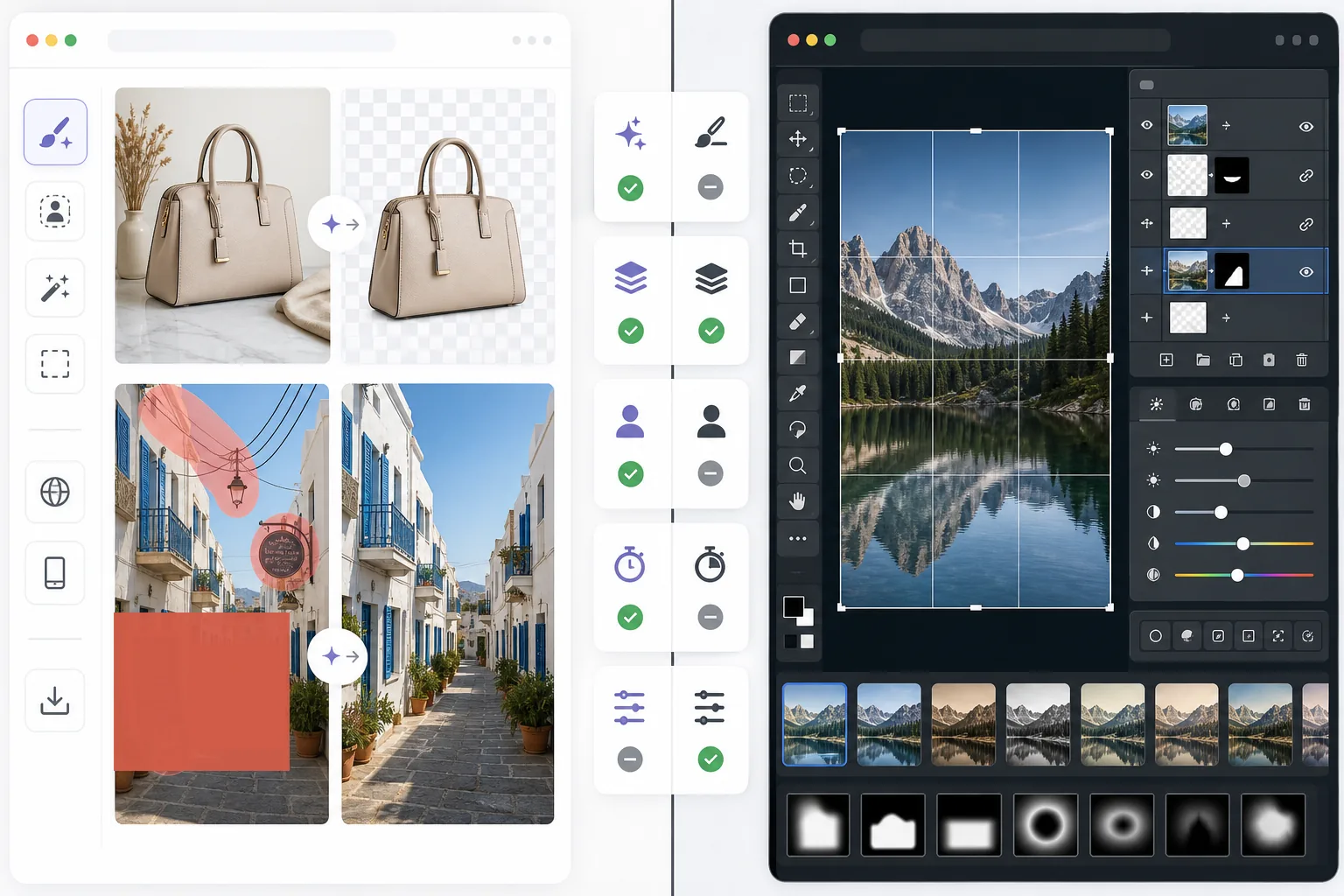
Pixlr ofrece a los usuarios un entorno de edición clásico en el navegador con capas y efectos. Magic Eraser se centra en la limpieza, la mejora y el trabajo de fondos con IA en primer lugar, para quienes quieren resultados pulidos sin una interfaz de edición completa.
Last updated
Prueba Magic Eraser gratisComparison rows are editorial summaries from the latest page review, not a guarantee of current pricing, limits, watermark policy, batch support, speed, or platform availability.
Resumen
Magic Eraser ayuda a los usuarios a resolver problemas prácticos de imagen rápidamente con IA: eliminar objetos no deseados, borrar texto, limpiar fondos, dar nitidez a los detalles y rellenar zonas que faltan.
Pixlr ofrece una experiencia de edición más tradicional en el navegador, con capas, filtros y herramientas manuales. Es flexible, pero a menudo más lento para tareas de limpieza repetitivas.
Comparación de funciones
Magic Eraser ayuda a los usuarios a resolver problemas prácticos de imagen rápidamente con IA: eliminar objetos no deseados, borrar texto, limpiar fondos, dar nitidez a los detalles y rellenar zonas que faltan.
Pixlr ofrece una experiencia de edición más tradicional en el navegador, con capas, filtros y herramientas manuales. Es flexible, pero a menudo más lento para tareas de limpieza repetitivas.
| Feature | Magic Eraser | Pixlr |
|---|---|---|
| Eliminación de objetos | Sí — pincel de IA | Limitado |
| Eliminación de fondos | Sí | Sí |
| Mejora de imagen | Sí | Básica |
| Edición basada en capas | No | Sí |
| Relleno generativo | Sí | Limitado |
| Fácil para principiantes | Sí | Moderado |
| Ideal para | Limpieza rápida y ediciones con IA | Edición general en el navegador |
| Plataforma | Web + móvil | Web + móvil |
Feature rows summarize visible product positioning and should be rechecked against official product pages before purchase, migration, or compliance decisions.
- Last content review June 21, 2026
- Pixlr source: official product site (https://pixlr.com/)
- Magic Eraser source: https://magiceraser.live/es/product/magic-eraser
- Pricing, feature availability, platform support, and limits can change; recheck official sources before relying on a buying decision.
Comparación de precios
| Plan | Magic Eraser | Pixlr |
|---|---|---|
| Plan gratuito | Gratis — ediciones limitadas | Gratis — básico + anuncios |
| Mensual | $9.99/mo | $7.99/mo (Plus) |
| Anual | $4.99/mo (facturado anualmente) | $4.90/mo (Plus, facturado anualmente) |
Precios a fecha de May 2026. Consulta cada proveedor para conocer las tarifas actuales.
Pricing rows are snapshots from review time. Free tiers, subscriptions, trials, export limits, and regional availability can change without notice.
- Last content review June 21, 2026
- Pixlr source: official product site (https://pixlr.com/)
- Magic Eraser source: https://magiceraser.live/es/product/magic-eraser
- Pricing, feature availability, platform support, and limits can change; recheck official sources before relying on a buying decision.
Por qué elegir Magic Eraser
Menos tiempo en los controles de edición
Magic Eraser reduce la necesidad de gestionar barras de herramientas, capas y efectos manuales cuando el objetivo principal es simplemente limpiar y mejorar una foto rápidamente.
Más útil para flujos de trabajo repetibles
Cuando editas fotos de productos, imágenes para redes sociales, anuncios o recursos de creadores cada día, el flujo de trabajo de IA más acotado pero más potente de Magic Eraser suele ahorrar más tiempo que un editor de uso general.
Mejor para limpiar fondos y distracciones
Magic Eraser destaca especialmente cuando el problema es el desorden, el texto, los cables o un entorno que distrae y que debe desaparecer de forma natural.
Menor carga de formación
Los equipos pueden incorporarse más rápido con Magic Eraser porque requiere menos conocimientos de edición que un editor clásico en el navegador con un conjunto más amplio de herramientas manuales.
Herramientas
Preguntas frecuentes
¿Es Magic Eraser más fácil de usar que Pixlr?
+
Sí para trabajos centrados en la limpieza. Pixlr ofrece más flexibilidad de edición tradicional, pero Magic Eraser es más fácil para usuarios que principalmente necesitan eliminar objetos y editar fondos con IA.
¿Tiene Pixlr capas?
+
Sí. Pixlr incluye un entorno de edición basado en capas más clásico. Magic Eraser se centra más en resultados rápidos asistidos por IA que en la edición manual por capas.
¿Qué herramienta es mejor para profesionales del marketing y vendedores?
+
Magic Eraser suele ser la mejor opción porque gestiona la limpieza, la mejora y la preparación de imágenes listas para presentar de forma más rápida.
¿Puedo eliminar texto de las imágenes con Magic Eraser?
+
Sí. Magic Eraser puede eliminar texto, etiquetas, carteles y otras distracciones mientras reconstruye el fondo de forma natural.
¿Qué editor funciona mejor en móvil y escritorio a la vez?
+
Magic Eraser ofrece un flujo de trabajo de IA más coherente entre la web y el móvil, lo que facilita cambiar de dispositivo para tareas de edición prácticas.
¿Necesitas un editor web más rápido para la limpieza de imágenes del mundo real?
Prueba Magic Eraser gratis y usa la IA para eliminar distracciones, mejorar la nitidez y terminar ediciones pulidas con menos pasos.
Prueba Magic Eraser gratisCasos de uso relacionados
Descubre cómo los profesionales utilizan estas herramientas en flujos de trabajo reales.
Las fotos de anuncios llenas de objetos personales, coches aparcados o material de obra espantan a los compradores. Magic Eraser usa IA para limpiar tus fotos de propiedades al instante — sin necesidad de Photoshop.
Los fondos desordenados y las fotos de producto descuidadas te cuestan ventas todos los días. Magic Eraser te ayuda a crear imágenes de producto profesionales en segundos — sin necesidad de saber Photoshop. Sube la foto, borra las distracciones y publica con confianza.
¿Desconocidos arruinando tus fotos de viaje? ¿Fondos desordenados matando tus selfies? Deja de perder horas en Photoshop. Magic Eraser elimina distracciones, limpia tus fotos y las adapta a cualquier formato — todo en un toque.
Guías relacionadas
Explora más guías y contenido editorial relacionado con este flujo de trabajo.
Aprende a usar Magic Eraser para quitar objetos, personas, texto y distracciones de fotos con resultados de IA más limpios.
Aprende a eliminar personas de fotos con IA en segundos. Guía para fotos de viaje, inmobiliaria y productos.
Guía paso a paso para eliminar marcas de agua de tus propias fotos con IA. Cuándo es apropiado, técnicas y consejos.
Otras comparaciones
Descubre cómo Magic Eraser se compara con otras herramientas de edición de fotos.
Dos potentes editores de fotos con IA y fortalezas diferentes. Magic Eraser ofrece un conjunto más amplio de herramientas de IA generativa, mientras que Photoroom destaca en fotografía de productos para e-commerce y procesamiento por lotes.
Probamos y comparamos las mejores herramientas de edición de fotos con IA para que no tengas que hacerlo. Desde la eliminación de objetos hasta el reemplazo de fondos, descubre cuál editor ofrece los mejores resultados.
Adobe Photoshop es potente, pero la mayoría de la gente solo usa una fracción de sus funciones. Magic Eraser ofrece las herramientas de retoque de fotos que realmente necesitas (eliminación de objetos, eliminación de fondos, mejora con AI y relleno generativo) en una interfaz más sencilla que funciona en la web y en el móvil sin necesidad de suscripción para empezar.
remove.bg es excelente en una cosa: eliminar fondos. Magic Eraser lo hace igual de bien, además de eliminar objetos no deseados, mejorar la calidad de la imagen, rellenar áreas faltantes con IA y gestionar todo tu flujo de trabajo de edición fotográfica, todo en un solo lugar.
Tried to remove an object or background and hit a Pro paywall in Canva, Adobe Express/Photoshop, or Fotor? Magic Eraser does the same job — object removal, background removal, watermark cleanup, and enhancement — for free. No subscription, and no watermark stamped on your download.
Compara Magic Eraser con magic-eraser.io. Mira funciones, precios y facilidad de uso lado a lado. Descubre por qué Magic Eraser es la mejor opción para edición de fotos con IA.