
Restaurierung von Vintage-Fotos
Erwecken Sie geliebte alte Fotografien wieder zum Leben. Diese Vorlage repariert die Schäden, die Jahrzehnte gedruckten Fotos zufügen: Sie entfernt Kratzer, Knicke und Flecken, stellt Farben aus verblassten Abzügen wieder her und wandelt sogar Sepia- oder Schwarz-Weiß-Originale in realistische Vollfarbe um, während der zeittypische Charakter des Bildes erhalten bleibt.
Diese Vorlage kostenlos testenRestoration template preview
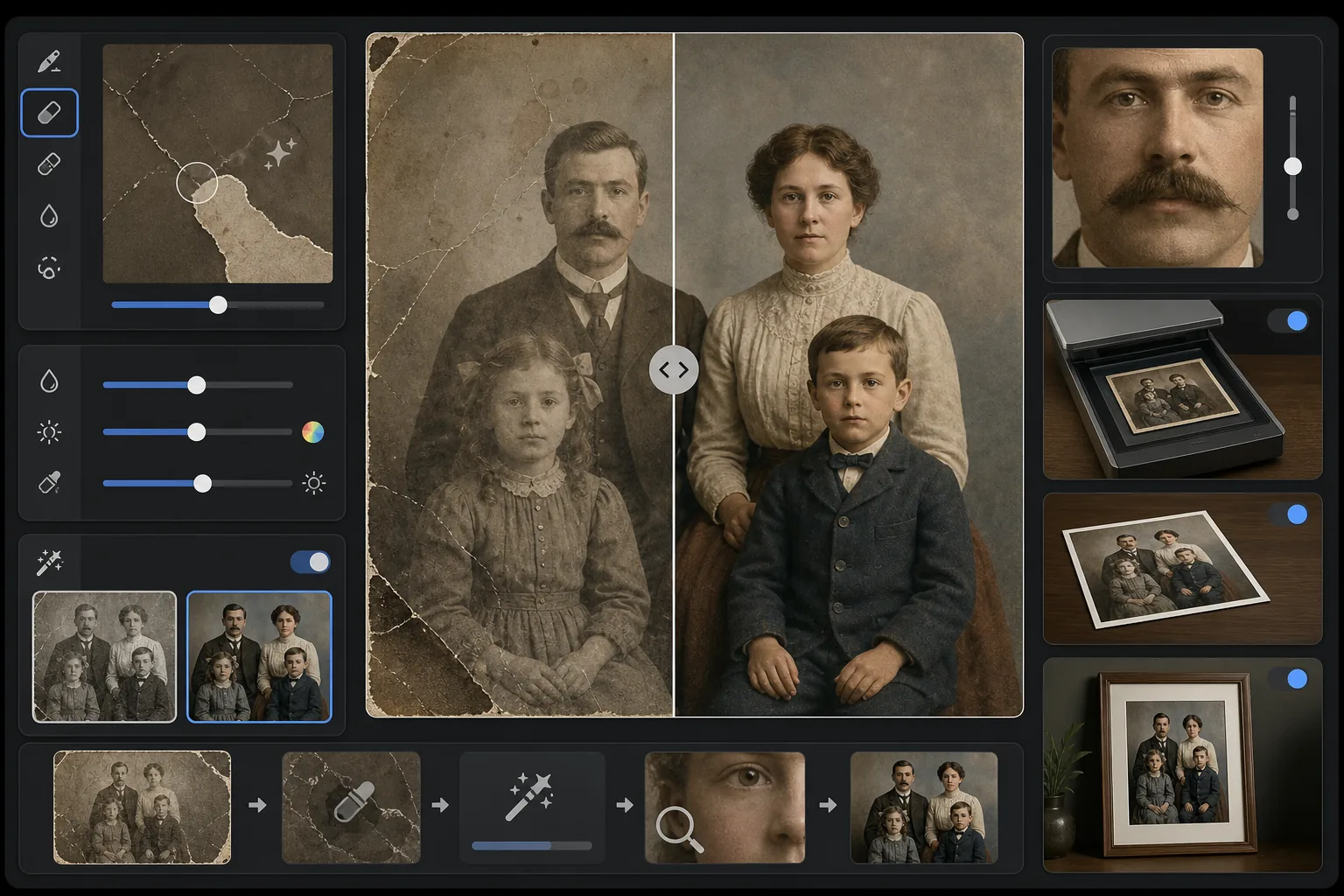
Was diese Vorlage leistet
Repariert physische Schäden und Alterungserscheinungen auf gescannten Vintage-Fotografien. Magic Eraser entfernt Kratzer, Knicke, Wasserflecken, Schimmelflecken und eingerissene Ränder, indem fehlende Bildinhalte aus dem umgebenden Kontext rekonstruiert werden. AI Enhance stellt Farben wieder her, die sich über Jahrzehnte verschoben oder verblasst haben, schärft durch das Alter weich gewordene Details und kann Schwarz-Weiß- oder Sepia-Fotos mit zeittreuen Farben kolorieren, die die Epoche des Originalbildes respektieren.
Vorlageneinstellungen
| Schadensreparatur | Aggressiv — entfernt Kratzer, Knicke, Flecken und eingerissene Ränder |
| Farbwiederherstellung | Volles Spektrum — stellt die ursprüngliche Leuchtkraft verblasster Pigmente wieder her |
| Kolorierungsmodus | Aus, Dezent oder Voll (für S/W- und Sepia-Originale) |
| Detailwiederherstellung | Rekonstruiert Gesichter und feine Details, die durch Alter und niedrige Scanauflösung weich geworden sind |
| Ausgabegröße | Entspricht den Originalscan-Abmessungen mit optionaler 2×-Hochskalierung |
| Epochenerhaltung | Behält die zeittypische Korntextur und Tonqualität bei |
So verwenden Sie diese Vorlage
Original scannen oder fotografieren
Scannen Sie das Vintage-Foto mit 600 DPI oder höher, um die meisten wiederherstellbaren Details zu erhalten. Ist kein Scannen möglich, fotografieren Sie den Abzug auf einer flachen Oberfläche bei gleichmäßigem, diffusem Licht — vermeiden Sie Blitz, der auf glänzenden Abzügen Reflexionsflecken erzeugt.
Physische Schäden reparieren
Magic Eraser erkennt und entfernt Kratzer, Knicke, Wasserschäden, Schimmelflecken und Kleberückstände. Die KI rekonstruiert fehlende Bereiche, indem sie den umgebenden Bildinhalt analysiert — sie füllt eingerissene Ecken, überbrückt Risse über Gesichter hinweg und entfernt Fleckverfärbungen.
Farbe wiederherstellen oder hinzufügen
Bei verblassten Farbabzügen stellt AI Enhance die ursprüngliche Farbpalette wieder her, indem es die spezifische Art umkehrt, in der sich verschiedene Farbschichten im Laufe der Zeit zersetzen. Bei Schwarz-Weiß- oder Sepia-Originalen fügt die optionale Kolorierung realistische Farben hinzu, basierend auf Kontexthinweisen wie Hauttönen, Laub, Himmel und Stoffmustern.
Schärfen und exportieren
Die Detailwiederherstellung schärft Gesichtszüge, Text und feine Details, die Jahrzehnte der Alterung weich gemacht haben. Exportieren Sie in der Originalscan-Auflösung oder skalieren Sie auf 2× hoch, um in größeren Formaten als das Original zu drucken.
Profi-Tipps für beste Ergebnisse
- ✓Scannen Sie in der höchsten Auflösung, die Ihr Scanner unterstützt — mindestens 600 DPI, vorzugsweise 1200 DPI. Mehr erfasste Details geben der KI mehr Material, um beschädigte Bereiche zu rekonstruieren.
- ✓Wenn das Foto in einem Rahmen oder Album steckt, fotografieren Sie es an Ort und Stelle, statt das Reißen zu riskieren — die Vorlage kann Rahmenränder und Albumseiten-Artefakte entfernen.
- ✓Geben Sie für die Kolorierung historischer Fotos nach Möglichkeit Kontext zur Epoche (Jahrzehnt) und zum Ort an — Kleidungsfarben, Autofarben und Baumaterialien variierten je nach Zeitraum und Region erheblich.
- ✓Bearbeiten Sie zuerst den am stärksten beschädigten Bereich des Fotos als Test, bevor Sie die vollständige Restaurierung ausführen — so können Sie bestätigen, dass die Rekonstruktionsqualität Ihren Erwartungen entspricht.
Häufige Fragen
Kann es Fotos mit fehlenden Abschnitten wie abgerissenen Ecken reparieren?
+
Ja. Die KI rekonstruiert fehlende Bereiche anhand des Kontexts des umgebenden Bildes. Bei Hintergründen wie Himmel, Wänden und Laub sind die Ergebnisse nahtlos. Bei fehlenden Teilen von Gesichtern oder wichtigen Details ist die Rekonstruktion beeindruckend, kann jedoch bei kritischen Merkmalen eine geringfügige manuelle Anpassung erfordern.
Wie genau ist die Kolorierung von Schwarz-Weiß-Fotos?
+
Die Kolorierung nutzt Kontextanalyse, um realistische Farben zuzuweisen — Hauttöne, Himmelblau, Laubgrün und gängige Stofffarben sind sehr genau. Spezifische Farben von Objekten, die die KI nicht aus dem Kontext bestimmen kann (wie der genaue Farbton eines Kleides), sind plausibel, aber nicht garantiert genau.
Entfernt die Restaurierung den Vintage-Charakter des Fotos?
+
Nein. Die Einstellung zur Epochenerhaltung behält die zeittypische Korntextur und Tonqualität bei, die Vintage-Fotos ihren Charakter verleihen. Physische Schäden wie Kratzer und Flecken werden entfernt, aber die fotografische Qualität der ursprünglichen Epoche wird respektiert — ein Foto aus den 1940er-Jahren sieht weiterhin aus wie ein Foto aus den 1940er-Jahren, nur eben unbeschädigt.
Retten Sie Ihre Familienerinnerungen
Laden Sie einen Scan einer beschädigten, verblassten oder alternden Fotografie hoch und beobachten Sie, wie Jahrzehnte der Abnutzung verschwinden. Kratzer weg, Farbe wiederhergestellt, Erinnerungen bewahrt.
Kostenlos testen