
Sport-Action-Aufnahme
Verwandeln Sie rohe Action-Fotos vom Spielfeldrand in Sportbilder in Publikationsqualität. Diese Vorlage schärft die Bewegungsunschärfe schnell bewegter Athleten, bereinigt ablenkende Hintergründe aus Zuschauern und Zäunen, hebt die Trikotfarben für eine naturgetreue Wiedergabe hervor und exportiert in der Auflösung und den Farbstandards, die von Printpublikationen und Sportmedien gefordert werden.
Diese Vorlage kostenlos testenSports template preview
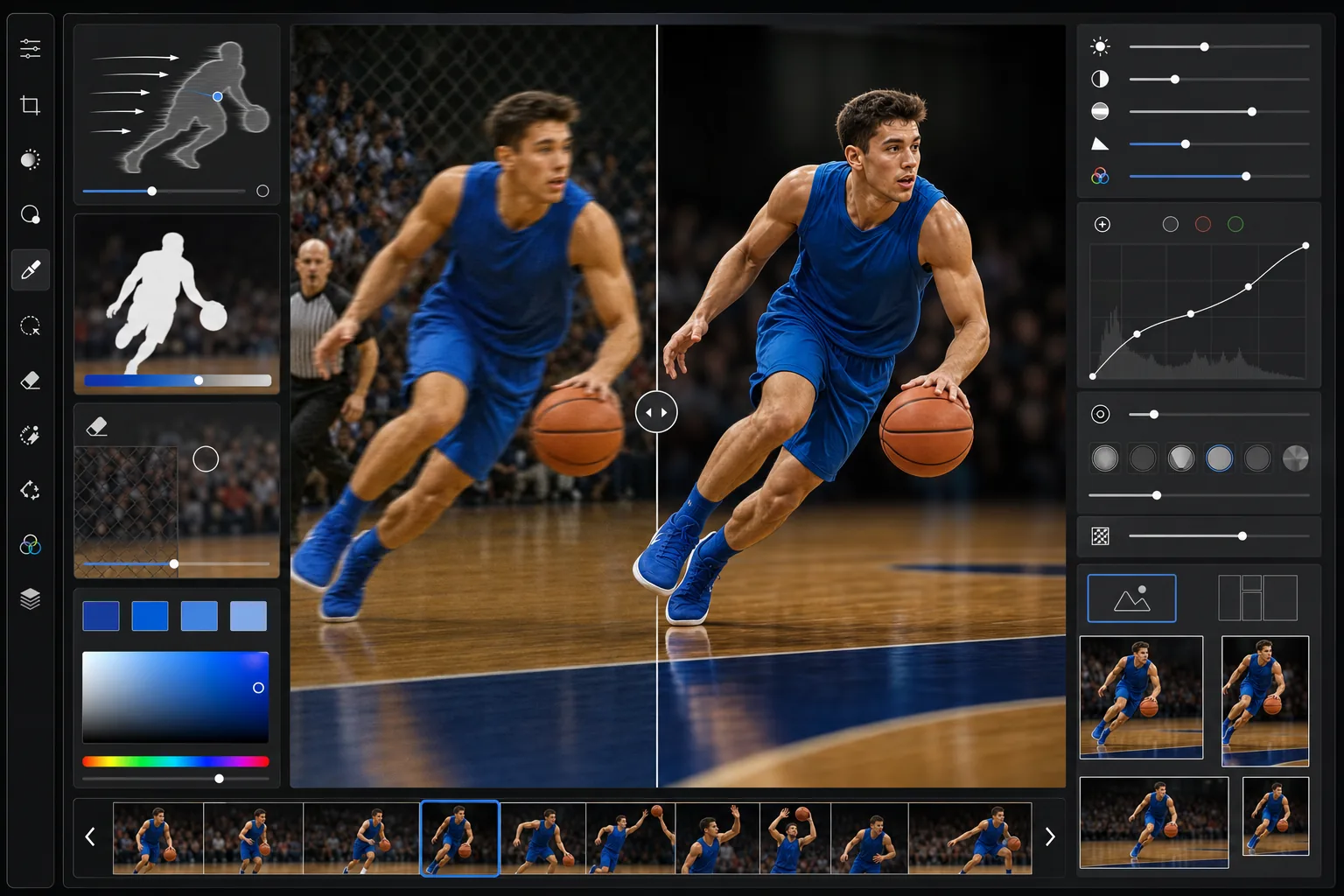
Was diese Vorlage leistet
Sie geht auf die spezifischen Herausforderungen der Sportfotografie ein: Bewegungsunschärfe schnell laufender Athleten, überladene Hintergründe voller Zuschauer, Zäune und Werbebanden, Teamfarben, die unter Stadion- oder bewölktem Licht matt wirken, sowie die Notwendigkeit präziser Ausgabevorgaben, die Verlage und Medien verlangen. AI Enhance wendet eine bewegungsbewusste Schärfung an, die Details in leicht unscharfen Motiven wiederherstellt, ohne das Hintergrundrauschen zu verstärken. Magic Eraser entfernt ablenkende Hintergrundelemente wie Maschendrahtzäune, hell gekleidete Zuschauer, die den Blick auf sich ziehen, und Werbeschilder. Die Farboptimierung zielt gezielt auf Trikot- und Uniformfarben ab, um eine genaue Teamzuordnung zu gewährleisten.
Vorlageneinstellungen
| Bewegungsschärfung | Richtungsabhängige Entunschärfung (analysiert den Bewegungsvektor, schärft entlang der Achse) |
| Hintergrundtrennung | Selektive Bokeh-Simulation (Schärfentiefe entsprechend f/2.8) |
| Farbverstärkung | Auf Trikots ausgerichtete Sättigung +12 (erhält Hauttöne, hebt Stoff hervor) |
| Kontrast | Redaktionelle Sport-Tonwertkurve (tiefe Schwarztöne, helle Lichter, kräftige Mitteltöne) |
| Rauschreduzierung | Hoch-ISO-Sportmodus (erhält die Trikotstruktur, glättet Himmel/Tribünen) |
| Ausgabe | Lange Kante 4500px, sRGB, JPEG Qualität 95 (Einreichungsvorgaben von AP/Getty) |
So verwenden Sie diese Vorlage
Laden Sie Ihr Action-Foto hoch
Laden Sie ein Sport-Action-Foto von jeder Wettkampfebene hoch — Jugendliga, Highschool, College oder Profibereich. Die Vorlage verarbeitet Bilder von Teleobjektiven an DSLRs ebenso wie herangezoomte Smartphone-Aufnahmen von der Tribüne. Serienbildsequenzen können als Stapel hochgeladen werden.
Schärfen Sie den Athleten
AI Enhance analysiert Richtung und Grad der Bewegungsunschärfe am Hauptmotiv und wendet eine richtungsabhängige Schärfung entlang der Bewegungsachse an. Dadurch werden Details bei leicht unscharfen Athleten wiederhergestellt, ohne Halo-Artefakte zu erzeugen. Gesichter, Trikotnummern und Ausrüstungsdetails werden bei der Schärfung priorisiert.
Bereinigen Sie den Hintergrund
Magic Eraser entfernt ablenkende Elemente hinter dem Athleten — Maschendrahtzäune am Spielerunterstand, hell gekleidete Zuschauer, die den Fokus rauben, Werbebanden sowie andere Athleten oder Offizielle, die die Komposition stören. Der Hintergrund kann dezent unscharf gemacht werden, um die geringe Schärfentiefe eines professionellen Teleobjektivs zu simulieren.
Exportieren Sie zur Veröffentlichung
Laden Sie an der langen Kante mit 4500px als sRGB-JPEG in Qualität 95 herunter, was den Einreichungsvorgaben von Nachrichtenagenturen, Zeitungen, Sport-Websites und Jahrbuchverlagen entspricht. IPTC-Metadatenfelder für Fotografennennung und Bildunterschrift bleiben aus der Originaldatei erhalten.
Profi-Tipps für beste Ergebnisse
- ✓Die Bewegungsentunschärfung funktioniert am besten bei leichter bis mittlerer Unschärfe, bei der die Merkmale des Motivs noch einigermaßen erkennbar sind. Ist der Athlet eine vollständige Schliere über das Bild, ist die Unschärfe für eine sinnvolle Wiederherstellung zu stark. Nutzen Sie bei der Aufnahme die schnellste Verschlusszeit — die Vorlage rettet die Beinahetreffer, nicht die kompletten Fehlschüsse.
- ✓Zur Entfernung von Maschendrahtzäunen bei Baseball- und Softball-Unterstandaufnahmen funktioniert die KI am besten, wenn der Zaun im Vergleich zum Motiv deutlich unscharf ist. Sind sowohl Zaun als auch Athlet scharf, liefert eine manuelle Auswahl des Zaunbereichs sauberere Ergebnisse als die automatische Erkennung.
- ✓Beim Hervorheben der Teamfarben zielt die Sättigungsverstärkung gezielt auf Stoff und vermeidet eine Übersättigung der Hauttöne. Gesichts- oder Körperbemalung in Teamfarben wird jedoch ebenfalls verstärkt. Falls das unerwünscht ist, können Sie den Gesichtsbereich vor der Verarbeitung maskieren.
- ✓Bei Hallensportarten wie Basketball und Volleyball gleicht die Vorlage die gemischte Quecksilberdampf- und LED-Beleuchtung aus, die einen grün-gelben Farbstich erzeugt. Weiße Trikots wirken dann wirklich weiß statt mit dem grünlichen Ton, den Hallenbeleuchtung auf Fotos oft erzeugt.
Häufige Fragen
Lassen sich damit stark verwackelte Action-Fotos korrigieren?
+
Die Bewegungsentunschärfung stellt Details aus leichter bis mittlerer Unschärfe wieder her, was etwa einer Verbesserung von 1-2 Verschlusszeitstufen entspricht. Wenn die Trikotnummer des Athleten im Original zumindest teilweise lesbar ist, wird sie nach der Verarbeitung klar erkennbar sein. Vollständige Bewegungsschlieren, bei denen das Motiv nicht erkennbar ist, können nicht wiederhergestellt werden, da das Detail vom Sensor nicht erfasst wurde.
Sieht die Hintergrundunschärfe natürlich aus?
+
Die selektive Bokeh-Simulation analysiert Tiefenhinweise im Bild, um eine abgestufte Unschärfe zu erzeugen, die mit der Entfernung vom Motiv zunimmt und so den Abfall eines echten Teleobjektivs bei f/2.8 nachahmt. Der Übergang vom scharfen Motiv zum unscharfen Hintergrund folgt der natürlichen Tiefenebene, statt eine flache Unschärfe anzuwenden, sodass das Ergebnis optisch statt digital wirkt.
Ist die Ausgabequalität hoch genug für den Zeitungsdruck?
+
Ja. Die lange Kante mit 4500px bei JPEG-Qualität 95 übertrifft die Anforderungen für die Zeitungswiedergabe bei 200 DPI (Standard-Druckauflösung für Zeitungen) bis zu einer Breite von 22 Zoll. Für höherwertige Magazinwiedergabe bei 300 DPI unterstützt die Ausgabe Drucke bis 15 Zoll Breite. Das sRGB-Farbprofil ist der von allen großen Publikationen akzeptierte Standard.
Lassen Sie jede Action-Aufnahme aussehen, als hätte sie ein Profi gemacht
Laden Sie Sportfotos hoch und erhalten Sie in Sekunden scharfe, publikationsreife Bilder mit sauberen Hintergründen und lebendigen Teamfarben.
Kostenlos testen