
Landschaft druckfertig
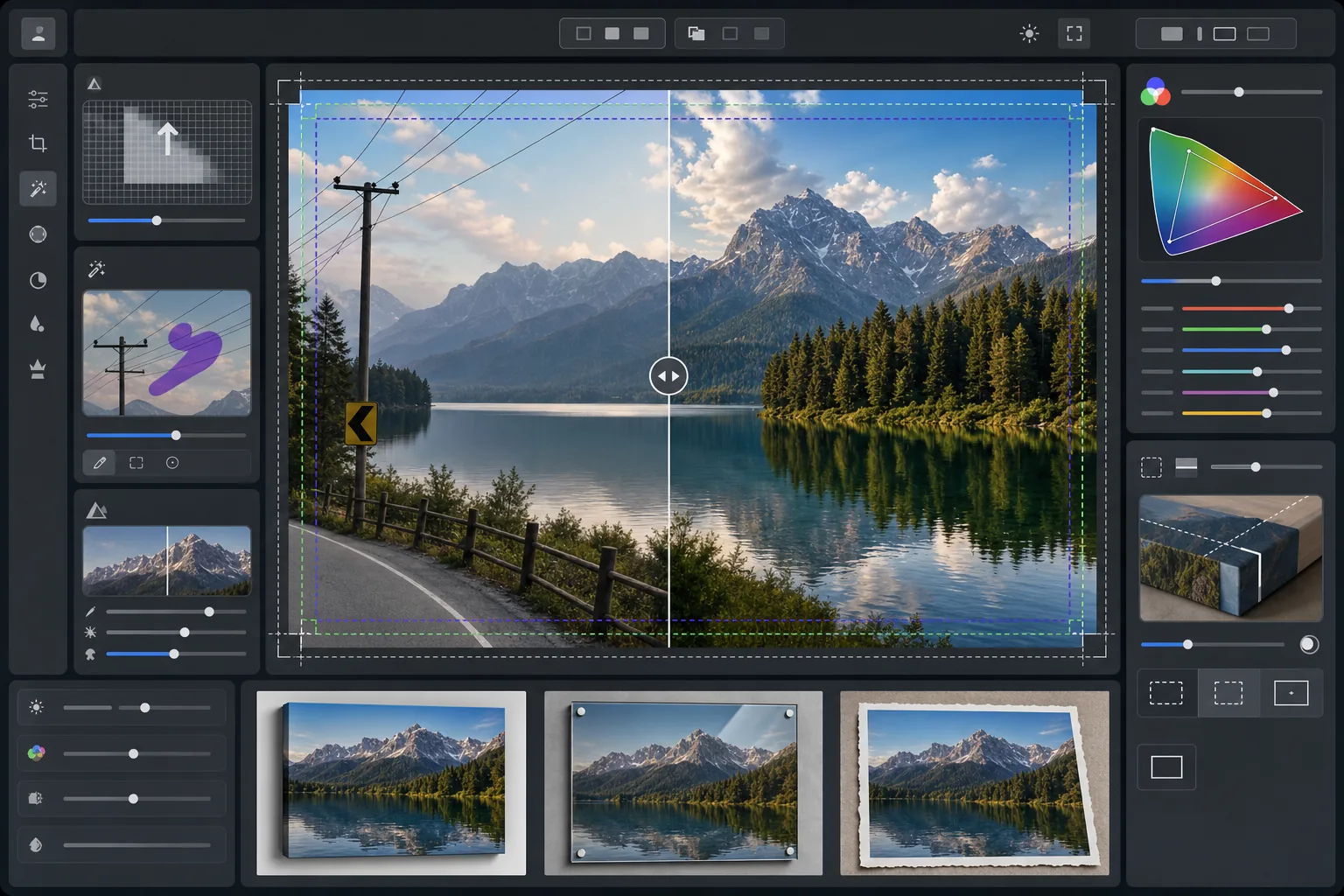
Verwandeln Sie Landschaftsfotos in druckfertige Großformatdateien mit 300 DPI. Diese Vorlage skaliert Bilder für Drucke ab 16x20 Zoll hoch und entfernt dabei störende visuelle Elemente wie Stromleitungen, Verkehrsschilder und Zäune, die von der natürlichen Szenerie ablenken. Die Farbkorrektur ist auf Leinwand-, Metall- und Feinkunstpapier-Substrate optimiert.
Diese Vorlage kostenlos testenPhotography template preview
Was diese Vorlage leistet
Bereitet Landschaftsfotos für den professionellen Großformatdruck vor, indem die Auflösung hochskaliert wird, um die Anforderung von 300 DPI bei 16x20 Zoll und darüber hinaus zu erfüllen. AI Enhance erhöht die Pixelanzahl ohne Artefakte und bewahrt feine Details in Laub, Wassertexturen und Wolkenformationen. Magic Eraser entfernt Stromleitungen, Strommasten, Verkehrsschilder, Zäune und andere von Menschen geschaffene Störungen, die die natürliche Komposition unterbrechen. Die Farbe wird an den größeren Farbraum und die unterschiedlichen Reflexionseigenschaften von Leinwandbespannungen, Aluminium-Metalldrucken und Feinkunst-Baumwollpapier angepasst.
Vorlageneinstellungen
| Skalierungsziel | 6000×4000px Minimum (300 DPI bei 20×13 Zoll) |
| Schärfung | Druckoptimierte Unscharfmaskierung (Radius 1,2, Stärke 80%) |
| Farbprofil | ProPhoto RGB (maximaler Farbraum für den Feinkunstdruck) |
| Dynamikumfang | Schatten +0,8 EV, Lichterwiederherstellung -0,3 EV |
| Rauschreduzierung | Luminanzbasiert (bewahrt Korn im Himmel, glättet Laub) |
| Ausgabeformat | 16-Bit-TIFF mit eingebettetem ICC-Profil |
So verwenden Sie diese Vorlage
Laden Sie Ihr Landschaftsfoto hoch
Laden Sie ein Landschaftsbild von einer beliebigen Kamera oder einem Smartphone hoch. Die KI analysiert die Quellauflösung und berechnet den Skalierungsfaktor, der erforderlich ist, um 300 DPI bei Ihrer Zieldruckgröße zu erreichen. Selbst 12-Megapixel-Smartphone-Fotos können sauber für 16x20-Drucke hochskaliert werden.
Entfernen Sie visuelle Störungen
Magic Eraser erkennt und entfernt Stromleitungen, Strommasten, Verkehrsschilder, Zäune, Müll und andere von Menschen geschaffene Elemente, die die Aufmerksamkeit von der natürlichen Szene ablenken. Die KI rekonstruiert Himmelsverläufe, Baumkronenkanten und Geländetexturen hinter den entfernten Objekten.
Optimieren Sie für die Druckausgabe
AI Enhance skaliert das Bild auf Ihre Zielauflösung hoch und schärft es für den Druckbetrachtungsabstand. Die Farbe wird in den ProPhoto-RGB-Farbraum verschoben, um die gesamte Bandbreite an Grün-, Blau- und Sonnenuntergangstönen zu bewahren, die das herkömmliche sRGB abschneidet.
Exportieren Sie für Ihr Drucksubstrat
Laden Sie eine 16-Bit-TIFF-Datei mit dem auf Ihre Ausgabe abgestimmten eingebetteten ICC-Profil herunter — Leinwandbespannung, Metalldruck oder Feinkunstpapier. Die Datei enthält den Beschnittrand und die Schnittmarken, die von den meisten professionellen Drucklaboren benötigt werden.
Profi-Tipps für die besten Ergebnisse
- ✓Fügen Sie bei Leinwandbespannungen an jeder Seite 1,5 Zoll Beschnitt hinzu, damit sich das Bild um die Keilrahmenleisten legt, ohne in die Hauptkomposition hineinzuschneiden. Die Vorlage enthält in der Ausgabe einen Sicherheitsbereich-Leitfaden für Galeriebespannungen.
- ✓Metalldrucke reflektieren Licht und verstärken den Kontrast, reduzieren Sie daher den Kontrastregler im Vergleich zum Bildschirmeindruck um 10-15%. Schatten, die auf Ihrem Monitor detailliert erscheinen, können auf Aluminiumsubstraten vollständig zulaufen.
- ✓Beim Entfernen langer Stromleitungen, die das gesamte Bild durchziehen, verarbeitet die KI sie in Segmenten. Für das sauberste Ergebnis verwenden Sie ein Quellfoto, bei dem der Himmel hinter den Leitungen einen sanften Verlauf statt komplexer Wolkenmuster aufweist.
- ✓Verarbeiten Sie in der größten Größe, die Sie jemals drucken könnten, auch wenn Ihre aktuelle Bestellung kleiner ist. Das Herunterskalieren einer 24x36-Datei auf 16x20 ist verlustfrei, aber Sie können eine 16x20-Datei später nicht ohne Qualitätsverlust auf 24x36 hochskalieren.
Häufige Fragen
Wie groß kann ich von einem Smartphone-Foto drucken?
+
Ein 12-Megapixel-Smartphone-Foto (4032x3024) kann sauber auf 8000x6000 Pixel hochskaliert werden, was den 300-DPI-Druck bei 26x20 Zoll unterstützt. Bei üblichen Betrachtungsabständen für Großdrucke (1 bis 1,2 Meter) wirken selbst 24x36-Zoll-Drucke aus KI-hochskalierten Smartphone-Originalen gestochen scharf.
Hinterlässt das Entfernen von Stromleitungen sichtbare Spuren?
+
Die KI rekonstruiert den Himmelsverlauf, die Wolkenkanten und die Baumlinie hinter entfernten Stromleitungen anhand der umgebenden Pixeldaten. Bei gleichmäßigem Himmel ist die Entfernung praktisch nicht erkennbar. Komplexe Himmel mit dramatischen Wolken können bei sehr genauer Betrachtung subtile Übergänge zeigen, aber bei normalen Druckbetrachtungsabständen ist das Ergebnis sauber.
Welches Dateiformat sollte ich an ein Drucklabor senden?
+
Die meisten professionellen Labore akzeptieren 16-Bit-TIFF-Dateien mit eingebetteten ICC-Profilen, was die Standardausgabe dieser Vorlage ist. Wenn Ihr Labor JPEG verlangt, exportieren Sie mit Qualität 100 im Adobe-RGB-Farbraum. Vermeiden Sie sRGB für Großformatdrucke, da es lebendige Grün- und tiefe Blautöne abschneidet, die in der Landschaftsfotografie häufig vorkommen.
Drucken Sie Ihre Landschaften in jeder Größe mit Zuversicht
Laden Sie ein Landschaftsfoto hoch und erhalten Sie eine druckfertige Datei mit entfernten Stromleitungen, hochskalierter Auflösung und für Leinwand, Metall oder Feinkunstpapier optimierter Farbe.
Kostenlos testen