
Mode-Lookbook-Foto
Erstellen Sie Lookbook-Bilder in redaktioneller Qualität für saisonale Kollektionen, Großhandelspräsentationen und E-Commerce-Kampagnen. Diese Vorlage entfernt Hintergründe vor Ort und ersetzt sie durch saubere Studiokulissen oder kuratierte redaktionelle Umgebungen, wendet eine modegerechte Farbkorrektur an, die Stoffe zur Geltung bringt, und veredelt die Haut mit natürlicher Retusche, die den Fokus auf der Kleidung hält.
Diese Vorlage kostenlos testenFashion template preview
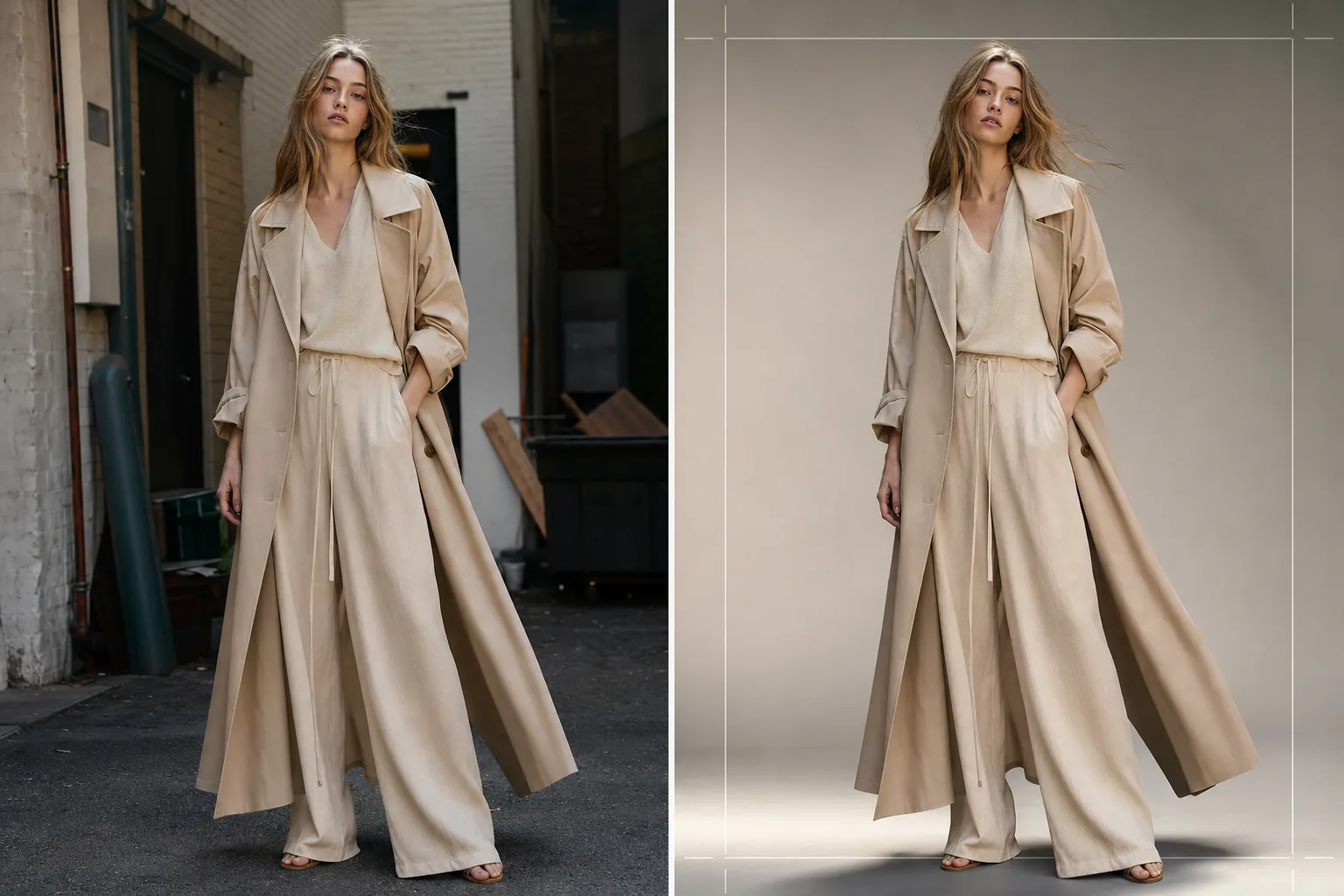
Was diese Vorlage leistet
Optimiert die gesamte Lookbook-Nachbearbeitung von der rohen Aufnahme vor Ort oder im Studio bis hin zu ausgefeilten, markenkonsistenten Bildern. Background Eraser isoliert Model und Kleidungsstück aus jeder Umgebung und bietet einen Ersatz durch einfarbige Studiofarben, Farbverläufe oder kuratierte redaktionelle Hintergründe wie Betonwände, natürliches Grün oder urbane Straßenszenen. AI Enhance wendet eine auf Stoffarten abgestimmte Farbkorrektur an — warme Töne für erdfarbenes Leinen und Wolle, kühlere Töne für Denim und technische Stoffe — sodass Textur und Fall des Kleidungsstücks der visuelle Held sind. Die Hautretusche ist leicht und redaktionell, gleicht temporäre Unreinheiten aus, ohne Sommersprossen, Muttermale oder natürliche Merkmale zu entfernen, die das Model authentisch wirken lassen.
Vorlageneinstellungen
| Hintergrundstil | Studioweiß, nahtloses Grau, Farbverlauf oder redaktionelle Umgebung |
| Farbkorrektur | Mode-Redaktion (stoffadaptiv: warm für Naturfasern, kühl für technische Stoffe) |
| Hautretusche | Leichte Redaktion (Unreinheitenentfernung, Tonangleichung, natürliche Merkmale erhalten) |
| Stoffverbesserung | Texturschärfung und Faltenwurf-Betonung für die Sichtbarkeit von Kleidungsdetails |
| Zuschnitt und Bildausschnitt | Ganzkörper-, Dreiviertel- oder Nahaufnahme mit Sicherheitsrand für Textüberlagerung |
| Ausgabeauflösung | 4000×6000px (Hochformat, druckfertig bei 300 DPI) |
So verwenden Sie diese Vorlage
Laden Sie Ihr Lookbook-Foto hoch
Laden Sie eine Ganzkörper- oder Dreiviertelaufnahme eines Models hoch, das das vorgestellte Kleidungsstück trägt. Fotos aus Studioaufnahmen, Außenlocations und Showrooms funktionieren alle. Die Vorlage verarbeitet RAW-Konvertierungen, JPEGs und hochauflösende TIFFs.
Hintergrund ersetzen oder verfeinern
Background Eraser isoliert das Model mit einer Kantenerkennung, die präzise genug ist, um lose Stoffkanten, fließendes Haar und durchscheinende Materialien wie Chiffon zu erhalten. Ersetzen Sie den Hintergrund durch eine Studiofarbe, die Ihren Markenrichtlinien entspricht, oder wählen Sie eine redaktionelle Umgebung, die die Stimmung der Kollektion ergänzt.
Farbkorrektur und Verbesserung anwenden
AI Enhance wendet eine Farbkorrektur an, die die Stofftextur und die wahre Farbe des Kleidungsstücks betont. Die Hautretusche wird in redaktioneller Intensität angewendet — Rötungen und temporäre Unreinheiten werden ausgeglichen, ohne die Haut zu glätten oder natürliche Merkmale zu entfernen. Die Stoffschärfung bringt Webmuster, Nähte und Faltenlinien zur Geltung.
Für Lookbook und E-Commerce exportieren
Laden Sie in 4000×6000px für gedruckte Lookbooks und Linesheet-PDFs herunter oder in weboptimierten Größen für Shopify, Großhandelsportale und soziale Medien. Die Vorlage kann konsistente Zuschnitte über eine gesamte Kollektion hinweg für ein einheitliches Lookbook-Layout ausgeben.
Profi-Tipps für beste Ergebnisse
- ✓Fotografieren Sie Kleidungsstücke wann immer möglich an einem Model statt an einer Schaufensterpuppe. Die KI-Hintergrundentfernung und Hautretusche liefern mit echten menschlichen Formen die natürlichsten Ergebnisse, und Käufer reagieren positiver auf Bilder, die zeigen, wie der Stoff an einem Körper fällt.
- ✓Verwenden Sie ein Haargummi oder eine Klammer, um langes Haar während der Aufnahme vom Halsausschnitt von Oberteilen und Jacken fernzuhalten. Die Hintergrundentfernung kommt mit losem Haar gut zurecht, aber Haar, das Kragendetails und die Halsausschnittkonstruktion verdeckt, verbirgt genau die Merkmale, die Käufer bewerten.
- ✓Halten Sie eine einheitliche Lichtrichtung über alle Aufnahmen einer Kollektion hinweg ein. Wenn die KI dieselbe Farbkorrektur anwendet und die Lichtrichtung konsistent ist, liest sich das Lookbook als zusammenhängende redaktionelle Geschichte und nicht als Flickwerk verschiedener Aufnahmen.
Häufige Fragen
Kann ich dies für flach liegende Kleidungsaufnahmen verwenden?
+
Diese Vorlage ist für die Fotografie am Model optimiert. Für flach liegende Kleidungsaufnahmen auf Tischen oder hängende Arrangements verarbeitet die Vorlage Clothing Flat Lay Cleanup diese Kompositionen effektiver, da sie die Geometrie von flach liegendem statt am Körper drapiertem Stoff versteht.
Bleiben durchscheinende Stoffe wie Chiffon erhalten?
+
Ja. Die Kantenerkennung in Background Eraser bewahrt halbtransparente Stoffkanten. Der Ersatzhintergrund ist durch dünnes Material hindurch sichtbar, genau wie es die ursprüngliche Umgebung wäre, und erhält die beabsichtigte Silhouette und den Schichteffekt des Kleidungsstücks.
Kann ich den Hintergrund an den genauen Hex-Farbwert meiner Marke anpassen?
+
Ja. Sie können einen genauen Hex-Code für die einfarbige Hintergrundfarbe angeben, und die KI erzeugt einen nahtlosen Hintergrund in dieser Farbe mit einem passenden Schattenverlauf unter den Füßen des Models für ein geerdetes, realistisches Aussehen.
Erstellen Sie ein ausgefeiltes Lookbook von jedem Aufnahmeort aus
Laden Sie Model-Aufnahmen hoch und erhalten Sie markenkonsistente Lookbook-Bilder in redaktioneller Qualität, bereit für Druck, Web und Großhandelspräsentationen.
Kostenlos testen