
Fahrzeuginserat-Foto
Lassen Sie jedes Fahrzeug in Inseratfotos wie im Showroom aussehen. Diese Vorlage entfernt das Durcheinander auf dem Parkplatz, korrigiert die Genauigkeit der Lackfarbe bei gemischtem Außenlicht, bereinigt Reflexionen auf Glas und Klarlack und exportiert in den von AutoTrader, Cars.com, Carvana und Facebook Marketplace empfohlenen Abmessungen — ganz gleich, ob Sie Händler oder Privatverkäufer sind.
Diese Vorlage kostenlos testenAutomotive template preview
Was diese Vorlage macht
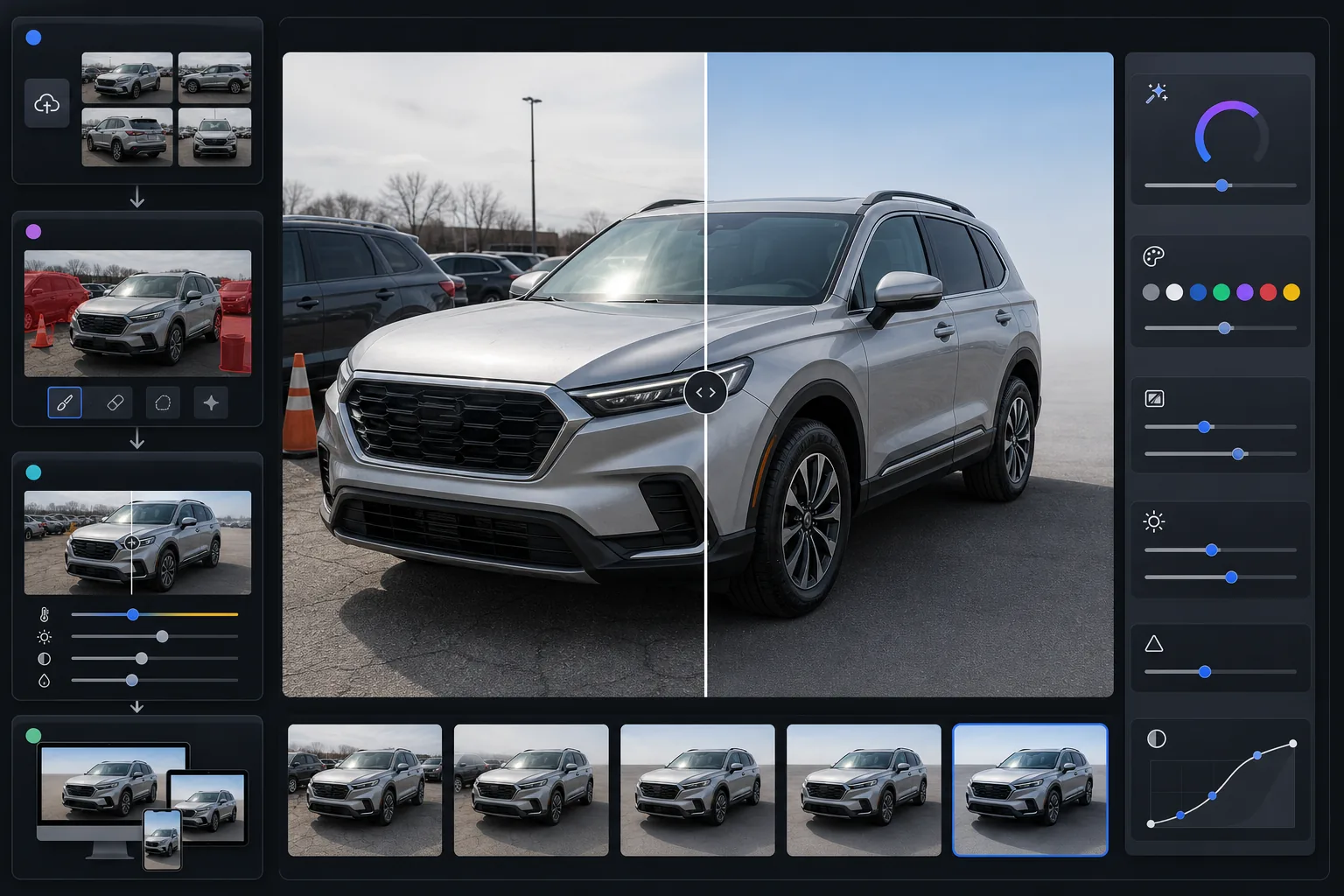
Verwandelt gewöhnliche Parkplatz- oder Einfahrtfotos in professionelle Inseratbilder für Fahrzeuge. Magic Eraser entfernt Fahrzeuge im Hintergrund, Beschilderung des Geländes, Mülltonnen und andere Autos aus der Szene. AI Enhance korrigiert Lackfarben, die durch bedeckten Himmel, das Natriumdampflicht des Geländes oder die orangefarbene Tönung der goldenen Stunde verfälscht erscheinen — sodass die tatsächliche Lackfarbe des Fahrzeugs auf dem Bildschirm naturgetreu wiedergegeben wird. Reflexionen auf Windschutzscheiben und Karosserieteilen werden abgemildert, damit das Fahrzeug selbst im Mittelpunkt steht und nicht der Fotograf.
Vorlageneinstellungen
| Ausgabegröße | 2400×1600px (3:2 Querformat, Standard für Fahrzeuginserate) |
| Lackfarbkorrektur | Neutraler Weißabgleich mit metallic-sensitiver Farbzuordnung |
| Reflexionsreduzierung | Abmilderung von Blendungen auf Glas und Klarlack (erhält Karosserielinien) |
| Hintergrundbereinigung | Automatisches Erkennen und Entfernen angrenzender Fahrzeuge und Geländeunordnung |
| Dateiformat | JPEG 92% Qualität (unter 5 MB für Inseratplattformen) |
| Farbprofil | sRGB (bildschirmgenau auf allen Inseratseiten) |
So verwenden Sie diese Vorlage
Laden Sie Ihre Fahrzeugfotos hoch
Fotografieren Sie das Fahrzeug aus allen vier Ecken (vordere 3/4- und hintere 3/4-Ansicht) sowie frontale Aufnahmen von vorn, hinten und beiden Seiten. Fügen Sie Innenaufnahmen, Motorraum, Räder und alle Zustandsdetails hinzu. Bedeckte Tage erzeugen die gleichmäßigste Beleuchtung auf reflektierenden Oberflächen.
Entfernen Sie Gelände- und Hintergrundunordnung
Magic Eraser entfernt andere Fahrzeuge, Geländebestand, Einkaufswagen, Beschilderung, Strommasten und alle Hintergrundelemente, die vom inserierten Fahrzeug ablenken. Die KI füllt den Hintergrund mit einer sauberen Fortsetzung der Parkfläche und des Himmels.
Korrigieren Sie Lackfarbe und Reflexionen
AI Enhance neutralisiert den Farbstich durch Geländebeleuchtung, bedeckten Himmel oder die Sonne der goldenen Stunde, der die Wiedergabe des Lacks auf der Kamera verändert. Metallic-, Perl- und Mattlackierungen werden unterschiedlich behandelt, um ihr charakteristisches Erscheinungsbild zu bewahren. Reflexionen auf Windschutzscheibe und Karosserieteilen werden reduziert, ohne die natürlichen Formhighlights abzuflachen.
Exportieren Sie für Ihre Inseratplattform
Laden Sie in 2400×1600px für maximale Qualität auf allen großen Plattformen herunter. AutoTrader, Cars.com, CarGurus, Carvana und Facebook Marketplace zeigen alle Fotos im Querformat an, und das Verhältnis 3:2 passt zum Galerie-Layout jeder Plattform.
Profi-Tipps für beste Ergebnisse
- ✓Fotografieren Sie das Fahrzeug an einem bedeckten Tag oder im offenen Schatten. Direktes Sonnenlicht erzeugt harte Reflexionen auf Glas und Karosserieteilen, die sich nur schwer vollständig korrigieren lassen, und wirft harte Schatten unter dem Fahrzeug, die die Hintergrundbereinigung weniger nahtlos machen.
- ✓Verwenden Sie für das Haupt-Inseratfoto die vordere 3/4-Ansicht (Sie stehen am Scheinwerfer der Fahrerseite und fotografieren in Richtung des Rücklichts der Beifahrerseite). Dieser Winkel zeigt die größte Oberfläche des Fahrzeugs und ist der Branchenstandard für Fahrzeuginserate.
- ✓Gehen Sie um das Fahrzeug herum und entfernen Sie vor der Aufnahme alle losen Gegenstände — Kennzeichenrahmen mit Händlernamen, Windschutzscheibenaufkleber und Parkausweise lassen sich physisch leichter entfernen als digital, und das Ergebnis wirkt natürlicher.
- ✓Fügen Sie eine Nahaufnahme des Kilometerzählers, des VIN-Schilds und aller Ausstattungsplaketten hinzu. Die Detailschärfung von AI Enhance macht diese selbst auf Smartphone-Fotos lesbar, was bei Privatverkaufsinseraten, bei denen die Verifizierung zählt, das Vertrauen der Käufer stärkt.
Häufige Fragen
Wird die Lackfarbe nach der Bearbeitung genau sein?
+
Die Farbkorrektur der Vorlage ist darauf ausgelegt, die wahre Lackfarbe des Fahrzeugs zu zeigen, indem umgebungsbedingte Farbstiche entfernt werden (Orange von Natriumlampen, Blau vom bedeckten Himmel, Grün vom umgebenden Laub). Metallic- und Perllackierungen werden mit einem spezialisierten Algorithmus behandelt, der den Flake-Effekt und die Tiefe bewahrt, die diese Lackierungen unverwechselbar machen.
Kann ich andere Autos aus dem Hintergrund entfernen?
+
Ja. Magic Eraser bewältigt Fahrzeuge, Beschilderung, Personen und Geländeinfrastruktur im Hintergrund. Die KI rekonstruiert einen sauberen Hintergrund hinter den entfernten Objekten — in der Regel als Fortsetzung der Parkfläche und des Himmels. Für das natürlichste Ergebnis lassen Sie bei der Aufnahme etwas Abstand zwischen dem inserierten Fahrzeug und benachbarten Autos.
Funktioniert das für Motorrad- und Bootsinserate?
+
Die Vorlage ist für Pkw, Lkw und SUV optimiert, funktioniert aber bei jedem Fahrzeug. Motorräder und Boote profitieren von derselben Hintergrundbereinigung, Reflexionsreduzierung und Farbkorrektur. Die 3:2-Querformatausgabe passt unabhängig vom Fahrzeugtyp zu jeder großen Inseratplattform.
Lassen Sie jedes Fahrzeug wie im Showroom aussehen
Laden Sie Ihre Autofotos hoch und erhalten Sie in Sekunden saubere, farbgetreue Inseratbilder. Funktioniert gleichermaßen für Händler und Privatverkäufer.
Kostenlos testen