
Vorher & Nachher Slider
Zeigen Sie die Wirkung Ihrer Arbeit mit perfekt ausgerichteten Vorher-Nachher-Vergleichsbildern. Diese Vorlage erstellt vorführbereite Paare mit einheitlichem Bildausschnitt, ausgewogener Beleuchtung und gleichen Abmessungen — ideal für Portfolios, Fallstudien, Social Proof und Produktmarketing, bei denen die visuelle Transformation die Geschichte erzählt.
Diese Vorlage kostenlos testenMarketing template preview
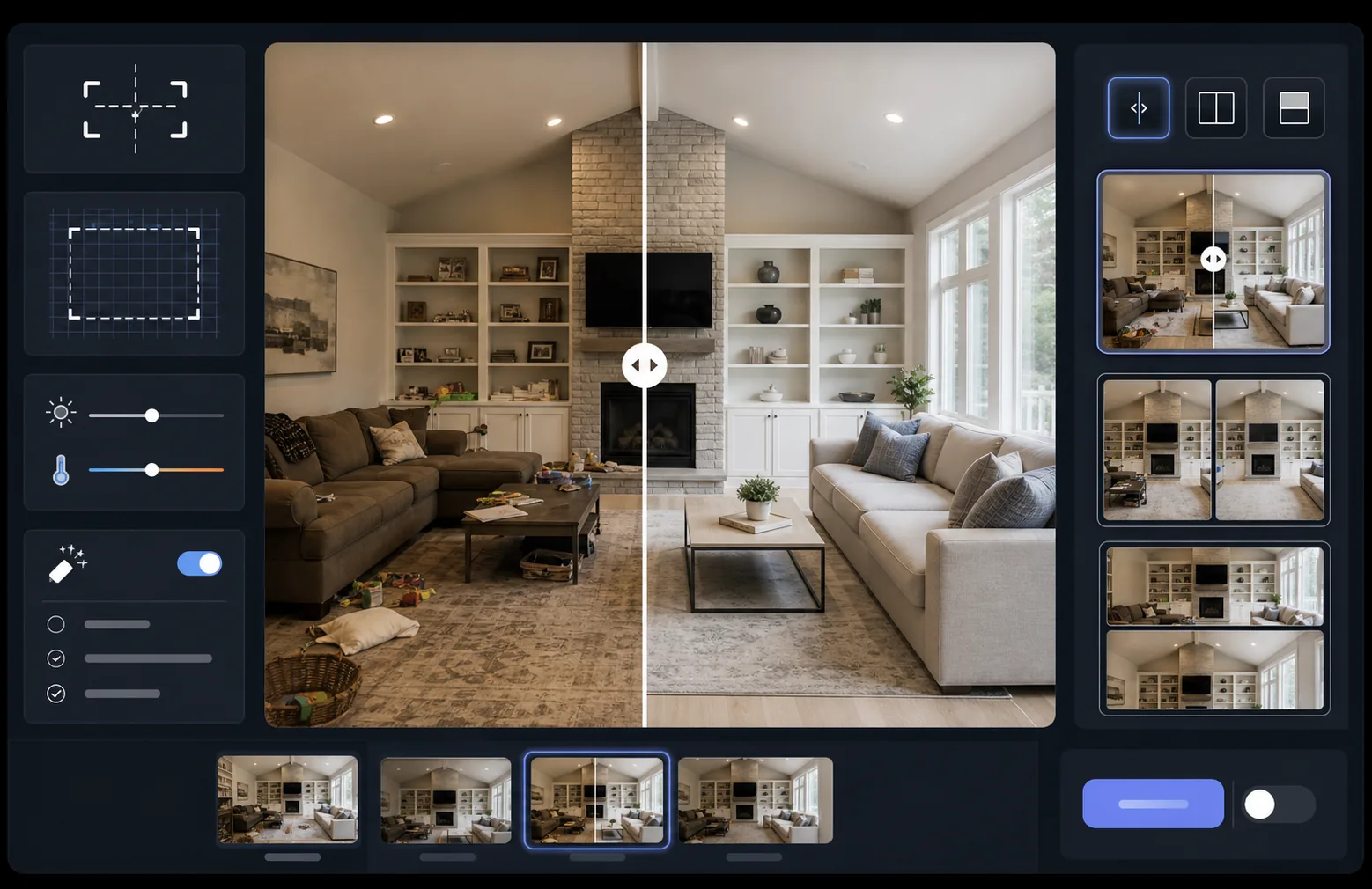
Was diese Vorlage leistet
Verarbeitet zwei Bilder — ein Vorher und ein Nachher — zu einem perfekt ausgerichteten Vergleichspaar, das für Slider-Widgets, nebeneinander angeordnete Layouts oder animierte Überblendungen bereit ist. AI Enhance gleicht Belichtung und Weißabgleich zwischen den beiden Bildern an, sodass die Transformation klar sichtbar ist, ohne dass Beleuchtungsunterschiede den Vergleich verfälschen. Magic Eraser kann beiläufige Störelemente in einem der beiden Bilder entfernen, die nicht Teil der beabsichtigten Transformation sind.
Vorlageneinstellungen
| Layout | Slider-fertiges Paar, nebeneinander oder vertikal gestapelt (auswählbar) |
| Ausgabegröße | 1600×1200px pro Bild (gleiche Abmessungen) |
| Ausrichtung | Automatische Registrierung — gleicht Perspektive und Bildausschnitt zwischen den Aufnahmen an |
| Beleuchtungsangleichung | Gleicht Belichtung und Weißabgleich über das gesamte Paar hinweg aus |
| Beschriftungs-Overlay | Optionale 'Before' / 'After'-Beschriftungen mit anpassbarer Position |
| Rahmen | 1px neutralgrauer Trenner oder nahtlose Kante (auswählbar) |
So verwenden Sie diese Vorlage
Laden Sie Ihr Vorher-Bild hoch
Laden Sie das originale, unbearbeitete Foto hoch, das den Ausgangszustand zeigt. Das kann ein Raum vor der Renovierung, ein Produkt vor der Optimierung, Haut vor der Behandlung oder jede visuelle Transformation sein, die Sie zeigen möchten.
Laden Sie Ihr Nachher-Bild hoch
Laden Sie das Ergebnisfoto hoch, das die abgeschlossene Transformation zeigt. Versuchen Sie, aus demselben Winkel und derselben Entfernung wie bei der Vorher-Aufnahme zu fotografieren. Die Vorlage richtet kleinere Unterschiede in Bildausschnitt und Perspektive automatisch aus.
Angleichen und ausrichten
Die Vorlage registriert die beiden Bilder automatisch, sodass sich entsprechende Elemente Pixel für Pixel ausrichten. Belichtung und Weißabgleich werden angeglichen, damit Beleuchtungsunterschiede zwischen den Aufnahmesitzungen nicht von der eigentlichen Transformation ablenken.
Exportieren Sie den Vergleich
Wählen Sie Ihr Ausgabeformat — passendes Paar für ein Slider-Widget, Nebeneinander-Komposition für soziale Medien oder vertikale Stapelung für E-Mail-Marketing. Fügen Sie optionale Before/After-Beschriftungen hinzu und exportieren Sie in web-optimierter Auflösung oder Druckqualität.
Profi-Tipps für beste Ergebnisse
- ✓Fotografieren Sie Vorher und Nachher nach Möglichkeit aus exakt derselben Position — markieren Sie die Stelle Ihres Stativs oder stellen Sie sich an dieselbe Stelle. Je weniger die KI die Ausrichtung korrigieren muss, desto schärfer der Vergleich.
- ✓Verwenden Sie für beide Aufnahmen dieselbe Brennweite, um Unterschiede in der perspektivischen Verzerrung zu vermeiden, die ausgerichtete Vergleiche subtil schief wirken lassen.
- ✓Entfernen Sie mit Magic Eraser nicht zusammenhängende Veränderungen zwischen Vorher und Nachher — wenn sich eine Pflanze bewegt hat oder ein neues Objekt aufgetaucht ist, löschen Sie es, damit sich die Betrachter auf die beabsichtigte Transformation konzentrieren.
- ✓Exportieren Sie für Web-Slider-Einbettungen beide Bilder in identischen Abmessungen und verwenden Sie verlustfreies PNG, um Kompressionsartefakte entlang der Trennlinie des Sliders zu vermeiden.
Häufige Fragen
Was ist, wenn die Vorher- und Nachher-Fotos aus leicht unterschiedlichen Winkeln aufgenommen wurden?
+
Das System zur automatischen Registrierung bewältigt moderate Unterschiede in Kamerawinkel, Entfernung und Bildausschnitt. Es ermittelt entsprechende Bezugspunkte in beiden Bildern und transformiert sie so, dass sie übereinstimmen. Für beste Ergebnisse sollte der Winkelunterschied unter 15 Grad liegen.
Kann ich das für Video-Thumbnails verwenden, die Transformationen zeigen?
+
Ja. Die Nebeneinander-Komposition eignet sich ideal für Video-Thumbnails auf YouTube und in sozialen Medien. Das Split-Screen-Layout mit Beschriftungen vermittelt sofort eine Transformationsgeschichte, die zu Klicks anregt.
Verändert die Beleuchtungsangleichung die tatsächlich gezeigten Ergebnisse?
+
Nein. Die Beleuchtungsangleichung passt nur die Gesamtbelichtung und den Weißabgleich an, sodass beide Bilder so wirken, als wären sie unter denselben Bedingungen aufgenommen worden. Die eigentliche Transformation — die Veränderungen am Motiv — bleibt genau so erhalten, wie sie fotografiert wurde.
Zeigen Sie Ihre Ergebnisse, nebeneinander
Laden Sie Ihre Vorher- und Nachher-Fotos hoch und erhalten Sie in Sekunden ein perfekt ausgerichtetes, professionell präsentiertes Vergleichsbild. Lassen Sie die Transformation für sich sprechen.
Kostenlos testen