
So ändern Sie einen Fotohintergrund
Benötigen Sie einen professionellen Studiohintergrund für ein Selfie? Ein weißer Hintergrund für ein Produktfoto auf einem Küchentisch? Eine andere Szene hinter einem Porträt? Background Eraser von Magic Eraser entfernt den ursprünglichen Hintergrund und ermöglicht es Ihnen, ihn durch eine beliebige Volltonfarbe, einen Farbverlauf oder ein benutzerdefiniertes Bild zu ersetzen – die Kanten des Motivs verschmelzen auf natürliche Weise mit dem neuen Hintergrund.
Last updated
Ändern Sie jetzt einen Hintergrund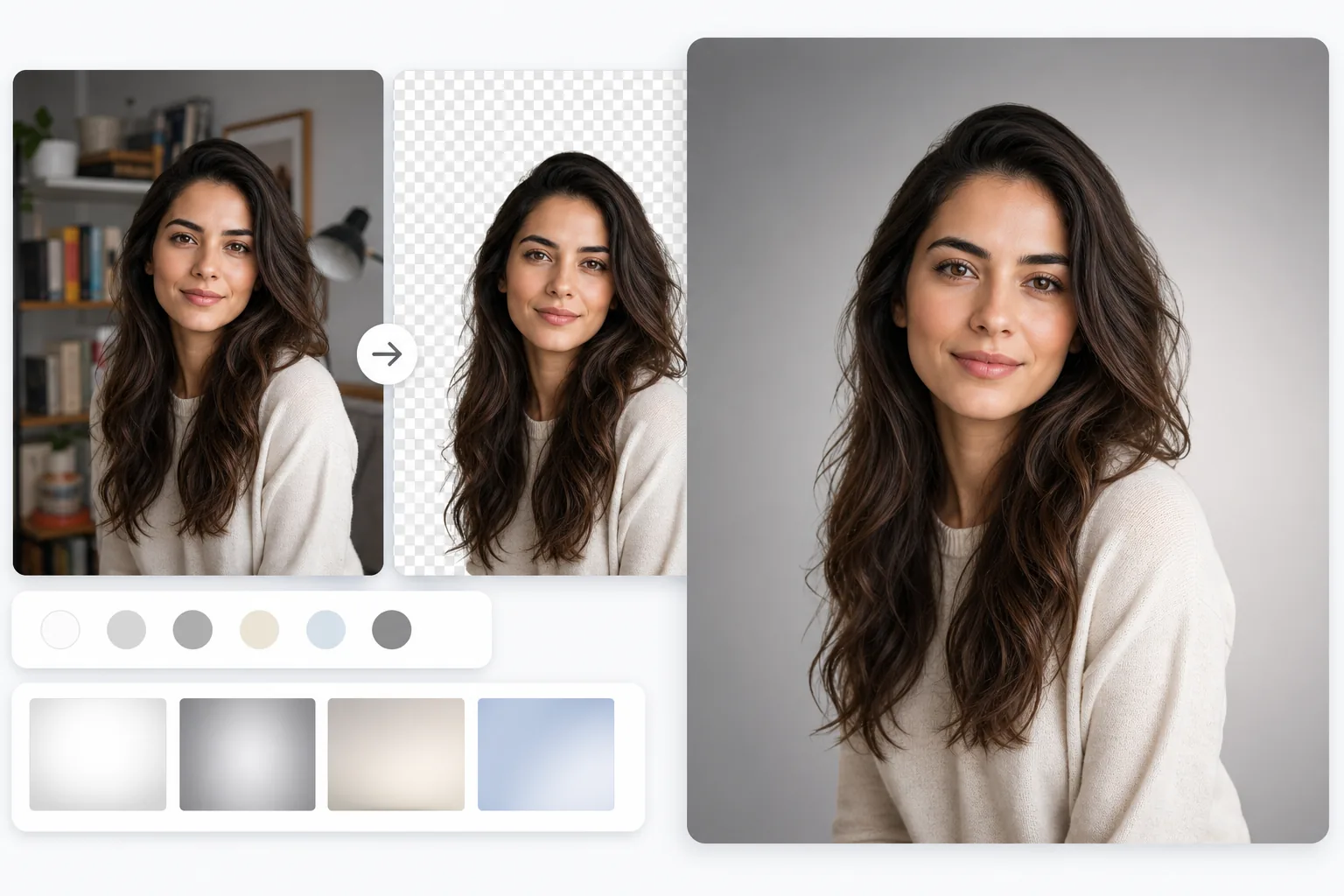
So änderst du den Hintergrund eines Fotos
Um den Hintergrund eines Fotos zu ändern, öffnest du Magic Eraser im Web, auf iOS oder Android, lädst das Bild hoch, lässt die KI den ursprünglichen Hintergrund mit einem Tippen entfernen und ersetzt ihn anschließend durch eine einfarbige Fläche, einen Farbverlauf oder ein eigenes Bild. Das ist kostenlos und ganz ohne Anmeldung. Die KI verfeinert die Kanten des Motivs – auch die Haare –, sodass der Ausschnitt nahtlos mit dem neuen Hintergrund verschmilzt, statt aufgeklebt zu wirken. Für ein glaubwürdiges Ergebnis wählst du am besten einen Hintergrund, dessen Lichtrichtung zum Motiv passt. So tauschst du den Hintergrund gegen einen neuen aus; wenn du das Motiv hingegen freigestellt auf transparentem Grund möchtest, exportiere stattdessen ein transparentes PNG. Die meisten Fotos werden an Orten aufgenommen, die für die endgültige Verwendung des Bildes nicht ideal sind. Unternehmensporträts werden in Konferenzräumen im Büro und nicht in professionellen Studios aufgenommen. Produktfotos werden auf jedem Untergrund gemacht, der zu Hause zur Verfügung steht. Pass- und Visafotos werden vor den Wänden der Wohnung statt vor einem vorschriftsmäßig weißen Hintergrund aufgenommen. In Schlaf- und Wohnzimmern werden Social-Media-Inhalte erstellt, die nicht zur ästhetischen Marke des Erstellers passen. Veranstaltungsfotos halten Zeremonienmomente vor der Infrastruktur des Veranstaltungsortes und den Ausgangsschildern fest. In jedem Fall ist das Motiv der eigentliche Inhalt und der Hintergrund eine Einschränkung des Ortes, an dem das Foto aufgenommen wurde. Der Hintergrundaustausch entkoppelt das Motiv vom Aufnahmeort – ein in einem Auto aufgenommenes Selfie wird zu einem Porträtfoto vor einem neutralen Studiohintergrund, ein auf einem Schreibtisch fotografiertes Produkt wird zu einem Marktplatzangebot in reinem Weiß, ein in einem überfüllten Raum aufgenommenes Porträt wird zu einem Social-Media-Beitrag mit einer konsistenten Markenästhetik. Der herkömmliche Photoshop-Workflow erfordert eine präzise Auswahl rund um das Motiv (Stiftwerkzeug, Schnellauswahl oder Motivauswahl), die Verfeinerung der Kantenmaske (insbesondere um Haare), das Löschen des ursprünglichen Hintergrunds und das Zusammensetzen des Motivs auf dem neuen – ein Vorgang, der je nach Kantenkomplexität 10–45 Minuten pro Bild dauert. Magic Eraser übernimmt die Auswahl, Kantenverfeinerung und Hintergrundentfernung mit einem Fingertipp und bietet dann sofort Ersatzoptionen an.
Before you start
Ändern Sie einen Fotohintergrund in drei Schritten
Start with laden sie das foto hoch. The result preview above and tips below use this guide's existing content; no separate before-and-after proof is assumed.
- 1
Laden Sie das Foto hoch
Öffnen Sie Magic Eraser im Web, iOS oder Android. Fügen Sie Porträtfotos, Produktfotos, Porträts oder andere Bilder ein, bei denen der Hintergrund geändert werden muss. Das Tool eignet sich für jedes Foto mit einem klaren Motiv – Menschen, Produkte, Tiere, Objekte. JPEG, PNG, HEIC und WebP werden unterstützt.
- 2
Entfernen Sie den ursprünglichen Hintergrund
Tippen Sie auf Background Eraser. Die KI erkennt das Motiv, entfernt den ursprünglichen Hintergrund und zeigt das Motiv auf einem transparenten Schachbrett an. Bei Motiven mit komplexen Kanten (Haare, Fell, Spitze, durchscheinende Materialien) behält die KI feine Kantendetails bei, anstatt eine grobe Silhouette zu schneiden. Wenn die Kante angepasst werden muss, verwenden Sie den Verfeinerungspinsel, um bestimmte Bereiche ein- oder auszuschließen.
- 3
Wenden Sie einen neuen Hintergrund an und exportieren Sie ihn
Wählen Sie einen Ersatz: eine Volltonfarbe (Weiß für E-Commerce, neutrales Grau für professionelle Porträtaufnahmen, Markenfarbe für Marketing), einen Farbverlauf (dezenter Hell-Dunkel-Effekt für Tiefe) oder ein benutzerdefiniertes Bild (eine Lifestyle-Szene, ein Studiohintergrund, eine Markenvorlage). Die Randbeleuchtung und die Schattenrichtung des Motivs bleiben erhalten, sodass das zusammengesetzte Ergebnis natürlich und nicht wie eingeklebt aussieht. Passen Sie bei Bedarf die Position und Skalierung des Motivs an den neuen Hintergrund an und exportieren Sie es dann in voller Auflösung.
Am besten für
- Professionelle Porträtaufnahmen, bei denen der ursprüngliche Aufnahmeort (Büro, Zuhause, im Freien) nicht dem neutralen Studio-Look entspricht, der für LinkedIn, Websites und Visitenkarten erforderlich ist
- E-Commerce-Produktfotos, bei denen die Aufnahmefläche marktüblich weiß sein muss oder ein Lifestyle-Mockup-Hintergrund sein muss
- Pass- und Visumfotos, bei denen Vorschriften bestimmte Hintergrundfarben erfordern (weiß, hellgrau oder hellblau, je nach Land)
- Social-Media-Inhalte, bei denen eine einheitliche Hintergrundästhetik über alle Beiträge hinweg ein erkennbares visuelles Branding schafft
- Team- und Gruppenfotos, bei denen einzelne Mitglieder an verschiedenen Orten fotografiert wurden und einen einheitlichen Hintergrund für die Unternehmensseite benötigen
- Event- und Hochzeitsfotografie, bei der die Zeremonienhintergründe eine Veranstaltungsortinfrastruktur umfassen, die vom Moment ablenkt
Tipps für beste Ergebnisse
Durch die einheitliche Beleuchtung des Motivs und des neuen Hintergrunds sieht das Bild natürlich aus. Wenn das Motiv mit Licht von links fotografiert wurde, liefert ein Ersatzhintergrund, der die gleiche Beleuchtungsrichtung impliziert (heller auf der linken Seite, subtilere Schatten auf der rechten Seite), ein überzeugenderes Ergebnis. Bei einfarbigen Hintergründen ist dies weniger kritisch, da es keinen passenden Umgebungsbeleuchtungskontext gibt. Bei zusammengesetzten Hintergründen (Platzierung eines Motivs in einer neuen Szene) ist auch die Anpassung der Perspektive wichtig – ein auf Augenhöhe fotografiertes Motiv sieht auf einem auf Augenhöhe fotografierten Hintergrund natürlich aus, wirkt jedoch zusammengesetzt, wenn es vor einem von oben oder unten aufgenommenen Hintergrund platziert wird. Speziell für Haarkanten: Dunkles Haar auf einem hellen neuen Hintergrund zeigt die meisten Kantendetails und Kantenartefakte. Helles Haar auf hellem Hintergrund verzeiht mehr. Wenn Sie entlang der Haarkante einen dünnen Rand der alten Hintergrundfarbe sehen (häufig beim Wechsel von einem farbigen Hintergrund zu Weiß), können Sie das Problem mit einem schnellen Verfeinerungspinsel entlang des Haaransatzes beheben. Bei der Stapelverarbeitung (einheitliche Hintergründe für ein Team von 20 Kopfschüssen) sorgt die KI für eine konsistente Motiverkennung im gesamten Stapel – die gleiche Qualität der Kantenerkennung und Hintergrundentfernung für jede Person –, sodass der endgültige Satz einheitlich aussieht.
Häufig gestellte Fragen
- Ist der Hintergrundaustausch kostenlos?
- Ja. Das kostenlose Kontingent von Magic Eraser umfasst Background Eraser und grundlegende Ersatzoptionen mit täglichen Nutzungslimits. Premium (29,99 $/Jahr) hebt Beschränkungen auf, ermöglicht hochauflösende Exporte und bietet zusätzliche Ersatzoptionen.
- Kann ich mein eigenes Bild als neuen Hintergrund verwenden?
- Ja. Nachdem Sie den ursprünglichen Hintergrund entfernt haben, können Sie ein beliebiges Bild als Ersatz hochladen. Das Motiv wird mit natürlicher Kantenüberblendung auf dem neuen Hintergrund zusammengesetzt. Um optimale Ergebnisse zu erzielen, wählen Sie einen Ersatzhintergrund mit kompatibler Beleuchtungsrichtung und -perspektive.
- Werden meine Haarränder auf dem neuen Hintergrund natürlich aussehen?
- Ja. Die KI bewahrt einzelne Haarsträhnen, anstatt eine grobe Silhouette zu schneiden. Feine Haardetails bleiben durch den Hintergrundwechsel erhalten. Wenn entlang der Haarkante ein dünner Rand der alten Hintergrundfarbe zurückbleibt (sichtbar beim Wechsel von einem stark gefärbten Hintergrund zu einer ganz anderen Farbe), reinigt der Verfeinerungspinsel ihn in Sekundenschnelle.
- Welche Hintergrundfarbe benötige ich für Passfotos?
- Die Anforderungen variieren je nach Land: US-Pässe erfordern Weiß oder Cremeweiß, britische Pässe erfordern Hellgrau, die meisten EU-Länder erfordern helle Hintergründe (Weiß oder Hellgrau) und einige Länder akzeptieren Hellblau. Überprüfen Sie die Anforderungen Ihres Landes, bevor Sie die Ersatzfarbe auswählen. Der einfarbige Ersatz von Magic Eraser macht es einfach, den genauen Farbton zu finden.
- Kann ich den Hintergrund von Telefonfotos ändern?
- Ja. Die iOS- und Android-Apps von Magic Eraser verwenden dieselbe KI wie die Webversion. Sie können den Hintergrund sofort auf Ihrem Telefon ändern – nützlich für schnelle Porträtfoto-Updates, Produktfotografie zu Hause und Social-Media-Inhalte, bei denen Sie das Ergebnis sofort benötigen.