
यूट्यूब चैनल आर्ट
ऐसे YouTube चैनल बैनर डिज़ाइन करें जो हर स्क्रीन पर तीखे दिखें — 2560px डेस्कटॉप मॉनिटर से लेकर मोबाइल फ़ोन क्रॉप तक। यह टेम्पलेट जटिल सुरक्षित-क्षेत्र गणना को संभालता है ताकि आपकी ब्रांडिंग, टेक्स्ट और क्रिएटर फ़ोटो TV, डेस्कटॉप, टैबलेट और मोबाइल पर बिना कटे सही ढंग से प्रदर्शित हो।
यह टेम्पलेट मुफ़्त आज़माएँSocial Media template preview
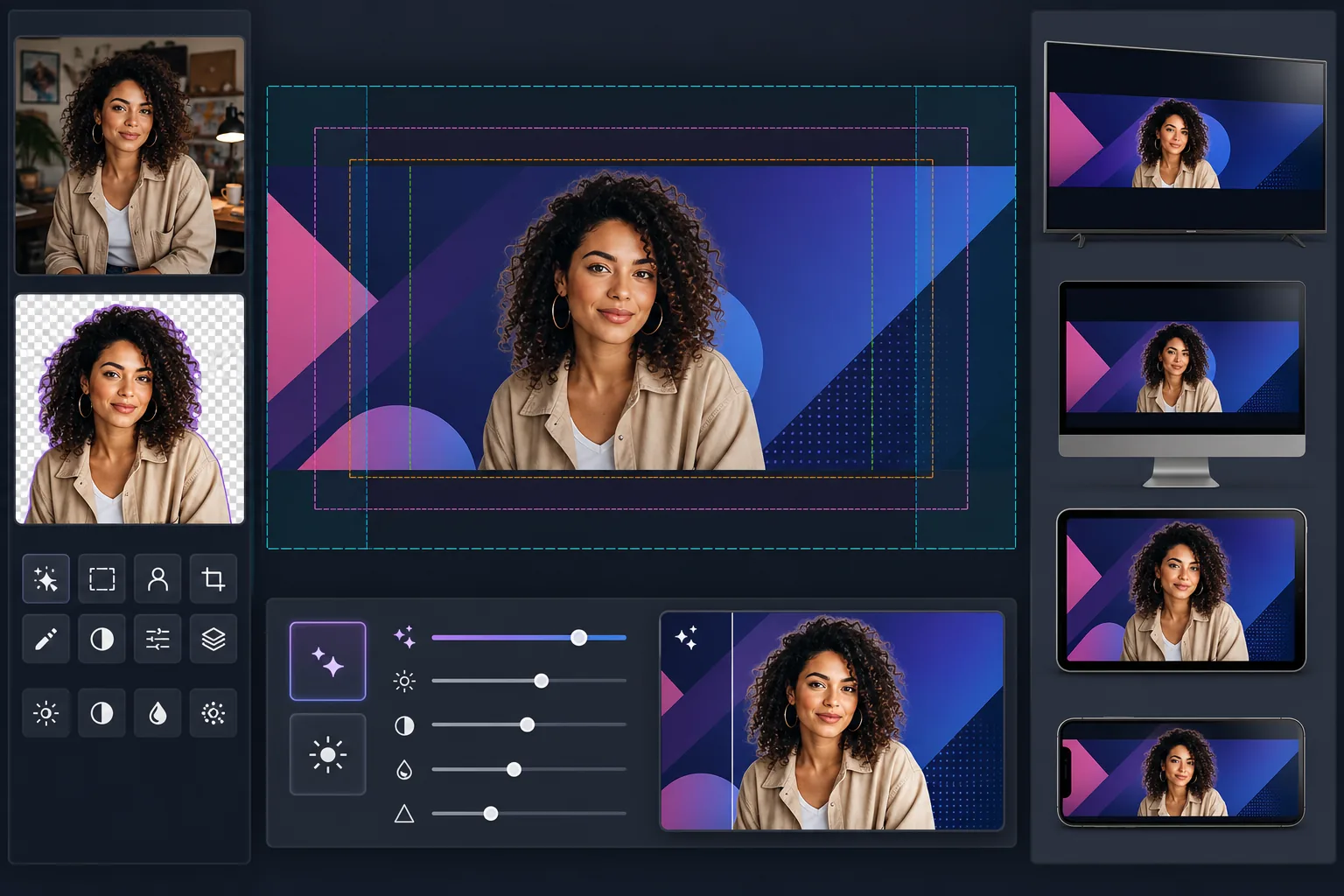
यह टेम्पलेट क्या करता है
सामग्री को YouTube के सुरक्षित क्षेत्रों के भीतर रखते हुए पूर्ण 2560×1440px कैनवास आकार में YouTube चैनल आर्ट बनाता है। Background Eraser क्रिएटर के पोर्ट्रेट को साफ़-सुथरे ढंग से निकालता है ताकि उन्हें ब्रांडेड पृष्ठभूमि पर संयोजित किया जा सके, और AI Enhance यह सुनिश्चित करता है कि अंतिम बैनर YouTube के उच्च-रिज़ॉल्यूशन प्रदर्शन आकार पर तीखा बना रहे। यह टेम्पलेट उन चार अलग-अलग क्रॉप क्षेत्रों को ध्यान में रखता है जिन्हें YouTube TV, डेस्कटॉप, टैबलेट और मोबाइल डिवाइसों पर लागू करता है।
टेम्पलेट सेटिंग्स
| कैनवास आकार | 2560×1440px (YouTube का आवश्यक अपलोड आकार) |
| सुरक्षित क्षेत्र (सभी डिवाइस) | 1546×423px केंद्रीय क्षेत्र (हमेशा दृश्यमान) |
| डेस्कटॉप दृश्यमान क्षेत्र | 2560×423px (पूर्ण चौड़ाई, केंद्रीय पट्टी) |
| रंग स्थान | sRGB (सुसंगत YouTube प्रदर्शन के लिए वेब मानक) |
| फ़ाइल प्रारूप | ग्राफ़िक्स/टेक्स्ट के लिए PNG, फ़ोटोग्राफ़िक बैनर के लिए JPEG 95% |
| अधिकतम फ़ाइल आकार | 6MB (YouTube की अपलोड सीमा) |
इस टेम्पलेट का उपयोग कैसे करें
अपनी क्रिएटर फ़ोटो या ब्रांड एसेट अपलोड करें
एक पोर्ट्रेट फ़ोटो, लोगो या ब्रांड इमेजरी अपलोड करें। क्रिएटर-केंद्रित चैनलों के लिए, एक साफ़ हेडशॉट या ऊपरी-शरीर की फ़ोटो सबसे अच्छी रहती है। Background Eraser आपको किसी भी पृष्ठभूमि से अलग कर देगा ताकि लचीले ढंग से स्थिति तय की जा सके।
अपने विषय को निकालें और स्थिति में रखें
Background Eraser मूल पृष्ठभूमि को हटा देता है, जिससे आपको एक साफ़ कटआउट मिलता है। अपनी क्रिएटर फ़ोटो या लोगो को 1546×423px सुरक्षित क्षेत्र के भीतर रखें — वह केंद्रीय क्षेत्र जो फ़ोन से लेकर स्मार्ट TV तक हर डिवाइस पर दृश्यमान होने की गारंटी देता है।
रिज़ॉल्यूशन और स्पष्टता बढ़ाएँ
AI Enhance अंतिम रचना को अपस्केल और तीखा करता है ताकि वह 2560px चौड़ाई पर तीखी दिखे। टेक्स्ट के किनारे तीखे रहते हैं, ग्रेडिएंट चिकने रहते हैं, और फ़ोटोग्राफ़िक तत्व YouTube के पूर्ण प्रदर्शन रिज़ॉल्यूशन पर प्राकृतिक विवरण बनाए रखते हैं।
पूर्वावलोकन करें और निर्यात करें
पूर्वावलोकन करें कि बैनर मोबाइल (1546×423px क्रॉप), डेस्कटॉप (2560×423px क्रॉप) और TV (पूर्ण 2560×1440px प्रदर्शन) पर कैसा दिखेगा। टेक्स्ट-भारी डिज़ाइनों के लिए PNG या फ़ोटोग्राफ़िक बैनर के लिए JPEG के रूप में निर्यात करें, YouTube की 6MB फ़ाइल-आकार सीमा के भीतर रहते हुए।
सर्वोत्तम परिणामों के लिए प्रो टिप्स
- ✓सभी महत्वपूर्ण तत्वों — आपका चेहरा, चैनल का नाम और टैगलाइन — को केंद्रीय 1546×423px सुरक्षित क्षेत्र के भीतर रखें। यह एकमात्र क्षेत्र है जो हर डिवाइस पर दृश्यमान होने की गारंटी देता है। इसके बाहर की कोई भी चीज़ मोबाइल पर क्रॉप हो जाएगी।
- ✓बैनर के निचले-दाएँ कोने में टेक्स्ट या लोगो रखने से बचें। YouTube डेस्कटॉप पर उस क्षेत्र में आपकी प्रोफ़ाइल तस्वीर और सब्सक्राइब बटन को ओवरले करता है, जो आपकी सामग्री को ढक सकता है।
- ✓अपने बैनर में किसी भी टेक्स्ट के लिए उच्च-कंट्रास्ट रंगों और बड़े बोल्ड फ़ॉन्ट का उपयोग करें। YouTube चैनल आर्ट को आक्रामक रूप से संपीड़ित करता है, और पतला या कम-कंट्रास्ट वाला टेक्स्ट अपठनीय हो जाता है, खासकर मोबाइल डिवाइसों पर।
- ✓बाहरी क्षेत्रों (सुरक्षित क्षेत्र से परे) को अपनी पृष्ठभूमि के विस्तार के रूप में डिज़ाइन करें — ठोस रंग, ग्रेडिएंट या आपकी मुख्य छवि के धुंधले संस्करण अच्छी तरह काम करते हैं। ये क्षेत्र TV और चौड़े डेस्कटॉप मॉनिटर पर दिखाई देते हैं लेकिन इनमें आवश्यक जानकारी नहीं होनी चाहिए।
الأدوات
सामान्य प्रश्न
YouTube को एक पतले बैनर के लिए इतनी बड़ी छवि की आवश्यकता क्यों है?
+
YouTube बेहद अलग-अलग डिवाइसों पर एक ही छवि का उपयोग करता है। TV पूर्ण 2560×1440px कैनवास प्रदर्शित करते हैं। डेस्कटॉप 2560×423px की क्षैतिज पट्टी दिखाता है। टैबलेट थोड़ा कम दिखाते हैं, और मोबाइल केवल केंद्रीय 1546×423px तक क्रॉप करता है। बड़ा कैनवास सुनिश्चित करता है कि आपका आर्ट अलग-अलग अपलोड की आवश्यकता के बिना हर स्क्रीन पर तीखा दिखे।
क्या मोबाइल पर मेरे चैनल का नाम कट जाएगा?
+
नहीं, यदि आप इसे सुरक्षित क्षेत्र के भीतर रखते हैं। टेम्पलेट 1546×423px केंद्रीय क्षेत्र को चिह्नित करता है जो हर डिवाइस पर दृश्यमान होता है। अपने चैनल का नाम, टैगलाइन और किसी भी महत्वपूर्ण ब्रांडिंग को इस क्षेत्र के भीतर रखें, और यह हर जगह सही ढंग से प्रदर्शित होगा।
क्या मैं मौसमी अभियानों के लिए अपना चैनल आर्ट अपडेट कर सकता हूँ?
+
हाँ। अपने ब्रांड रंगों और लोगो प्लेसमेंट के साथ एक आधार टेम्पलेट रखें, फिर मौसमी अपडेट, वीडियो लॉन्च या मील के पत्थरों के लिए पृष्ठभूमि इमेजरी या एक्सेंट रंगों को बदलें। सुरक्षित-क्षेत्र की स्थिति संस्करणों के बीच सुसंगत रहती है।
हर स्क्रीन पर काम करने वाला YouTube बैनर बनाएँ
अपनी फ़ोटो या ब्रांड एसेट अपलोड करें और मिनटों में डिवाइस-अनुकूलित चैनल आर्ट बनाएँ। किसी डिज़ाइन सॉफ़्टवेयर की आवश्यकता नहीं।
मुफ़्त आज़माएँRelated templates
More social media templates for your workflow.
قالب اقتصاص مربع مُحسّن لـ Instagram بدقة 1080 × 1080 بكسل. خلفيات نظيفة وألوان نابضة بالحياة والتفاصيل الدقيقة التي تبرز في الموجز.
قالب صورة غلاف Facebook بحجم 820 × 312 بكسل لسطح المكتب و640 × 360 بكسل للجوال. قم بتنظيف صور العلامة التجارية باستخدام مناطق آمنة مناسبة لتداخل صورة الملف الشخصي ووضع زر CTA.
أنشئ صورًا احترافية لرأس Twitter/X بأبعاد 1500 × 500 بكسل بالضبط. تتداخل حسابات صورة الملف الشخصي، وتعمل في الوضع المظلم والوضع الفاتح.
قم بتحسين صور الملف الشخصي للمواعدة من خلال تنعيم البشرة بشكل طبيعي، وتنظيف الخلفية، وتصحيح الإضاءة، وتدرج الألوان الدقيق الذي يبدو أصليًا - غير مفلتر.
قم بإنشاء صور دبوس Pinterest متوقفة للتمرير بخلفيات نظيفة وأبعاد رأسية مثالية 2:3 وتحسين الألوان النابضة بالحياة وتركيبة جاهزة للتثبيت.
أنشئ صور غلاف فيديو TikTok ملفتة للنظر بخلفيات نظيفة وإطارات جريئة للموضوع وأبعاد رأسية محسّنة تبلغ 9:16 لتحقيق اتساق شبكة الملف الشخصي.