
تحسين صور الزفاف
أنقذ صور الاستقبال ضعيفة الإضاءة، وأزل الخلفيات المشتتة للانتباه، وحسّن درجات لون البشرة للحصول على صور زفاف تليق بالألبوم. صُمم هذا القالب لظروف الإضاءة الصعبة في الحفلات ومراسم الاستقبال — الأماكن الخافتة الإضاءة، وتداخل ألوان أضواء الدي جي، والخلفيات المزدحمة التي تصرف الانتباه عن العروسين.
جرّب هذا القالب مجانًاEvents template preview
ماذا يفعل هذا القالب
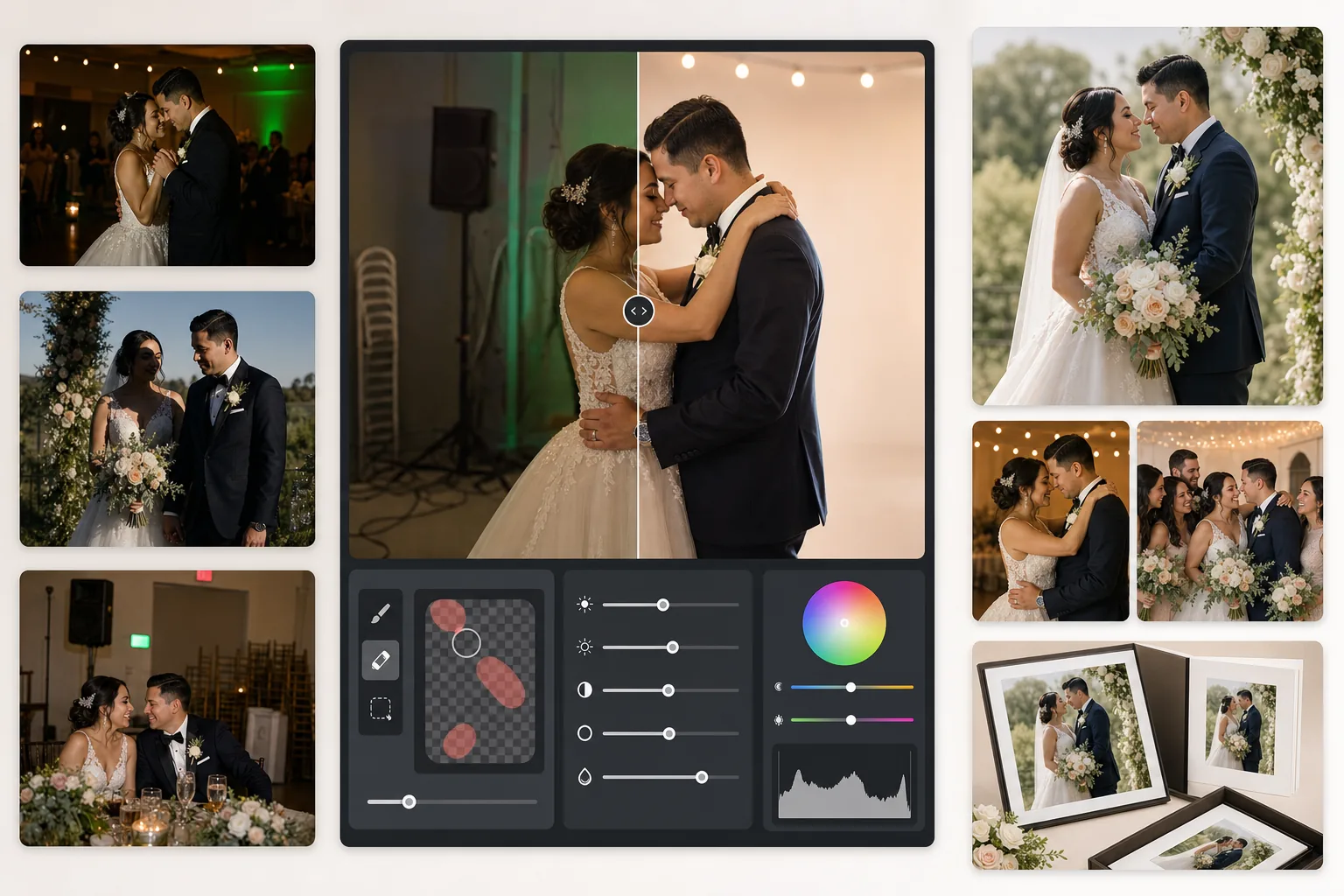
يصحح أكثر المشكلات شيوعًا في تصوير الأعراس: لقطات الاستقبال ضعيفة التعريض، والصبغة البرتقالية من مصابيح التنغستن أو الخضراء من مصابيح الفلورسنت، وظلال الفلاش القاسية، وعناصر الخلفية المشتتة مثل علامات الخروج والكراسي المكدسة ومعدات التموين. يستعيد AI Enhance التفاصيل من صور حلبة الرقص المظلمة ويوازن الإضاءة المختلطة، بينما يزيل Magic Eraser الأجسام غير المرغوب فيها دون ترك أثر. تُحسَّن درجات لون البشرة لتبدو طبيعية ودافئة دون تنعيم مفرط.
إعدادات القالب
| استعادة التعريض | رفع الظلال بمقدار +1.5 EV مع الحفاظ على المناطق الساطعة |
| توازن اللون الأبيض | تصحيح تلقائي للإضاءة المختلطة (تنغستن/فلورسنت/ضوء النهار) |
| وضع درجة لون البشرة | دفء طبيعي (+5 دفء، +3 تنعيم، مع الحفاظ على التفاصيل) |
| دقة الإخراج | 4000px للحافة الطويلة (جاهز للطباعة بدقة 300 DPI حتى 13×19) |
| ملف الألوان | Adobe RGB (نطاق ألوان أوسع للطباعة الاحترافية) |
| تقليل التشويش | تكيّفي عند ISO العالي (يحافظ على التفاصيل في الظلال المرفوعة) |
كيفية استخدام هذا القالب
حمّل صور زفافك
حمّل لقطات الاستقبال أو صور المراسم أو الصور التي التقطها الضيوف بالهاتف الذكي. يتعامل القالب مع كل شيء، من ملفات JPEG المصدّرة من RAW لكاميرا DSLR احترافية إلى صور الهاتف المضغوطة — يكيّف الذكاء الاصطناعي قوة التحسين بناءً على جودة المصدر.
صحّح الإضاءة واللون
يرفع AI Enhance إضاءة مشاهد الاستقبال المظلمة، ويحيّد الصبغة البرتقالية الخضراء الناتجة عن الإضاءة المختلطة للمكان، ويوازن بين المقدمة المضاءة بالفلاش والخلفية المضاءة بالضوء المحيط. تُنقل درجات لون البشرة نحو دفء طبيعي دون التأثير على بياض الفستان أو ألوان الديكور.
أزل العناصر المشتتة
يزيل Magic Eraser علامات الخروج وطفايات الحريق والكراسي المكدسة وعربات التموين وكابلات الكهرباء على الأرض والضيوف الذين يظهرون في الخلفية. يعيد الذكاء الاصطناعي بناء نمط الخلفية بشكل طبيعي خلف الأجسام المُزالة.
صدّر للألبومات والطباعة
نزّل بدقة 4000px للحافة الطويلة بملف Adobe RGB للطباعة في مختبرات الصور الاحترافية، أو بملف sRGB للمشاركة الرقمية والمعارض عبر الإنترنت. حُدد حجم الإخراج للطباعة حتى 13×19 بوصة بدقة 300 DPI.
نصائح احترافية لأفضل النتائج
- ✓بالنسبة للقطات حلبة الرقص المظلمة، يمكن للقالب استعادة نحو 1.5 درجة من تفاصيل الظلال. إذا كانت الصورة الأصلية سوداء بالكامل تقريبًا، فقد يُدخل التحسين تشويشًا — ابدأ بالصور التي يمكنك على الأقل رؤية الأشخاص فيها بشكل خافت.
- ✓تُعاير تصحيح درجة لون البشرة لدفء تصوير الأعراس — أدفأ قليلًا من المحايد، مما يُبرز معظم درجات لون البشرة تحت الإضاءة المختلطة. أما صور المراسم الخارجية التي تتمتع بالفعل بإضاءة طبيعية جيدة، فيكون التصحيح فيها خفيفًا.
- ✓عند إزالة أجسام الخلفية، اعمل على منطقة واحدة في كل مرة للحصول على أكثر النتائج طبيعية. علامات الخروج ورؤوس الرشاشات ومنافذ الكهرباء الجدارية صغيرة بما يكفي للإزالة النظيفة في مرة واحدة. أما الأجسام الأكبر مثل الكراسي المكدسة، فقد يكون من الأفضل إزالتها على أقسام.
- ✓عالج صور العروسين الفردية أولًا، ثم اللقطات الجماعية، ثم اللقطات العفوية. يتيح لك ذلك وضع أساس متسق لتدرج الألوان عبر أهم الصور قبل الانتقال إلى الصور الثانوية.
الأدوات
أسئلة شائعة
هل يمكن لهذا إصلاح صور الاستقبال الضبابية؟
+
يمكن لـ AI Enhance زيادة حدة النعومة الطفيفة الناتجة عن سرعات الغالق البطيئة واستعادة قدر كبير من تفاصيل الظلال، لكنه لا يستطيع إصلاح ضبابية الحركة الشديدة التي تظهر فيها الأشخاص ممتدة بوضوح. أما الصور ذات الضبابية الطفيفة من اهتزاز اليد أو نعومة التركيز الخفيفة فستتحسن بشكل كبير.
هل سيفقد فستان العروس الأبيض تفاصيله؟
+
تحمي خوارزمية تعيين الدرجات اللونية تفاصيل المناطق الساطعة في الألوان البيضاء على وجه التحديد. يُحافظ على ملمس الفستان وأنماط الدانتيل وثنيات القماش حتى عند رفع الظلال في الصورة نفسها. وتحافظ النتيجة على نطاق كامل من الأبيض الساطع إلى الظلال العميقة.
هل هذا جيد بما يكفي لألبومات الطباعة؟
+
نعم. يدعم الإخراج بدقة 4000px عند 300 DPI الطباعة حتى 13×19 بوصة. يحافظ ملف ألوان Adobe RGB على نطاق الألوان الأوسع الذي تستخدمه مختبرات الصور الاحترافية. وبالنسبة لصفحات الألبوم القياسية بحجم 8×10، تتجاوز الدقة بكثير ما هو لازم للطباعة الحادة.
حوّل كل صورة زفاف إلى صورة تليق بالألبوم
حمّل صور الاستقبال والمراسم واحصل على صور محسّنة باحترافية وجاهزة للطباعة في ثوانٍ. تعمل مع صور الكاميرات الاحترافية وصور الهواتف الذكية على حد سواء.
جرّبه مجانًاRelated templates
More events templates for your workflow.