
تفتيح صور المناسبات
استعد التفاصيل من صور الأماكن المظلمة الملتقطة في الحفلات الموسيقية والحفلات الكبرى وحفلات أعياد الميلاد وفعاليات الشركات. يرفع هذا القالب التعريض الضوئي حتى +2 EV، ويصحح ظلال الفلاش القاسية، ويزيل العين الحمراء، ويعزز أجواء المشهد الأصلي حتى تبدو صور مناسباتك نابضة بالحياة كما كانت اللحظة نفسها.
جرّب هذا القالب مجانًاEvents template preview
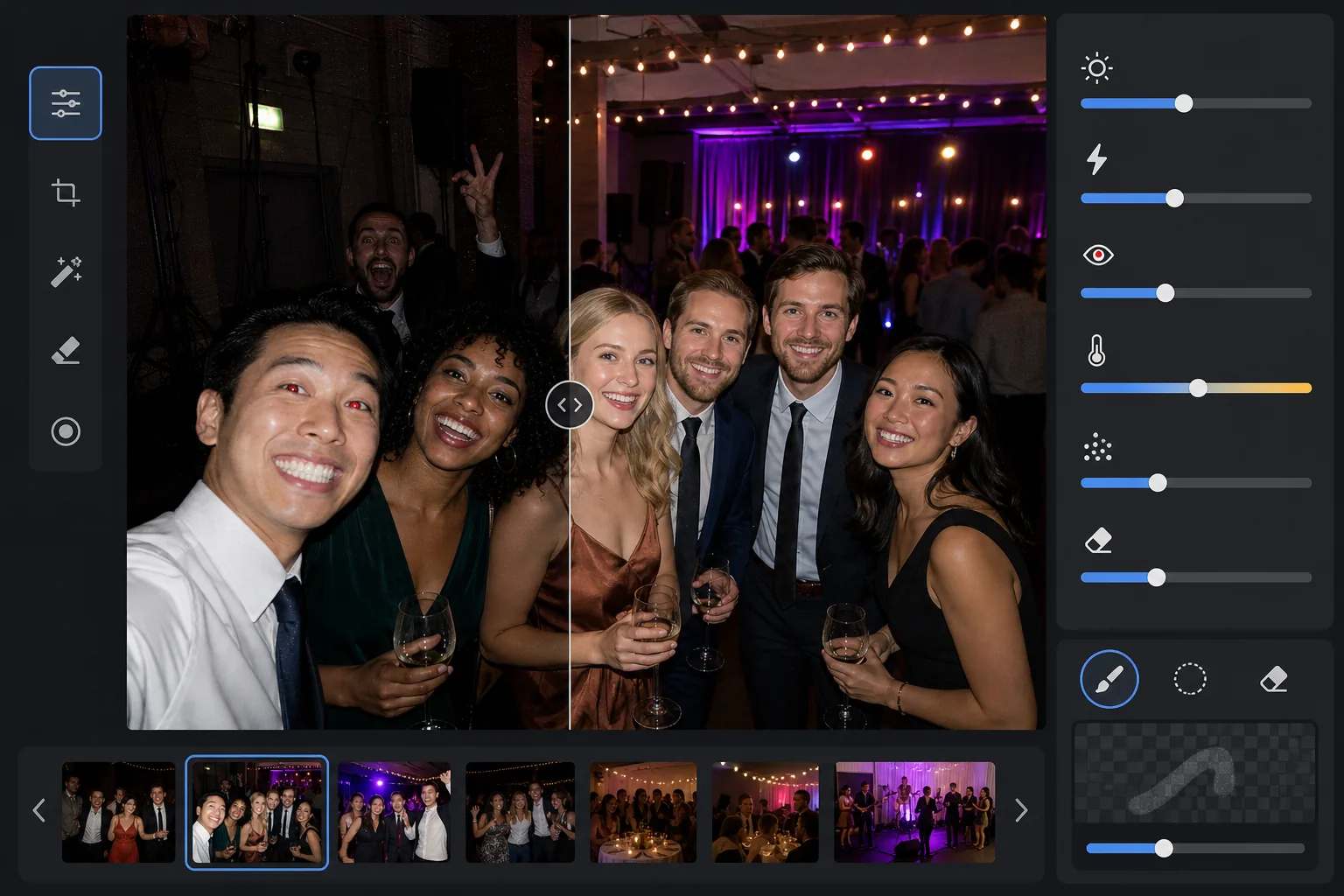
ما الذي يفعله هذا القالب
ينقذ صور المناسبات الملتقطة في بيئات الإضاءة المنخفضة الصعبة — قاعات الولائم خافتة الإضاءة، وأماكن الحفلات الموسيقية ذات إضاءة المسرح الملونة، والحفلات المسائية في الهواء الطلق، وغرف الترفيه في الطابق السفلي. يستعيد AI Enhance ما يصل إلى درجتين من تفاصيل الظلال مع الحفاظ على أجواء الإضاءة الملونة والزينة. يتم تصحيح عيوب الفلاش بما في ذلك ظلال المقدمة القاسية والعين الحمراء والوجوه المحترقة تلقائيًا. يزيل Magic Eraser المتطفلين على الصورة ولافتات المخرج والمعدات المكدسة وغيرها من عوامل التشتيت الشائعة في المناسبات.
إعدادات القالب
| رفع التعريض الضوئي | استعادة تكيفية للظلال بمقدار +2.0 EV مع الحفاظ على الأجواء |
| تصحيح الفلاش | تنعيم ظلال المقدمة، وتخفيف الإضاءات الساطعة على البشرة المضاءة بالفلاش |
| إزالة العين الحمراء | الكشف التلقائي وإعادة بناء لون القزحية |
| توازن اللون الأبيض | تكيفي متعدد المصادر (أضواء الدي جي، التنغستن، الفلورسنت، الشموع) |
| وضع الأجواء | تعزيز دافئ للأجواء (+8 دفء، +5 حيوية في الخلفية) |
كيفية استخدام هذا القالب
ارفع صور المناسبة
ارفع صورًا من أي مناسبة — حفلات موسيقية أو أعراس أو حفلات أعياد ميلاد أو حفلات شركات كبرى أو تجمعات في الفناء الخلفي. يكتشف القالب بيئة الإضاءة تلقائيًا ويضبط شدة التحسين بناءً على مدى نقص التعريض الضوئي في الأصل.
استعد التعريض الضوئي وصحح الفلاش
يرفع AI Enhance مناطق الظلال حتى +2 EV، كاشفًا الوجوه والتفاصيل التي ضاعت في الظلام. يتم تخفيف الإضاءات المحترقة بالفلاش على الأشخاص في المقدمة لاستعادة ملمس البشرة، وتُنعَّم الظلال القاسية المتساقطة خلف الأشخاص المضاءين بالفلاش لتندمج بشكل طبيعي.
أزل العين الحمراء وعوامل التشتيت
يتم اكتشاف العين الحمراء الناتجة عن الفلاش المباشر تلقائيًا واستبدالها بلون قزحية طبيعي. يزيل Magic Eraser الغرباء المتطفلين والمعدات الظاهرة مثل أكوام السماعات وأسلاك الكابلات ولافتات المخرج وغيرها من الفوضى التي تنتقص من اللحظة.
صدّر الصور المحسّنة
نزّل صور المناسبات المفتّحة بالدقة الأصلية للمشاركة على وسائل التواصل أو الطباعة أو الأرشفة. تحافظ النتيجة على أجواء المشهد الأصلي — وهج الشموع الدافئ أو أضواء المسرح الملونة أو الأضواء الخيطية المتلألئة — مع جعل الوجوه والتفاصيل مرئية بوضوح.
نصائح احترافية لأفضل النتائج
- ✓تعمل استعادة +2 EV بشكل أفضل على الصور التي يكون فيها الأشخاص مرئيين بشكل خافت على الأقل في الأصل. إذا كانت الصورة سوداء تمامًا باستثناء بضعة مصادر ضوء، فستحتوي الظلال المستعادة على ضوضاء كبيرة. ابدأ بالصور التي يمكنك تمييز الظلال الخارجية فيها.
- ✓بالنسبة لصور الحفلات الموسيقية ذات إضاءة المسرح الملونة الدرامية، يحافظ تصحيح توازن اللون الأبيض على التدرج اللوني الفني بدلاً من تحييده. تُحفظ موجات إضاءة المسرح الزرقاء والأرجوانية مع الاستمرار في تصحيح درجات لون البشرة للأشخاص القريبين من المسرح.
- ✓عند معالجة دفعة من الصور من المناسبة نفسها، أجرِ اختبارًا أولاً على صورة مظلمة تمثيلية وصورة بالفلاش. يتيح لك ذلك التحقق من أن مستوى السطوع والدفء مناسبان قبل الالتزام بالدفعة الكاملة.
- ✓يعمل تصحيح العين الحمراء على عيون البشر والحيوانات الأليفة على حد سواء. بالنسبة لصور الحيوانات الأليفة في المناسبات، يتعامل الذكاء الاصطناعي مع وهج العين الأخضر أو الأصفر الذي تنتجه الحيوانات من فلاش الكاميرا، مستبدلاً إياه بحدقة داكنة طبيعية.
الأدوات
أسئلة شائعة
هل يمكن لهذا إصلاح الصور السوداء تمامًا؟
+
يستعيد القالب ما يصل إلى +2 EV من تفاصيل الظلال، وهو ما يعادل تقريبًا جعل الصورة أكثر سطوعًا بأربع مرات. إذا أظهرت الصورة الأصلية على الأقل خطوطًا خارجية خافتة لأشخاصك، فستنتج الاستعادة نتائج قابلة للاستخدام. الإطارات السوداء تمامًا التي تظهر فيها مصادر ضوء نقطية فقط لا تحتوي عادةً على بيانات مستشعر كافية لاستعادة تفاصيل ذات معنى.
هل سيجعل التفتيح الصور تبدو محببة؟
+
بعض الضوضاء أمر لا مفر منه عند رفع الظلال العميقة، لكن خفض الضوضاء التكيفي يستهدف المناطق المرفوعة تحديدًا. تُحفظ التفاصيل الدقيقة في الأجزاء جيدة الإضاءة من الإطار مع تنعيم الضوضاء في الظلال المستعادة. النتيجة أفضل بكثير من مجرد زيادة السطوع في محرر صور أساسي.
هل يعمل هذا على صور الحفلات الموسيقية ذات إضاءة المسرح؟
+
نعم. صُمم القالب للتعامل مع الإضاءة المختلطة والملونة. تُحفظ موجات إضاءة المسرح باللون الأزرق والأحمر والأرجواني والأخضر كعناصر فنية للمشهد بدلاً من معاملتها كتدرجات لونية تحتاج إلى تصحيح. تتلقى وجوه الأشخاص القريبين من المسرح ضبطًا انتقائيًا لتوازن اللون الأبيض مع الحفاظ على أجواء إضاءة الخلفية.
اجعل كل صورة مناسبة تستحق المشاركة
ارفع صور المناسبات المظلمة أو المحترقة بالفلاش أو المصابة بالعين الحمراء واحصل على نتائج ساطعة وطبيعية المظهر تجسّد طاقة اللحظة.
جرّبه مجانًاRelated templates
More events templates for your workflow.