
صورة لافتة Twitch
صمم لافتة قناة Twitch احترافية تجعل بثك يبدو راسخًا منذ الزيارة الأولى. يعزل هذا القالب صورتك الشخصية عن أي خلفية، ويضعها على خلفيات ذات سمات الألعاب أو بألوان علامتك التجارية، ويُصدِّرها بأبعاد لافتة Twitch الدقيقة مع مناطق آمنة لتراكب صورة الملف الشخصي وعناصر التنقل في القناة.
جرّب هذا القالب مجانًاSocial Media template preview
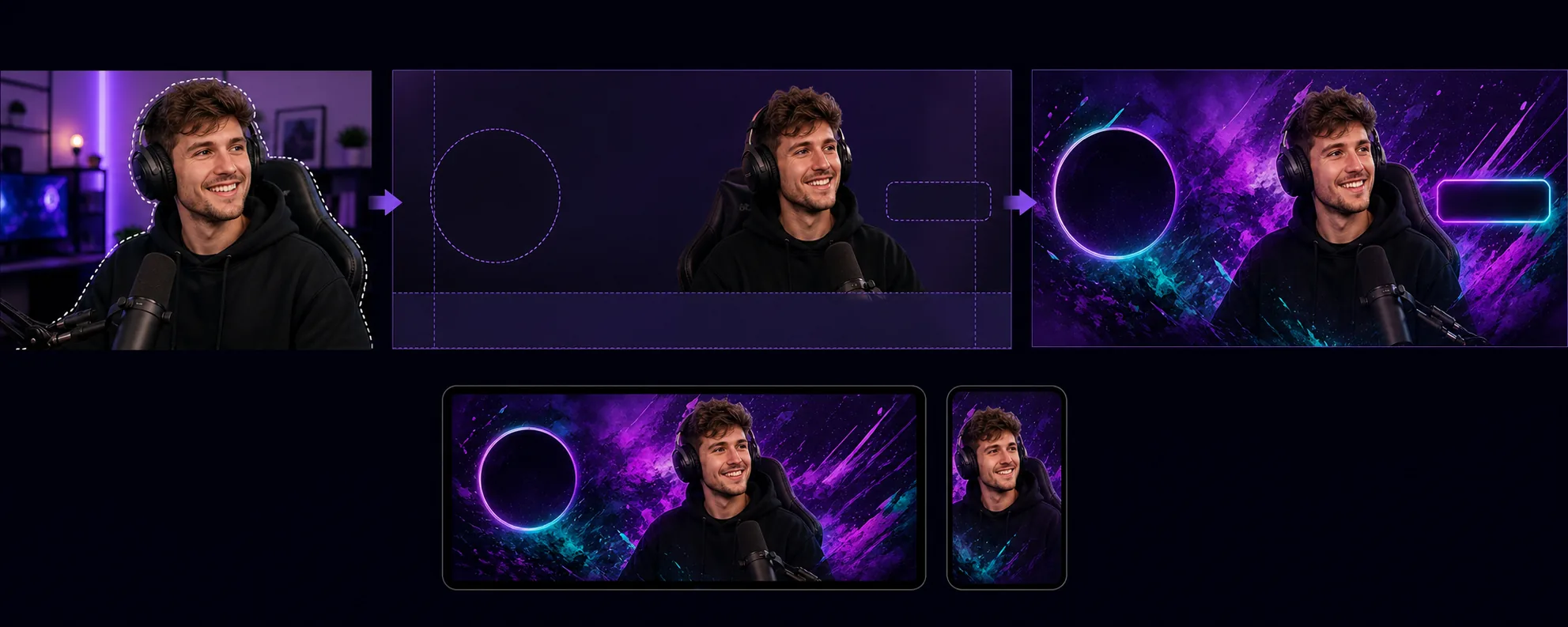
ما يفعله هذا القالب
ينشئ لافتات قنوات محسّنة لمتطلبات التخطيط الفريدة لـ Twitch، حيث تتراكب صورة الملف الشخصي وزر المتابعة والتنقل في القناة فوق مناطق محددة من اللافتة. يعزل Background Eraser صورتك الشخصية كجهاز بث أو صورة فريقك عن أي بيئة ويضعها على خلفية تتناسب مع الهوية البصرية لقناتك — ألوان علامة تجارية صريحة، أو تدرجات لونية، أو سمات ألعاب تجريدية، أو أنماط خفية. يحترم القالب المناطق الآمنة في Twitch بحيث لا يُحجب المحتوى البصري المهم أبدًا خلف دائرة صورة الملف الشخصي (الجانب الأيسر) أو أزرار نقاط القناة/الاشتراك (الجانب الأيمن). يكون حجم المخرجات 1200×480px (أبعاد اللافتة الموصى بها) ومضبوطًا للوضوح في كل من عروض متصفح سطح المكتب ورؤوس تطبيق الجوال، حيث تُقتطع اللافتة بشكل مختلف.
إعدادات القالب
| حجم اللافتة | 1200×480px (لافتة الملف الشخصي الموصى بها من Twitch) |
| المناطق الآمنة | يسار 250px (تراكب الملف الشخصي)، يمين 200px (الأزرار)، أسفل 80px (شريط التنقل) |
| الخلفية | لون صريح، أو تدرج لوني، أو نمط ألعاب تجريدي، أو صورة مخصصة |
| وضع الصورة الشخصية | يمين-وسط أو وسط، مع تجنب منطقة تداخل صورة الملف الشخصي |
| حيوية الألوان | مُعزَّزة للوضوح على واجهة Twitch البنفسجية الداكنة |
كيفية استخدام هذا القالب
ارفع صورتك كجهاز بث
ارفع صورة لنفسك، أو لإعداد البث الخاص بك، أو لفريقك. تعمل لقطات الجزء العلوي من الجسم ذات الأوضاع المعبّرة بشكل أفضل مع اللافتات. يتعامل القالب مع لقطات كاميرا الويب، وصور السيلفي بالهاتف، والصور الاحترافية.
اعزل وحدّد الموضع
يزيل Background Eraser الخلفية الأصلية ويضع صورتك الشخصية داخل المناطق الآمنة للافتة. تُترك البكسلات 250 اليسرى خالية لتراكب دائرة صورة الملف الشخصي، وتتجنب البكسلات 80 السفلية شريط التنقل. تُوضع صورتك حيث يكون لها أقصى تأثير بصري على كل من سطح المكتب والجوال.
طبّق الخلفية والعلامة التجارية
اختر خلفية تتناسب مع هوية قناتك. تظهر التدرجات اللونية الجريئة والأنماط ذات سمات الألعاب بشكل جيد على الواجهة البنفسجية الداكنة لـ Twitch. إذا كانت قناتك تمتلك ألوانًا راسخة لعلامة تجارية، فاستخدمها لتعزيز التعرف عليها عندما يصل المشاهدون إلى صفحة قناتك.
صدّر وارفع
نزّل بدقة 1200×480px محسّنة لـ Twitch. يكون حجم الملف أقل من 10MB (حد Twitch) ومضغوطًا ليُحمَّل بسرعة للمشاهدين ذوي الاتصالات الأبطأ. عاين كيف تبدو اللافتة مع تراكب صورة الملف الشخصي والتنقل قبل رفعها إلى قناتك.
نصائح احترافية لأفضل النتائج
- ✓استخدم صورة بوضع معبّر أو حيوي — الإشارة إلى الكاميرا، أو الاحتفال، أو الميل إلى الأمام. تختفي الأوضاع الثابتة في تنسيق اللافتة الضيق، بينما تخلق الأوضاع الديناميكية طاقة بصرية تجعل المشاهدين يرغبون في البقاء.
- ✓اختبر لافتتك على كل من سطح المكتب والجوال. يقتطع Twitch اللافتة بشكل مختلف على الجوال، حيث يعرض الجزء الأوسط بشكل أساسي. ضع المحتوى البصري الأكثر أهمية في البكسلات 700 الوسطى لضمان التوافق عبر الأجهزة.
- ✓طابِق ألوان لافتتك مع إعداد لون التمييز في Twitch. عندما يتحول تدرج اللافتة إلى لون التمييز نفسه المستخدم لزر الاشتراك والنص المميز في قناتك، تبدو الصفحة بأكملها متناغمة وذات علامة تجارية احترافية.
الأدوات
الأسئلة الشائعة
ما الأبعاد التي يتطلبها Twitch للافتات؟
+
يوصي Twitch بدقة 1200×480 بكسل للافتات الملف الشخصي. الحد الأقصى لحجم الملف هو 10MB. يُصدِّر القالب بهذه الأبعاد بالضبط مع ضغط مناسب.
هل يمكنني إضافة نص على اللافتة؟
+
ينتج القالب التخطيط البصري دون تراكب نص. يمكنك إضافة اسم قناتك، أو جدولك، أو معرّفاتك على وسائل التواصل الاجتماعي باستخدام أي محرر صور بعد ذلك. تُظهر أدلة المناطق الآمنة بالضبط أين سيظل النص مرئيًا ولن تغطيه عناصر واجهة مستخدم Twitch.
هل يعمل هذا مع شاشات Twitch دون اتصال أيضًا؟
+
حُدِّد حجم القالب للافتة الملف الشخصي. تستخدم صور شاشة Twitch دون اتصال نسبة عرض إلى ارتفاع 16:9 (1920×1080). يمكنك استخدام سير عمل مماثل — عزل الصورة الشخصية، وتطبيق الخلفية — ولكن ينبغي اختيار أبعاد الشاشة دون اتصال بشكل منفصل.
اجعل قناتك على Twitch تبدو راسخة منذ اليوم الأول
ارفع صورة واحصل على لافتة قناة احترافية تحترم تخطيط Twitch وتجعل بثك بارزًا.
جرّبه مجانًاRelated templates
More social media templates for your workflow.
قالب اقتصاص مربع مُحسّن لـ Instagram بدقة 1080 × 1080 بكسل. خلفيات نظيفة وألوان نابضة بالحياة والتفاصيل الدقيقة التي تبرز في الموجز.
قالب شعار YouTube بحجم 2560 × 1440 بكسل مع أدلة المنطقة الآمنة. إزالة الخلفية بشكل واضح لصور منشئي المحتوى والتخطيط المتوافق مع الجهاز وصور القناة المتوافقة مع العلامة التجارية.
قالب صورة غلاف Facebook بحجم 820 × 312 بكسل لسطح المكتب و640 × 360 بكسل للجوال. قم بتنظيف صور العلامة التجارية باستخدام مناطق آمنة مناسبة لتداخل صورة الملف الشخصي ووضع زر CTA.
أنشئ صورًا احترافية لرأس Twitter/X بأبعاد 1500 × 500 بكسل بالضبط. تتداخل حسابات صورة الملف الشخصي، وتعمل في الوضع المظلم والوضع الفاتح.
قم بتحسين صور الملف الشخصي للمواعدة من خلال تنعيم البشرة بشكل طبيعي، وتنظيف الخلفية، وتصحيح الإضاءة، وتدرج الألوان الدقيق الذي يبدو أصليًا - غير مفلتر.
قم بإنشاء صور دبوس Pinterest متوقفة للتمرير بخلفيات نظيفة وأبعاد رأسية مثالية 2:3 وتحسين الألوان النابضة بالحياة وتركيبة جاهزة للتثبيت.