
صورة محفظة الوشم
اعرض أعمال الوشم بالتفاصيل ودقة الألوان التي تجذب عملاء جدد. يعزز هذا القالب تشبع الحبر ووضوح الخطوط، ويقلل من احمرار الجلد وتورمه بعد الجلسة، ويصحح إضاءة الاستوديو لألوان حبر حقيقية، وينشئ عروض محفظة نظيفة تترك العمل الفني يتحدث عن نفسه.
جرّب هذا القالب مجانًاBusiness template preview
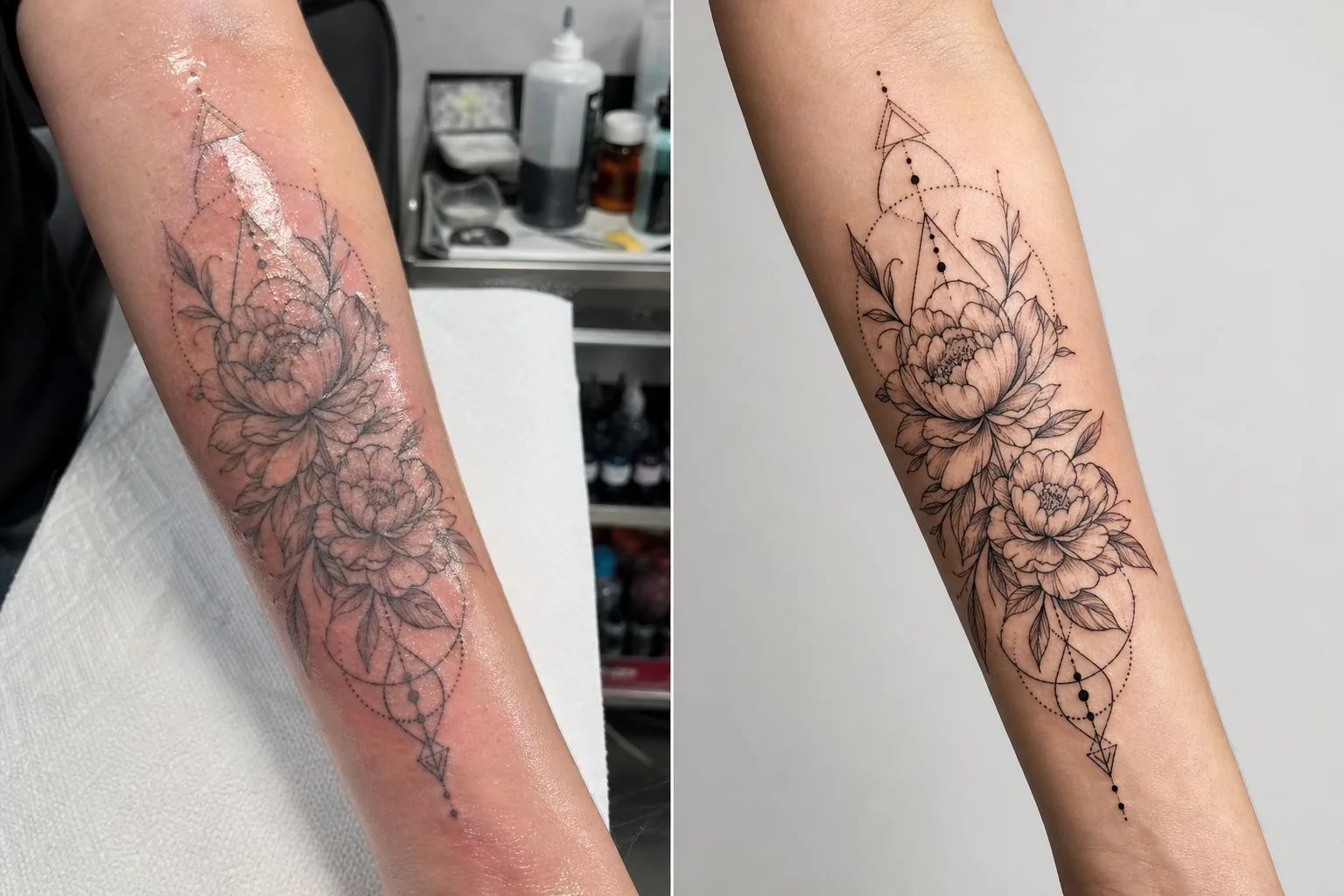
ماذا يفعل هذا القالب
يعالج تحديات التصوير المحددة التي يواجهها فنانو الوشم عند توثيق أعمالهم. تُصوَّر الأوشام الحديثة في ظروف الاستوديو بإضاءة مختلطة، ويكون الجلد حول الحبر الجديد أحمر ومتورمًا ومغطى بحبر زائد ومرهم — ولا يمثل أي من ذلك النتيجة النهائية بعد الشفاء. يستخدم هذا القالب AI Enhance لتصحيح الإضاءة بحيث تظهر ألوان الحبر كما ستكون عند الشفاء، ويزيد من حدة العمل بالخطوط الدقيقة وتفاصيل dotwork، ويقلل من الاحمرار والتورم حول الأوشام الحديثة. يزيل Magic Eraser الفوضى في خلفية محطة الوشم، بما في ذلك زجاجات الحبر والمناديل الورقية والقفازات والمعدات، مما يخلق خلفية نظيفة تركز الانتباه بالكامل على العمل الفني.
إعدادات القالب
| تعزيز الحبر | زيادة تشبع الألوان لأنماط الوشم الأسود والملون والمائي |
| زيادة حدة الخطوط | تعزيز التفاصيل الدقيقة للخطوط الرفيعة وdotwork |
| تصحيح الجلد | تقليل الاحمرار والتورم ولمعان المرهم حول الأوشام الحديثة |
| تصحيح الإضاءة | تصحيح إضاءة الاستوديو المختلطة إلى ضوء نهار محايد لألوان حبر حقيقية |
| الخلفية | خلفية نظيفة بلون موحّد أو ضبابية (إزالة فوضى المحطة) |
| أبعاد الإخراج | 2000 × 2000 px (مربع Instagram) أو 4000px لطباعة المحفظة |
كيفية استخدام هذا القالب
ارفع صورة الوشم الخاصة بك
ارفع صورة للوشم المكتمل — حديثًا أو بعد الشفاء. صوّر الوشم من الأمام مباشرة لتقليل تشوه المنظور. يتعامل القالب مع لقطات التفاصيل المقربة، ولقطات النظرة العامة للعمل الكامل، والتكوينات الملتفة على أسطح الجسم المنحنية مثل الذراعين والساقين والأضلاع.
تعزيز الحبر والخطوط
يزيد AI Enhance من تشبع الحبر بحيث تبدو الأوشام السوداء عميقة وغنية بينما تُظهر الأوشام الملونة حيويتها الكاملة. تُشحذ الخطوط الرفيعة وdotwork والأنماط الهندسية لإظهار دقة عملك بالإبرة. يحترم التعزيز أنماط الوشم المختلفة — التقليدي الجريء والخط الرفيع والمائي وblackwork يتلقى كل منها المعالجة المناسبة.
تصحيح الجلد والخلفية
بالنسبة للأوشام الحديثة، يُقلَّل الاحمرار والتورم حول الحبر للاقتراب من المظهر بعد الشفاء. يُخفَّف لمعان المرهم والحبر الزائد على الجلد المحيط. يزيل Magic Eraser خلفية محطة الوشم — أكواب الحبر والمناديل الورقية والقفازات والمعدات — ويستبدلها بخلفية نظيفة.
التصدير للمحفظة ووسائل التواصل
نزّل بحجم مربع 2000 × 2000 px لمنشورات محفظة Instagram، أو بحافة طويلة 4000px لمحافظ المواقع الإلكترونية وكتيبات العرض المطبوعة. يحافظ ملف تعريف الألوان على النطاق الكامل لألوان حبر الوشم بما في ذلك التباينات الدقيقة في درجات اللون في الأنماط المائية والنيو-تقليدية.
نصائح احترافية لأفضل النتائج
- ✓صوّر الوشم تحت ضوء متوازن مع ضوء النهار (5000–5500K) من زاوية ثابتة. يمنح ذلك القالب أدق بيانات الألوان للعمل عليها. تجعل أضواء التنغستن الدافئة الحبر يبدو أكثر صفرة وبرتقالية، والتصحيح، رغم فعاليته، يعطي نتائج أفضل عند البدء من إضاءة محايدة.
- ✓امسح الحبر الزائد والمرهم عن سطح الجلد قبل التصوير. يقلل القالب من لمعان المرهم، لكن السطح النظيف المجفف بالتربيت يُظهر عمل الحبر بوضوح أكبر ويعطي نتيجة معززة أفضل.
- ✓صوّر النسختين الحديثة والمشفية من الوشم نفسه عند الإمكان. تمنحك الصورة الحديثة المعالجة عبر القالب محتوى محفظة فوريًا، وتؤكد الصورة المشفية النتيجة الفعلية المستقرة. وجود النسختين في محفظتك يدل على الاحترافية.
- ✓بالنسبة للأعمال الكبيرة الملتفة حول الأطراف، التقط عدة لقطات تفصيلية متداخلة بالإضافة إلى النظرة العامة للعمل الكامل. يشحذ القالب التفاصيل التي تضيع في لقطات النظرة العامة الواسعة، وتشكل اللقطات المقربة للعناصر البارزة منشورات محفظة فردية مؤثرة.
الأدوات
أسئلة شائعة
هل يمكن أن يجعل هذا الوشم الحديث يبدو مشفيًا؟
+
يقلل القالب من الاحمرار والتورم للاقتراب من المظهر بعد الشفاء، لكن النتيجة هي تحسين وليست تنبؤًا مثاليًا بالشفاء. يختلف الشفاء الفردي حسب نوع البشرة ونوع الحبر وموقع الجسم. ستبدو الصورة الحديثة المحسّنة قريبة من المشفية لكنها قد لا تكون مطابقة للنتيجة المشفية الفعلية.
هل يعمل هذا مع جميع أنماط الوشم؟
+
نعم. يتعرّف القالب على الأنماط التقليدية الجريئة واليابانية والخط الرفيع وdotwork والهندسية والمائية والنيو-تقليدية وblackwork وأنماط البورتريه الواقعي ويعززها بشكل مناسب. يتلقى كل نمط شحذًا ومعالجة لونية مختلفة معايرة لما يبدو أفضل لتلك الجماليات.
ماذا عن أوشام التغطية؟
+
تُعالَج أوشام التغطية مثل أي وشم آخر. يعزز القالب الحبر المرئي، وهو تصميم التغطية. إذا أردت إظهار قبل وبعد (الأصلي مقابل التغطية)، فعالج كل صورة على حدة للحصول على أكثر عرض محفظة اتساقًا.
محفظة تملأ كرسيك بالحجوزات
ارفع صور الوشم واحصل على صور محفظة حادة التفاصيل ودقيقة الألوان تُبرز فنّك وتجذب عملاء جددًا.
جرّبه مجانًاRelated templates
More business templates for your workflow.
صور فريق الشركة البولندية بخلفيات متسقة، وتصحيح إضاءة احترافي، ودرجات ألوان مناسبة للعلامة التجارية، وجودة صورة موحدة عبر الفريق.
قم بتحسين صور الصالة الرياضية واللياقة البدنية من خلال تحسين تعريف العضلات وتصحيح الإضاءة الديناميكي وتنظيف الخلفية ودرجات الألوان الرياضية عالية التباين.
أنشئ صورة مصقولة للسيرة الذاتية مع استبدال الخلفية وتنعيم البشرة وتصحيح الإضاءة. مثالي للسير الذاتية وبوابات الوظائف وأدلة الشركات.
أنشئ صورًا احترافية للفريق واللاعبين الفرديين مع استبدال الخلفية وتحسين ألوان القميص وخلفيات الاستاد أو الاستوديو للقوائم والبرامج.
أنشئ صورًا ترويجية احترافية للفرقة الموسيقية والموسيقيين مع استبدال الخلفية وتحسين الإضاءة الدراماتيكية ومخرجات جاهزة للطباعة لمجموعات المواد الصحفية وتقديمات المكان.
اعرض فن الأظافر مع تحسين التفاصيل على المستوى الكلي، ودقة ألوان الجل والتلميع الحقيقية، وتحديد موضع اليد بشكل واضح لمحافظ Instagram وصفحات الحجز.