
How to remove window reflection from a photo
تعلم كيفية How to remove window reflection from a photo باستخدام Magic Eraser. دليل بسيط خطوة بخطوة مع أداة ذكاء اصطناعي مجانية. يعمل على الويب وiOS وAndroid.
Last updated
جرب الآن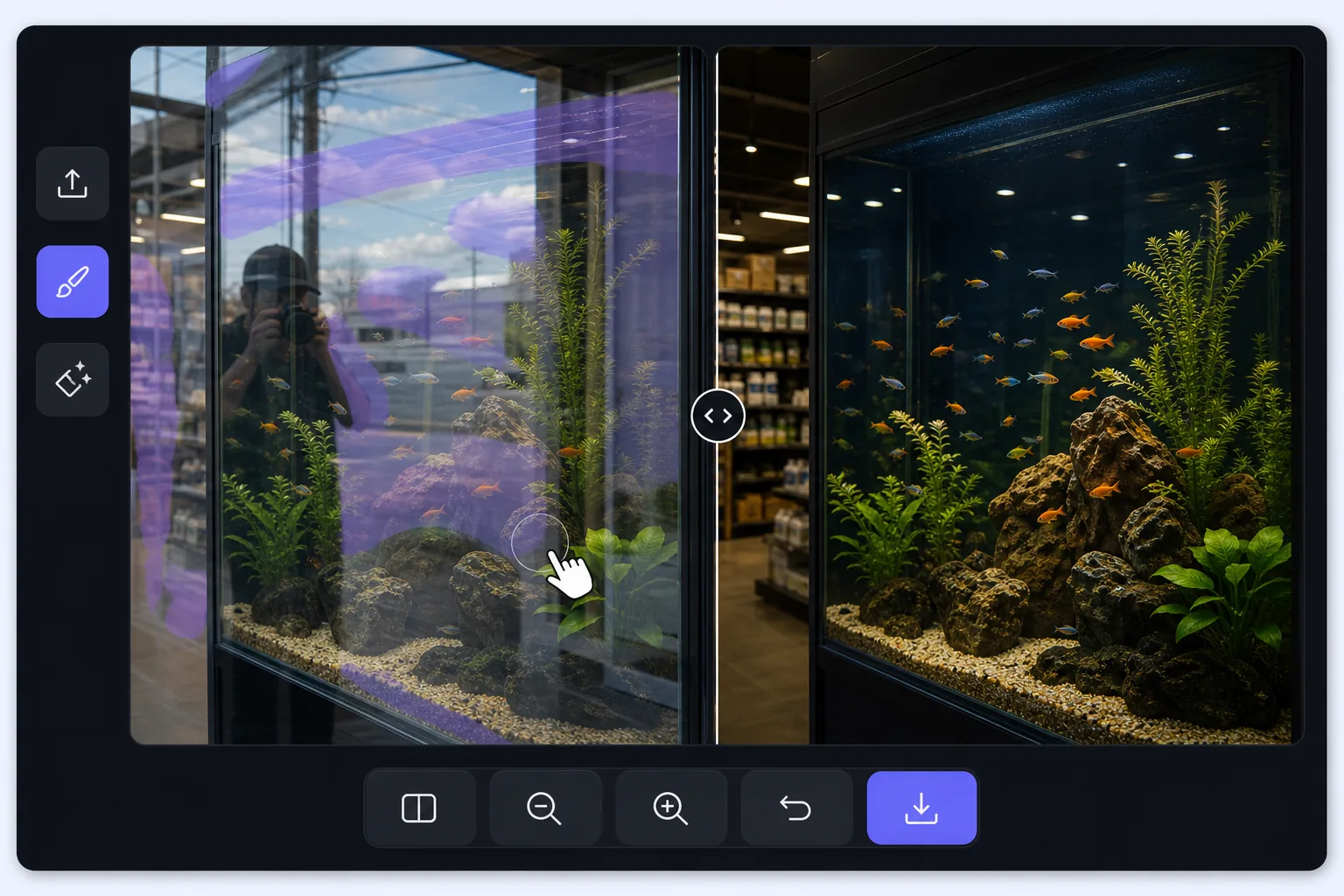
Shooting through glass is a layering problem — Magic Eraser
A window pane does two things at once: it lets you see through to what is behind it, and it reflects whatever is in front of it. When you photograph through it, the camera records both layers stacked together — the storefront mannequin and your own reflection, the aquarium octopus and the gallery lights behind you, the road ahead and the dashboard mirrored in the windshield. The reflected layer is usually brightest where the glass is darkest behind, which is exactly where your subject hides. A polarizing filter helps at capture time, but if the shot is already taken, the reflection is baked in. Magic Eraser approaches it differently: you mark the reflected streaks and shapes, and its AI inpainting reconstructs a plausible version of what was behind the glass using the surrounding visible detail. It is honest to say the result is a synthesized reconstruction, not literal recovery of pixels the reflection covered — but when the subject behind the pane is mostly visible and the reflection only veils part of it, the rebuild is convincing.
Before you start
التعليمات خطوة بخطوة
Start with ارفع الصورة. The result preview above and tips below use this guide's existing content; no separate before-and-after proof is assumed.
- 1
ارفع الصورة
افتح Magic Eraser على الويب أو iOS أو Android. اسحب وأفلت صورتك بتنسيق JPEG أو PNG أو HEIC أو WebP. لا حاجة لحساب.
- 2
اختر الأداة والمنطقة
اختر الأداة المناسبة وحدد المنطقة المراد معالجتها. سيحلل الذكاء الاصطناعي ويطبق التغييرات تلقائيًا في ثوانٍ.
- 3
حمّل النتيجة
معاينة النتيجة وتحميل الصورة المعدلة. تصدير بصيغة PNG أو JPEG عالي الجودة.
الأنسب لـ
- Storefront and shop-window photos where your reflection or the street sits on top of the display behind the glass
- Car, train, and bus window shots where the dashboard, your face, or interior lights veil the view outside
- Aquarium and zoo-enclosure photos where gallery lighting and visitors reflect over the animals in the tank
- Museum display cases and glass cabinets where overhead spots reflect across the exhibit you are shooting
- Photos through office, gallery, or skyscraper windows where the indoor room reflects over the cityscape outside
نصائح للحصول على أفضل النتائج
The cleaner the original capture, the more convincing the rebuild: press the lens close to the glass and shoot at a slight angle to push your own reflection out of frame, and cup a hand or use a rubber lens hood against the pane to block stray light. When you do edit, work the reflection in patches rather than one giant selection — the AI has more surrounding subject to reference, so the reconstruction stays faithful to what is actually behind the glass. Watch the boundary between reflected and clear areas; that seam is where artifacts show, so a second light pass along it usually tidies things up. Be realistic about coverage: a reflection that only veils the subject lifts away cleanly, but a hot spec of glare that completely hides a section means the AI is inventing that patch, and on aquarium or storefront scenes with busy detail behind the glass, re-shooting from another angle often beats fighting a fully blocked area.
الأسئلة الشائعة
- هل ميزة How to remove window reflection from a photo مجانية؟
- نعم، يتيح لك Magic Eraser How to remove window reflection from a photo مجانًا ضمن الحد اليومي. قم بالترقية إلى Pro للمعالجة غير المحدودة والتصدير بدقة عالية.
- كم يستغرق How to remove window reflection from a photo؟
- بضع ثوانٍ فقط. يعالج الذكاء الاصطناعي في Magic Eraser الصور بسرعة — معظم النتائج متاحة فور الرفع.
- هل يمكنني استخدامه على الهاتف؟
- نعم، Magic Eraser يعمل على iOS وAndroid وجميع متصفحات الويب. يمكنك التبديل بين الأجهزة بحرية.
- هل تتأثر جودة الصورة؟
- لا، يحافظ Magic Eraser على جودة الصورة الأصلية. يعالج الذكاء الاصطناعي بذكاء للحفاظ على التفاصيل والوضوح.