
How to remove a price sticker from a photo
تعلم كيفية How to remove a price sticker from a photo باستخدام Magic Eraser. دليل بسيط خطوة بخطوة مع أداة ذكاء اصطناعي مجانية. يعمل على الويب وiOS وAndroid.
Last updated
جرب الآن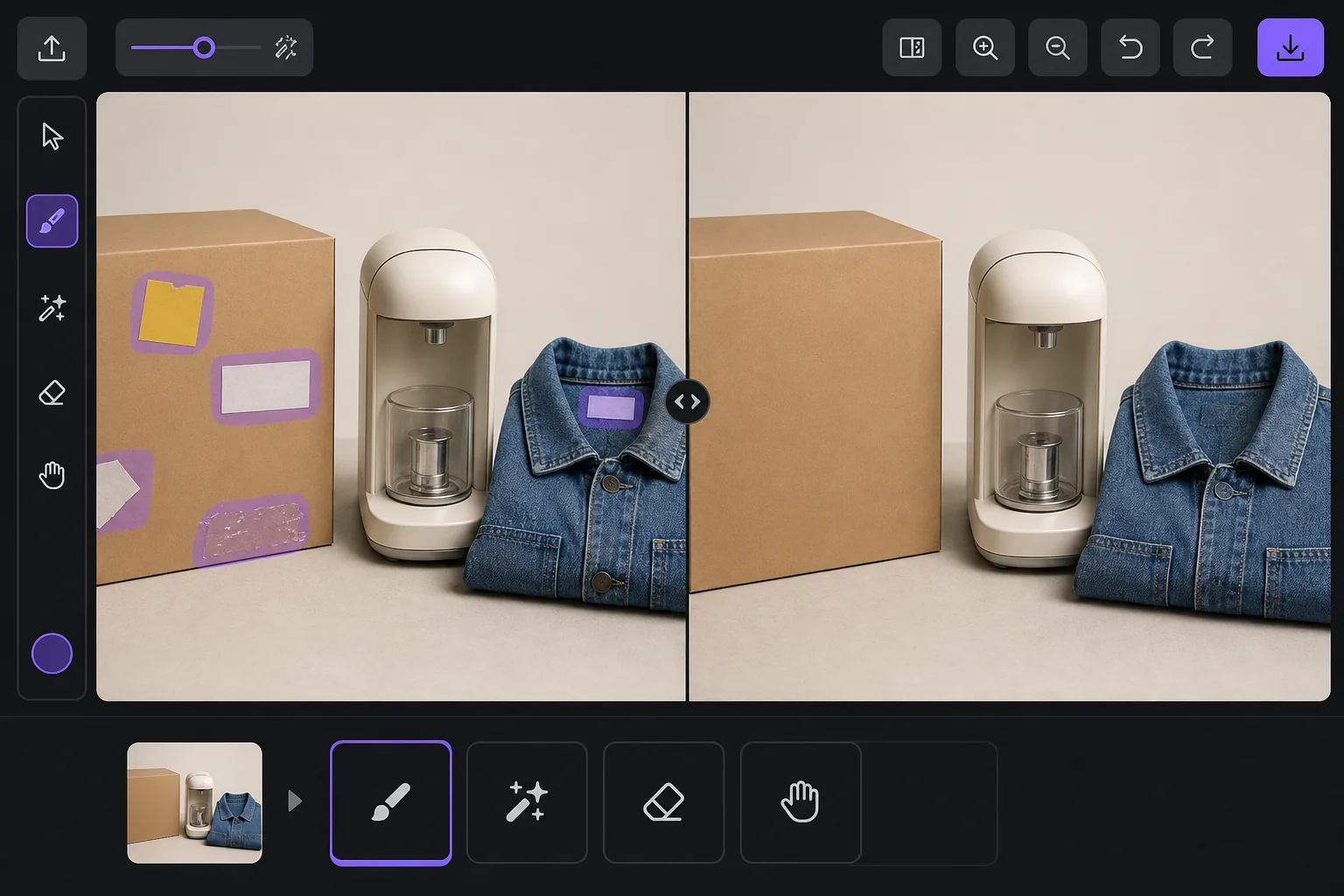
Why a visible price sticker hurts your resale listing — Magic Eraser
A price tag in a listing photo quietly works against you. Buyers see the original retail or clearance price and anchor their offer below it, so a leftover $4.99 yellow sticker can cost you more than five dollars in negotiation. It also signals the item came from a closeout bin or was already returned once, which lowers perceived condition even when the product is genuinely good. And some platforms care: marketplaces and their image guidelines generally want a clean product shot, and a barcode or store tag clutters the main image where buyers decide in a half-second whether to tap. Peeling a sticker off physically often leaves adhesive residue, a torn label, or a faded rectangle where the box was protected from light — so the photo problem survives the physical one. Removing it in the photo is the faster fix. A price sticker is rendered onto the image pixels just like any other object, so it replaces whatever box art, fabric, or surface sat behind it. Magic Eraser's AI brushes the sticker away and generates a plausible reconstruction of that hidden area from the surrounding pixels. Be clear on what that means: over a flat colored box or a plain surface the result is usually seamless, but the AI is synthesizing what was likely there, not recovering literal hidden detail — so printed text or a logo that sat entirely under the sticker is invented, not restored.
Before you start
التعليمات خطوة بخطوة
Start with ارفع الصورة. The result preview above and tips below use this guide's existing content; no separate before-and-after proof is assumed.
- 1
ارفع الصورة
افتح Magic Eraser على الويب أو iOS أو Android. اسحب وأفلت صورتك بتنسيق JPEG أو PNG أو HEIC أو WebP. لا حاجة لحساب.
- 2
اختر الأداة والمنطقة
اختر الأداة المناسبة وحدد المنطقة المراد معالجتها. سيحلل الذكاء الاصطناعي ويطبق التغييرات تلقائيًا في ثوانٍ.
- 3
حمّل النتيجة
معاينة النتيجة وتحميل الصورة المعدلة. تصدير بصيغة PNG أو JPEG عالي الجودة.
الأنسب لـ
- eBay and Facebook Marketplace sellers cleaning price tags off secondhand items before listing
- Resellers and thrift flippers removing clearance and markdown stickers that anchor buyers low
- Hiding barcode and store-inventory labels stuck to product boxes and packaging
- Removing price gun tags and plastic fasteners from clothing and accessory photos
- Erasing adhesive residue or the faded outline left after a sticker was peeled off by hand
نصائح للحصول على أفضل النتائج
Whenever you can, peel the sticker off the real item and photograph the actual surface — a true photo always beats a reconstruction, and it spares you any question about whether the listing image is accurate. Use the eraser for what's left behind: adhesive gunk, a torn corner, or the sun-faded rectangle a long-stuck tag protected. Keep your edits honest about the product itself. Removing a price tag or barcode is fine, but don't erase genuine flaws a buyer needs to see — scratches, stains, or damage belong in the listing, and most marketplaces treat a doctored condition photo as grounds for a return or a policy strike. Reconstruction quality tracks the background: a sticker on a flat single-color box vanishes cleanly, while one sitting across detailed printed artwork, a logo, or a model number is the hardest case, because the AI has to guess at text it can't see. If part of the hidden label is still visible elsewhere on the item, photograph that angle instead. Finally, shoot a little wider than the sticker so there's plenty of surrounding surface for the AI to sample from — tightly cropped tags leave it less to work with.
الأسئلة الشائعة
- هل ميزة How to remove a price sticker from a photo مجانية؟
- نعم، يتيح لك Magic Eraser How to remove a price sticker from a photo مجانًا ضمن الحد اليومي. قم بالترقية إلى Pro للمعالجة غير المحدودة والتصدير بدقة عالية.
- كم يستغرق How to remove a price sticker from a photo؟
- بضع ثوانٍ فقط. يعالج الذكاء الاصطناعي في Magic Eraser الصور بسرعة — معظم النتائج متاحة فور الرفع.
- هل يمكنني استخدامه على الهاتف؟
- نعم، Magic Eraser يعمل على iOS وAndroid وجميع متصفحات الويب. يمكنك التبديل بين الأجهزة بحرية.
- هل تتأثر جودة الصورة؟
- لا، يحافظ Magic Eraser على جودة الصورة الأصلية. يعالج الذكاء الاصطناعي بذكاء للحفاظ على التفاصيل والوضوح.