
Remove Multiple Emojis From a Photo in One Pass
تعلم كيفية إزالة عدة إيموجي باستخدام Magic Eraser. دليل بسيط خطوة بخطوة مع أداة ذكاء اصطناعي مجانية. يعمل على الويب وiOS وAndroid.
Last updated
جرب الآن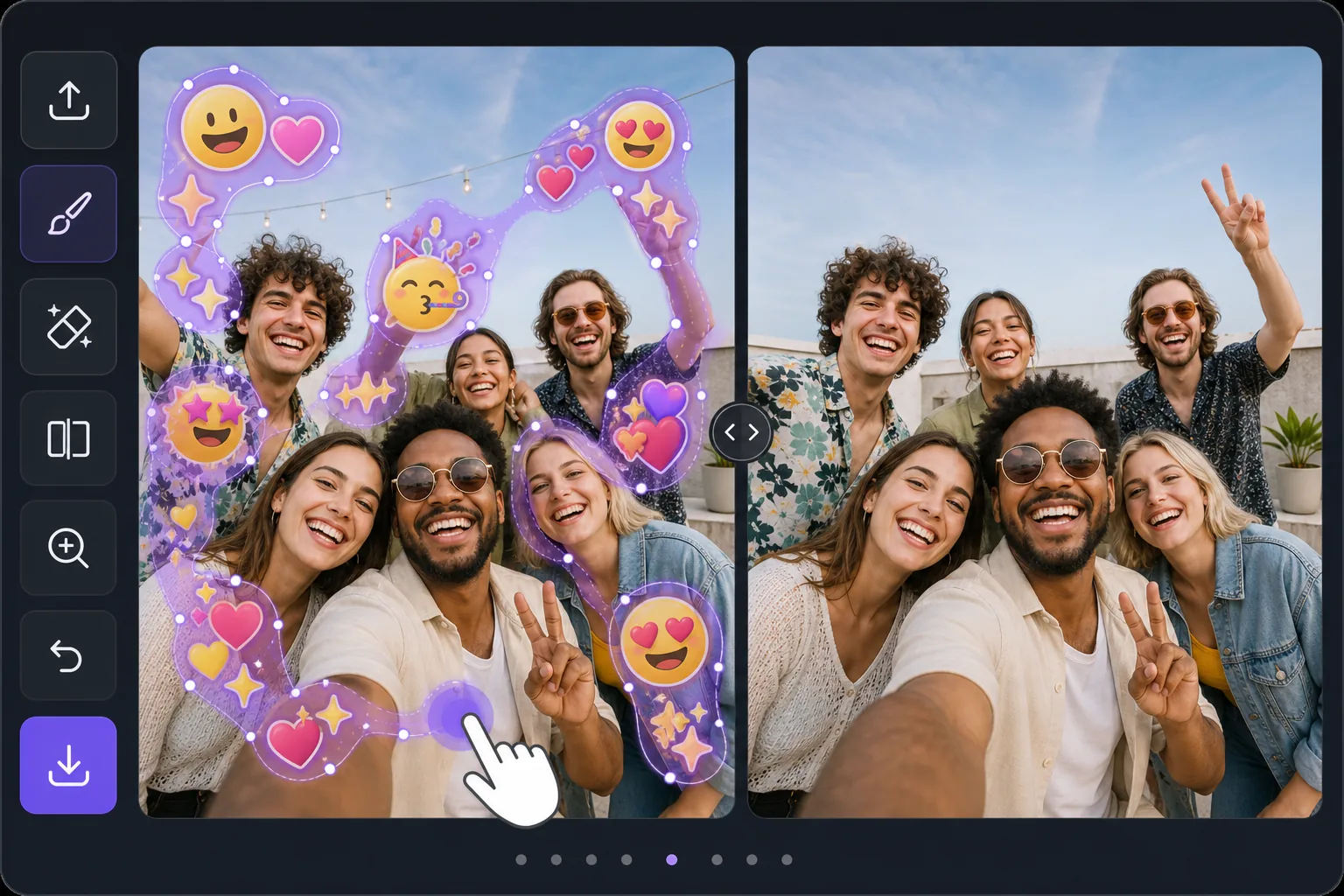
Batch-erase a photo covered in emojis — Magic Eraser
Some photos look like an emoji explosion: smiley faces, hearts, sparkles, and sticker packs piled across faces, backgrounds, and corners. Removing them individually means dozens of taps and re-renders. Magic Eraser is built for the opposite workflow — mark every emoji you want gone in one selection, then let the AI clear them together. Instead of treating each emoji as a separate job, you brush a continuous mask across the whole emoji-covered area, including overlapping stacks and scattered reactions, and process them in a single pass. The AI inpainting studies the surrounding pixels and synthesizes a believable fill for everything underneath at once, so textures like skin, sky, walls, and clothing flow naturally across the cleared zone. Be clear about what this does: it generates a plausible reconstruction of what was likely behind the emojis — it does not recover the literal original pixels or reveal any hidden face or identity. For a photo blanketed in emoji clutter, that one-pass batch approach is the fastest way from chaotic to clean.
Before you start
التعليمات خطوة بخطوة
Start with ارفع الصورة. The result preview above and tips below use this guide's existing content; no separate before-and-after proof is assumed.
- 1
ارفع الصورة
افتح Magic Eraser على الويب أو iOS أو Android. اسحب وأفلت صورتك بتنسيق JPEG أو PNG أو HEIC أو WebP. لا حاجة لحساب.
- 2
اختر الأداة والمنطقة
اختر الأداة المناسبة وحدد المنطقة المراد معالجتها. سيحلل الذكاء الاصطناعي ويطبق التغييرات تلقائيًا في ثوانٍ.
- 3
حمّل النتيجة
معاينة النتيجة وتحميل الصورة المعدلة. تصدير بصيغة PNG أو JPEG عالي الجودة.
الأنسب لـ
- Group selfies or party photos plastered with friends' emoji and sticker reactions
- Screenshots where multiple emojis were stamped across faces and the background
- Memes or edits buried under sparkles, hearts, and laughing-face stacks
- Social posts covered in scattered emoji clutter you want cleared before reposting
- Cleaning up a single image with dozens of small emojis faster than erasing each one
نصائح للحصول على أفضل النتائج
Work in passes rather than chasing perfection in one go. First, mask the dense clusters and overlapping emoji stacks — these benefit most from being inpainted together so the AI keeps the background consistent across them. Then do a second pass for the small, scattered emojis in corners and edges. Zoom in for emojis that overlap a face or fine detail; a tighter brush leaves more real pixels for the AI to reference, which yields a more believable reconstruction. If a large emoji covered a busy area like a crowd or patterned fabric, expect the fill to be a plausible approximation, not the exact hidden detail — it never restores a true hidden face or identity. For photos that are almost entirely emoji, sometimes a generous single mask over the whole covered zone reconstructs more cohesively than many small separate edits.
الأسئلة الشائعة
- هل ميزة إزالة عدة إيموجي مجانية؟
- نعم، يتيح لك Magic Eraser إزالة عدة إيموجي مجانًا ضمن الحد اليومي. قم بالترقية إلى Pro للمعالجة غير المحدودة والتصدير بدقة عالية.
- كم يستغرق إزالة عدة إيموجي؟
- بضع ثوانٍ فقط. يعالج الذكاء الاصطناعي في Magic Eraser الصور بسرعة — معظم النتائج متاحة فور الرفع.
- هل يمكنني استخدامه على الهاتف؟
- نعم، Magic Eraser يعمل على iOS وAndroid وجميع متصفحات الويب. يمكنك التبديل بين الأجهزة بحرية.
- هل تتأثر جودة الصورة؟
- لا، يحافظ Magic Eraser على جودة الصورة الأصلية. يعالج الذكاء الاصطناعي بذكاء للحفاظ على التفاصيل والوضوح.