
Remove Emoji Stickers From a TikTok Video Frame
تعلم كيفية إزالة الإيموجي من إطار TikTok باستخدام Magic Eraser. دليل بسيط خطوة بخطوة مع أداة ذكاء اصطناعي مجانية. يعمل على الويب وiOS وAndroid.
Last updated
جرب الآن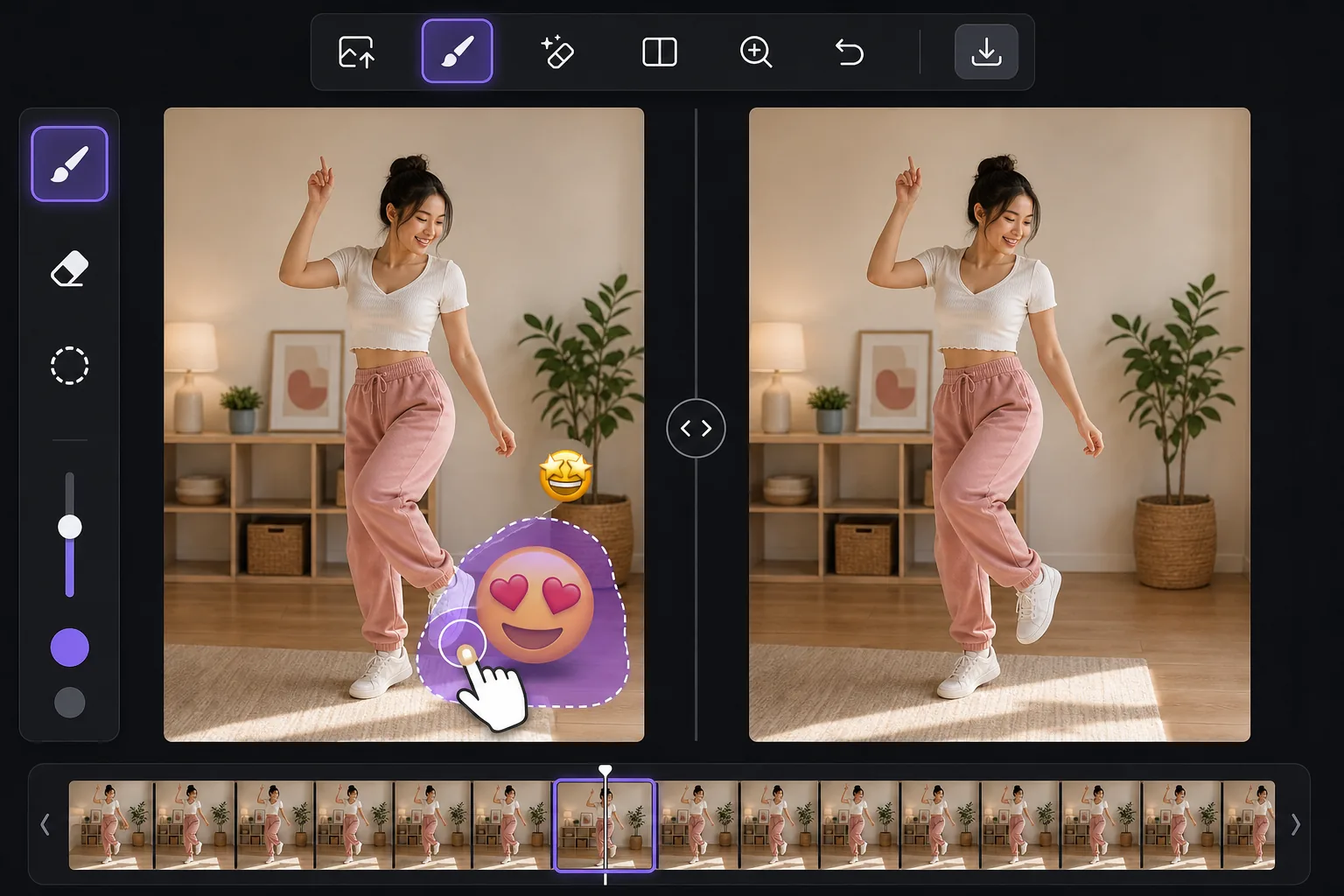
Clean up the still, not the whole video — Magic Eraser
TikTok lets creators slap emoji stickers anywhere on a clip, and they often land over a face, a product, a price tag, or the corner of the shot you actually wanted. You can't peel a sticker off a video the app already baked in, but you can work from a single frame. Take a screenshot mid-playback, or export the frame from your camera roll, and you have a clean still image to edit. Magic Eraser is an AI photo editor for exactly this: brush over the emoji on that TikTok frame and its inpainting model removes the sticker and synthesizes a plausible reconstruction of whatever was behind it. Be clear on what that means — the AI invents a believable fill based on surrounding pixels. If a smiling-face emoji was covering someone's eyes, the result is a convincing guess, not the real hidden face. It's perfect for tidying up backgrounds, walls, skies, and textures behind a sticker, less reliable for recovering fine detail that was never visible.
Before you start
التعليمات خطوة بخطوة
Start with ارفع الصورة. The result preview above and tips below use this guide's existing content; no separate before-and-after proof is assumed.
- 1
ارفع الصورة
افتح Magic Eraser على الويب أو iOS أو Android. اسحب وأفلت صورتك بتنسيق JPEG أو PNG أو HEIC أو WebP. لا حاجة لحساب.
- 2
اختر الأداة والمنطقة
اختر الأداة المناسبة وحدد المنطقة المراد معالجتها. سيحلل الذكاء الاصطناعي ويطبق التغييرات تلقائيًا في ثوانٍ.
- 3
حمّل النتيجة
معاينة النتيجة وتحميل الصورة المعدلة. تصدير بصيغة PNG أو JPEG عالي الجودة.
الأنسب لـ
- A reaction emoji landed over a face or product in a TikTok you screenshotted and want to repost as a clean still
- Pulling a thumbnail or cover image from a TikTok frame without the creator's emoji clutter
- Saving a recipe, outfit, or DIY frame where an emoji sticker blocks the detail you needed
- Cleaning a TikTok screenshot before adding it to a moodboard, blog post, or slide
- Removing a watermark-style emoji someone stamped across the corner of an exported frame
نصائح للحصول على أفضل النتائج
Grab the highest-resolution frame you can — a full-screen screenshot beats a tiny preview, and more pixels give the AI more to work with. Crop away the TikTok interface first so the model isn't tempted to rebuild text or icons. Emoji over flat areas like a wall, sky, or solid shirt fill almost invisibly; emoji over a busy face or detailed texture take more passes and may need a touch-up brush. If a sticker overlaps the edge of the frame, expand your brush slightly past the border so the fill blends. And remember the honest limit: the tool reconstructs a likely background, it does not reveal the literal pixels the emoji was hiding.
الأسئلة الشائعة
- هل ميزة إزالة الإيموجي من إطار TikTok مجانية؟
- نعم، يتيح لك Magic Eraser إزالة الإيموجي من إطار TikTok مجانًا ضمن الحد اليومي. قم بالترقية إلى Pro للمعالجة غير المحدودة والتصدير بدقة عالية.
- كم يستغرق إزالة الإيموجي من إطار TikTok؟
- بضع ثوانٍ فقط. يعالج الذكاء الاصطناعي في Magic Eraser الصور بسرعة — معظم النتائج متاحة فور الرفع.
- هل يمكنني استخدامه على الهاتف؟
- نعم، Magic Eraser يعمل على iOS وAndroid وجميع متصفحات الويب. يمكنك التبديل بين الأجهزة بحرية.
- هل تتأثر جودة الصورة؟
- لا، يحافظ Magic Eraser على جودة الصورة الأصلية. يعالج الذكاء الاصطناعي بذكاء للحفاظ على التفاصيل والوضوح.